
The Boltz Retro Stick promises thousands of classic games, wireless controllers, and convenient plug-and-play entertainment. However, after examining its advertised features, product claims, and customer feedback, I wouldn’t recommend rushing into a purchase.
Reports of unreliable games, inconsistent performance, and questionable value raise concerns.
If you’re looking for a dependable retro gaming experience, I believe you should compare better-established alternatives before spending your money.
My First Experience With The Boltz Retro Stick
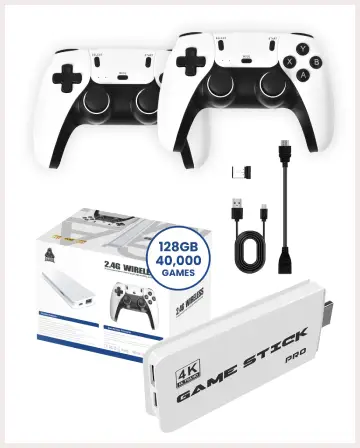
When I first came across the Boltz Retro Stick, I understood why it might attract so much attention.
The idea sounds fantastic: connect a small gaming device to your television, pick a favorite classic game, and enjoy the kind of entertainment many of us remember from childhood.
You don’t need a large gaming console, expensive accessories, or a complicated gaming setup. At least, that’s the experience the marketing promises.
What caught my attention most was the advertised collection of more than 20,000 classic games. That’s an impressive number for such a compact device.
Instead of purchasing separate consoles or searching for old cartridges, the Boltz Retro Stick supposedly brings everything together in one convenient package.
However, I wouldn’t judge a gaming product entirely by its advertised game count. What matters is whether those games actually work, whether the controls respond properly, and whether the overall experience feels enjoyable.
A device can contain thousands of game files without delivering thousands of genuinely playable experiences.
The first thing I would examine is the setup process. The product is promoted as a plug-and-play HDMI gaming stick.
According to its marketing materials, users connect it to an HDMI port, provide USB power, connect the wireless controller receiver, and select a game from the menu. Internet access isn’t supposed to be necessary for ordinary gameplay.
That sounds convenient, particularly if you’re buying a gaming device for children, parents, or someone who doesn’t enjoy dealing with complicated electronics.
Nevertheless, straightforward installation doesn’t automatically mean reliable performance.
Another aspect worth considering is the wireless controller experience. The product is advertised with wireless controllers, allowing players to enjoy games without sitting directly beside the television. That’s useful for multiplayer entertainment, but controller responsiveness is especially important in older platform, fighting, and racing games.
Even a small amount of input delay can make certain games frustrating.
I would also pay attention to the difference between the advertised picture quality and actual output resolution.
Some promotional materials describe the device as offering 4K HDMI visuals, while product information associated with the seller specifies 1280 × 720 resolution at 60Hz. Those specifications aren’t interchangeable. A television accepting a 4K-compatible HDMI connection doesn’t mean the connected gaming device produces native 4K graphics.
This is an important distinction because buyers deserve accurate technical information rather than impressive-sounding advertising.
The game library is another area where I would remain cautious. The advertised collection includes classic arcade games, platformers, racing games, fighting games, and titles associated with older gaming systems.
However, the exact selection can vary, and a large library doesn’t guarantee that every title runs smoothly.
Customer feedback also makes me hesitant. The Amazon listing discussed in available product coverage shows a mixed rating of approximately 3.6 out of 5 from 478 global ratings.
Its review summary mentions reliability problems, games that don’t work properly, and disagreements about whether the product provides good value. Some customers appreciate the simple setup, while others report disappointing experiences.
tutelamedical.com+1
I think that mixed feedback deserves attention. When you’re purchasing something primarily for entertainment, you don’t want to spend your free time troubleshooting controllers, searching for working games, or trying to understand why the device isn’t behaving as advertised.
I also wouldn’t treat promotional testimonials as equivalent to independent customer experiences. Seller-controlled review pages can present an overwhelmingly positive picture, but that doesn’t necessarily represent the experience of every buyer.
My overall assessment is that the Boltz Retro Stick has an appealing concept but raises too many questions about reliability and consistency.
I wouldn’t recommend it as a first choice, especially when other retro gaming options offer more transparent specifications and established support.
Pros Of Boltz Retro Stick
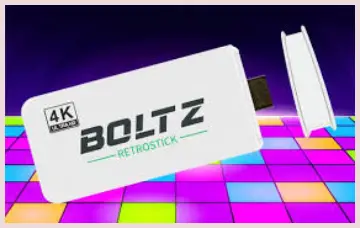
- Large Advertised Game Library
The biggest selling point is undoubtedly the advertised game collection.
Having thousands of classic titles available in one place sounds attractive. You don’t have to purchase multiple cartridges or maintain several old gaming systems.
For someone who enjoys exploring different genres, a large collection could provide plenty of entertainment.
However, I wouldn’t consider the advertised number a major advantage without knowing how many games actually work. Duplicate entries, incomplete files, and compatibility problems can significantly reduce the practical value of a large library.
- Compact and Portable Design
Another positive aspect is the small form factor.
Traditional gaming consoles can occupy considerable space around a television. A compact HDMI stick is easier to store and transport.
You could potentially keep it in a drawer when you’re not using it or carry it while traveling.
I particularly appreciate compact electronics when they don’t require complicated installation. Unfortunately, portability alone isn’t enough to make a gaming device worthwhile.
- Convenient HDMI Connectivity
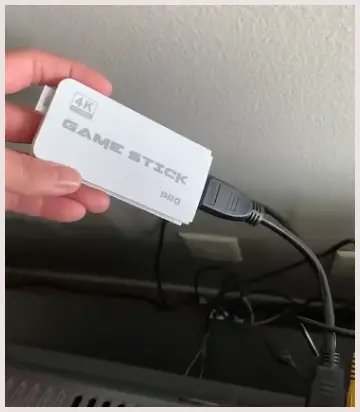
The product is designed to connect directly to a television through HDMI.
This means buyers don’t necessarily need an older television with traditional analog connections.
Most modern televisions already include HDMI ports, making this type of connection convenient.
Still, you should check the television’s available ports and the device’s actual power requirements before purchasing.
- Wireless Controller Support
Wireless controllers are another advertised advantage.
A wireless setup can make family gaming more comfortable because players aren’t restricted by short controller cables.
It also reduces cable clutter around the entertainment area.
However, wireless connectivity needs to be reliable. If the controller disconnects frequently or responds inconsistently, the convenience quickly disappears.
- No Constant Internet Requirement
The product is promoted as an offline gaming solution.
This could be useful for people who don’t want another subscription-based entertainment service.
Traditional retro gaming is often enjoyable precisely because you can turn on a console and start playing without waiting for updates or downloading additional content.
Nevertheless, buyers should distinguish between the advertised offline functionality and any internet connection that might be needed for initial setup, troubleshooting, or additional downloads.
Cons Of Boltz Retro Stick
- Mixed Customer Feedback
Customer feedback is one of the most important factors I consider when evaluating an electronic product.
A gaming device should provide consistent performance, particularly when its main selling point is immediate access to thousands of games.
Available Amazon review coverage reports mixed customer sentiment, including complaints about reliability and games that fail to work properly. Although some customers appreciate the device, others question its overall quality and value.
That inconsistency is concerning.
I wouldn’t want to purchase a gaming stick only to discover that some of my favorite titles don’t launch or that the system becomes unreliable after a short period.
- Questionable Game Count Claims
The advertised game count sounds impressive, but I don’t think buyers should automatically interpret it as the number of enjoyable games available.
Retro gaming devices sometimes include repeated titles, regional variations, alternate versions, and incomplete game files.
These entries can inflate the overall number without providing much additional entertainment.
For me, game quality matters much more than quantity.
A carefully selected collection with dependable compatibility is far more useful than an enormous library that requires hours of searching to find playable titles.
- Unclear Graphics Specifications
Another concern involves the product’s resolution claims.
The marketing mentions 4K HDMI visuals, while associated seller information specifies 1280 × 720 resolution at 60Hz.
These specifications describe different things.
A television can accept an HDMI signal while displaying content at its native resolution, but that doesn’t mean the connected gaming device generates native 4K output.
I would prefer manufacturers to explain the actual output resolution clearly rather than relying on attractive promotional language.
- Potential Controller Problems
Wireless controllers are convenient only when they work properly.
Retro games often require precise timing, especially fighting games and platformers.
If a controller has delayed responses, unreliable connections, or poorly functioning buttons, the gaming experience becomes frustrating.
I would also consider the long-term durability of the controller buttons, directional pads, and battery compartments.
These are components that receive frequent use, so build quality matters.
- Uncertain Long-Term Reliability
A product can work reasonably well during its first few gaming sessions and still develop problems later.
Potential concerns include overheating, unstable connections, storage-card errors, controller issues, and software instability.
I haven’t found enough independently verified long-term testing to establish how reliably the Boltz Retro Stick performs after extended use.
That uncertainty makes me hesitant to recommend it to someone looking for a dependable gaming device.
Maintenance For The Boltz Retro Stick
- Keep the Device Clean
Dust is one of the most common problems affecting electronic equipment.
Because compact gaming sticks often sit behind televisions or near entertainment systems, they can accumulate dust over time.
I recommend checking the device periodically and gently cleaning its exterior with a dry microfiber cloth.
Avoid spraying cleaning products directly onto the electronics.
If dust accumulates around connectors, use an appropriate soft cleaning tool rather than inserting sharp objects into the ports.
Keeping the device clean helps prevent unnecessary buildup around its connection points.
- Avoid Excessive Heat
Heat can affect the performance and lifespan of electronic components.
Don’t place the gaming stick near heating equipment, direct sunlight, or enclosed areas without sufficient ventilation.
If your television has limited space around its HDMI ports, an HDMI extension cable may help position the device somewhere with better airflow.
I would also avoid leaving the console running unnecessarily for extended periods.
If the device becomes unusually hot, disconnect it safely and allow it to cool before using it again.
- Handle the HDMI Connection Carefully
HDMI ports are relatively durable, but repeated rough handling can damage connectors.
When installing or removing the Boltz Retro Stick, avoid pulling it sideways or applying unnecessary pressure.
Make sure the connection is properly aligned before inserting it.
If the device doesn’t display anything, check the selected television input and cable connection before assuming the hardware is defective.
An extension cable can also reduce strain on the television’s HDMI port.
- Protect the USB Power Cable
The power cable is an important part of the gaming setup.
A damaged cable can cause intermittent power problems, unexpected shutdowns, or difficulty starting the device.
I recommend keeping the cable away from sharp edges and avoiding tight bends.
Don’t pull the cable out by holding its wire. Instead, grip the connector when disconnecting it.
If you notice exposed wiring, damaged insulation, or unusual heating, stop using the cable and replace it with a compatible one that meets the manufacturer’s requirements.
- Take Care of the Wireless Controllers
Controllers receive more physical interaction than almost any other part of a gaming system.
Repeated button pressing, accidental drops, and poor storage habits can reduce their lifespan.
I would keep the controllers in a clean, dry location when they’re not being used.
Avoid eating greasy foods while gaming because residue can accumulate around the buttons and directional controls.
For cleaning, use a soft, slightly damp cloth on the exterior, ensuring that moisture doesn’t enter the buttons or openings.
Never immerse an electronic controller in water.
- Check the Batteries Regularly
If your controller uses replaceable batteries, check their condition periodically.
Old or leaking batteries can damage the battery compartment.
Remove batteries when storing controllers for an extended period.
Also, avoid mixing old and new batteries or combining different battery types.
If the controller suddenly stops responding, checking the batteries should be one of your first troubleshooting steps.
- Protect the Game Storage Card
Some versions of retro gaming sticks rely on removable memory cards to access their game libraries.
These cards deserve particular attention because storage problems can prevent the device from accessing games.
Never remove a memory card while the system is actively reading or writing data.
If the manufacturer provides a safe shutdown procedure, follow it before removing the card.
Keep the card away from moisture, dust, and excessive heat.
I would also avoid experimenting with unfamiliar formatting or file changes because modifying the storage structure could make the gaming system unusable.
- Keep the Device Away From Moisture
Water and electronic components don’t mix.
Don’t place drinks directly beside the gaming stick, controllers, or power connections.
Even small amounts of liquid can damage internal circuitry.
If liquid spills near the device, disconnect the power safely if possible and avoid switching it back on until it has been properly inspected and dried.
- Store Accessories Properly
One advantage of compact gaming equipment is that it’s relatively easy to store.
However, throwing everything into a drawer can result in damaged cables, lost receivers, and scratched controllers.
I recommend keeping the gaming stick, receiver, cables, and controllers together in a small storage container.
This makes it easier to find accessories when you want to play.
Comparison of Boltz Retro Stick With Other Retro Gaming Brands
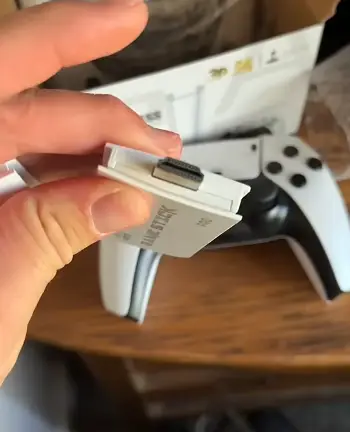
- Boltz Retro Stick vs Game Stick 4K
The Game Stick 4K is another product category that competes directly with Boltz.
These devices generally follow a similar concept: connect a compact stick to a television, browse a preloaded game collection, and play using wireless controllers.
The biggest challenge is that Game Stick 4K isn’t one universally standardized product. Different sellers offer different hardware configurations, storage capacities, controllers, and game libraries under similar descriptions.
Consequently, I wouldn’t automatically consider every Game Stick 4K model better than Boltz.
- Boltz Retro Stick vs Nintendo Switch
The Nintendo Switch offers a considerably different gaming experience.
It isn’t simply a collection of old games inside a compact HDMI device. Instead, it’s a dedicated gaming platform with an established ecosystem, recognizable hardware, and a library of officially supported games.
The Nintendo Switch is particularly appealing if you enjoy both modern releases and selected classic gaming experiences.
Its biggest disadvantage compared with inexpensive retro sticks is the higher overall investment. Games and accessories can also increase the cost.
Nevertheless, I appreciate the more established platform and the availability of official support.
- Boltz Retro Stick vs Anbernic Retro Handhelds
Anbernic is a recognizable name in the retro handheld gaming market.
Its devices are designed for people who want portable gaming rather than simply connecting a stick to their television.
Depending on the model, Anbernic handhelds offer dedicated controls, built-in displays, rechargeable batteries, and support for various retro gaming platforms.
What I particularly like about this category is that buyers can research individual models, hardware specifications, screen quality, and community experiences before choosing.
The downside is that some handheld models require more configuration than a basic plug-and-play stick.
- Boltz Retro Stick vs Raspberry Pi Retro Gaming Setup
A Raspberry Pi retro gaming setup is another interesting alternative.
Instead of purchasing a preloaded gaming stick, you can build a customized gaming system using compatible hardware and software.
The biggest advantage is flexibility. You have greater control over the operating system, supported emulators, storage, and configuration.
However, this option requires more technical involvement.
If you enjoy experimenting with electronics, organizing game collections, and customizing software, a Raspberry Pi setup can be rewarding.
If you simply want something that works immediately, it might require more effort than you’re comfortable with.
Is The Boltz Retro Stick Worth Buying?
After considering its advertised features, potential advantages, and customer feedback, I wouldn’t place the Boltz Retro Stick among my recommended retro gaming purchases.
Its concept is attractive. A compact device offering thousands of classic games, wireless controllers, and simple television connectivity sounds like an excellent entertainment solution.
However, the actual value depends on performance.
I would be particularly concerned about reports of games not working properly, inconsistent customer experiences, and questions surrounding the advertised technical specifications.
The game count also needs to be viewed carefully. A large collection doesn’t necessarily translate into a better gaming experience.
Before spending money, I would ask the seller for a complete list of included games, clarification about native output resolution, details about controller compatibility, and written confirmation of the return policy.
I would also compare the product against established alternatives rather than purchasing it because of a limited-time discount.
For me, reliability is more important than marketing promises.
Frequently Asked Questions (FAQ)
The Boltz Retro Stick is a marketed retro gaming product with a product listing and seller website. However, that doesn’t establish that every advertised feature works as promised.
Customer feedback is mixed, with reported reliability problems and games that don’t function properly. I wouldn’t automatically call it a scam, but I also wouldn’t recommend purchasing it without carefully checking independent reviews and return conditions.
Yes, retro gaming sticks are a genuine product category. They use emulation software to run older games on modern televisions.
However, quality varies considerably between manufacturers and models. Some provide enjoyable gaming experiences, while others have problems with compatibility, controllers, storage, and overall performance.
I recommend researching the specific model rather than assuming every device is reliable.
The Boltz Retro Stick is advertised with thousands of classic games across several categories, including arcade, platform, racing, fighting, and adventure games.
The manufacturer promotes a collection exceeding 20,000 games. However, the exact titles depend on the product configuration and included game library.
I would request a complete game list before purchasing because advertised quantities don’t guarantee that every game is playable.
There isn’t one perfect retro gaming stick for everyone.
I would consider a well-reviewed Game Stick 4K package for simple television gaming, Super Console X for a more traditional retro console arrangement, or an Anbernic handheld if portability matters.
If you prefer a more established gaming platform, Nintendo Switch is also worth considering.
My recommendation is to prioritize dependable performance, controller quality, transparent specifications, and customer support instead of choosing a device based only on its advertised game count.
Final Verdict
The Boltz Retro Stick makes an appealing promise, but I don’t think its marketing claims alone justify the purchase.
Mixed customer feedback, reported game compatibility problems, and unclear technical specifications make me hesitant to recommend it.
If you’re serious about retro gaming, I’d spend time comparing better-established alternatives. A smaller collection of reliable games is much more valuable than thousands of questionable entries.
Recent Posts
Green Bean Buddy Reviews: Does It Really Work for Pest Control?
Green Bean Buddy has attracted attention among people looking for a convenient way to manage unwanted household pests.But does it actually deliver the results buyers expect? In this review, I'll...
Kushi Bee Venom Serum Reviews: Does It Really Work for Wrinkles, and Crepey Skin?
Kushi Bee Venom Serum has attracted attention among people looking for smoother, firmer, and younger-looking skin without expensive cosmetic procedures. But does it actually deliver visible...