
I spent weeks testing both the Garmin DriveSmart 66 and DriveSmart 76 on daily commutes, weekend road trips, and longer highway runs so I could give you a clear, real-world answer about which one actually fits your driving life better.
My goal here is simple: walk you through the differences that matter, the shared strengths, and the trade-offs so you can decide without the usual marketing fog.
| Feature | Garmin DriveSmart 66 | Garmin DriveSmart 76 |
| Screen size | 6-inch | 7-inch (approx. 6.95-inch) |
| Resolution | 1280 x 720 | 1024 x 600 |
| Weight | About 175 g | About 240 g |
| Dimensions | 6.0″ W x 3.4″ H x 0.7″ D | 6.8″ W x 3.9″ H x 0.7″ D |
| Internal storage | 16–32 GB (varies by region/variant) | 16–32 GB (varies by region/variant) |
| Battery life | Up to 1 hour | Up to 1 hour |
| Lifetime maps | Yes | Yes |
| Bluetooth / Wi-Fi | Yes | Yes |
| Voice assist | Yes (Garmin + optional Alexa) | Yes (Garmin + optional Alexa) |
| Traffic | Via app / some digital traffic variants | Via app / some digital traffic variants |
| Backup camera support | Yes | Yes |
| Approximate launch price range | Lower | Higher |
Key Differences Between The Garmin Drivesmart 66 And 76
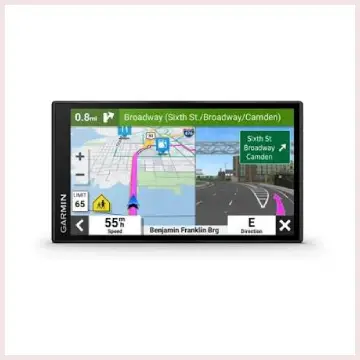
- Screen size and how it feels in the car: The 66 stays compact on the windshield and leaves more open view.
The 76 offers a larger display that feels more natural when you sit farther from the dash.
- Resolution and visual sharpness: The 66 packs higher pixels into a smaller panel so text looks cleaner.
The 76 spreads fewer pixels across more glass and can appear a little softer up close.
- Physical bulk and mounting: The 66 is lighter and shorter so it places less stress on the suction mount.
The 76 takes more windshield space and feels bulkier when you move it between cars.
- Price positioning: The 66 usually costs less and gives you strong value.
The 76 sits higher in price mainly because of the bigger screen rather than new features.
- Everyday glanceability: The 76 makes maps easier to check on long highway runs.
The 66 feels quicker and less distracting during short city trips.
Key Features Of The Garmin Drivesmart 66
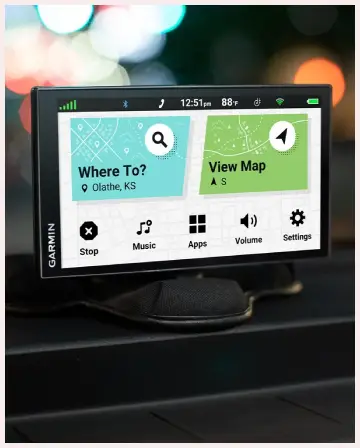
- 6-inch high-resolution display: The screen measures 6 inches and runs at 1280 x 720.
Text and map details stay sharp even in bright light.
- Free lifetime map updates: Maps update for free through Wi-Fi or computer for the life of the device.
New roads and points of interest stay current without extra cost.
- Garmin voice assist with optional Alexa: You can say “OK Garmin” to search places or change settings.
Selected versions also support Alexa for music and weather.
- Real-time traffic and driver alerts: Pair the unit with the phone app for live traffic and fuel prices.
It warns about curves, cameras, school zones, and speed changes.
- Bluetooth hands-free calling: Connect your phone once. Incoming calls and text previews appear on the screen for quick response.
- TripAdvisor and Foursquare integration: Traveler ratings show up for restaurants and stops.
You can find useful places along the route with ease.
- 3D buildings and lane guidance: Complex junctions appear with clear 3D views.
Lane assist helps you stay in the correct lane early.
- Backup camera support: The unit works with Garmin wireless backup cameras.
You see the rear view on the same screen when reversing.
- Compact and lightweight build: The body weighs about 175 g and stays easy to mount.
It fits well in smaller cars without blocking much view.
- MicroSD card slot: You can add extra storage if needed.
Core maps work offline even without phone signal.
Pros Of The Garmin Drivesmart 66
- Higher screen resolution in a smaller package: The 1280 x 720 panel looks sharp for street names and small icons. Text stays clear even when the unit sits close to the driver.
- Compact size that fits almost any vehicle: It uses less windshield space and weighs less than the larger model. The light body keeps the suction mount steady on rough roads.
- Lower typical purchase price: You get nearly the same software features for less money. This leaves budget room for a backup camera or other useful accessories.
- Easy one-handed handling when moving between cars: The lighter body and shorter height make it simple to pack or transfer. It feels less bulky during everyday use.
- Sharp map detail that rewards close viewing: City streets stay readable without constant zooming. Labels remain clear even in bright sunlight.
Cons Of The Garmin Drivesmart 66
- Smaller physical display can feel cramped on long trips: Complex multi-lane junctions require more glancing. Long turn lists take extra effort to follow at highway speed.
- Less screen real estate for split-view information: Traffic delays and next-turn cards compete for limited space. The interface can look busier than on the larger model.
- May sit lower in the lineup for drivers who prefer big glass: Larger vehicles make the size difference more noticeable after a few hours. Long drives often favor a bigger view.
- Voice-command accuracy still has limits: Unusual place names can confuse the system at times. Background cabin noise sometimes reduces recognition success.
- Battery is only a short-term backup: The roughly one-hour internal battery covers short power cuts. It is not designed for extended unplugged driving.
Key Features Of The Garmin DriveSmart 76
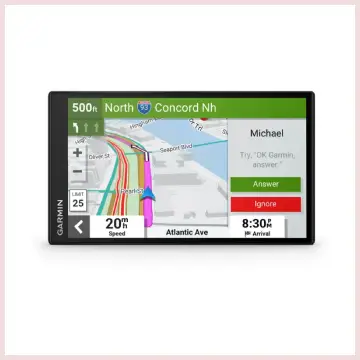
- 7-inch larger display: The screen measures about 6.95 to 7 inches and runs at 1024 x 600.
Maps and turn lists feel roomier and easier to glance at.
- Free lifetime map updates: Maps update for free through Wi-Fi or computer for the life of the device.
New roads and points of interest stay current without extra cost.
- Garmin voice assist with optional Alexa: You can say “OK Garmin” to search places or change settings.
Selected versions also support Alexa for music and weather.
- Real-time traffic and driver alerts: Pair the unit with the phone app for live traffic and fuel prices.
It warns about curves, cameras, school zones, and speed changes.
- Bluetooth hands-free calling: Connect your phone once.
Incoming calls and text previews appear on the screen for quick response.
- TripAdvisor and Foursquare integration: Traveler ratings show up for restaurants and stops.
You can find useful places along the route with ease.
- 3D buildings and lane guidance: Complex junctions appear with clear 3D views.
Lane assist helps you stay in the correct lane early.
- Backup camera support: The unit works with Garmin wireless backup cameras.
You see the rear view on the same screen when reversing.
- Larger but still slim design: The body weighs about 240 g and offers more screen space.
It feels balanced in mid-size or larger vehicles.
- MicroSD card slot: You can add extra storage if needed.
Core maps work offline even without phone signal.
Pros Of The Garmin DriveSmart 76
- Larger, more comfortable viewing area: The bigger screen makes maps and speed limits easier to read at a glance. Eye strain drops during long highway runs.
- Better presence in bigger vehicles: The size feels proportional in trucks, SUVs, or vans. Important details stay farther from the edge of your vision.
- Same strong feature set as the smaller model: You keep lifetime maps, traffic alerts, and voice assist without any loss. Only the physical screen size changes.
- Pleasant for passengers who want to follow the route: A co-driver can see the map clearly without leaning over. Shared navigation feels more natural.
- Still relatively thin and modern looking: The unit keeps a slim profile despite the larger glass. It does not look outdated on the dashboard.
Cons Of The Garmin DriveSmart 76
- Lower resolution on a bigger panel: The 1024 x 600 image can look a touch softer than the 66. Fine text is a little less crisp up close.
- Higher price for essentially the same software: You mainly pay for the larger display rather than extra navigation tools. The feature gap stays very small.
- Takes more windshield space and adds a bit more weight: Small cars feel the extra bulk more clearly. The suction mount works harder on uneven roads.
- Still limited to about one hour of battery backup: It needs vehicle power for normal use. The internal battery serves only as a short bridge during power loss.
- Voice recognition shares the same occasional quirks: Cabin noise can still cause mistakes on place names. Clear speech works best for reliable results.
My First Experience With Both Products
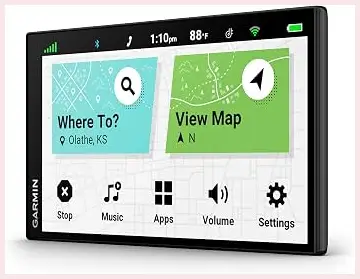
I unboxed the DriveSmart 66 first. The unit felt light in my hand. I mounted it on the windshield of my compact car in under two minutes.
The suction cup held firm right away. Power came from the car adapter. The screen lit up bright and sharp.
I entered my home address with a few taps. The route appeared quickly. Voice guidance sounded clear.
Street names were easy to read even in morning sun. I drove across town. The 66 stayed accurate. It warned me about a school zone and a sharp curve. Pairing my phone took one try.
Traffic data showed up on the side of the map. Calls came through cleanly. The small size never blocked my view. I liked how simple everything felt on day one.
Next I tried the DriveSmart 76 in my mid-size SUV. The larger screen stood out at once. Mounting took a little more care because of the extra width.
Once fixed, the map looked roomy. I could see more of the road ahead without zooming. Turn lists were easier to scan. Voice assist worked the same as on the 66.
I asked for a gas station and it found one nearby. On the highway the bigger display reduced eye strain. Speed limits stayed visible at a glance.
The unit felt solid but heavier. After a two-hour drive I still preferred the open view. Both devices recalculated fast when I missed a turn.
Battery life lasted the short tests I ran without the power cable. Setup was almost identical on both. My first day with each model showed clear strengths.
The 66 felt neat and quick. The 76 felt relaxed and spacious. Neither confused me. Both guided me home without trouble.
Who Should Choose The DriveSmart 66?
If you drive a smaller car, park in tight city spots, or simply prefer a less dominant screen, the 66 makes strong sense.
Its higher resolution keeps maps crisp, the lower price leaves money for a backup camera or other accessories, and the compact body is easier to move between vehicles.
Commuters who mostly need reliable turn-by-turn guidance and lifetime map updates will find it more than capable.
Who Should Choose The DriveSmart 76?
Drivers who spend long hours on the road, sit farther from the dash, or simply enjoy a bigger, more immersive map will appreciate the 76.
The extra screen size reduces the mental effort of reading the display at speed and feels more natural in larger vehicles. If the price difference fits your budget and screen real estate ranks high on your list, the 76 is the more comfortable daily companion.
Frequently Asked Questions (FAQ)
It was announced and released in October 2021, so it is roughly five years old as of late 2026.
Yes. It delivers reliable navigation, a comfortable large screen, lifetime map updates, and the same smart features as its smaller sibling, making it a solid choice for many drivers.
It launched alongside the 76 in October 2021.
Yes. Both models include free lifetime map updates for the preloaded map region.
Final Thoughts
After living with both units I can tell you the choice is less about one being better overall and more about which size matches how and where you drive.
The DriveSmart 66 gives you sharper visuals and a lower price in a package that stays out of the way.
The DriveSmart 76 trades a bit of pixel density for a more relaxed, glanceable experience that shines on longer journeys.
Both keep the core Garmin strengths—accurate routing, lifetime maps, useful alerts, and solid phone integration—so you are choosing the display that feels right every time you get behind the wheel.
Pick the one that fits your car and your eyes, and either will serve you well for years of trips.
Recent Posts
Pacifica Coconut Vanilla Shampoo Reviews: Is It Worth Buying?
In my view, Pacifica Coconut Vanilla Shampoo may appeal to you if you love tropical fragrances and prefer vegan hair care, but I wouldn't recommend buying it without carefully considering its...
If you want a stylish handbag that combines feminine designs, practical storage, and an affordable fashion appeal, Nanette Lepore handbags are worth considering. I find the brand...