
If you want an affordable way to add front and rear lighting to your monitor, the Monster LED Duo Monitor Light Bars may look tempting.
I like the concept, especially the adjustable white lighting, RGB effects, phone control, and Razer Chroma integration.
However, after looking closely at the product and customer feedback, I would not recommend buying it as my first choice.
Several users report weak brightness, unreliable app behavior, fragile construction, and early failures. For me, there are better monitor-lighting options worth considering.
My Personal Experience With The Monster LED Duo Monitor Light Bars
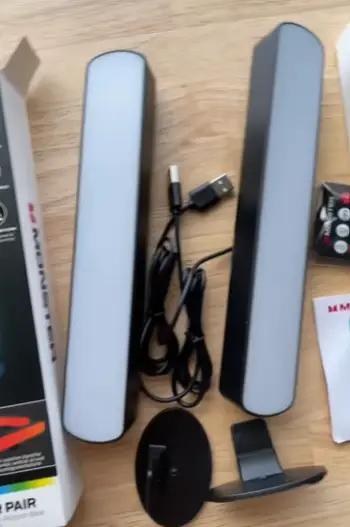
When I first looked at the Monster LED Duo Monitor Light Bars, I understood immediately why this product attracts attention.
It is designed around a simple idea: put useful illumination directly around your monitor while adding colorful ambient lighting behind the screen.
That sounds great on paper.I have always liked monitor lighting because it can make a desk feel more comfortable without taking up valuable space.
A conventional desk lamp can occupy part of my workspace, create shadows, or sit directly in my line of sight. A monitor light bar takes a different approach by attaching to the display and directing illumination toward the desk.
The Monster Duo+ concept goes one step further by combining front lighting with colorful rear illumination.
The product is marketed with smart color control and Razer Chroma integration, while the manufacturer’s positioning focuses heavily on gaming, entertainment, and customizable lighting.
Retail listings also describe phone-based color control and compatibility with gaming setups.
Installation is one of the areas where I can understand the positive feedback. I don’t need a complicated mounting system or a toolbox.
The light bar clips onto the monitor, connects through USB for power, and can be positioned without turning my desk into a construction project.
That simplicity matters. If I am replacing a desk lamp with a monitor light bar, I don’t want to spend an hour figuring out brackets, screws, or complicated wiring. The Monster unit gets the basic physical setup right.
The front light is also useful for ordinary desk work. If I’m typing at night, reading documents, checking notes, or working in a darker room, having illumination around the keyboard area can make the desk feel less harsh.
However, this is where my enthusiasm starts to become more restrained.
Several customer reviews specifically complain that the light isn’t bright enough. One reviewer said it helped illuminate a keyboard area but was not as bright as expected. Another described the light bar as fairly dim even with the settings turned up.
I consider brightness particularly important because a monitor light bar isn’t useful merely because it produces light. It needs to provide enough usable illumination for the task.
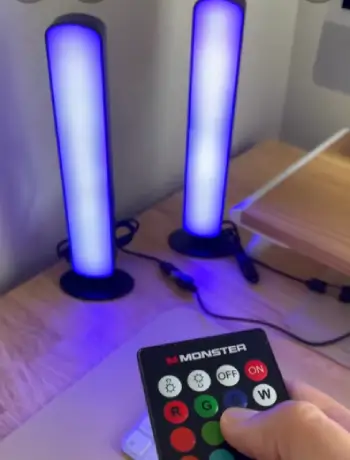
The rear RGB lighting is a different story. I think the colorful effects are fun, particularly if I’m building a gaming desk. The RGB side can give a plain monitor a more dramatic appearance, and the ability to customize colors adds personality.
But I would not buy this product primarily for the RGB effects.
The biggest reason is reliability.
Customer feedback contains multiple complaints about the color lighting stopping, app connectivity problems, settings not being retained, and other software-related frustrations. One buyer reported that the colorful side failed while the white light continued working. Another complained that the programming was forgotten the next day.
That is not what I want from a lighting accessory.
I want to configure it once, find settings I like, and then use it. I don’t want to troubleshoot an app every time I sit down at my computer.
The Razer Chroma integration also sounds more convenient than it apparently is for some users. One review specifically complained that the Monster lighting application needed to remain open for Chroma functionality to work.
For someone who enjoys constantly changing RGB effects, that might be acceptable. For me, it adds unnecessary friction.
The physical build is another concern. The product is inexpensive compared with premium monitor lamps, and some buyers describe the construction as cheap or flimsy. A particularly negative review complained that the clamp was fragile and did not fit different monitors well.
This is where I think the product’s low price needs to be considered carefully.
A cheap product is not automatically a bad purchase. If it lasts for years and does the basic job, I can forgive inexpensive materials. But when a low-cost accessory combines mediocre brightness with questionable durability and inconsistent software, the savings become less impressive.
The overall customer rating is not disastrous. Walmart’s listing currently shows roughly 4.1 out of 5 stars from more than 200 ratings, with most buyers giving it four or five stars. However, the same review pool includes a meaningful group of two- and one-star experiences, and those negative reviews repeatedly touch on the same categories: brightness, app functionality, durability, connectivity, and mounting.
That pattern matters more to me than the headline rating.
A handful of isolated complaints would not necessarily change my opinion. But when several users independently report similar problems, I start treating those weaknesses as potential ownership risks rather than random bad luck.
So my experience with the product concept is positive, but my assessment of this particular model is cautious.
I like what Monster is trying to accomplish.
I simply don’t think the execution is consistent enough for me to recommend it confidently when there are stronger alternatives.
Pros Of The Monster LED Duo Monitor Light Bars
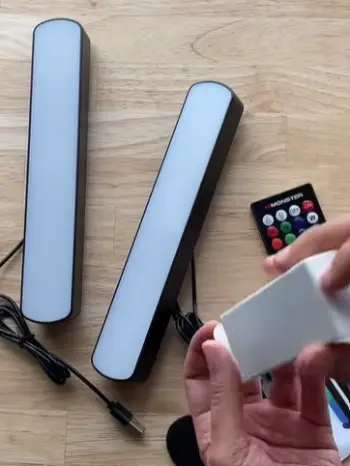
- Easy Monitor Installation
One of the strongest points is the straightforward physical installation.
I appreciate products that don’t require a complicated setup, and this one is designed to clip onto a monitor. Retail descriptions emphasize its tool-free installation, and customers frequently mention setup as one of its better qualities.
That makes it approachable for someone who has never used a monitor light bar before.
I can attach it, connect the power, position the lighting, and start experimenting.
For a desk accessory, that’s exactly the kind of simplicity I want.
- Useful Front Lighting for Desk Work
Even reviewers who criticize other parts of the product often acknowledge that the white lighting can be useful.
That’s important.
I don’t necessarily need a monitor lamp to turn my entire room into a brightly illuminated office. Sometimes I only need enough light to see my keyboard, notebook, mouse, or nearby desk surface.
The Monster light can fill that role.
If I work in a darker corner of a room, the front lighting can make the workspace feel more functional without introducing a large floor or desk lamp.
- Adjustable White Lighting
Another advantage is the availability of different white-light settings.
For me, this is arguably more useful than RGB.
Cooler white light can feel appropriate when I’m concentrating on work, while warmer light can create a softer atmosphere later in the evening.
One customer specifically mentioned liking the different hues of white even after experiencing problems with the colorful side.
That tells me something important about the product: the basic illumination can still have value independently of the RGB functionality.
- RGB Adds Visual Personality
If you are building a gaming setup, I understand the appeal of the rear RGB lighting.
A plain black monitor can look somewhat ordinary. Add colorful lighting behind it, and suddenly the entire desk feels more customized.
The Monster Duo also supports smart color control and Razer Chroma integration, which gives it an advantage over extremely basic monitor lamps that only provide white illumination.
I wouldn’t call the RGB system a reason to overlook the product’s weaknesses, but it is definitely one of its more attractive features.
- Compact Desk Footprint
I like the fact that a monitor light bar uses vertical space rather than taking up a large portion of my desk.
If my desk is already crowded with a keyboard, mouse, speakers, notebook, microphone, and other accessories, removing a traditional desk lamp can make a noticeable difference.
This is one of the fundamental reasons I like monitor light bars in general.
- Affordable Entry Into Monitor Lighting
The Monster Duo is positioned as a relatively inexpensive way to experiment with monitor lighting. Current retail listings have shown pricing in the roughly $20–$25 range for the single unit, although prices can change.
That makes it more approachable than premium monitor lamps.
If I were simply curious about monitor lighting and wanted to experiment without spending much, I could understand the attraction.
The catch is that low purchase cost doesn’t eliminate the importance of reliability.
Cons Of The Monster LED Duo Monitor Light Bars
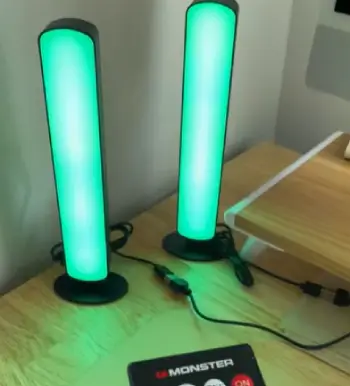
- Brightness Can Be Underwhelming
This is probably my biggest concern.
A monitor light bar should provide practical illumination. If I have to turn everything up to maximum and still feel that my desk is dim, the product isn’t accomplishing its primary job particularly well.
Several customer reviews mention insufficient brightness, including complaints that the backlight is especially weak.
For me, this makes the product difficult to recommend for people specifically looking for strong task lighting.
It may work better as a subtle desk accent than as a serious replacement for a good desk lamp.
- App Performance Is a Concern
Smart lighting sounds convenient until the software becomes the least convenient part of the experience.
Customer feedback repeatedly mentions app functionality, lag, connectivity, and control problems.
One reviewer described the app as laggy, while another said the color side would not connect despite repeated attempts.
That’s frustrating. I don’t want my lighting to behave like another piece of software that needs troubleshooting.
- Some Users Report Color-Light Failures
This is a bigger issue than merely disliking the app. There are reports from customers who experienced failures with the colorful portion of the lighting while the white portion continued functioning.
One reviewer said half of the back color bar stopped working within approximately 12 hours.
A lighting product can survive if one optional feature isn’t perfect.
But premature hardware failure changes the equation completely.
- Build Quality Does Not Feel Premium
The Monster Duo is clearly positioned as an affordable accessory, and the construction reflects that.
Some reviewers describe the plastic as cheap, while others complain about fragile mounting hardware.
I don’t expect premium aluminum construction at this price.
Still, the mounting mechanism deserves particular attention because it is responsible for holding the light against my monitor.
If the clamp feels fragile, I become hesitant to move the monitor, adjust the display, or reposition the lighting.
- Compatibility May Not Be Perfect
The product is marketed as attaching to most monitors, but that doesn’t mean every monitor will provide an ideal fit.
Monitor thickness, rear curvature, bezels, cable placement, and stand design can all affect how a clip-on accessory sits.
One negative customer review specifically criticized the clamp’s ability to work with different monitor brands.
That is why I would check my monitor’s physical design carefully before purchasing.
Maintenance Tips For The Monster LED Duo Monitor Light Bars
- Keep the Light Bar Free From Dust
Monitor lighting sits in an area where dust naturally accumulates.
I would wipe the exterior regularly with a soft, dry microfiber cloth. I wouldn’t spray cleaning fluid directly onto the light bar because liquid and electronics are a poor combination.
A quick cleaning every week or two is usually enough for a normal workspace.
- Clean Around the Mounting Area
The mounting point deserves special attention.
Dust, crumbs, and other debris can accumulate between the monitor and clamp. Over time, that can affect how securely the accessory sits.
Whenever I clean my monitor, I would also inspect the mounting area.
If the light bar begins moving more than it used to, I wouldn’t simply ignore it.
I’d remove it, clean the contact area, inspect the clamp, and reinstall it carefully.
- Avoid Excessive Movement
This is particularly important because of the concerns about the product’s construction.
I wouldn’t repeatedly swing or reposition the light bar unnecessarily.
Once I find a comfortable position, I’d leave it there.
Frequent movement puts additional stress on the mounting mechanism and cable connection.
- Protect the USB Connection
Because the light bar depends on USB power, the cable and connector are important components of the setup.
I would route the cable so that it isn’t pulled tightly across the desk.
A loose, organized cable route reduces accidental strain.
If the light suddenly flickers, I would inspect the cable and USB connection before assuming the light itself has failed.
- Don’t Use Excessive Force on the Controls
If physical controls become stiff or unresponsive, I wouldn’t repeatedly press them harder.
A small electronic accessory doesn’t benefit from aggressive handling.
The same principle applies to the mounting clamp. If it doesn’t fit correctly, I would remove it and reposition it rather than forcing it into place.
- Keep Software Updated When Necessary
If I’m using the app or Chroma integration, I would keep the relevant software reasonably current.
However, I would also avoid installing unnecessary companion applications simply because they are available.
The goal is a stable setup.
If an update introduces problems, I would first determine whether the lighting works normally without advanced synchronization features.
- Save Simple Lighting Settings
Because some customers report problems with saved programming, I’d keep my preferred setup simple.
Instead of building an elaborate sequence with multiple effects, I would establish a basic white-light setting for everyday use and treat RGB scenes as optional.
That way, if the smart features misbehave, the light still has a useful primary function.
- Give the LEDs Adequate Ventilation
Although LED lighting generally produces much less heat than traditional bulbs, electronics still benefit from reasonable airflow.
I wouldn’t cover the light bar with cloth, tape, decorations, or other materials.
The best maintenance strategy is simple: keep it clean, uncovered, dry, and securely positioned.
Comparison Of Monster LED Duo With Other Brands
- Monster LED Duo vs BenQ ScreenBar
The BenQ ScreenBar is the type of product I would look at if my priority were serious desk illumination rather than RGB effects.
Monster’s biggest attraction is its combination of front lighting and colorful rear effects.
BenQ takes a more focused approach.
If I mainly want a comfortable, purpose-built monitor lamp, I’d lean toward the more specialized design. If I want RGB atmosphere at a low initial price, the Monster is more interesting.
For long-term reliability and refined lighting control, however, I would be more comfortable considering a premium monitor-lighting brand.
- Monster LED Duo vs Xiaomi Monitor Light Bars
Xiaomi’s monitor-lighting products are another category worth considering because they often emphasize clean design, wireless controls, and practical task lighting.
The Monster Duo is more gaming-oriented.
If I were designing a colorful gaming setup, Monster’s RGB concept would appeal to me more.
If I wanted my workspace to look minimal and understated, I would probably prefer Xiaomi-style monitor lighting.
- Monster LED Duo vs Quntis
Quntis has become popular among people looking for budget-friendly monitor light bars.
This is where Monster’s pricing becomes less compelling.
The Monster Duo’s RGB functionality gives it an obvious entertainment advantage, but I wouldn’t pay extra merely to get RGB if the core white lighting isn’t bright enough for my needs.
For a straightforward office setup, I’d compare the actual brightness, controls, mounting system, and warranty rather than choosing based on brand name alone.
- Monster LED Duo vs Baseus
Baseus products often appeal to users who want a modern-looking desk accessory without spending premium money.
Against Monster, Baseus-style monitor lamps can make more sense for someone who values minimalism and everyday usability.
Monster has more visual flair.
Baseus-type designs tend to make more sense to me when I’m building a clean workspace rather than a gaming station.
- Monster LED Duo vs Premium Monitor Lamps
Premium monitor lamps generally cost more, but they can justify that difference through better materials, more refined controls, stronger lighting performance, and better overall consistency.
This is the central question I would ask myself:
Do I want inexpensive RGB lighting, or do I want the best possible monitor illumination?
If I want the first, the Monster Duo is understandable.
If I want the second, I’d spend more.
Frequently Asked Questions (FAQ)
Yes. A monitor light bar can provide useful illumination for the desk and keyboard area while using very little desk space. The Monster LED Duo does provide front lighting, but customer reviews suggest that its brightness may be weaker than some buyers expect.
There isn’t one universal winner. For me, the best choice depends on whether you prioritize brightness, eye comfort, build quality, RGB effects, smart controls, or price. If dependable task lighting is my priority, I would look beyond the Monster LED Duo toward more specialized monitor-lighting products.
Yes, if you enjoy ambient lighting or want to make your desk more visually comfortable. A rear light can add indirect illumination behind the monitor and make a gaming or entertainment setup look more polished. I consider it a useful extra rather than a necessity.
It can make a dark workspace feel more comfortable by reducing the contrast between a bright monitor and a completely dark background. However, it doesn’t automatically protect your eyes. I would combine appropriate screen brightness, reduced glare, a comfortable viewing distance, and regular breaks with any monitor lighting.
Wrapping Up
I like the idea behind the Monster LED Duo Monitor Light Bars, but I would not recommend them as my first choice.
The easy installation, RGB effects, adjustable white lighting, and compact design are appealing, yet recurring customer complaints about dim output, app problems, fragile construction, connectivity, and early failures concern me.
If you only want inexpensive RGB desk lighting, it may be worth considering at a discounted price.
Otherwise, I would spend more on a better-established monitor light bar for dependable everyday use.
Recent Posts
Blood Balance Plus Reviews: Is This Blood Support Supplement Worth Buying?
Blood Balance Plus is marketed as a natural supplement designed to support healthy blood sugar levels, blood pressure, and metabolic wellness.However, after examining its product information,...
Lemme Play Gummies Review: Do They Really Support Women's Intimacy?
Lemme Play Gummies are marketed as daily intimacy supplements designed to support women's libido, arousal, sexual satisfaction, and healthy blood circulation.Although the formula contains...