
I spent weeks testing both the Onn 4K Pro and the Onn 4K Plus side by side in my living room, bedroom setup, and even a secondary TV in the guest room.
My goal was simple: figure out which one actually delivers better value for everyday streaming, multitasking, and long-term use so you can decide without the usual marketing fog.
This article breaks down the real differences, daily performance, and which device fits different needs.
| Feature | Onn 4K Pro (2026) | Onn 4K Plus |
| Approximate Price | $60 | $30 |
| Processor | Amlogic S905X5M | Amlogic S905X5M |
| RAM | 3GB | 2GB |
| Storage | 32GB | 16GB |
| Wi-Fi | Wi-Fi 6 | Wi-Fi 6 |
| Ethernet | Built-in 10/100 | None (hub required) |
| USB | USB-A + USB-C power | USB-C |
| Hands-free Voice | Yes (Gemini) | No |
| Remote Features | Backlit, Find My Remote | Standard voice remote |
| Dolby Vision / Atmos | Yes | Yes |
| Form Factor | Larger fabric-top box | Compact box |
| Matter Support | Yes | Limited / none reported |
My First Experience With Onn 4k Pro And Plus
I unboxed the Onn 4K Plus first because it cost less and I wanted a quick test on my bedroom TV. Setup took about eight minutes.
I plugged in the HDMI cable, connected power, and signed into my Google account. The interface loaded smoothly and felt familiar right away. I installed Netflix, YouTube, and Disney+ without any lag.
The first 4K movie looked sharp with good colors. The remote responded quickly when I pressed the mic button. I liked how small the box was. It disappeared behind the TV stand and left the shelf clean.
Wi-Fi 6 held a steady stream even during evening hours. After two days I felt the Plus handled normal watching very well. Storage looked fine for the apps I used every day.
Next I set up the Onn 4K Pro on the main living room television. The larger fabric box felt different in my hand. Setup followed the same simple steps.
This time I noticed the hands-free voice worked the moment I finished the Google sign-in.
I said a search command from the sofa and the Pro answered without me touching the remote. That small moment already felt useful. I connected the Ethernet cable and watched a live sports stream.
The picture stayed solid with zero buffering. The backlit remote made night viewing easier. Buttons glowed softly so I did not need extra light. Find My Remote also worked the first time I tested it. I pressed the button on the box and the remote beeped from under a cushion.
Both devices played 4K content with clear Dolby Vision and Atmos support. The Plus impressed me with its speed and value. The Pro impressed me with extra comfort and stability.
After the first week I already knew which one I preferred for daily use and which one worked better as a second device.
Key Differences Between The Onn 4k Pro And Plus

- Processor speed: Both devices use the same Amlogic S905X5M chip so raw power is very close.
In daily use the interface feels snappy on either one and only heavy multitasking shows small gaps.
- Memory and storage: The Pro comes with 3GB of RAM and 32GB of storage while the Plus has 2GB of RAM and 16GB of storage.
This difference becomes clear when you keep many apps installed or run several services at the same time.
- Wired connection: The Pro includes a built-in 10/100 Ethernet port that keeps streams stable even when home Wi-Fi is busy.
The Plus has no Ethernet and needs a USB-C hub if you want a wired link.
- Voice and remote: The Pro supports hands-free Gemini so you can speak commands without picking up the remote.
It also has a backlit remote with Find My Remote while the Plus uses a standard voice remote that still works well but needs button presses.
- Size and design: The Pro is larger with a fabric-covered top that looks more premium on a media shelf.
The Plus is more compact so it hides easily behind a television or fits tight spaces better.
Key Features Of The Onn 4K Pro
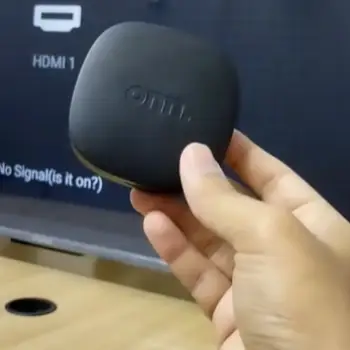
- Extra memory: 3GB of RAM keeps apps running smoothly even when several are open in the background.
Multitasking feels more reliable during long evening sessions with different streaming services.
- More storage: 32GB of space holds a full set of apps plus updates without constant cleanup. You can keep free live TV apps, games, and main services installed at the same time.
- Ethernet port: The built-in 10/100 port gives stable streams when Wi-Fi gets crowded in the evening.
Live sports and 4K titles stay consistent without sudden buffering.
- Hands-free voice: Gemini works without touching the remote so commands are quick from across the room.
This becomes useful while cooking or relaxing on the sofa.
- Better remote: Buttons light up in the dark and the Find My Remote feature works well when the remote disappears under cushions.
Night use becomes much easier with these small additions.
USB and Matter: A full USB-A port supports external drives and controllers without adapters.
Matter support also adds basic smart home control options for lights and other devices.
Pros Of The Onn 4K Pro
- More headroom: Extra RAM and storage reduce lag over time when apps and updates grow. Heavy users notice fewer slowdowns after months of regular use.
- Stable connection: Ethernet removes many Wi-Fi problems and keeps live sports and 4K titles consistent. Homes with crowded networks gain the most from this feature.
- Convenient remote: Backlighting and Find My Remote save time every evening. Locating a lost remote or using buttons in the dark becomes simple.
- Hands-free control: Voice commands work without the remote and add real daily convenience. Speaking from across the room feels natural after a few days.
- Expansion options: The USB-A port supports external drives and controllers easily. Local media libraries and game pads work without extra adapters.
- Solid build: The fabric design looks nicer on a shelf and feels more premium than basic plastic boxes. It sits well next to other living room gear.
Cons Of The Onn 4K Pro
- Higher price: It costs nearly twice as much as the Plus so light users may not need the extras. The premium only makes sense if you use the added features regularly.
- Larger size: The box takes more space on a media console or shelf. Tight entertainment centers can feel crowded once the Pro is in place.
- Limited Ethernet speed: The port is only 10/100 so fast local file transfers are not possible. Gigabit speeds are missing if you move large media files often.
- Stock issues: The device sometimes sells out at Walmart and finding one can take extra effort. Popular demand leads to short periods of empty shelves.
- Fabric care: The top collects dust and fingerprints more easily than smooth plastic. Cleaning needs a bit more attention over the months.
Key Features Of The Onn 4K Plus
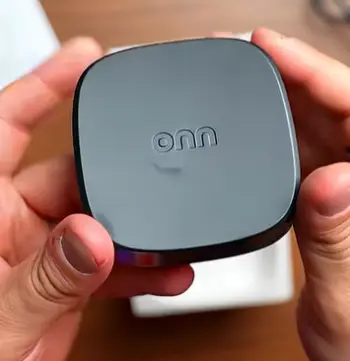
- Strong processor: The S905X5M chip handles apps quickly and keeps navigation smooth for normal streaming.
Benchmarks often show it matching or beating older Pro models in pure speed tests.
- Decent storage: 16GB holds the main streaming apps most people use every day.
You still need to manage space if you install many free live TV services or sideloaded tools.
- Wi-Fi 6: Modern wireless keeps 4K streams steady on a good router.
Performance stays reliable as long as the signal reaches the television without heavy interference.
- Compact size: The small body fits tight spaces and hides easily behind a TV.
Secondary rooms or guest setups benefit from the smaller footprint.
- Dolby support: Vision and Atmos work the same as the Pro so picture and sound quality match well on compatible gear.
Movies and sports look sharp without any extra setup.
- Simple remote: The voice remote controls search and playback for daily needs. It covers the basics well even without backlighting or a finder feature.
Pros Of The Onn 4K Plus
- Great value: The lower price delivers strong 4K performance and modern features without stretching the budget. Most streaming needs are covered for roughly half the cost of the Pro.
- Small design: The compact body fits more places and works well for secondary TVs. Guest rooms or bedrooms benefit from the easy placement options.
- Quick performance: The processor keeps menus and apps responsive during normal use. Daily streaming feels fast even with several services installed.
- Easy setup: Everything needed comes in the box so installation takes only a few minutes. HDMI cable and power adapter are ready right away.
- Matching picture: Dolby Vision and Atmos quality equals the Pro on compatible televisions. Movies look sharp and sound rich without paying extra.
- Simple operation: Fewer features mean less complexity for users who prefer straightforward devices. It suits basic streaming habits very well.
Cons Of The Onn 4K Plus
- Less storage: 16GB fills up faster when many apps and free live TV services are installed. Updates can force cleanup sooner than on the Pro.
- Lower RAM: 2GB can slow down during heavy multitasking or with memory-hungry apps. Occasional stutters appear when several services stay open.
- No Ethernet: You rely fully on Wi-Fi so weak signals can cause buffering. Homes with crowded networks feel this limit more often.
- Basic remote: There is no backlight or Find My Remote so dark rooms and lost remotes are harder to manage. Night use needs a little more effort.
- No hands-free voice: You must press the button for every command and lose some convenience. Speaking freely from across the room is not possible.
- Fewer ports: Expansion needs extra adapters for drives or controllers. Local media and accessories become less convenient without a hub.
Real-World Performance And Daily Use

I ran both devices through the same routine for several weeks. Morning news, daytime YouTube, evening Netflix and Disney+ 4K titles, plus sports streams all played well.
The Pro handled heavy app switching with more ease. The Plus stayed close for pure streaming and only slowed a little under load.
Voice control on the Pro became a quiet favorite. I could pause shows or search without grabbing the remote.
The Plus still responded quickly once I pressed the mic button. Both remotes included shortcut buttons that cut navigation time.
Setup took under ten minutes on each. Google account sign-in and app downloads followed the usual Google TV flow. Software updates arrived regularly on both.
Who Should Choose The Onn 4K Pro?
Choose the Pro if you want a main living-room device. Extra RAM and storage support heavier use. Ethernet helps in larger homes.
Families that lose remotes will like the finder feature. Hands-free voice adds daily convenience. The higher price pays for smoother long-term use.
Who Should Choose The Onn 4K Plus?
Pick the Plus when budget matters most. It covers excellent 4K streaming and modern Wi-Fi for half the cost. Secondary TVs and guest rooms work well with it.
Strong Wi-Fi and main streaming apps make the Plus a smart choice. You get nearly the same picture quality without paying for extras you may not use.
Long-Term Considerations
Storage capacity stands out over time. Apps grow and free live-TV services fill space. The Pro’s 32GB provides a comfortable buffer.
Memory also helps the interface age better. Both devices should receive similar software support. Build quality feels solid on each.
Value depends on how you watch. Light users get almost the same result from the Plus. Heavier users gain more from the Pro.
Frequently Asked Questions (FAQ)
The Pro is better for most primary setups thanks to more RAM, storage, Ethernet, and remote features, while the Plus wins on pure value for lighter use.
No, the 2026 model remains available, though stock can vary by location and time.
The 4K Plus adds a faster processor generation, more storage than basic 4K models, Wi-Fi 6, and Dolby Vision compared with earlier entry-level Onn 4K devices.
It ranks among the strongest value options in its price range for Google TV, especially if you need the extra features, but the best choice still depends on your specific needs and budget.
Wrapping Up
After living with both, I reach for the Onn 4K Pro as a primary streamer. Extra memory, storage, Ethernet, and remote features reduce small frustrations.
I still recommend the Onn 4K Plus for lighter use or secondary rooms. It punches above its price and delivers the core Google TV experience most people need.
Match the device to your habits. Strong Wi-Fi and basic streaming favor the Plus. Heavier use and wired reliability favor the Pro. That practical filter makes the choice clear.
Recent Posts
Her Own Irish Sea Moss may appeal to women who want to add a sea moss supplement to their daily wellness routine.With interest in mineral-rich supplements, digestive health, and overall...
I spent months comparing the Cooper ProControl and Cooper Endeavor Plus on daily drives, highway runs, and wet roads to figure out which one actually fits different vehicles and driving...