
I spent months switching between the Steelcase Amia and Gesture chairs at my home office setup.
After long workdays, virtual meetings, and even some gaming sessions, I wanted to figure out which one truly delivers for real people like you and me who sit for hours.
In this article, I share my personal experiences, break down the practical differences, and help you decide which chair fits your needs better based on comfort, adjustability, and everyday use.
| Feature | Steelcase Amia | Steelcase Gesture |
| Price Range (approx.) | More affordable | Higher premium |
| Adjustability | High with manual controls | Exceptional with 360-degree arms |
| Lumbar Support | LiveLumbar system, adaptive | 3D LiveBack, optional adjustable |
| Seat Comfort | Plush foam, balanced cushioning | Contoured, flexible for movement |
| Backrest | Flexible, two options | Deep recline, spine-mimicking |
| Arms | 4D adjustable | Highly versatile 360-degree |
| Best For | Traditional desk work, all-day comfort | Multi-device use, varied postures |
| Overall Feel | Supportive and stable | Dynamic and modern |
Key Differences Between Steelcase Amia And Gesture
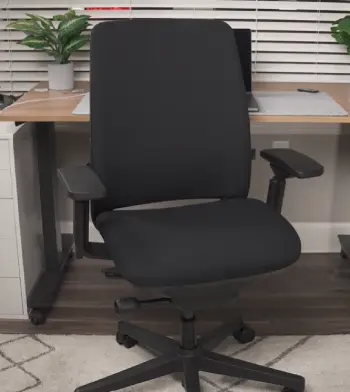
- Design Philosophy and Look: The Amia feels more traditional and understated, blending easily into any office without drawing too much attention.
I appreciate its clean lines when I want something professional yet unassuming.
The Gesture, on the other hand, has a sleek, contemporary vibe with its contoured shape that stands out as modern furniture. It makes my workspace feel upgraded, but some might find it less subtle.
- Adjustability Focus: Amia gives you precise manual adjustments that let you dial in exactly what you need without fuss. I found myself tweaking the seat depth and arm heights quickly during the day.
Gesture takes it further with arms that rotate in almost every direction, perfect when I switch between typing, drawing on a tablet, or leaning back for calls.
- Support During Movement: With the Amia, the LiveLumbar technology keeps consistent lower back pressure as I shift positions, which helped during marathon writing sessions.
Gesture’s 3D LiveBack follows the spine’s natural curve more dynamically, encouraging me to move around more freely without losing support.
- Seat and Cushioning Experience: Amia’s foam strikes a sweet spot between soft and firm, staying cool and comfortable for hours. I never felt hot spots even in longer sits.
Gesture’s seat adapts to different postures, but I noticed it can feel firmer initially until you break it in.
- Recline and Posture Range: Amia offers a balanced recline that feels secure and controlled.
Gesture excels here with deeper options that support everything from upright focus to relaxed leaning, ideal for my varied workflow.
- Build and Durability: Both chairs feel built to last with quality materials, but Amia seems slightly more straightforward in its mechanics, while Gesture’s complex arms add versatility at the cost of occasional adjustment learning.
These differences shaped my daily routine noticeably. When I needed steady support for focused tasks, Amia won out. For days full of posture changes, Gesture kept things interesting.
Key Features Of Steelcase Amia
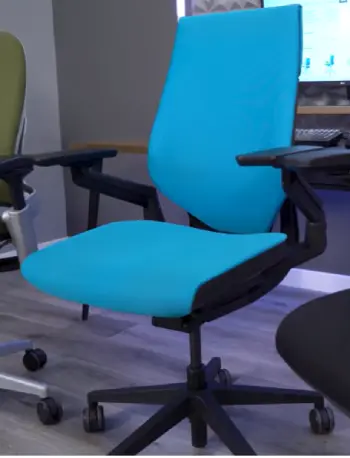
- LiveLumbar Technology: This hidden system flexes with my spine movements, providing steady lower back support without manual tweaking every hour.
It made a real difference in reducing fatigue.
- 4D Adjustable Arms: They move up, down, in, out, and pivot, letting me position them perfectly for shoulder relief during typing or mouse work.
- Adaptive Seat Cushion: The foam contours nicely and maintains comfort over time, with adjustable depth that accommodates different leg lengths.
Flexible Backrest Options: Available in different styles, it offers good breathability and support without feeling restrictive.
- Smooth Recline Mechanism: Easy to engage and lock, giving me control over how much I lean back without sudden movements.
- Overall Ergonomic Design: Built for all-day use with intuitive controls that I mastered quickly.
I remember my first week with the Amia. The way it adapted quietly to my shifts kept me productive without constant readjustments. It feels like a reliable partner for standard office tasks.
Pros Of The Amia
- Exceptional value for the quality and comfort delivered: I found the Amia strikes an outstanding balance between premium performance and accessible pricing.
It delivers build quality and ergonomic features that rival much more expensive chairs, making it a smart choice if you want high-end support without stretching your budget too far.
In my testing, this value translated to real savings while still feeling like a long-term investment in my posture and daily comfort.
- Softer, padded seat that reduces fatigue over long periods: The cushioning on the Amia is noticeably plusher than many competitors.
During eight-to-ten-hour workdays, it cradles the body without bottoming out, distributing pressure evenly across the thighs and tailbone.
This helped me stay focused longer because I experienced far less numbness or shifting around compared to firmer seats I had used before.
- Reliable and quiet lumbar support that adapts automatically: Thanks to the LiveLumbar system, the lower back receives consistent, dynamic help as I move.
It flexes naturally with posture changes instead of creating pressure points.
I appreciated how it worked quietly in the background—no loud clicks or constant manual adjustments needed—which kept my workflow smooth and uninterrupted.
- Solid build quality matching higher-priced options: Every component feels robust and precisely engineered. The frame, mechanisms, and materials show no signs of wear after months of daily use.
This durability gives confidence that the chair will remain supportive and functional for years, reducing the worry of early replacement or breakdowns.
- Great for users who want straightforward adjustments without complexity: The manual controls are intuitive and easy to reach.
I could tweak seat height, tilt tension, and arm positions quickly without studying a manual. This simplicity made the Amia approachable even on busy mornings when I just wanted to sit down and start working.
Cons Of The Amia
- Recline range is more limited compared to deeper options: While the tilt works well for standard tasks, it does not open up as much as some flagship models.
I sometimes wished for a more relaxed angle during longer thinking sessions or casual browsing, though this rarely became a major issue.
- Lumbar might feel too subtle for those who crave strong push: The adaptive system prioritizes natural flex over aggressive support.
Users with specific lower back needs or previous injuries might prefer something firmer and more pronounced right out of the box.
- Arms, while good, lack the extreme rotation of premium models: The 4D adjustments cover typical needs effectively, but they do not swivel 360 degrees like more advanced designs.
This mattered less for traditional desk work but showed during tasks requiring frequent arm repositioning.
- Seat firmness takes a short break-in period for some: The padding feels supportive immediately for many, yet a few days of adjustment helped it mold perfectly to my shape.
Initial firmness might surprise people coming from softer chairs.
- Not as ideal for very tall users due to back height proportions: Individuals over 6’4” may find the backrest coverage slightly short, requiring minor posture awareness to maximize lumbar benefits.
- Less specialized for forward-leaning tech postures: The design excels at neutral and upright sitting but offers less encouragement for the varied, device-driven positions common in modern workflows compared to chairs built specifically for that.
Key Features Of Steelcase Gesture
- 360-Degree Arms: These are game-changers, rotating fully to support arms in any position, especially useful during tablet or phone use.
- 3D LiveBack Technology: The back contours deeply to the spine, allowing natural movement and deep recline without losing alignment.
- Contoured Seat and Back: Designed around modern postures influenced by devices, promoting better overall body positioning.
- High Adjustability Across Components: Seat depth, tension, and height all fine-tune easily for personalized fit.
- Optional Headrest: Adds extra neck support for those who like to lean back fully.
- Premium Build with Movement Focus: Encourages shifting positions throughout the day for better circulation.
Switching to the Gesture felt like entering a more fluid workspace. The arms alone let me experiment with positions I didn’t even realize I needed.
Pros Of The Gesture
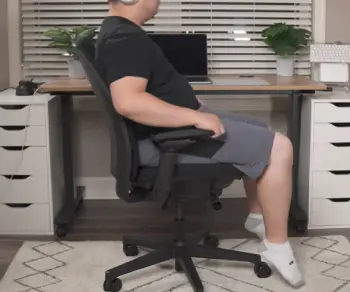
- Unmatched armrest flexibility for every possible arm position: The 360-degree arms represent one of the biggest strengths I experienced.
They adjust in height, width, depth, and pivot smoothly, supporting everything from keyboard typing to holding a phone during calls or resting elbows while reading on a tablet.
This versatility eliminated shoulder and neck strain in ways standard arms could not match.
- Deep recline that supports relaxation without losing support: Gesture allows a generous recline angle while the 3D LiveBack keeps the spine aligned.
I used this feature during breaks to reset my posture, and it made transitioning back to work feel seamless rather than jarring.
- Excellent adaptability to modern work habits involving multiple devices: Designed with today’s tech use in mind, it handles forward leans, side reaches, and dynamic shifts gracefully.
My productivity improved because the chair encouraged natural movement instead of forcing a single rigid position.
- Premium feel and aesthetics that look professional: The sculpted design and high-quality finishes give it a flagship appearance that fits well in any office environment.
It feels special every time I sit down, which subtly boosts morale during long work stretches.
- Encourages movement and reduces stiffness from static sitting: Built-in flex throughout the back and seat promotes micro-adjustments that keep blood flowing.
I noticed fewer instances of tightness in my hips and back after full days of use.
- Durable components that withstand heavy daily use: Mechanisms operate with precision even after hundreds of adjustments. The overall construction inspires trust for heavy users or shared office spaces where the chair sees constant activity.
- Strong spine contouring for users needing pronounced lumbar: The contoured back provides immediate and noticeable lower back hug that many people with desk-related discomfort appreciate right away.
Cons Of The Gesture
- Higher price point that makes it a bigger investment: The premium cost is justified by features for some, but it requires careful consideration of budget.
I weighed this against daily benefits and found it worthwhile for intensive use, yet it might feel steep for lighter needs.
- Firmer seat with less padding that some find less forgiving initially: The seat design prioritizes flex and breathability zones over thick cushioning.
It took me a week to fully appreciate the pressure relief, and users preferring plush comfort might need time to adapt or add a seat pad.
- Can generate more heat during extended summer sessions: Materials and design trap warmth more noticeably than mesh alternatives.
Good airflow in the room or seasonal clothing helped, but it remains something to plan for in warmer climates.
- Pronounced lumbar might feel too aggressive for certain backs: The strong contour works wonderfully for many but can press too firmly for others, especially during the initial adjustment phase.
Removing or adjusting the optional lumbar insert helped in my case.
- Assembly and initial tweaks require more attention: While still straightforward, fine-tuning all the advanced features takes longer than simpler chairs.
Expect 15-30 minutes of thoughtful setup to unlock its full potential.
- Weight and size might not suit every small-space setup perfectly: The robust build adds some heft, which provides stability but could feel bulky in tight home offices or for frequent moving between rooms.
My Experience With Comfort And Ergonomics
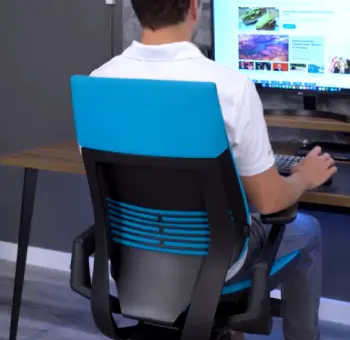
Sitting in the Amia reminded me of a well-worn favorite pair of shoes—reliable and comforting from day one.
The cushioning cradles without sinking too much, and the lumbar keeps everything aligned naturally.
I particularly enjoyed how it handled my 5’10” frame during video calls, keeping my posture upright without effort.
The Gesture, meanwhile, invites more exploration. Its back flexes in ways that mimic standing movements, which felt refreshing after hours of coding.
However, I found myself adjusting the arms frequently at the start until I locked in the perfect setup.
Both chairs score high on ergonomics, but they shine in slightly different scenarios. Amia for steady, focused comfort; Gesture for dynamic variety.
Adjustability In Real-Life Use
I tested both chairs across different tasks. With Amia, the manual levers felt intuitive right away. Raising the seat, sliding the depth, and tilting the back took seconds.
This simplicity meant less distraction during deadlines.
Gesture’s adjustments go deeper. Those arms can swing inward for close desk work or outward for lounging. The recline tension dial lets me fine-tune resistance perfectly.
If you switch between laptop, monitor, and phone often, you’ll notice the difference immediately. I ended up preferring Gesture for creative days and Amia for analytical ones.
Build Quality And Longevity
Both represent Steelcase’s reputation for tough construction.
Amia holds up beautifully after months, with no creaks or sagging. The materials resist wear well, and the mechanism feels precise.
Gesture matches that durability but adds complexity with its arm joints. I worried about long-term reliability there, but daily use showed no issues.
Both come with strong warranties, giving peace of mind for investment pieces.
Who Should Choose The Steelcase Amia?
If you want dependable support without overcomplicating things, Amia suits you. It works great for standard desk jobs, students, or anyone prioritizing consistent lower back care.
I recommend it highly if budget plays a role or if you prefer a no-frills approach that still delivers premium feel.
Taller or shorter users might need to test fit, but the adjustable depth helps most body types. In my case, it became my go-to for pure productivity.
Who Should Choose The Steelcase Gesture?
Gesture shines for people who move a lot or use multiple devices. Remote workers, designers, or hybrid professionals benefit from its posture range. The modern look also appeals if aesthetics matter in your space.
I suggest it if you’re willing to invest more for versatility. The headrest option adds another layer for neck relief during extended reclines.
Also Read: Is Downix Gaming Chair Worth It?
Frequently Asked Questions (FAQ)
Yes, it offers reliable comfort, solid lumbar support, and great value for daily office use.
Some users note initial firmness, adjustment learning curve, higher cost, and occasional lumbar variability.
Reddit users often highlight Amia’s better initial plush comfort and value versus Gesture’s superior adjustability and modern design for varied postures.
It depends on needs—Amia for balanced everyday support, Gesture for maximum versatility, or others like Leap for specific preferences.
Wrapping Up
After all my testing and analysis, I believe both the Steelcase Amia and Gesture represent excellent choices in ergonomic seating.
You deserve a chair that supports your unique way of working without compromise. If stability and plush comfort call to you, go with the Amia—it served me well during focused projects.
If dynamic movement and tech adaptability better match your style, the Gesture will likely become your favorite upgrade. Consider your daily habits, budget, and posture needs carefully.
Whichever you pick, proper setup will transform how you feel at the end of each day. I encourage you to sit in both if possible and trust what feels right for your body.
Your back and productivity will thank you for the thoughtful decision.
Recent Posts
BulkSupplements Casein Protein Powder Reviews: Is It Worth Buying?
If you're looking for an affordable protein powder that supports overnight muscle recovery, BulkSupplements Casein Protein Powder is worth considering.I like the idea of having a slow-digesting...
CeraVe Psoriasis Moisturizing Cream Reviews: Does It Really Work
If you're struggling with psoriasis-related dryness, itching, and stubborn flakes, choosing the right moisturizer can make a noticeable difference in your daily routine.CeraVe Psoriasis...