
If you want my honest take, I would not recommend buying a YADA dash cam right now unless you have a very specific reason to choose its compact 2-in-1 design.
The YADA BEON Plus 1080p offers attractive features such as Wi-Fi access, voice control, compact construction, and body-camera functionality, but its mixed customer feedback makes me cautious.
Current reviews mention overheating, weak battery life, unreliable app connectivity, and inconsistent operation.
For something I depend on to preserve evidence after an accident, reliability matters more than a long feature list.
My Personal Experience With YADA Dash Cam
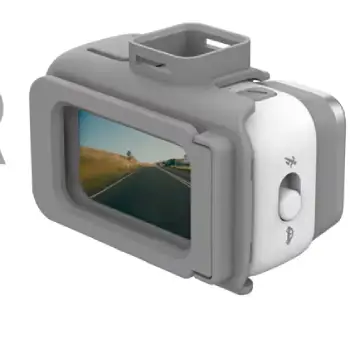
When I evaluate a dash cam, I don’t start with the number of features printed on the box. I start with a much simpler question: Would I trust this camera to record the few seconds that matter most?
That is the standard I would apply to the YADA BEON Plus.
The first thing that caught my attention is the unusual concept. The YADA BEON Plus isn’t positioned simply as a conventional windshield-mounted dash camera.
It is designed as a compact 2-in-1 device that can function as a vehicle camera and a wearable body camera. It also includes voice control and wireless access to recordings through a phone. On paper, that combination is genuinely interesting.
I can understand why someone shopping on a budget might immediately like it. You get 1080p recording, a small physical footprint, Wi-Fi connectivity, app compatibility, and a device that can be moved from the vehicle to another location. Some owners also praise the compact design and simple installation.
But this is where my assessment becomes more cautious.
A dash cam isn’t something I want to judge only by how convenient it feels during normal driving. A camera can appear perfectly fine for weeks and still become frustrating when I actually need a particular recording.
That’s why I pay much more attention to reports involving overheating, recording reliability, file saving, battery endurance, connectivity, and accident-event recording.
And unfortunately, YADA receives criticism in several of those areas.
The current Walmart listing shows an overall rating of approximately 3.8 out of 5 from more than 300 ratings. That isn’t disastrous, but it isn’t the kind of score that makes me comfortable recommending the camera without reservations either.
More importantly, the distribution includes a meaningful number of low ratings, including 17% at one star on one current listing.
The most concerning complaint I found involves overheating. One verified purchaser reported that the camera became extremely hot while plugged in and claimed it became hot enough to eject the SD card.
I can’t independently verify that individual incident, but I wouldn’t ignore it when assessing a small electronic device that may sit behind a windshield in a hot vehicle.
Battery life is another recurring concern. Some owners report roughly an hour of battery use, while the product information and customer summaries indicate that the internal battery isn’t intended to replace continuous vehicle power for normal dash-cam operation.
That doesn’t automatically make the product bad. Most traditional dash cams are designed to receive power from the vehicle. Still, if I am buying something partly because it can operate as a body camera, I expect better standalone endurance.
The phone experience also makes me hesitate.
The YADA documentation confirms that the BEON Plus can connect to a smartphone through its Wi-Fi network, and the connection is primarily intended for accessing video files wirelessly.
That’s useful in theory. I would much rather download a short incident clip to my phone than remove an SD card every time.
However, recent reviews of the YADA Drive app are concerning. Users have reported connection problems, crashes, slow downloads, and difficulty saving videos through the app.
One July 2026 review described the app as unreliable and another May 2026 review reported frequent crashes while attempting to open recordings.
For me, that changes the equation.
If I have a camera that records good footage but makes accessing that footage frustrating, I don’t consider the experience complete.
There are still positives. Some customers say installation is easy, the image is clear enough for everyday use, and the compact design is convenient. One recent owner specifically praised the 1080p video and microSD support.
So my overall impression is complicated: I can see why some people like the YADA, but I wouldn’t personally choose it when reliability is my primary goal.
Pros Of The YADA Dash Cam
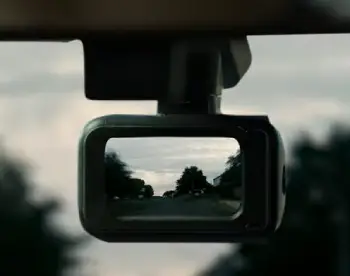
- Compact and Discreet Design
The small form factor is genuinely attractive.
I prefer a camera that doesn’t dominate my windshield, and YADA’s compact design makes it relatively unobtrusive.
That’s especially useful if I don’t want passengers constantly asking about a large camera hanging in front of them.
- 1080p Video Is Adequate for Everyday Driving
Full HD isn’t cutting-edge anymore, but it remains practical.
For routine incident documentation, 1080p provides a reasonable balance between storage requirements and image quality.
I wouldn’t buy it expecting premium cinematic footage, but I also wouldn’t dismiss 1080p simply because higher resolutions exist.
- Easy Installation
Customer feedback frequently mentions straightforward installation. Several owners describe the camera as easy to set up and use.
That’s important because I don’t want to spend an afternoon trying to understand a complicated mounting system.
- Wireless File Access
The ability to connect the camera to a phone is convenient.
If the app works properly, I can potentially find a recording, transfer it, and share it without removing the memory card.
That can be extremely useful after a minor collision when I need to preserve footage quickly.
- Dual-Purpose Design
The body-camera function gives the YADA more versatility than a conventional dash camera.
For someone who genuinely needs a portable recorder, that feature could justify considering the product.
- Relatively Affordable Positioning
YADA’s pricing has generally positioned it toward budget-conscious buyers. A current Walmart listing, for example, shows the BEON Plus at roughly the mid-$40 range, although prices naturally change.
That makes the product tempting.
But here’s my warning: inexpensive doesn’t automatically mean good value.
If I save money on the initial purchase but later struggle with overheating, connectivity, battery life, or unreliable recording, the low price doesn’t feel like much of a bargain.
Cons Of The YADA Dash Cam
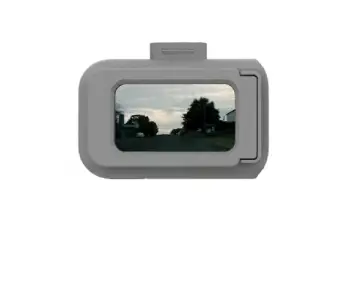
- Overheating Is My Biggest Concern
This is the issue I take most seriously.
A windshield camera lives in a harsh environment. Even a well-designed dash cam needs to tolerate heat.
A current YADA listing contains a particularly serious one-star complaint alleging extreme heat while connected to power.
I wouldn’t assume every YADA unit will overheat, but I also wouldn’t dismiss the complaint.
If you’re in a hot climate, I would be especially cautious.
- Battery Life Is Limited
Battery performance isn’t one of the YADA’s strengths.
Customer reports indicate that standalone battery operation can be relatively short, with one owner saying they were lucky to get about an hour.
For ordinary dash-camera use, that’s not necessarily fatal because the camera can operate from vehicle power.
But it becomes more relevant when considering the device as a portable body camera.
- App Reliability Is Questionable
This is another major drawback for me.
The YADA Drive app has recent complaints concerning crashes, connection problems, slow downloads, and difficulty saving footage.
A smartphone app doesn’t need to be fancy. It needs to work.
When I’m trying to retrieve evidence, I don’t want to fight with a crashing application.
- Recording Behavior Can Be Concerning
Some user reports raise questions about how incident footage is preserved.
A Reddit owner reported that the BEON capture camera saved recordings in one-minute segments and expressed concern about which segment would be preserved during a collision.
Reddit reports are individual experiences rather than laboratory testing, so I wouldn’t treat that account as universal. However, it is exactly the sort of complaint I would investigate before purchasing.
- Not the Best Choice for a Reliability-First Buyer
This is ultimately why I don’t recommend YADA.
The product isn’t devoid of strengths. It has several clever features.
But a dash cam is fundamentally a reliability product.
I would rather have a simpler camera that starts recording every time, saves incident footage correctly, survives heat, and lets me retrieve files easily than a feature-rich camera that occasionally frustrates me.
Maintenance Tips For YADA Dash Cam
- Keep the Lens Clean
This sounds obvious, but it matters enormously.
I would clean the lens regularly with a soft microfiber cloth. Dust, fingerprints, windshield residue, and oily film can reduce contrast and create glare.
I wouldn’t spray cleaning liquid directly onto the camera.
Instead, I’d put a small amount of appropriate screen or lens cleaner on the cloth and gently wipe the lens.
- Keep the Windshield Area Clean
Even a perfect camera can’t compensate for a dirty windshield.
If the glass in front of the lens has dust or oily residue, nighttime headlights can scatter across it and create distracting glare.
I would clean the windshield around the camera regularly, especially before long trips.
- Inspect the Mount
The mounting system deserves attention too.
I would periodically check whether the camera is still firmly attached and pointing in the correct direction.
A camera that gradually shifts downward isn’t doing me much good.
This is particularly important with adhesive mounts. Heat can affect adhesives over time.
- Protect the Camera From Excessive Heat
Given the overheating complaints associated with some YADA units, I would take temperature management seriously.
Whenever possible, I would park in shade or use a windshield sunshade.
I would also avoid leaving the camera unnecessarily exposed to extreme temperatures when the vehicle isn’t being used.
If the device becomes unusually hot, I wouldn’t simply ignore it.
- Check the microSD Card Regularly
A dash cam depends heavily on its memory card.
I would use a compatible, high-endurance microSD card and periodically check whether recordings are actually being saved.
I wouldn’t wait for an accident to discover that the card has become corrupted.
I would also format the card periodically using the camera’s recommended procedure, after backing up any important footage.
- Review Test Footage
This is one maintenance step I strongly recommend.
After installing any dash cam, I would make a short test recording and watch it.
Then I would repeat the process occasionally.
I want to verify that the camera is still recording, that the lens is correctly positioned, that the timestamp is accurate, and that the memory card is functioning.
Comparison Of YADA Dash Cam With Other Brands
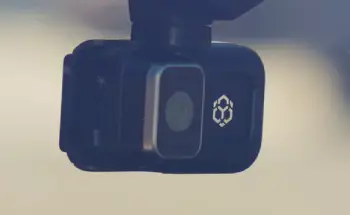
- YADA vs Garmin
Garmin is the brand I would consider when reliability, polished software, and ecosystem quality matter more than getting the cheapest camera possible.
YADA offers an interesting compact 2-in-1 concept, whereas Garmin’s dash cameras are more focused on the driving-camera experience.
If I only needed a straightforward vehicle recorder, I’d lean toward Garmin rather than choosing YADA primarily for its extra body-camera capability.
- YADA vs Vantrue
Vantrue has built a strong reputation among dash-cam buyers who want more advanced recording setups.
The brand offers cameras aimed at drivers who want features such as multiple cameras, higher resolutions, parking surveillance, and broader coverage.
YADA feels more like a compact budget gadget.
Vantrue feels more purpose-built around serious dash-camera use.
If I were spending money specifically to protect myself with reliable driving footage, I’d investigate Vantrue before YADA.
- YADA vs VIOFO
VIOFO is another brand I would put ahead of YADA for a dedicated dash-cam purchase.
The reason is simple: VIOFO’s product range is heavily focused on dash cameras rather than combining dashboard recording with body-camera functionality.
That specialization matters to me.
If the main job is recording my drive, I want a device designed primarily around that job.
- YADA vs ROVE
ROVE occupies a similar consumer-friendly area of the market, with affordable cameras that are designed to be relatively easy for ordinary drivers to install.
YADA’s advantage is its unusual portable form factor and body-camera capability.
ROVE’s appeal is more conventional: I buy it as a dash cam, install it, and leave it there.
For someone who doesn’t need YADA’s dual-purpose functionality, I’d personally look at the conventional option first.
Also Read: Is GuardHouse Security Camera Worth It?
Frequently Asked Questions (FAQ)
There isn’t one universal best brand for every driver. Garmin, VIOFO, Vantrue, ROVE, and other established manufacturers all have strong options depending on budget and requirements. Personally, I would prioritize reliable recording, good nighttime performance, dependable storage, and a proven software experience over unusual extra features.
Yes. The YADA BEON Plus supports Wi-Fi connectivity to compatible smartphones for accessing recordings. The manufacturer’s manual explains connecting the phone to the camera’s Wi-Fi network.
However, I’d keep expectations realistic. Recent YADA Drive reviews report connection failures, crashes, and slow file transfers, so I wouldn’t make the app my only way of retrieving important footage.
I understand the appeal. It is compact, inexpensive, offers 1080p recording, Wi-Fi access, voice control, and dual dash-camera/body-camera functionality. Some owners are genuinely happy with it.
But the current feedback is too mixed for me to confidently recommend it. The 3.8/5 overall rating, reports of overheating, limited battery life, and recent complaints about the companion app all make me prefer a more established dedicated dash-camera option.
Not automatically.
A dash cam can provide useful evidence after an accident, but whether an insurer offers a discount depends on the insurer, policy, location, and applicable rules.
I wouldn’t buy a dash cam expecting a guaranteed insurance reduction. I’d buy one primarily because having independent video evidence can be valuable when an accident or disputed traffic incident occurs.
Final Verdict
After weighing the features against the customer feedback, I wouldn’t recommend the YADA dash cam as my first choice.
I like the concept. I like the compact design. I like the idea of switching between vehicle and body-camera use. I also think 1080p recording and wireless file access can be useful at this price level.
But I keep coming back to the same question: Would I trust it when something important happens?
The current feedback gives me enough reasons to hesitate.
The reported overheating problems concern me. The short battery life limits its portable usefulness. The YADA Drive app appears to have reliability complaints. And reports concerning recording behavior make me even more cautious.
So if you’re asking me whether you should buy it, my answer is I would pass.
If you already own one, I wouldn’t panic. Test the recording, check the memory card, monitor the camera for excessive heat, keep your lens clean, and maintain an alternative method of accessing your footage.
But if I’m spending my own money today and my main goal is dependable accident documentation, I’d put my budget toward a dedicated dash-cam brand with a stronger reliability record.
For me, a dash cam doesn’t need to be flashy. It needs to work when I need it.
And that’s the standard the YADA currently doesn’t convince me it can consistently meet.
Recent Posts
Blood Balance Plus Reviews: Is This Blood Support Supplement Worth Buying?
Blood Balance Plus is marketed as a natural supplement designed to support healthy blood sugar levels, blood pressure, and metabolic wellness.However, after examining its product information,...
Lemme Play Gummies Review: Do They Really Support Women's Intimacy?
Lemme Play Gummies are marketed as daily intimacy supplements designed to support women's libido, arousal, sexual satisfaction, and healthy blood circulation.Although the formula contains...