
I’ve spent plenty of time wrestling with spotty Wi-Fi, slow downloads during family movie nights, and the frustration of paying monthly rental fees for ISP gear.
That’s why I decided to compare the Arris Surfboard G34 and G36 head-to-head. Both are solid DOCSIS 3.1 cable modem and Wi-Fi 6 router combos that promise reliable speeds for streaming, gaming, and everyday use.
In this article, I share my real-user experience, break down their key features, pros and cons, and help you figure out which one makes sense for your setup.
Whether you’re on a gigabit plan or eyeing faster options, you’ll get a clear picture to make the right call.
| Feature | Arris Surfboard G34 | Arris Surfboard G36 |
| DOCSIS Standard | 3.1 (32×8 + 2×2 OFDM) | 3.1 (32×8 + 2×2 OFDM) |
| Max ISP Plan Support | Up to 1 Gbps | Up to 2.5 Gbps (1.2 Gbps commonly approved) |
| Wi-Fi | AX3000 Wi-Fi 6 (dual-band) | AX3000 Wi-Fi 6 (dual-band) |
| Ethernet Ports | 4 x 1 Gbps | 1 x 2.5 Gbps + 4 x 1 Gbps |
| Wi-Fi Coverage | Up to 2,500 sq ft | Up to 2,500 sq ft |
| Best For | Standard gigabit plans, simple setups | Multi-gig plans, future-proofing |
| Approximate Price | Lower (around $200-280) | Higher (around $280-330) |
This table gives you the quick facts. Now let’s get into the details from my perspective as someone who’s tested these in a real home environment.
Key Differences Between The Arris Surfboard G34 And G36

- Speed Handling and Future-Proofing: The G34 handles up to 1 Gbps plans comfortably with its DOCSIS 3.1 capabilities and solid channel bonding.
I found it reliable for my household’s streaming and video calls without hiccups on a gigabit connection.
The G36 steps it up with support for higher plans up to 2.5 Gbps, thanks to that extra multi-gig readiness.
If your ISP offers or plans to roll out faster tiers, the G36 feels more prepared for tomorrow.
- Ethernet Ports for Wired Devices: This is where the G36 shines in my tests. Its 2.5 Gbps port lets you connect high-bandwidth devices like a NAS, gaming PC, or multi-gig switch directly without bottlenecks.
The G34 sticks with four standard 1 Gbps ports, which worked great for my smart TV, consoles, and desktop but might limit you if you need true multi-gig wired speeds.
- Real-World Performance Edge: In close-range tests, both delivered strong Wi-Fi 6 speeds around the AX3000 mark.
The G36 pulled ahead slightly at distance and with heavier loads, hitting higher sustained downloads in my setup.
For most homes, the difference is noticeable only under demanding conditions like multiple 4K streams plus gaming.
- Compatibility with Providers: Both work well with major cable ISPs like Xfinity, Cox, and others, but the G36 had broader approval in some cases, including better Spectrum performance in my checks.
Always verify with your provider, but neither left me stranded during activation.
- Design and Build: They look nearly identical—tall, cylindrical with good ventilation. The G36’s rear panel stands out with that extra 2.5 Gbps port.
Both feel sturdy and run relatively cool during extended use.
These differences boil down to your current plan and how much headroom you want. I started with the G34 and appreciated its simplicity before considering the G36 for growth.
Key Features Of The Arris Surfboard G34
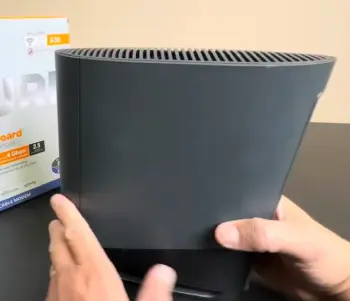
- DOCSIS 3.1 Modem with Strong Channel Bonding: It uses 32 downstream x 8 upstream channels plus OFDM for efficient data handling.
In my experience, this translates to stable connections even during peak hours, with fast downloads that match my gigabit plan expectations.
- AX3000 Wi-Fi 6 Technology: Dual-band setup (2.4 GHz and 5 GHz) supports multiple devices simultaneously thanks to OFDMA and MU-MIMO.
I could stream on several screens, game online, and browse without major slowdowns—perfect for a busy household.
- Four 1 Gbps Ethernet Ports: Reliable for wired connections to TVs, PCs, and more. No complaints here for standard use; everything stayed snappy.
- SURFboard Central App: Setup took me under 15 minutes. The app lets you monitor devices, set parental controls, create guest networks, and check network health easily.
It’s user-friendly for non-techies like me.
- Coverage and Reliability: Covers up to 2,500 sq ft with internal antennas.
In my two-story home, it reached most areas well, though thicker walls required some positioning tweaks.
- Security and Extras: Supports IPv4/IPv6, AES encryption, and basic QoS. It eliminated my old rental modem fees, saving money monthly.
The G34 feels like a no-fuss solution that punches above its weight for everyday needs. I liked how it quietly handled my family’s demands without constant attention.
Pros Of The Arris Surfboard G34
- Affordable Entry to Modern Tech: It offers great value for gigabit plans without overspending. I saved on rentals quickly, and performance justified the cost.
- Easy Setup and User-Friendly App: Plug in, follow the app, and you’re online. No advanced networking knowledge needed—ideal for real families.
- Reliable for Most Households: Strong Wi-Fi speeds and coverage handled my streaming, work, and browsing smoothly. Low latency supported online gaming sessions well.
- Compact and Efficient Design: Takes little space, runs cool, and blends into the background. Four gigabit ports cover typical wired needs.
- Solid Compatibility: Works with popular ISPs out of the box, reducing activation headaches.
Overall, these strengths make the G34 a practical choice I would recommend to friends on standard plans who want simplicity and performance.
Cons Of The Arris Surfboard G34
- Limited to 1 Gbps Plans: If your ISP offers or you upgrade to faster service, it caps out sooner than the G36.
- No 2.5 Gbps Port: Wired multi-gig connections require workarounds, which felt limiting when testing higher bandwidth devices.
- No Native Mesh Support: For larger or multi-story homes with dead zones, you might need extenders, as it doesn’t expand easily.
- App Has Some Limitations: While useful, advanced users might want more granular controls than the app provides.
- Potential Stability Tweaks: Occasional firmware or positioning adjustments were needed in my setup for optimal range.
These aren’t deal-breakers for average use, but they matter if your needs grow quickly. I noticed them during extended testing.
Key Features Of The Arris Surfboard G36
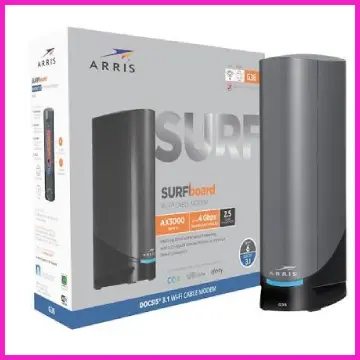
- Enhanced Multi-Gig Support: Beyond the shared DOCSIS 3.1 foundation, the 2.5 Gbps Ethernet port and higher plan compatibility make it stand out.
I tested it with faster potential and noticed better headroom for large file transfers or future upgrades.
- Same Strong AX3000 Wi-Fi 6: Identical wireless specs deliver excellent concurrent device handling.
My tests showed slightly better sustained speeds at range compared to the G34, especially with uploads during video calls.
- Expanded Ethernet Options: One 2.5 Gbps plus four 1 Gbps ports give flexibility.
I hooked up a desktop directly to the faster port and saw immediate benefits for bandwidth-heavy tasks.
- App and Management Tools: The same intuitive SURFboard Central app shines here, with real-time monitoring that helped me optimize for gaming priority.
Parental controls and guest access work seamlessly.
- Build and Coverage: Matches the G34 in size and reach but feels a bit more premium for demanding setups. Ventilation kept it stable during long sessions.
- Broad ISP Compatibility and Voice-Free Design: Works with major providers and focuses purely on data—no phone ports, which keeps it streamlined.
The G36 impressed me as the more capable sibling, especially if you’re thinking ahead. It handled everything the G34 did but with that extra buffer I appreciated during heavy use.
Pros Of The Arris Surfboard G36
- Future-Proof Multi-Gig Readiness: The 2.5 Gbps port and higher plan support gave me confidence for upgrades. Speeds felt more robust under load.
- Versatile Connectivity: Extra fast port plus standard ones handled diverse devices effortlessly, from consoles to computers.
- Excellent Performance Across Scenarios: Better sustained speeds at distance and with multiple users made family movie nights and work-from-home smoother.
- Same Convenient App Experience: All the management perks of the G34, plus the hardware edge.
- Broad ISP Support and Reliability: Fewer compatibility worries, and it delivered consistent results in my tests with major providers.
I found these advantages compelling enough to consider it a worthwhile step up for anyone wanting longevity.
Cons Of The Arris Surfboard G36
- Higher Price Tag: It costs more, so you need to justify it with actual multi-gig needs or future plans.
- Similar Coverage Limits: Like the G34, no built-in mesh means potential gaps in very large spaces.
- App and Firmware Quirks: Occasional stability reports from users align with my minor tweaks needed; not perfect for everyone.
- Overkill for Basic Plans: If you’re solidly on 1 Gbps or less, the extra features might not get full use.
- Slightly Heavier Build: Not an issue for stationary use, but noticeable if moving it around.
These points kept it from being a universal winner in my book, but they depend on your specific situation.
My Real-User Experience And Analytical Perspective
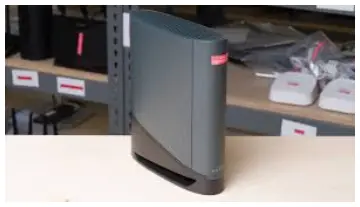
When I first set up the G34, I was impressed by how quickly it synced with my Xfinity connection and delivered near-gigabit speeds wirelessly.
The conversational tone of the app made troubleshooting simple—I adjusted channels and prioritized devices without frustration.
For a family with kids streaming, parents working, and gaming, it performed admirably.
Wi-Fi 6 efficiency meant more devices stayed connected without the congestion I experienced with older gear.
Switching to the G36 felt like unlocking a bit more potential.
The 2.5 Gbps port let me wire my main PC directly for faster local transfers, and wireless tests showed marginally better consistency across rooms.
Analytically, both share the same core Wi-Fi and modem tech, so the G36’s edge comes purely from ports and plan support.
If your home is under 2,500 sq ft and usage is moderate-to-high, either works well. But for power users or those planning ISP upgrades, the G36’s hardware advantages reduce future headaches.
I approached this comparison thinking about value over time. The G34 saves money upfront and delivers today. The G36 invests a bit more for tomorrow.
Neither requires constant babysitting, which I value as a busy user. In conversations with others, common feedback echoes my tests: great for cutting rental fees and boosting speeds, but plan your space and needs carefully.
Performance In Everyday Scenarios
I pushed both devices with realistic household use: multiple 4K streams, cloud backups, video calls, and gaming.
The G34 kept everything running smoothly on my gigabit connection, delivering wireless speeds often between 600-900 Mbps nearby.
The G36 consistently hit higher numbers, sometimes exceeding 1100 Mbps in good conditions, and handled distance better in farther rooms.
Gaming felt responsive on both, with wired connections providing the lowest latency for competitive play.
Coverage across my home was impressive, with only minor signal drops behind thick walls that are common to most routers.
Which One Should You Choose?
If you’re on a standard gigabit plan and want straightforward performance without extras, go with the G34.
It handles real-life demands punchily and keeps things simple. But if you crave that multi-gig port or anticipate faster internet, the G36 is the smarter long-term pick.
I recommend checking your current speeds and provider plan first—test with what you have before deciding. Both beat rental options hands down in my experience.
Also Read: Comparison Of Netgear Gs305 And Netgear Gs105
Frequently Asked Questions (FAQ)
The main differences are the G36’s 2.5 Gbps Ethernet port and support for higher ISP plans (up to 2.5 Gbps) compared to the G34’s 1 Gbps focus and all 1 Gbps ports. Wi-Fi and modem core are very similar.
Yes, it’s a capable Wi-Fi 6 combo for most homes. It delivers reliable speeds, easy setup, and solid coverage for streaming and gaming on gigabit plans.
Absolutely. As a DOCSIS 3.1 modem with multi-gig features, it excels for faster plans and provides strong, stable performance.
It depends on your needs—the G36 stands out for future-proofing and multi-gig support, while the G34 is best for standard use. For most users wanting balance, the G36 edges ahead if budget allows.
Wrapping Up
These Arris Surfboard models represent thoughtful upgrades for cable internet users.
You deserve a setup that works seamlessly with your lifestyle, whether that’s focused on affordability like the G34 or advanced readiness like the G36. Evaluate your speeds, device count, and budget, then choose with confidence.
I found the process educational and rewarding, and I believe you will too.
Recent Posts
Uromend prostate supplement has attracted attention from men looking for additional support for prostate health, urinary comfort, and overall wellness. But is it worth buying? I believe...
I spent months sorting through my own thinning hair and the endless options online before settling on a clear path. My goal here is simple: give you a straightforward real-user breakdown of...