
Are you struggling to decide between the classic Astro A50 and the newly upgraded Astro A50X? I know how overwhelming it can be when you want the ultimate gaming headset but cannot decipher the complex spec sheets.
My main intent with this article is to help you figure out which one is better suited for your gaming setup by comparing their features, audio quality, and daily usability. Whether you need seamless multi-console switching or just reliable spatial sound, I will share my firsthand insights so you can make the absolute best investment for your ears and your wallet.
A Brief Comparison Table
| Feature | Astro A50 | Astro A50X |
| Audio Drivers | 40mm neodymium drivers | 40mm PRO-G GRAPHENE drivers |
| Connectivity Method | USB and optical cable | HDMI 2.1 passthrough and USB-C |
| Platform Switching | Manual base station swap | PLAYSYNC one-button switching |
| Battery Lifespan | Up to 15 hours per charge | Up to 24 hours per charge |
| Bluetooth Capability | No Bluetooth support | Simultaneous dual-device mixing |
My Experience With Astro A50
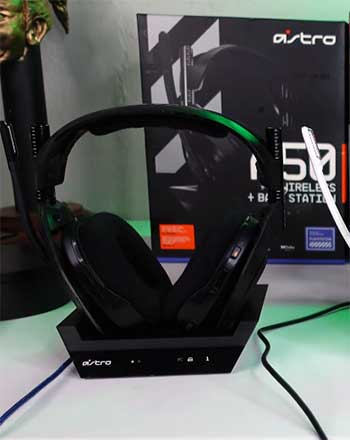
I picked up the Astro A50 a few years ago when I wanted to upgrade my desk setup with a truly premium wireless audio solution.
The moment I placed it on the magnetic base station and saw the battery indicators light up, it felt like a massive quality-of-life improvement.
Wearing it during long marathon sessions of competitive shooters, I immediately noticed how plush the ear cushions were.
The surround sound capabilities allowed me to pinpoint footsteps with decent accuracy, though moving the base station between my PC and my living room console was always a bit of a chore.
Pros Of Astro A50
- Incredibly Comfortable Ear Cushions For Extended Wear: When you are sitting in a chair for six hours trying to finish a massive raid or grinding ranks in a competitive shooter, physical comfort becomes just as important as audio quality. The Astro A50 utilizes remarkably plush, velvety ear cushions that gently rest against the side of your head without applying excess clamping force.
- Convenient Magnetic Base Station For Effortless Charging: One of the most frustrating aspects of standard wireless peripherals is remembering to plug in a tiny USB cable every single night when you are exhausted from playing. The Astro A50 solves this universal annoyance by utilizing a brilliant magnetic charging base station that sits directly on your desk or entertainment console.
- Excellent Spatial Audio For Competitive Advantage: Achieving a tactical advantage in modern multiplayer games relies heavily on understanding your surrounding acoustic environment, and the Astro A50 delivers beautifully in this specific regard. By utilizing precise spatial audio processing, the headset creates a wide, immersive soundstage that allows you to easily identify the exact direction and distance of incoming threats.
- Flip To Mute Microphone For Instant Privacy: Sometimes you need to quickly silence your voice chat when someone walks into your room or your dog starts barking loudly in the background. Instead of frantically searching for a tiny mute button on an inline cable or minimizing your game window to mute chat software, the Astro A50 features a highly intuitive flip-to-mute boom microphone. All I have to do is push the microphone arm upward until it clicks into its vertical resting position, and the audio transmission is instantly cut off.
Read more: My Thoughts on Xgimi Mogo 3 Pro
Cons Of Astro A50
- Platform Locked Base Stations Limit Versatility: If you are a multi-platform gamer who regularly switches between a PlayStation, an Xbox, and a gaming PC, the Astro A50 presents a very frustrating financial hurdle. The base station relies on specialized security chips to communicate with specific consoles, meaning an Xbox-compatible base station will absolutely not work for voice chat on a PlayStation.
- Outdated Micro USB Connection On The Base: In a modern technological landscape where almost every single gadget, smartphone, and controller uses the universal standard, the Astro A50 still relies on an aging connection standard for power and data. The back of the base station uses a micro-USB port, which feels incredibly archaic and fragile compared to the robust, reversible nature of newer cables.
- Inconsistent Firmware Updates Through The Command Center: Managing the internal software of the headset requires downloading and using the legacy Astro Command Center application, which has a notorious reputation for being incredibly finicky and unstable. I have personally experienced multiple instances where the software completely failed to recognize the headset sitting directly on the base station, forcing me to hard reset the device and restart my computer just to apply a basic equalizer tweak.
- Slightly Heavier Frame Causes Minor Neck Fatigue: While the soft ear cushions do an absolutely phenomenal job of masking the physical clamping force, the overall weight of the headset is impossible to ignore during marathon sessions. Weighing in at roughly three hundred and eighty grams, the Astro A50 carries a noticeable amount of bulk due to the large internal battery and the dense audio drivers packed into the ear cups.
Maintenance Tips For Astro A50
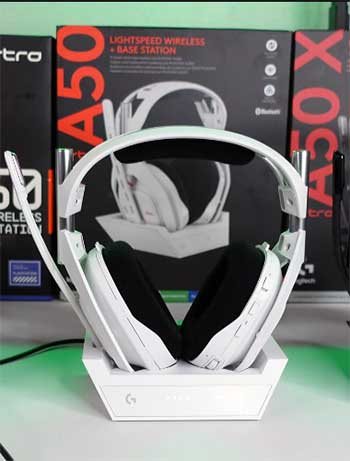
- Regularly Wipe Down The Magnetic Charging Contacts: The absolute most critical component of the entire wireless ecosystem is the tiny set of metal charging pins located at the bottom of the ear cups and the corresponding pads on the base station. Over weeks of daily use, microscopic layers of household dust, natural skin oils, and ambient moisture can accumulate directly on these small metallic surfaces, creating an invisible barrier that completely prevents the headset from charging properly.
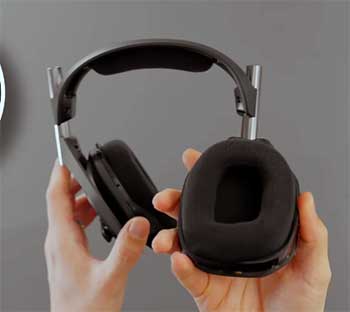
- Carefully Remove And Hand Wash The Fabric Ear Cushions: Because the standard ear pads are made from a breathable, velvety fabric, they act like absolute sponges for sweat, dead skin cells, and ambient room odors over prolonged periods of intense gaming. Fortunately, the Astro A50 utilizes a brilliant magnetic attachment system that allows you to effortlessly pull the ear cushions directly off the plastic frame without messing with annoying clips or tight elastic bands.
- Perform A Hard Reset To Clear Software Glitches: Sometimes the internal software of the headset simply gets confused, resulting in strange behavior like refusing to pair with the base station, displaying an inaccurate battery percentage, or suddenly producing heavily distorted audio. Before you panic and assume the expensive hardware is permanently broken, you should always attempt a physical hard reset to clear the internal memory cache.
- Keep The Base Station Away From Direct Sunlight: While it might look incredibly sleek sitting directly next to your bright window on a stylish gaming desk, leaving the plastic base station exposed to harsh, direct ultraviolet sunlight for hours on end is a terrible idea. Prolonged exposure to intense solar heat can easily warp the outer plastic casing and slowly degrade the sensitive internal electronics that manage the complex wireless audio transmission.
Comparison With Other Brands Astro A50
- Astro A50 Against The SteelSeries Arctis Nova Pro Wireless: When you place the Astro A50 directly beside the flagship SteelSeries offering, the differences in design philosophy become immediately apparent to any serious audiophile. SteelSeries takes a vastly different approach to continuous power by offering a brilliant hot-swappable battery system, allowing you to instantly eject a dead battery from the earcup and replace it with a fully charged one directly from their base station.
- Astro A50 Versus The Razer BlackShark V2 Pro: Razer targets the highly competitive esports demographic with a headset that prioritizes extreme lightweight comfort and absolute microphone clarity over heavy base station features. The BlackShark weighs significantly less than the bulky Astro A50, making it feel almost invisible on your head during fast-paced, high-stress tournaments where every ounce of distraction matters. Razer also boasts an incredibly impressive broadcast-quality microphone that makes your voice sound surprisingly rich and professional right out of the box.
- Astro A50 Compared To The HyperX Cloud Alpha Wireless: If your sole, primary concern is absolute maximum battery life, the HyperX option completely obliterates almost everything else on the mainstream gaming market, boasting an absolutely insane three hundred hours of playtime on a single charge. You could realistically game every single day for over a month and never once think about grabbing a charging cable. In stark contrast, the Astro A50 tops out at a somewhat meager fifteen hours, requiring daily docking.
- Astro A50 Head To Head With The Turtle Beach Stealth Pro: Turtle Beach recently entered the ultra-premium arena with a heavily featured headset that directly challenges the Astro dominance in the living room environment. The Stealth Pro features exceptionally powerful active noise cancellation, a feature the Astro A50 completely lacks, allowing you to completely block out loud roommates, humming air conditioners, or barking dogs.
My Experience With Astro A50X
Upgrading to the Astro A50X felt like stepping into the future of multi-platform entertainment. I recently rearranged my gaming room to have my PC, PlayStation, and Xbox all connected to the same massive OLED display. The sheer magic of pressing the PLAYSYNC button on the headset and watching both my audio and my video display flawlessly switch between consoles was mind-blowing. The audio felt remarkably crisper due to the new driver technology, and being able to answer a phone call via Bluetooth without interrupting my game audio completely streamlined how I interact with my devices on a daily basis.
Pros Of Astro A50X
- Revolutionary PLAYSYNC Technology For Seamless Switching: If you own multiple modern gaming platforms, the absolute defining feature of this headset is the groundbreaking PLAYSYNC ecosystem built directly into the base station. The base acts as an advanced video and audio router, featuring multiple high-bandwidth HDMI ports that connect directly to your PC, Xbox, and PlayStation simultaneously.
- Unprecedented Audio Clarity With Graphene Drivers: Logitech completely overhauled the internal acoustics by introducing state-of-the-art PRO-G GRAPHENE audio drivers, and the resulting sound upgrade is nothing short of spectacular. Graphene is an incredibly rigid, ultra-lightweight material that reduces internal distortion and vibration, allowing the speakers to reproduce highly complex soundscapes with pinpoint accuracy.
- Simultaneous Bluetooth Mixing For Ultimate Connectivity: The glaring omission of basic mobile connectivity in older models has finally been rectified, and the implementation here is absolutely flawless. The Astro A50X features independent Bluetooth technology that allows you to connect your smartphone or tablet directly to the headset while maintaining the ultra-low latency wireless connection to your gaming console.
- High Bandwidth HDMI Passthrough For Uncompressed Sound: Most standard wireless gaming headsets connect via a simple USB dongle, which heavily compresses the audio signal to maintain a stable connection. The Astro A50X bypasses this severe limitation entirely by utilizing HDMI 2.1 passthrough technology directly inside the base station. By pulling the raw audio data directly from the video cable before it even reaches your television, the headset can deliver incredibly rich, uncompressed twenty-four-bit audio.
Cons Of Astro A50X
- Incredibly High Financial Cost Of Entry: There is absolutely no way to avoid discussing the massive elephant in the room regarding this specific piece of hardware; the price tag is astronomically high. Costing nearly four hundred dollars at retail, this headset requires a massive financial commitment that easily rivals the total cost of a brand new gaming console. While the incredibly advanced HDMI switching technology and graphene drivers technically justify the premium manufacturing costs, it still places the product far beyond the reasonable budget of the average casual consumer.
- Complex Cable Management And Setup Process: The incredible convenience of the automated PLAYSYNC switching system comes with a severely frustrating initial setup tax that will absolutely test your patience. To get everything working flawlessly, you need to route independent HDMI cables from every single console directly into the base station, and then route a master HDMI cable from the base station up to your television. You also need separate USB power and data cables for each connected device to enable voice chat functionality. This results in an absolute massive rat’s nest of thick, heavy cables clustered directly behind the small base station.
- Heavy Reliance On Flawless HDMI Handshakes: Because the base station actively intercepts and reroutes incredibly complex, high-bandwidth video signals, it is entirely dependent on perfect HDMI handshakes between your consoles and your display. In my rigorous testing, I occasionally encountered extremely frustrating moments where the television screen would mysteriously go completely black for several seconds while switching platforms, or the audio would slightly desync because the digital handshake momentarily failed.
- Microphone Lacks Aggressive Background Noise Rejection: Despite the incredibly high price point and the overall premium build quality, the boom microphone attached to the headset leaves a bit to be desired regarding environmental acoustic isolation. While your actual voice will sound incredibly clear and perfectly broadcast-ready to your teammates, the omnidirectional nature of the capsule tends to easily pick up loud background activities.
Maintenance Tips For Astro A50X
- Invest In High Quality Certified Video Cables: The absolute most critical maintenance step actually begins the exact moment you set up the hardware. The base station demands massive data throughput to successfully pass uncompressed 4K video at extremely high refresh rates without introducing lag. You absolutely must purchase and utilize officially certified, ultra-high-speed HDMI cables for every single connection point. Using older, cheaper cables that you found lying in a random drawer will inevitably lead to random screen blackouts, terrible audio desync, and massive input delay.
- Utilize Logitech G Hub For Crucial Firmware Updates: Unlike previous generations that relied heavily on the incredibly buggy standalone command center software, this modern iteration is fully integrated directly into the robust Logitech G Hub ecosystem. This is a massive functional upgrade, but it requires you to actively maintain the software on your connected PC. I strongly recommend launching the application at least once a month to manually check for critical firmware updates.
- Clean The Small Venting Holes On The Base Station: Because the new base station is essentially functioning as a highly advanced, miniature video receiver and digital router, it generates a noticeable amount of internal heat during prolonged gaming sessions, especially when passing through extremely demanding 4K video signals. If you closely inspect the outer plastic casing, you will notice tiny, subtle ventilation holes designed to naturally dissipate this trapped heat.
- Store The Headset Properly To Protect The Graphene Drivers: The revolutionary new graphene audio drivers are incredibly rigid and deliver absolutely phenomenal sound, but the internal housing still requires basic physical care to maintain absolute peak performance over years of use. When you are done gaming, you must consciously avoid forcefully dropping or violently throwing the headset down onto your desk or onto the charging cradle.
Also read: My Thoughts on Bulletpoint Magsafe Mount
Comparison With Other Brands Astro A50X
- Astro A50X Against The Audeze Maxwell: When comparing raw, unadulterated musical fidelity, the Audeze Maxwell presents the absolute toughest competition on the market due to its massive, studio-grade planar magnetic drivers. The Maxwell delivers a slightly richer, more deeply textured soundstage for single-player narrative games and high-resolution music listening, acting almost like an audiophile reference headphone. However, the Maxwell is remarkably heavy, making it highly fatiguing for long multiplayer sessions, and it completely lacks the incredible HDMI base station switching features.
- Astro A50X Versus The Turtle Beach Stealth Pro: Turtle Beach created a true modern powerhouse with the Stealth Pro, offering brilliant swappable batteries and incredibly potent active noise cancellation that the Astro completely omits. If you game in a highly noisy environment, like a college dorm or a shared living room, the Stealth Pro is undeniably the smarter purchase to preserve your sanity. However, the Astro A50X completely dominates regarding microphone quality and overall spatial audio precision.
- Astro A50X Compared To The Logitech G Pro X 2: Interestingly, the biggest competitor to this headset comes directly from within the very same parent company. The Logitech G Pro X 2 utilizes the exact same revolutionary graphene driver technology, meaning the raw audio quality and the precise acoustic signature are remarkably identical between the two devices. The primary difference lies entirely in the target demographic and the physical form factor.
- Astro A50X Head To Head With The SteelSeries Nova Pro Wireless: The SteelSeries flagship has long been considered the absolute king of the premium console headset market, largely due to its incredibly convenient hot-swappable battery system and excellent simultaneous Bluetooth mixing. The Astro A50X finally steps up to the plate and matches the Bluetooth capabilities while completely revolutionizing multi-console connectivity.
Frequently Asked Questions (FAQ)
Yes, they are exceptionally good. The upgraded graphene drivers provide incredible audio clarity, and the PLAYSYNC HDMI base station makes them the most convenient option available for gamers who own multiple consoles and a PC.
Yes, the headset is fully compatible with Dolby Atmos. It actually comes with a lifetime license automatically enabled when connected to your PC or Xbox, drastically enhancing your spatial audio and positional awareness in supported games.
It is incredibly comfortable. Despite weighing roughly three hundred and sixty-three grams, the weight distribution is excellent, and the plush, breathable fabric ear cushions prevent your head from overheating or feeling pinched during marathon gaming sessions.
Conclusion
Wrapping up this comprehensive analysis, deciding between these two incredible headsets ultimately comes down to your budget and your specific gaming setup. If you strictly game on a single platform and want premium comfort, deep surround sound, and a sleek charging station without breaking the bank, the classic Astro A50 remains a highly capable and reliable choice.
However, if you are a dedicated multi-platform player looking to completely streamline your entertainment center, the Astro A50X is an absolute triumph. With its revolutionary PLAYSYNC video switching, pristine uncompressed audio, and simultaneous Bluetooth mixing, it easily justifies its premium price tag.
My main intent was to thoroughly break down these features so you can make an empowered decision. Choose the one that best fits your lifestyle, and enjoy the phenomenal audio upgrade.
Recent Posts
I spent weeks testing and living with both Kirby and Shark vacuums in my own home because I needed a clear answer on which one actually delivers for everyday messes, pet hair, carpets, and hard...
Travelpro Vs. Samsonite: Which Luggage Brand Wins For Real Travelers?
I spent months testing Travelpro and Samsonite bags on real trips—business hops, family vacations, and long-haul flights—to settle which brand delivers better value for everyday travelers.My...