
I spent weeks running both the Creality K2 and Bambu Lab P1S side by side in my workshop, printing everything from functional brackets to detailed multi-color models.
My goal here is simple: help you decide which enclosed CoreXY machine better fits your needs by comparing real-world performance, features, reliability, and value so you can pick the right one without second-guessing.
| Feature | Creality K2 | Bambu Lab P1S |
| Build Volume | 260 × 260 × 260 mm | 256 × 256 × 256 mm |
| Max Print Speed | 600 mm/s | 500 mm/s |
| Acceleration | 20,000 mm/s² | 20,000 mm/s² |
| Nozzle Temp | 300 °C | 300 °C |
| Bed Temp | 100 °C | 100 °C |
| Enclosure | Fully enclosed (passive heat) | Fully enclosed (passive ~50-60 °C) |
| Multi-color System | CFS (up to 16 colors) | AMS (up to 16 colors) |
| Display | 4″ color touchscreen | 2.7″ monochrome with buttons |
| Camera | 720p chamber camera | 720p chamber camera |
| Weight / Footprint | ~18 kg / larger | ~13 kg / more compact |
| Ecosystem Maturity | Growing, more open | Highly polished, mature |
| Typical Price Range | More competitive standalone | Strong value, especially Combo |
Key Differences Between The Creality K2 And Bambu Lab P1S
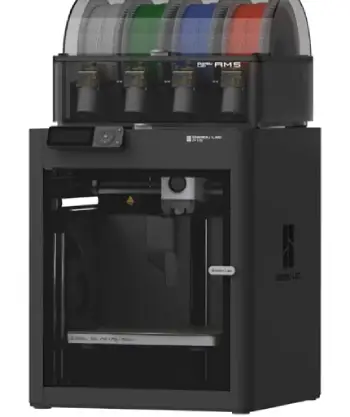
- Build volume and physical size: The K2 offers a slightly larger 260 mm cube that helps with taller or wider functional parts in one piece while the P1S stays at 256 mm and feels more compact on the desk.
I noticed the K2 needs more bench space and weighs more overall.
- Speed claims versus real throughput: Creality advertises 600 mm/s while Bambu lists 500 mm/s yet both share similar high acceleration.
In daily use the P1S often finished medium PLA jobs a touch quicker thanks to tighter default profiles and the K2 caught up or pulled ahead once tuned on larger models.
- Multi-color ecosystem: Both support up to 16 colors through CFS or AMS systems.
Bambu’s AMS currently feels smoother with more reliable loading and better humidity control while Creality’s CFS works well but still shows occasional small hiccups in the workflow.
- Software and user interface: The K2 includes a full-color touchscreen that makes local adjustments faster.
Bambu relies on a simpler button screen yet wins with its polished Studio software and mobile app for remote starts and monitoring.
- Openness versus closed ecosystem: Creality stays more open and flexible for custom profiles and community tweaks.
Bambu keeps a tighter appliance-like experience that prioritizes reliability over deep customization.
Key Features Of The Creality K2
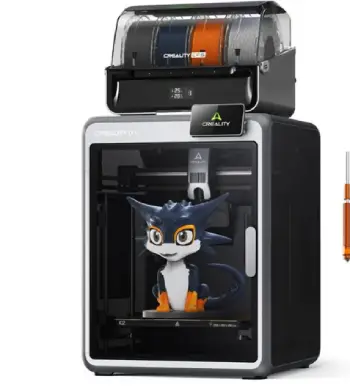
- CoreXY motion with step-servo motors: The rigid frame and motors deliver quiet precise movement even at higher speeds.
Long overnight prints stayed stable with almost no ringing after input shaping settled in.
- All-metal dual-gear direct drive extruder: Hardened gears and a quick-swap tri-metal nozzle handle standard and mildly abrasive filaments without early wear.
Filament grip remains consistent across PLA PETG and ABS.
- Automatic bed leveling with strain sensor: The system levels only the area required for the current model.
First-layer success stayed high after the initial calibration run.
- Chamber camera and basic monitoring: The 720p camera allows remote progress checks.
Resolution is modest yet still useful for catching failures early during long jobs.
- CFS multi-filament system: You can load up to four spools per unit and chain more for 16 colors.
RFID on official spools auto-detects type and color while humidity sensors help keep filament drier.
Color touchscreen and connectivity: Wi-Fi USB and a responsive screen make on-machine control straightforward.
The growing Creality ecosystem continues to improve slicer profiles over time.
Pros Of The Creality K2
- Slightly larger build volume: The extra few millimeters on each axis let me print bigger functional pieces in one go. Helmets large brackets and tall vases fit more comfortably without splitting.
- Higher listed top speed: On big models the K2 can finish faster once properly tuned. Acceleration matches the competition so the difference shows clearly on longer toolpaths.
- More open software approach: Greater flexibility exists for custom profiles and community mods. I appreciated the ability to experiment without hitting as many software walls.
- Competitive pricing for the feature set: You receive enclosure multi-color readiness and solid hardware at a price that undercuts many rivals. Value feels strong for the hardware alone.
- Touchscreen convenience: Adjusting settings directly on the machine is quicker and clearer than button navigation. Local control becomes more pleasant during setup or mid-print changes.
- Good material range for the class: PLA through mild composites work well. The extruder and enclosure handle everyday engineering filaments without major drama.
I kept returning to the K2 whenever a project needed that extra bit of height or width. The open nature also meant I could dig into configuration files more freely when a particular filament needed special handling. For makers who enjoy tuning and want room to grow, those advantages matter.
Cons Of The Creality K2
- Newer multi-color system still maturing: CFS performs solidly yet occasional loading hiccups and less refined purge management appear compared with the longer-established AMS.
- Passive chamber only: No active heater means large ABS or high-temp parts can still warp more than on machines with chamber heating. I limited big engineering prints accordingly.
- Ecosystem still catching up: Slicer profiles and community support grow quickly but they do not yet match the depth of Bambu’s library for every filament type.
- Larger footprint and weight: It needs more bench space and feels heavier when you move it. The size is less ideal for small apartments or shared workspaces.
- Camera and monitoring are basic: Resolution and features lag behind higher-end options. Remote viewing works but stays functional rather than premium.
Key Features Of The Bambu Lab P1S
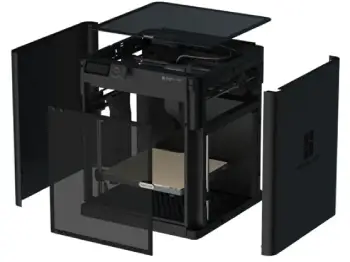
- Proven CoreXY with high acceleration: The welded frame and motion system feel locked in from the start.
Vibration compensation works reliably and produces clean walls even on fast settings.
- Direct-drive toolhead with self-cleaning: The nozzle purges into a rear chute before and during color changes.
This reduces clogs and keeps the start of each print cleaner overall.
- Fully automatic calibration suite: Bed leveling flow calibration and vibration compensation run with almost no user input.
I rarely needed to touch anything after the first setup session.
- Mature AMS multi-color system: Four spools fit per unit and expand to 16. Loading is nearly automatic and the dry-box effect keeps filament happier during multi-day jobs.
- Enclosed design with carbon filtration: Passive chamber heat reaches useful levels for ABS and ASA on moderate-sized parts.
The filter cuts odor effectively in a home workshop.
- Bambu Studio and cloud ecosystem: Slicing remote start and camera monitoring work seamlessly from phone or desktop.
Official filament profiles are tightly dialed in while third-party ones need only minor tweaks.
Pros Of The Bambu Lab P1S
- Exceptional out-of-the-box reliability: Almost every print started cleanly with zero manual tweaks after the first calibration. Failures stayed rare even on multi-day jobs.
- Polished multi-color workflow: AMS loading color changes and waste management feel smoother. I finished complex multi-color models with fewer interventions overall.
- Mature software and app experience: Bambu Studio and the mobile app make remote control monitoring and slicing effortless. Profiles for official materials stay tightly dialed in.
- Compact size and lower weight: Placement on a desk or shelf becomes easier. Quieter operation in daily use helped when the printer sat near living space.
- Strong passive chamber performance: For the size of parts I typically print ABS and ASA came out with minimal warping. Filtration keeps the air cleaner during longer sessions.
- Consistent speed and surface quality: Real-world throughput often matched or beat the K2 on medium models because of better default tuning from the start.
Cons Of The Bambu Lab P1S
- Slightly smaller build volume: Those four millimeters per axis force more part splitting on larger projects. I occasionally wished for the extra room the K2 provides.
- Closed ecosystem limitations: Third-party filament sometimes needs extra calibration steps. Custom firmware options stay more restricted than on more open platforms.
- Basic physical interface: The small non-touch screen and buttons feel dated next to a full color display. Most control happens through the app anyway.
- Multi-color purge waste: Color changes generate noticeable filament waste. The system is efficient yet the material cost still adds up on complex multi-color models.
- No active chamber heating: The same limitation as the K2 appears for very large high-temp parts. Performance stays good for most home and small workshop needs.
My Real Life Experience With Both Brands
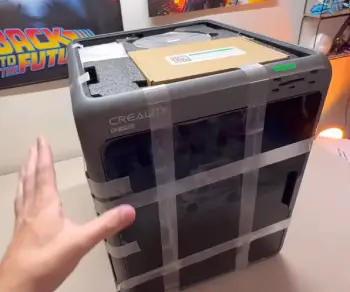
The smaller volume bit me more than once on helmet or large enclosure projects.
The closed software approach also felt limiting when I wanted to push experimental materials beyond official recommendations. Still, for the majority of my day-to-day work those issues stayed minor.
Print quality on both machines sits at a high level once calibrated. Walls come out clean, dimensional accuracy stays tight enough for functional parts, and surface finish satisfies both technical and display pieces.
Noise levels remain acceptable for a home workshop environment. Both handle PLA, PETG, TPU, ABS, and ASA competently inside their enclosures.
Abrasive or filled filaments work better with hardened nozzles on either machine, and I swapped nozzles without drama on both.
Maintenance stays low. Nozzle changes are straightforward. The P1S self-cleans more aggressively during color changes while the K2 rewards occasional manual checks of the drive gears and cooling fans.
Long-term reliability currently favors the P1S in my experience simply because the ecosystem has more real-world miles behind it.
The K2 has closed the gap quickly through firmware updates and continues to improve.
Cost of ownership includes filament waste on multi-color jobs, electricity, and the occasional spare part. Both printers are efficient for their class.
The P1S often wins on total ease of ownership while the K2 can win on raw capability per dollar depending on current street pricing and whether you need the extra volume.
I treated both as serious tools rather than gadgets. The P1S impressed me most with its set-it-and-forget-it reliability and smooth multi-color results. Prints rarely needed babysitting.
The K2 earned respect for its extra volume, more open nature, and strong raw hardware at a compelling price.
When I needed larger single-piece prints or wanted to experiment with settings, the K2 felt more accommodating.
For pure convenience and polished results on medium-sized models, the P1S pulled ahead.
Frequently Asked Questions (FAQ)
Bambu Lab currently edges ahead with a more mature ecosystem and fewer early issues reported across many users. Creality has improved dramatically with the K2 series and remains very solid for most owners.
Yes if you want slightly more build volume, a more open system, and strong hardware value. It delivers excellent results for the price, especially in Combo form.
In the enclosed high-speed category right now many users rank the Bambu Lab P1S or X1 series, the Creality K2/K2 Pro/Plus line, and select Prusa or Qidi models depending on specific needs for volume, materials, or openness.
The P2S improves on the P1S with better screen, quicker nozzle changes, and refined airflow, so it often feels more advanced. The K2 still competes hard on volume and price. Choice depends on whether you prioritize the latest Bambu refinements or Creality’s space and value.
Wrapping Up
After living with both printers I can say neither is a wrong choice.
The Bambu Lab P1S gives you near-appliance reliability and a polished daily experience that lets you focus on making things instead of fixing the machine.
The Creality K2 rewards you with extra space, flexibility, and competitive performance that feels future-proof as its ecosystem grows.
You should weigh how much you value plug-and-play convenience against the desire for larger prints and more open control. Measure your typical model sizes, decide how important multi-color is, and check current pricing.
Whichever you pick, you will own a capable enclosed CoreXY printer that turns ideas into real objects faster and more reliably than machines from just a few years ago.
The best printer is the one that matches your projects and stays out of the way while you create.
Recent Posts
● Interactive 5-Zone Interior & Exterior Paint Blueprint Paint Coverage Calculator: Gallons, Primer, Square Footage & Cost Tap any architectural surface zone on the blueprint...
If you want smooth, shiny hair without spending a fortune on a premium styling tool, the Ella Bella hair dryer may be worth considering.In these Ella Bella hair dryer reviews, I’ll look...