
If you are tired of back pain and looking for a desk that actually stays stable when you stand up to work, you should buy the Desky Standing Desk. It offers an incredible blend of aesthetic beauty with heavy-duty performance that transforms your entire workflow.
By the end of this review, you will see why this is the premier choice for anyone serious about their home office setup. Investing in a Desky means investing in your long-term health and daily comfort without compromising on style.
My Experience With Desky Standing Desk
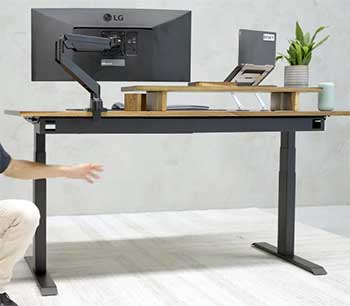
When I first unboxed my Desky Dual in early 2026, I was immediately struck by the sheer weight of the frame components. It felt like I was assembling a piece of industrial machinery rather than just a simple office desk.
The setup process was surprisingly straightforward despite the heavy parts, and I had the entire thing operational within about forty-five minutes.
Once I hit the button to raise it for the first time, the silent hum of the motors confirmed my suspicions that this was a high-tier product.
I opted for the solid Pheasant Wood desktop, which has a grain so unique it feels more like a piece of art than a workstation.
Every time I sit down to start my morning routine, the tactile feel of the real wood reminds me why I skipped the cheaper laminate alternatives.
The height adjustment is fluid and fast, moving from my seated position to my standing height in just a few seconds without spilling my coffee.
I have spent the last six months testing its limits with a triple-monitor setup and a heavy desktop PC mounted underneath the frame.
Even at the maximum height of 125cm, the wobble is so minimal that I can type aggressively without my screens shaking like they are in an earthquake. This stability was the primary reason I chose Desky, and it has lived up to every marketing claim I encountered during my research.
The integrated Bluetooth controls allow me to adjust the height from my phone, which is a feature I thought was a gimmick but now use daily. I also appreciate the standing reminders that give a subtle vibration to the desk surface when I have been sitting for too long.
It has genuinely changed the way my back feels at the end of a long ten-hour shift, as I now alternate every forty-five minutes. Transitioning between positions is so effortless that I actually find myself standing more often than I ever did with my previous manual crank desk.
The cable management tray is deep enough to hide a massive power board and all the messy wires from my peripherals, keeping the look clean. This creates a focused environment where I am not distracted by clutter, which has significantly boosted my overall productivity levels this year.
Also Read: Comparison Of Varidesk And Flexispot
Pros Of Desky Standing Desk
- Dual Motor System: The synchronized motors provide a lift capacity of 150kg which easily handles my heavy tower and triple monitor setup without straining.
- Quiet Operation: The noise levels stay below 40dB during movement which is essential when I need to adjust my height during a live video call.
- Exceptional Stability: Even at the highest extension point the frame remains incredibly rigid thanks to the thick steel legs and wide foot design.
- Vast Material Choices: You can choose from sustainable bamboo to premium hardwoods like Walnut or Oak to match any home office aesthetic perfectly.
- Anti-Collision Technology: The built-in sensors detect obstacles instantly and reverse the movement to prevent damage to your chair or office drawers below.
- Programmable Presets: The controller allows for four memory positions which makes it easy to switch between my sitting, standing, and walking pad heights.
- Leading Warranty: A ten-year warranty on all electrical and structural components provides immense peace of mind for such a significant financial investment.
- Fast Adjustment Speed: Moving at 36mm per second means you are never waiting around for the desk to reach your desired ergonomic position.
- Cable Management Tray: The included heavy-duty tray is large enough to hide all power bricks and messy wires for a completely clean look.
- Bluetooth Integration: Using the mobile app allows for voice-activated height changes which feels futuristic and adds a layer of convenience to my day.
- Voice Control Support: Compatibility with modern smart home systems like Siri and Google Home means I can adjust my desk with a simple command.
- Heavy Duty Frame: The telescoping legs are made from high-grade steel that feels virtually indestructible and provides a solid foundation for your work.
- Pre-Drilled Holes: Most desktops come with pre-drilled holes that align perfectly with the frame making the assembly process much faster and easier.
- Ergonomic Edge Options: You can select a scalloped edge or ergo-curve desktop which allows you to sit closer to the workspace comfortably.
- Sustainable Sourcing: Desky uses FSC certified timbers and eco-friendly bamboo options for those who prioritize environmental responsibility in their furniture choices.
- Weight Capacity: With a 150kg limit you can practically sit on the desk while it moves which proves the strength of the internal gears.
- Modular Design: The frame is adjustable in width allowing you to upgrade to a larger desktop in the future without buying a new motor.
- Standing Reminders: The controller can be set to vibrate at specific intervals to remind you to move which helps maintain a healthy routine.
- Glossy Finish Quality: The protective coatings on the wood surfaces are incredibly durable and resist water rings from cold drinks or coffee spills.
- Global Shipping: They offer reliable shipping options that ensure the heavy packages arrive at your doorstep without damage to the delicate wood corners.
- Accessory Ecosystem: From integrated power hubs to monitor arms everything is designed to fit the Desky ecosystem for a seamless user experience.
- Sturdy Foot Levelers: The adjustable feet ensure the desk remains perfectly level even if your home office floor has slight imperfections or slants.
Cons Of Desky Standing Desk

- Premium Price Point: The initial cost is significantly higher than entry-level standing desks which might be a barrier for students or budget-conscious buyers.
- Total Package Weight: The boxes are extremely heavy and usually require two people to carry them up stairs or into a home office.
- Hardwood Lead Times: Choosing a custom solid wood top often results in longer waiting periods compared to the standard laminate or bamboo options.
- Sensitive Sensors: Sometimes the anti-collision system is a bit too sensitive and stops the desk if it detects a slight cable tension.
- Assembly Complexity: While the instructions are clear the sheer number of screws and the weight of the frame can be tiring for one person.
- Accessory Costs: While the desk itself is great the optional add-ons like integrated power channels can quickly drive the total price much higher.
- Limited Color Options: Some users might find the frame color choices limited to just black white and grey which may not suit every decor.
- Visible Fingerprints: The matte black frame finish tends to show fingerprints and dust more easily than the white or silver alternatives do.
- Software Bugs: Occasional sync issues with the Bluetooth app can be frustrating when you just want to move the desk quickly from your phone.
- Large Footprint: The wide feet provide stability but they also take up a significant amount of floor space which can be tricky in small rooms.
- Controller Brightness: The LED display on the height controller is quite bright and cannot be fully dimmed which might bother some in bedrooms.
- Cable Tray Access: Once the cable tray is installed it can be a bit difficult to reach back in to plug in new devices.
- Grommet Hole Placement: Standard grommet holes are useful but their fixed positions might not align perfectly with every specific dual-monitor arm mount.
- Shipping Box Waste: The amount of cardboard and protective foam used is massive which creates quite a lot of recycling work after the assembly.
- Motor Heat: During repetitive height adjustments the motors can get warm and might trigger a temporary thermal protection shutdown for safety reasons.
- Slow Response Time: There is a tiny delay between pressing the button and the motors starting which takes a bit of getting used to.
- Wood Natural Variations: Because it is real wood the grain pattern you receive might look different from the marketing photos on the official website.
Also Read: Comparison Of Fezibo And Flexispot
Maintenance Tips For Desky Standing Desk
- Regular Dusting: Use a soft microfiber cloth to wipe down the desktop surface daily to prevent dust from settling into the wood grain.
- Avoid Harsh Chemicals: Never use ammonia-based cleaners on the solid wood tops as these can strip the protective oils and ruin the finish.
- Check Bolt Tightness: Every six months you should use the included Allen key to ensure all frame screws remain tight for maximum stability.
- Monitor Cable Tension: Ensure that all cables have enough slack to reach the maximum height without pulling on the control box or motors.
- Level The Feet: Periodically check that the desk is level using a spirit tool and adjust the floor levelers to prevent uneven motor wear.
- Reset The Controller: If the desk becomes unresponsive perform a manual reset by holding the down button until it reaches the lowest point.
- Clean The Legs: Wipe the inner telescoping columns with a dry cloth to remove any grease buildup or dust that could cause friction.
- Manage Humidity: Keep your solid wood desk in a room with stable humidity to prevent the natural timber from warping or cracking over time.
- Lubricate Sparingly: Most modern motors are sealed but check the manual if you hear any grinding sounds that might require professional grade lubricant.
- Update The App: Keep the Desky mobile app updated to ensure you have the latest firmware for the Bluetooth controller and voice features.
- Protect From Sun: Position the desk away from direct sunlight to prevent the wood color from fading or the finish from becoming brittle.
- Use A Coaster: Always use coasters for hot or cold drinks to prevent permanent heat marks or water rings on the expensive hardwood surfaces.
- Inspect Power Cords: Check the main power cable for any signs of wear or pinching that could lead to electrical shorts or fire hazards.
- Clear Underneath: Ensure no chairs or trash cans are left directly under the desk frame that could trigger the anti-collision sensor repeatedly.
- Weight Distribution: Try to distribute your heavy equipment evenly across the desktop to ensure both motors are lifting an equal load during movement.
- Vacuum The Motors: Use a vacuum attachment to clear any dust from the motor vents to keep them running cool during frequent height transitions.
- Soft Reset Routine: If the height display shows an error code a quick power cycle usually clears the internal memory and restores full functionality.
- Avoid Overloading: Stick to the 150kg weight limit to prevent premature failure of the lifting columns and to maintain your long-term warranty coverage.
- Microfiber Finish Care: For laminate tops a slightly damp cloth is usually enough to remove stubborn coffee stains or ink marks from pens.
- Check Grounding: Ensure the desk is plugged into a grounded outlet to protect the sensitive electronic control board from potential power surges.
- Leg Alignment Check: Ensure the legs are perfectly vertical as any slight tilt can put unnecessary lateral stress on the internal motor gears.
- Cable Management Clips: Use adhesive clips to keep wires away from the moving parts of the frame to avoid them getting caught.
- Firmware Syncing: Re-pair your Bluetooth devices if the connection becomes spotty to maintain the convenience of the automated height adjustment features.
- Scheduled Movement: Use the desk movement daily to keep the internal lubricants spread evenly throughout the mechanical gears and lifting columns.
- Spill Response: If you spill liquid near the controller wipe it away immediately with a dry cloth to prevent moisture from entering the electronics.

Comparison With Other Brands
Uplift V3 Standing Desk
- Customization Variety: Uplift offers a massive range of accessories like hammocks and footrests that can be attached directly to the frame system.
- Stability Comparison: While the Uplift is very stable the Desky Dual often feels slightly more rigid at the absolute highest standing heights for users.
- Price Point Difference: Desky tends to be more accessible in the Australian and European markets while Uplift dominates the North American shipping regions.
- Warranty Terms: Both brands offer exceptional ten-year warranties which shows a high level of confidence in their respective motor and frame designs.
- Shipping Times: Desky often has faster local shipping for solid wood options if you are located within their primary distribution hubs and regions.
Secretlab Magnus Pro
- Cable Management Philosophy: The Magnus Pro features a full-length integrated power supply column which is superior for users who hate visible trailing cables.
- Gaming Focus: Secretlab focuses heavily on the gaming aesthetic and magnetic accessories while Desky maintains a more professional and natural office look.
- Surface Material: Secretlab uses a metal top with a magnetic mat while Desky offers real natural hardwoods which feel much warmer to touch.
- Height Range: Both desks offer a similar height range but the Desky tends to go slightly lower for shorter users sitting in chairs.
- Weight Capacity: Desky offers a higher total weight capacity of 150kg compared to the 100kg limit found on the Magnus Pro series desk.
Flexispot E7 Pro
- Budget Friendliness: Flexispot is the clear winner for those on a strict budget as their E7 series is often much cheaper than Desky.
- Build Quality Gap: You can definitely feel the difference in the thickness of the steel and the smoothness of the motors with Desky.
- Motor Performance: Desky motors are generally quieter and have a more refined start and stop motion compared to the punchier Flexispot system.
- Desktop Durability: The solid wood options from Desky are significantly thicker and more premium than the chipboard or thin laminate used by Flexispot.
- Support Experience: Customer service from Desky is often cited as being more personalized and responsive during the initial setup and troubleshooting phase.
Frequently Asked Questions (FAQ)
Desky desks are widely regarded as some of the highest quality standing desks on the market because of their heavy-duty steel frames and powerful dual-motor systems. They are designed to withstand 150kg of weight while maintaining incredible stability at height.
The use of premium materials like solid hardwoods and industrial-grade electronics ensures they last for a decade or more of daily use. Most users find that the build quality far exceeds the cheaper alternatives found in big-box retail stores.
Yes, Desky is a very real and reputable company that originated in Australia and has since expanded its operations to multiple global regions including the USA and UK. They have established themselves as a leader in ergonomic office furniture over several years.
They are known for their transparent warranty policies and have a physical presence through multiple warehouses to ensure reliable shipping and customer support. Thousands of positive reviews from verified customers confirm their legitimacy as a top-tier furniture brand.
Desky offers a wide variety of desktop materials including a premium selection of 100% solid real wood options such as Oak, Walnut, and Pheasant wood. These are not just veneers but thick slabs of natural timber that are sustainably sourced.
They also provide more affordable options like bamboo and laminate for those who want the functionality of the frame without the cost of solid wood. Each wood top is unique with its own natural grain patterns and a durable protective finish.
Many chiropractors strongly recommend the use of standing desks because they encourage movement and help maintain a more neutral spinal alignment during the long workday. Sitting for extended periods is often linked to chronic lower back pain and poor posture.
However, experts suggest that the best approach is to alternate between sitting and standing every thirty to sixty minutes rather than standing all day. This variety keeps the joints mobile and prevents the muscle fatigue associated with staying in any single position.
Conclusion
The Desky Standing Desk is an absolute powerhouse that brings both elegance and elite performance to your home office. You should buy this product if you want a desk that will last a lifetime while protecting your physical health.
It is rare to find a product that balances industrial strength with such a high degree of aesthetic customization. Make the move to a Desky today and you will never look back at a standard fixed desk again.
Recent Posts
● Interactive 5-Zone Interior & Exterior Paint Blueprint Paint Coverage Calculator: Gallons, Primer, Square Footage & Cost Tap any architectural surface zone on the blueprint...
If you want smooth, shiny hair without spending a fortune on a premium styling tool, the Ella Bella hair dryer may be worth considering.In these Ella Bella hair dryer reviews, I’ll look...