
When I started building a smart home setup, two compact smart speakers kept appearing on every recommendation list: the Echo Dot and the HomePod Mini. Both devices promise voice control, smart home automation, and music streaming in a small package.
In this article, I share my personal experience and analytical comparison to help you understand how these two smart speakers perform in real life. My goal is to help you decide which device fits better into your daily routine and smart home ecosystem.
A Brief Comparison Table Echo Dot Vs HomePod Mini
| Feature | Echo Dot | HomePod Mini |
| Voice Assistant | Alexa | Siri |
| Smart Home Compatibility | Wide compatibility | Best with Apple ecosystem |
| Sound Quality | Good for size | Richer and balanced audio |
| Music Services | Many supported platforms | Optimized for Apple Music |
| Design | Spherical compact design | Mesh sphere premium look |
| Ecosystem | Amazon ecosystem | Apple ecosystem |
| Price Range | Usually cheaper | Slightly more expensive |
| Best For | Smart home control | Apple device integration |
My Experience With Echo Dot
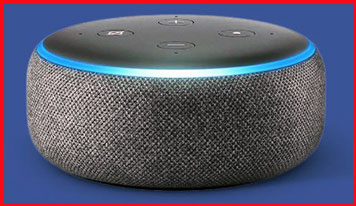
When I first started using the Echo Dot, the main reason I bought it was convenience. I wanted a simple way to control lights, play music, and check information without touching my phone.
Setting up the device was surprisingly easy. Once connected to Wi-Fi and the Alexa app, I could immediately start giving voice commands. Asking for the weather, setting alarms, and controlling smart plugs became part of my daily routine.
One of the biggest advantages I noticed was how flexible Alexa is. The Echo Dot works with a huge number of smart home devices, from lights to thermostats. This makes it extremely useful if you are building a smart home gradually.
The speaker quality is decent for its small size. While it does not replace a full sound system, it performs well for casual music listening or podcasts.
Another feature I appreciated was Alexa Skills. These are additional apps that expand what the Echo Dot can do, from games to productivity tools.
However, the sound quality feels slightly less rich compared to some competing smart speakers. It is good, but clearly designed more for functionality than premium audio.
From my perspective, the Echo Dot is ideal for users who want a powerful smart assistant with broad compatibility.
Read More: Comparison Of Tozo Nc3 Vs. Nc9
Pros Of Echo Dot
- Powerful Voice Assistant: Alexa understands commands quickly and supports a wide range of requests.
- Extensive Smart Home Compatibility: Works with many smart lights, plugs, cameras, and thermostats.
- Affordable Price: Echo Dot is usually one of the cheapest smart speakers available.
- Compact Design: Small size allows it to fit easily in any room.
- Alexa Skills Library: Thousands of skills expand functionality.
- Multi-Room Audio: Multiple Echo devices can play synchronized music.
- Voice Control Convenience: Simple commands can manage daily tasks.
- Wide Music Service Support: Compatible with many streaming platforms.
- Routine Automation: Alexa routines automate several actions at once.
- Fast Setup Process: Installation through the mobile app is quick.
- Frequent Software Updates: Amazon regularly improves Alexa features.
- Hands-Free Operation: Perfect for cooking, cleaning, or multitasking.
- Good Entry-Level Smart Speaker: Ideal for beginners entering smart home technology.
Cons Of Echo Dot
- Average Sound Quality: Audio is good but not premium.
- Privacy Concerns: Some users worry about voice recordings.
- Alexa Dependency: Requires internet connection for most features.
- Design Simplicity: Appearance may feel basic compared to premium speakers.
- Occasional Voice Misinterpretation: Complex commands sometimes confuse Alexa.
- Limited Apple Integration: Works better with Amazon and Android environments.
- Microphone Sensitivity: Background noise may interfere with commands.
- Music Quality Limits: Audiophiles may want stronger speakers.
- Requires Amazon Account: Setup requires linking an account.
- Ads And Recommendations: Alexa occasionally promotes Amazon services.
- Small Speaker Driver: Limits bass performance.
- Limited Local Processing: Many commands depend on cloud services.
- Not Ideal For High-End Audio: Designed more for convenience than sound performance.
Maintenance Tips For Echo Dot
- Keep Firmware Updated: Software updates improve performance and security.
- Place Speaker In Open Area: Avoid blocking the microphones.
- Clean Dust Regularly: Dust buildup may affect microphone sensitivity.
- Avoid Moisture Exposure: Electronics can be damaged by humidity.
- Restart Occasionally: Restarting fixes small software glitches.
- Update Alexa App: New features require updated mobile apps.
- Use Strong Wi-Fi Connection: Reliable internet ensures smooth voice commands.
- Disable Unused Skills: Removing unnecessary skills improves performance.
- Review Privacy Settings: Adjust recording preferences for comfort.
- Check Power Adapter: Using original accessories ensures safe operation.
- Organize Smart Home Devices: Naming devices clearly improves voice recognition.
- Keep Away From Heat Sources: Excess heat may affect electronics.
- Position Away From Loud Speakers: Prevent interference with microphones.
Comparison With Other Brands
- Compared With HomePod Mini: Echo Dot offers broader smart device compatibility.
- Compared With Google Nest Mini: Both offer similar features but different assistants.
- Compared With Sonos Roam: Sonos focuses more on sound quality.
- Compared With Bose Smart Speaker: Bose prioritizes premium audio performance.
- Compared With JBL Link Series: JBL speakers combine smart features with stronger bass.
- Compared With Apple HomePod: Apple emphasizes ecosystem integration.
- Compared With Xiaomi Smart Speaker: Xiaomi offers budget alternatives.
- Compared With Samsung Smart Speakers: Samsung focuses on SmartThings integration.
- Compared With Lenovo Smart Clock: Lenovo adds screen functionality.
- Compared With Facebook Portal: Portal devices focus more on video calling.
- Compared With Harman Kardon Speakers: Harman Kardon emphasizes sound design.
- Compared With Sony Smart Speakers: Sony models often provide stronger audio.
- Compared With Portable Bluetooth Speakers: Echo Dot prioritizes smart assistant features.
My Experience With HomePod Mini
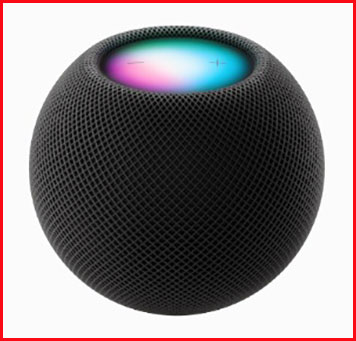
When I tried the HomePod Mini for the first time, the most noticeable difference was sound quality. Despite its small size, the speaker produces surprisingly balanced audio.
The bass feels deeper, and the vocals sound clearer compared to many compact smart speakers.
Another major difference is how deeply the device integrates with the Apple ecosystem. If you use an iPhone, iPad, or Mac, the experience becomes very seamless.
For example, transferring music from my phone to the HomePod Mini was effortless. I simply moved the phone close to the speaker and the music continued playing.
Siri handles basic commands well, such as setting reminders, controlling smart lights, or sending messages.
However, Siri currently supports fewer smart home services compared to Alexa.
From my perspective, the HomePod Mini is perfect for people who already use Apple products and want a speaker that integrates smoothly with their devices.
Pros Of HomePod Mini
- Excellent Audio Quality: Produces balanced and surprisingly rich sound.
- Seamless Apple Integration: Works perfectly with iPhone, iPad, and Mac.
- Premium Design: Mesh exterior looks modern and elegant.
- Strong Privacy Focus: Apple emphasizes user privacy protection.
- Stereo Pair Capability: Two speakers can create a stereo sound setup.
- Intercom Feature: Allows communication between Apple devices in the home.
- Apple Music Integration: Works smoothly with Apple’s music service.
- Smart Home Control: Integrates with Apple HomeKit devices.
- Compact Size: Small footprint fits easily in any room.
- Automatic Sound Adjustment: Audio adapts to room acoustics.
- Reliable Voice Recognition: Siri responds quickly to commands.
- Secure Data Handling: Apple processes many requests locally.
- High Build Quality: Materials feel durable and premium.
Cons Of HomePod Mini
- Higher Price Than Echo Dot: Costs slightly more.
- Limited Smart Device Compatibility: Works best with HomeKit devices.
- Siri Feature Limitations: Siri offers fewer capabilities than Alexa.
- Apple Ecosystem Dependency: Best experience requires Apple products.
- Limited Music Service Support: Apple Music is the primary platform.
- Less Customization: Fewer third-party integrations compared to Alexa.
- No Bluetooth Speaker Mode: Designed mainly for Apple streaming.
- Smaller Skill Ecosystem: Fewer extensions than Alexa Skills.
- Voice Assistant Flexibility: Alexa currently offers broader features.
- Limited Cross-Platform Support: Android users may not benefit fully.
- Requires Apple ID: Setup needs Apple account integration.
- Fewer Automation Options: Smart routines may feel limited.
- Not Portable: Requires constant power connection.
Maintenance Tips For HomePod Mini
- Keep Software Updated: Apple regularly releases performance updates.
- Place Speaker On Stable Surface: Ensures proper sound projection.
- Avoid Blocking Speaker Mesh: Sound quality depends on airflow.
- Clean Exterior Gently: Use soft cloth to remove dust.
- Maintain Wi-Fi Stability: Stable network improves responsiveness.
- Restart Occasionally: Restarting fixes temporary software issues.
- Protect From Moisture: Water exposure can damage electronics.
- Use Original Power Adapter: Ensures safe power delivery.
- Adjust Privacy Settings: Review Siri recording preferences.
- Group Speakers For Multi-Room Audio: Enhances music experience.
- Avoid Direct Sunlight: Excess heat may affect performance.
- Organize HomeKit Devices: Clear naming improves voice commands.
- Check Apple Account Settings: Ensure proper device synchronization.
Comparison With Other Brands
- Compared With Echo Dot: HomePod Mini focuses more on sound quality.
- Compared With Google Nest Mini: Google offers stronger search integration.
- Compared With Sonos One: Sonos provides premium audio performance.
- Compared With Bose Smart Speaker: Bose emphasizes high-end sound.
- Compared With JBL Smart Speakers: JBL focuses on bass-heavy audio.
- Compared With Amazon Echo: Amazon devices offer wider smart home compatibility.
- Compared With Xiaomi Smart Speaker: Xiaomi models focus on budget users.
- Compared With Samsung Galaxy Home: Samsung integrates with SmartThings.
- Compared With Lenovo Smart Clock: Lenovo devices combine speakers with displays.
- Compared With Harman Kardon Citation: Harman Kardon prioritizes sound quality.
- Compared With Sony Smart Speaker: Sony offers powerful sound drivers.
- Compared With Portable Bluetooth Speakers: HomePod Mini focuses on ecosystem features.
- Compared With Traditional Speakers: Smart speakers add voice assistant functionality.
Also Read: My thoughts on Tozo Nc2 Vs. Nc3
Frequently Asked Questions (FAQ)
HomePod Mini offers better sound quality and Apple integration, while Alexa provides broader smart home compatibility.
The HomePod Mini is Apple’s closest equivalent to the Echo Dot smart speaker.
The original larger HomePod was discontinued due to limited demand, while the HomePod Mini remains actively supported.
Conclusion
After using both smart speakers, I realized they serve slightly different types of users.
The Echo Dot excels in smart home control, affordability, and voice assistant flexibility. If you want broad compatibility and powerful automation features, it is a strong choice.
The HomePod Mini focuses more on sound quality and seamless integration with Apple devices.
If you already use Apple products daily, the HomePod Mini may fit perfectly into your ecosystem.
Ultimately, the best choice depends on your priorities. By understanding how you plan to use a smart speaker, you can confidently choose the one that fits your home and daily routine.
Recent Posts
I spent weeks testing and living with both Kirby and Shark vacuums in my own home because I needed a clear answer on which one actually delivers for everyday messes, pet hair, carpets, and hard...
Travelpro Vs. Samsonite: Which Luggage Brand Wins For Real Travelers?
I spent months testing Travelpro and Samsonite bags on real trips—business hops, family vacations, and long-haul flights—to settle which brand delivers better value for everyday travelers.My...