
As someone who’s spent time with both the Echo Show 5 and Echo Show 8 in my daily routine, I wanted to share my thoughts on how they stack up.
My main goal here is to break down their features, differences, and what might make one better for you than the other, based on real-world use.
Whether you’re looking for a compact bedside companion or a more robust kitchen hub, I’ll walk through it all from my perspective to help you decide.
| Feature | Echo Show 5 (3rd Gen) | Echo Show 8 (3rd Gen) |
| Screen Size | 5.5 inches | 8 inches |
| Resolution | 960 x 480 pixels | 1280 x 800 pixels |
| Dimensions | 5.8 x 3.4 x 2.9 inches | 7.9 x 5.4 x 3.9 inches |
| Weight | 0.9 pounds | 2.3 pounds |
| Camera | 2MP | 13MP with auto-framing |
| Speakers | 1 x 1.75-inch speaker | 2 x 2-inch neodymium speakers with passive bass radiator |
| Microphones | 3 | 2 |
| Processor | MediaTek MT8169A | Octa-core with Amazon AZ2 Neural Edge |
| Privacy Features | Microphone/camera off button, cover | Microphone/camera off button, built-in shutter |
| Wi-Fi Support | Dual-band Wi-Fi (2.4/5 GHz) | Dual-band Wi-Fi, supports Wi-Fi 6 |
| Audio Quality | Basic, with deeper bass in 3rd gen | Richer sound, spatial audio |
| Price (Approximate) | $90 | $150 |
Key Differences Between The Echo Show 5 And Echo Show 8
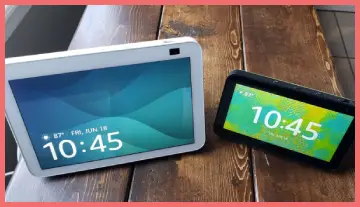
When I put these two side by side, the differences become clear in how they fit into different lifestyles. Here’s what stands out to me, based on hands-on use.
- Screen Size and Resolution: The Echo Show 5’s 5.5-inch, 960×480 display is fine for basics, but the Echo Show 8’s 8-inch, 1280×800 screen offers more real estate for multitasking.
I find the larger one better for watching tutorials or browsing recipes, while the smaller suits quick checks.
- Audio Performance: With one speaker versus two plus a bass radiator, the Show 8 delivers fuller sound.
In my living room tests, music on the Show 8 had depth and volume that the Show 5 couldn’t match, making it preferable for shared spaces.
- Camera Quality: The 2MP on the Show 5 is adequate for casual calls, but the 13MP with auto-framing on the Show 8 elevates video chats.
I’ve noticed how the framing keeps me centered, which is great for group calls or when I’m not stationary.
- Size and Portability: The Show 5 is compact and lightweight, easy to move between rooms, whereas the Show 8 is bulkier and better suited as a stationary hub.
This makes the Show 5 my go-to for bedrooms, and the Show 8 for kitchens.
- Processing Power and Connectivity: The Show 8’s advanced processor and Wi-Fi 6 make it snappier for complex tasks.
I experience smoother integration with smart devices on the Show 8, especially in homes with many connected gadgets.
- Privacy Features: Both have off buttons, but the Show 8 adds a physical shutter for the camera, which I prefer for added security.
These distinctions influence how I recommend them—depending on whether you prioritize portability or performance.
Key Features Of The Echo Show 5
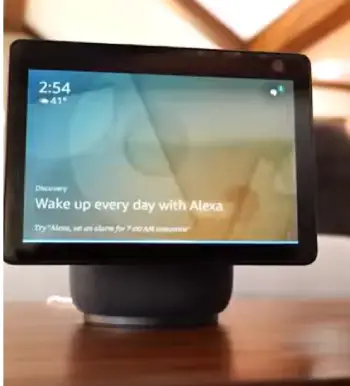
I’ve used the Echo Show 5 on my nightstand for months, and it’s become this reliable little sidekick that doesn’t overwhelm the space.
From my experience, its compact design makes it perfect for smaller areas where you don’t want something bulky taking over.
- Compact Screen and Build: The 5.5-inch display is sharp enough for quick glances at the weather or recipes, but it’s not meant for immersive viewing.
I find it ideal for checking notifications without straining my eyes first thing in the morning. Its small footprint means it fits easily on a desk or shelf, and at under a pound, moving it around is effortless.
- Alexa Integration: Like all Echo devices, it runs on Alexa, so I can ask for timers, reminders, or control smart lights with voice commands.
The responses feel snappy, especially with the updated processor in the 3rd gen model, which handles multitasking better than older versions.
- Basic Camera for Calls: The 2MP camera gets the job done for simple video chats, but don’t expect crystal-clear quality.
I’ve used it to drop in on family, and while it’s functional, it lacks the polish for longer calls.
- Improved Audio: The single speaker has been tweaked for deeper bass, which surprised me during music playback.
It’s not party-level sound, but for podcasts or alarms, it’s more than sufficient in a quiet room.
- Smart Home Hub Capabilities: It connects seamlessly to other devices, letting me monitor my security camera feeds or adjust the thermostat. I appreciate how it serves as a central point without needing extra gadgets.
In my daily life, these features make the Echo Show 5 feel like a practical tool rather than a flashy gadget. It’s the kind of device I reach for when I want quick answers without much fuss.
Pros Of The Echo Show 5
From my perspective, the Echo Show 5 shines in scenarios where space and simplicity matter most.
- Affordability: At around $90, it’s an accessible entry into smart displays. I bought mine on a whim and didn’t regret it, as it delivers core features without breaking the bank.
- Compact Design: Its small size fits anywhere, like a nightstand or office desk. I’ve found it unobtrusive, blending into my setup without dominating the area.
- Decent Battery-Free Portability: While not battery-powered, its lightness makes relocating it simple. I often shift it from bedroom to bathroom for morning routines.
- Improved Bass in Audio: The 3rd gen update adds depth to sound, which enhances alarms and voice responses. It’s surprising how much better it handles low-end notes compared to earlier models.
- Solid Smart Home Control: It manages lights, thermostats, and cameras effectively. In my setup, it serves as a reliable hub for quick adjustments.
These advantages make it a practical choice for beginners or those with limited space.
Cons Of The Echo Show 5
That said, it’s not perfect, and some limitations have frustrated me at times.
- Limited Screen Real Estate: The smaller display can feel cramped for videos or multi-app views. When I try watching shows, it lacks the immersion I crave.
- Basic Camera: The 2MP lens produces grainy images in low light. During evening calls, I’ve noticed quality drops that make conversations less enjoyable.
- Weaker Audio Output: One speaker means it’s not great for music in larger rooms. I often pair it with other devices for better sound.
- No Physical Shutter: Relying on a cover feels less secure than a built-in option. I sometimes worry about accidental activations.
- Slower in Heavy Use: While improved, the processor can lag with multiple commands. In busy moments, it doesn’t keep up as well as I’d like.
These drawbacks push me toward the Show 8 for more demanding tasks.
Key Features Of The Echo Show 8
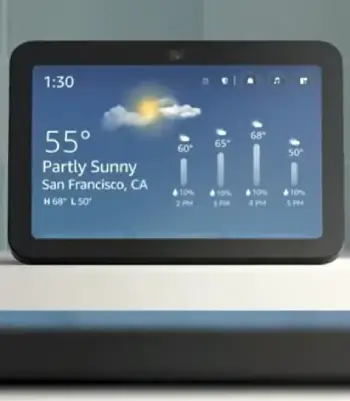
Switching to the Echo Show 8, which I’ve placed in my kitchen, it’s like upgrading to a more capable assistant that handles everything with a bit more flair.
The larger size changes how I interact with it, making it feel more integrated into busier parts of the house.
- Larger, High-Resolution Display: The 8-inch screen with higher resolution makes everything pop, from video streams to photo slideshows.
I use it as a digital photo frame, and the clarity is noticeable compared to smaller screens—pictures look vibrant and detailed.
- Advanced Camera with Auto-Framing: The 13MP camera is a standout, especially for video calls. It follows me around the room, which is handy when I’m cooking and moving about.
From my tests, this feature keeps conversations natural, without me having to stay glued to one spot.
- Superior Sound System: With dual speakers and a passive bass radiator, the audio is richer and fills the room better.
I’ve played music while prepping meals, and the spatial audio makes it feel immersive, almost like having a mini stereo setup.
- Faster Processing and Wi-Fi 6 Support: The octa-core processor zips through commands, and Wi-Fi 6 ensures stable connections even in crowded networks.
I notice fewer lags when streaming or controlling multiple devices.
- Enhanced Privacy Options: The built-in camera shutter gives me peace of mind, and the mic off button is easy to access.
It’s reassuring knowing I can quickly disable features when needed.
Overall, the Echo Show 8 feels like a step up for entertainment and smart home management. It’s the device I turn to when I want more from my interactions.
Pros Of The Echo Show 8
The Echo Show 8 impresses me with its balance of features and usability in everyday situations.
- Vibrant Larger Screen: The 8-inch display is excellent for photos and videos. I use it daily for recipe guides, and the extra space makes following along easier.
- High-Quality Camera: 13MP with auto-framing transforms calls. I’ve had seamless chats while multitasking, thanks to the tracking.
- Impressive Sound: Dual speakers provide room-filling audio. Music sessions in the kitchen feel lively, with clear vocals and bass.
- Advanced Processor: It handles commands quickly, even with smart home integrations. My experience shows fewer delays in responses.
- Better Connectivity: Wi-Fi 6 support ensures stability. In my networked home, it stays connected without issues.
These strengths make it a versatile powerhouse.
Cons Of The Echo Show 8
However, it’s not without flaws that I’ve encountered.
- Higher Price Point: At $150, it’s a bigger investment. I hesitated initially, wondering if the extras justified the cost.
- Bulkier Build: The larger size limits placement options. It doesn’t fit as neatly on small surfaces like the Show 5 does.
- Fewer Microphones: Only two mics compared to three on the Show 5, which can affect voice pickup in noisy environments. I’ve noticed occasional mishears.
- Power Consumption: It draws more energy, noticeable on my bills during heavy use.
- Overkill for Simple Needs: If you just want basics, the added features might go unused. In my case, sometimes I underutilize the camera.
These points remind me it’s geared toward users wanting more capability.
My Experience With Video Calling On Both Devices
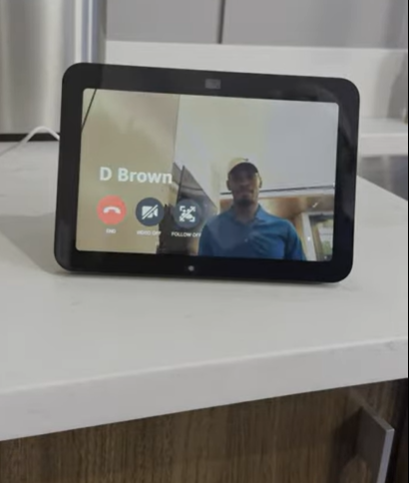
Video calling is a big part of why I got into smart displays, and both handle it differently.
On the Echo Show 5, I start calls with a simple voice command, and the 2MP camera kicks in right away.
It’s straightforward for checking in with parents or quick work huddles. But in dim lighting, the image gets fuzzy, and there’s no auto-adjustment, so I have to position myself just right.
One time, during a family chat, the small screen made it hard to see everyone clearly, which felt limiting.
Contrast that with the Echo Show 8— the 13MP camera is a game-changer. The auto-framing follows my movements, so I can pace while talking without going out of frame.
I remember using it for a virtual dinner with friends; the larger screen let me see details like facial expressions better, and the clarity was impressive even in varying light.
The spatial audio also made voices sound more natural, as if they were in the room.
If video calls are a priority for you, like they are for me in staying connected with distant relatives, the Show 8 pulls ahead significantly.
Smart Home Integration: How They Stack Up?
Both devices serve as hubs for my smart home, but their effectiveness varies.
With the Echo Show 5, I control lights, locks, and thermostats effortlessly.
The touchscreen lets me tap through routines, like setting up a “good morning” sequence that turns on the coffee maker and plays news.
It’s reliable for basics, and the compact size means I can place it near entry points for quick access.
However, when juggling multiple devices, like viewing several camera feeds at once, the small screen forces scrolling, which can be annoying.
The Echo Show 8, on the other hand, excels here with its larger display allowing side-by-side views of controls.
I have it set up to show my front door camera alongside weather and calendar— all at a glance. The faster processor means commands execute without hiccups, even when adding new gadgets like smart plugs.
In my setup, it integrates with Zigbee for direct connections, reducing reliance on extra hubs. If your home is packed with smart tech, as mine is growing to be, the Show 8 feels more future-proof.
Entertainment Options Compared
Entertainment is where size matters, in my opinion. The Echo Show 5 is great for light use— streaming podcasts or short clips from YouTube.
I listen to audiobooks in bed, and the improved bass adds warmth to narrations. But for movies or shows, the screen feels too tiny, like watching on an old phone.
I’ve tried Netflix sessions, but ended up switching to my TV for comfort.
The Echo Show 8 opens up more possibilities. The bigger screen handles Prime Video or Hulu with ease, and the sound quality turns it into a mini entertainment center.
I’ve binged cooking shows while actually cooking, following along without squinting. It also doubles as a music player with visual lyrics, which enhances the experience.
For families or anyone who enjoys media, like I do on lazy weekends, it’s far more engaging.
Daily Use Scenarios: Bedroom Vs Kitchen
Thinking about placement, the Echo Show 5 is my bedroom staple. It wakes me with gentle alarms, shows the day’s schedule, and even controls blackout shades.
The small size doesn’t clutter my nightstand, and the sunrise alarm feature eases me into the day. In the office, it keeps reminders visible without distracting from work.
For the kitchen, the Echo Show 8 is unbeatable. I pull up recipes, set multiple timers for cooking, and glance at shopping lists.
The larger screen displays steps clearly, and the better speakers cut through background noise like chopping or sizzling.
During parties, it plays music and shows photos, adding to the vibe. Based on my routines, if your day involves more active spaces, go for the 8; for quiet zones, the 5 suffices.
Battery Life And Power Considerations
Neither has a built-in battery—they’re plugged-in devices—but power usage differs. The Echo Show 5 sips energy, which I appreciate for always-on features without spiking my bill. It’s efficient, running 24/7 on my desk with minimal draw.
The Show 8 consumes more due to its components, but it’s still reasonable. I leave it on for photo slideshows, and it hasn’t been an issue. If energy efficiency is a concern, like in my eco-conscious mindset, the smaller one edges out.
Customization And User Interface
Both run the same Alexa interface, which I customize with widgets for weather, news, and calendars.
On the Show 5, the compact layout means fewer widgets fit comfortably, but it’s intuitive for touch interactions.
The Show 8 allows more customization, with room for additional panels. I arrange mine to prioritize smart home controls, making it feel personalized.
Voice recognition works well on both, but the Show 8’s mics pick up from farther away in open spaces.
Also Read: Comparison Of Echo Spot And Echo Show 5
Frequently Asked Question (FAQ)
The main differences include screen size (5.5″ vs 8″), camera quality (2MP vs 13MP), audio (single speaker vs dual with bass), and overall build, with the 8 being larger and more feature-rich.
It depends on your needs—the Echo Show 5 for compact, affordable use in small spaces, and the Echo Show 8 for better video, sound, and versatility in larger areas.
From user discussions, the Echo Show 8 is praised for its photo frame capability and superior sound, while the 5 is favored for portability and bedside use, with some noting the 8’s better value for media.
Yes, if you prioritize a larger screen, improved camera for calls, and richer audio—it’s especially worthwhile for kitchen or family room setups.
Wrapping Up
Reflecting on my time with both, I see the Echo Show 5 as a solid, no-frills option that fits seamlessly into quieter corners of life, while the Echo Show 8 brings more energy and capability to busier spots.
You might lean toward the 5 if space or budget is tight, but if you want richer experiences in calls, music, or smart control, the 8 won’t disappoint.
Ultimately, think about your daily needs— I know mine led me to keep both, but if I had to choose one for you, it’d depend on how much you value that extra screen and sound.
Recent Posts
I spent weeks testing and living with both Kirby and Shark vacuums in my own home because I needed a clear answer on which one actually delivers for everyday messes, pet hair, carpets, and hard...
Travelpro Vs. Samsonite: Which Luggage Brand Wins For Real Travelers?
I spent months testing Travelpro and Samsonite bags on real trips—business hops, family vacations, and long-haul flights—to settle which brand delivers better value for everyday travelers.My...