
If you’re looking for an affordable way to personalize jewellery, metal, glass, wood, plastic, or even leather, the Resparked Customizer Engraving Pen is worth considering.
I bought it because I wanted to create personalized gifts without paying a professional engraver every time.
After spending plenty of time testing it on different materials, I found both impressive strengths and a few limitations.
In this review, I’ll share my real experience, what I liked, what disappointed me, and whether it’s the right engraving pen for your needs.
My Personal Experience Using The Resparked Customizer Engraving Pen
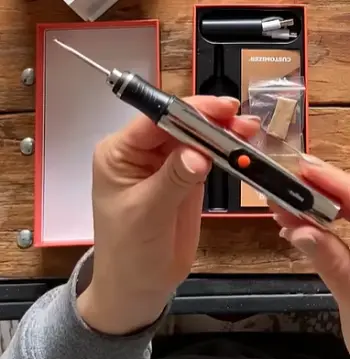
When I first opened the package, I was pleasantly surprised by how lightweight and comfortable the engraving pen felt.
It wasn’t bulky or intimidating like some rotary engraving tools I’ve used before. It looked simple enough that I felt confident trying it immediately.
My first project was engraving my initials onto a stainless steel keychain. I honestly expected uneven lines and shaky lettering because I had never used this particular pen before.
To my surprise, after practising on an old spoon for about fifteen minutes, I started producing much cleaner engravings than I expected.
The biggest thing I noticed was how much control I had over the pen. Instead of feeling like I was fighting against the tool, it almost felt like writing with a thick marker. That made tracing letters much easier, especially on smaller objects.
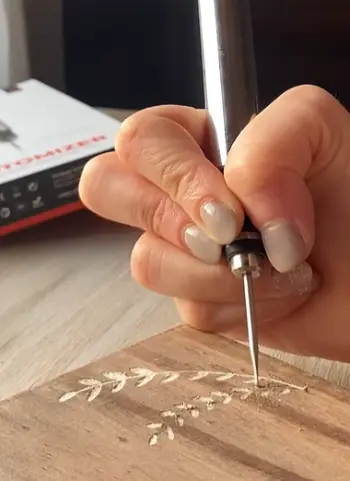
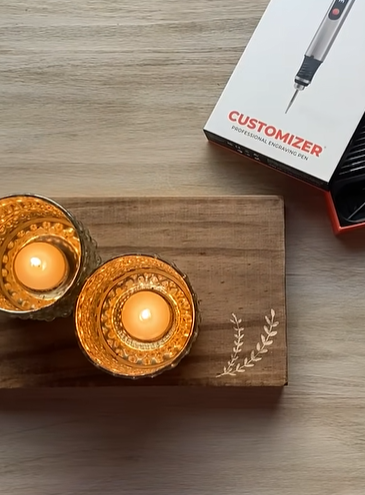
Next, I tested it on wood. This turned out to be one of my favourite materials because the engraving was smoother and more forgiving.
I personalized a wooden coaster set, and the results looked surprisingly professional once I cleaned away the dust.
Glass required a slower pace. I engraved a wine glass with a simple floral pattern, and although I had to move carefully, the finished design looked elegant.
I wouldn’t recommend rushing through glass because steady pressure makes a noticeable difference.
Plastic was another easy material. I engraved labels onto storage containers, and the markings remained clear without cracking the surface.
Battery performance also impressed me. I completed several small projects before needing to recharge or replace batteries, depending on the version you purchase. It never became excessively hot, even during longer sessions.
Of course, it wasn’t perfect. Harder stainless steel demanded patience. Trying to rush only produced shallow markings. Once I slowed down and made multiple passes, the engraving became much deeper and more consistent.
Another thing I learned quickly was that preparation matters. Cleaning the surface beforehand made every engraving look sharper. Any grease or dust affected the final finish more than I initially expected.
After using the Resparked Customizer Engraving Pen for several weeks, I found myself reaching for it whenever I wanted to add a personal touch to gifts or household items.
It won’t replace expensive commercial engraving machines, but for everyday projects and hobby use, it delivered far better results than I originally expected.
Pros Of The Resparked Customizer Engraving Pen
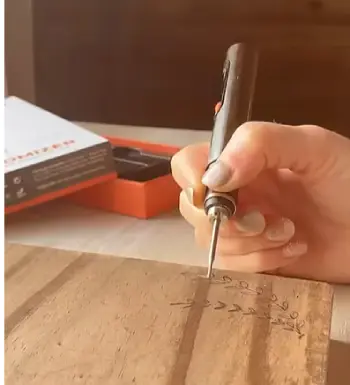
- Comfortable to Hold During Long Projects
One of my favourite features is its ergonomic design. Some engraving tools become uncomfortable after twenty or thirty minutes, forcing you to stop because your hand feels tired.
That wasn’t my experience here.
The slim body sits naturally in my hand, allowing me to work longer without discomfort. Whether I was engraving jewellery or decorating wooden signs, I rarely felt hand fatigue.
If you’re planning multiple projects in one sitting, you’ll appreciate this comfort more than you might expect.
- Easy Enough for Beginners
Many engraving tools can seem intimidating at first. I appreciated that this one didn’t require complicated settings or advanced knowledge before getting started.
After only a short practice session, I felt comfortable creating simple names, initials, and decorative lines.
If you’re completely new to engraving, this pen offers a friendly introduction without making you feel overwhelmed.
At the same time, I think experienced hobbyists can still produce attractive custom work with it.
- Excellent for Personalised Gifts
This feature alone makes the engraving pen worthwhile for many people.
Instead of buying generic presents, I started personalising items for birthdays and holidays.
Simple engravings like names, important dates, favourite quotes, or initials instantly made ordinary gifts feel much more meaningful.
Friends often assumed I had paid a professional to engrave them.
That’s one of the biggest compliments any DIY tool can receive.
- Surprisingly Precise Results
Precision depends partly on your own hand control, but I found the engraving tip responsive enough to create neat lettering.
Curved lines, borders, and small decorative designs came out cleaner than I expected.
After gaining confidence, I even attempted simple illustrations with satisfying results.
If you enjoy crafting, you’ll probably appreciate the level of detail this pen can achieve.
- Portable and Convenient
Unlike larger rotary engraving systems, the Resparked Customizer Engraving Pen doesn’t require much workspace.
I often carried it between my workshop and kitchen table depending on what I was working on.
Its compact size also makes storage easy.
If you enjoy crafting while travelling or visiting family, portability becomes another significant advantage.
- Quiet Operation
Some engraving tools produce loud, high-pitched noises that quickly become irritating.
This pen stays relatively quiet during operation.
That made indoor projects much more enjoyable because I didn’t feel like I was disturbing everyone else in the house.
For anyone living in an apartment or shared home, quieter operation is definitely a welcome feature.
- Great Value for Hobby Users
Professional engraving machines can cost hundreds or even thousands.
That’s unnecessary for many people.
If your goal is creating occasional personalised gifts, custom accessories, or small craft projects, I believe this engraving pen delivers excellent value for its price.
It gives you access to creative engraving without requiring a huge investment.
- Helps Build Creative Confidence
Something I didn’t expect was how much more confident I became after completing a few successful projects.
My first engravings weren’t perfect, but they improved surprisingly quickly. Every new project helped me understand pressure, speed, and control a little better.
Eventually, I started experimenting with decorative borders, handwritten quotes, and small illustrations.
The tool encouraged me to try ideas that I probably wouldn’t have attempted with a more expensive machine because I wasn’t worried about damaging costly equipment.
That confidence made the entire experience much more enjoyable.
Cons Of The Resparked Customizer Engraving Pen
- Hard Metals Require Extra Patience
Although the pen can engrave stainless steel and other hard metals, I noticed that these materials demand much more patience than wood or plastic.
Trying to engrave too quickly usually resulted in shallow lines. To achieve darker, cleaner markings, I often needed to make multiple passes over the same design.
That isn’t necessarily a deal-breaker, but it’s something buyers should expect.
If your primary goal is heavy-duty metal engraving every day, a professional rotary engraving system will still outperform this pen.
- Precision Depends on a Steady Hand
The pen offers excellent control, but it doesn’t automatically create perfect lettering.
Your own hand movement plays a major role in the final appearance.
If your handwriting tends to wobble, your engraving probably will too.
I found that sketching the design beforehand or using stencil guides significantly improved my results.
- Not Intended for Large Commercial Projects
After completing several small projects, it became obvious that this engraving pen is designed for hobbyists rather than production work.
If you’re engraving dozens of products every single day for a business, you may eventually want something faster and more powerful.
For occasional gifts, crafts, and personal items, it performs very well.
For continuous commercial production, however, larger engraving machines remain the better option.
- Replacement Tips May Not Always Be Easy to Find
Depending on where you purchase the engraving pen, replacement accessories may not be as widely available as those for larger brands.
That isn’t an immediate concern because the original tip lasts quite a while with normal use, but it’s worth checking replacement availability before purchasing if you expect frequent use.
- Fine Artwork Takes Practice
Simple names and initials are fairly easy.
Detailed portraits, intricate logos, and extremely fine artwork are another story.
Creating highly detailed designs requires patience, practice, and excellent hand control.
The engraving pen is certainly capable of attractive results, but it isn’t a magic solution for producing professional artwork overnight.
Maintenance Tips For The Resparked Customizer Engraving Pen
- Clean the Engraving Tip After Every Project
The habit that helped me most was cleaning the engraving tip immediately after finishing each project.
Tiny particles of metal, wood, plastic, or glass naturally collect around the tip during engraving. If they remain there, they can affect future performance and reduce engraving precision.
I simply wipe the tip gently with a clean, dry cloth after every session. For stubborn debris, I carefully use a small soft brush to remove the buildup without damaging the engraving point.
Keeping the tip clean helps maintain smoother engraving and extends the overall lifespan of the tool.
- Always Practise Before Working on the Final Piece
Even after becoming comfortable with the pen, I still practise on scrap material before touching the actual project.
Different materials respond differently to the engraving tip. Wood feels softer than aluminium, while stainless steel requires noticeably more pressure.
A few minutes of practice lets me adjust my speed and pressure, reducing the chances of making irreversible mistakes.
This simple habit has saved several projects.
- Use Light Pressure Instead of Forcing the Tool
One mistake I made early on was pressing too hard.
I assumed more pressure would create deeper engravings immediately. Instead, it reduced my control and produced rougher lines.
The better approach is allowing the engraving tip to do the work naturally.
Gentle, steady pressure combined with slow movement creates much cleaner results.
Whenever I need a deeper engraving, I simply make another pass instead of forcing the pen through the material.
This approach improves both accuracy and tip longevity.
- Keep Batteries Fresh or Fully Charged
Performance depends heavily on power.
Whenever I noticed slightly weaker engraving performance, the batteries usually needed replacing or recharging.
Using strong power keeps the engraving speed consistent, especially when working on harder materials.
Before starting larger projects, I always check the battery level to avoid interruptions halfway through the design.
- Store It in a Dry, Safe Location
Although the engraving pen feels durable, I avoid leaving it in dusty workshops or damp storage areas.
Moisture and excessive dust can eventually affect internal components.
I store mine inside its protective case or a drawer where it stays clean and protected between projects.
This also prevents accidental damage to the engraving tip.
- Protect the Engraving Tip During Storage
The engraving tip is the most important working component.
I always make sure nothing heavy rests against it while the tool is stored.
A bent or damaged tip can reduce engraving quality and make detailed work much more difficult.
Treating the tip carefully keeps the pen performing like new for much longer.
- Prepare Every Surface Before Engraving
One maintenance habit actually applies to the material rather than the pen itself.
I always clean the object I’m engraving before starting.
Oil, fingerprints, dust, and moisture can interfere with smooth engraving, especially on glass and polished metals.
A quick wipe with a clean cloth creates a much better working surface and noticeably improves the finished appearance.
- Take Short Breaks During Long Projects
When I spend an hour or more engraving multiple items, I occasionally stop for a few minutes.
This allows both the tool and my hand to rest.
The short breaks improve accuracy because tired hands naturally become less steady.
I also use these pauses to inspect the engraving tip and remove any accumulated debris before continuing.
Regular pauses contribute to cleaner results and help the tool maintain consistent performance.
Comparison Of Esparked Customizer Engraving Pen With Other Brands
- Resparked Customizer Engraving Pen vs Dremel Engraver
After trying the Resparked pen, I can understand why many people compare it with a Dremel engraver.
Both tools are designed to personalize materials like metal, wood, glass, and plastic, but they cater to different types of users.
The Dremel engraver is generally built for heavier-duty work. It usually offers more power, making it easier to create deeper engravings on tougher metals.
If you’re working on demanding DIY projects every week, you’ll probably appreciate its extra strength.
The Resparked Customizer Engraving Pen, however, wins when comfort and simplicity matter most.
I found it easier to hold for extended periods, and its lighter design gave me better control while writing names, initials, or simple artwork. For casual users and beginners, it feels less intimidating and more enjoyable to use.
If your goal is personalizing gifts rather than tackling industrial-style engraving jobs, I believe the Resparked pen offers a more approachable experience.
- Resparked Customizer Engraving Pen vs Uolor Engraving Pen
The Uolor engraving pen is another popular option for hobbyists, and I noticed several similarities between the two.
Both tools focus on affordability and ease of use, making them suitable for beginners who want to experiment with engraving before investing in professional equipment.
Where the Resparked pen stood out for me was overall comfort. During longer engraving sessions, the grip felt more natural in my hand, allowing me to maintain steadier control.
The Uolor pen performs well on smaller projects, but I felt the Resparked model delivered slightly more consistent results across different materials, especially when switching between wood, metal, and plastic.
If versatility is your priority, I’d lean toward the Resparked Customizer Engraving Pen.
- Resparked Customizer Engraving Pen vs Tilswall Engraving Tool
The Tilswall engraving tool is often marketed as a more feature-rich option. Depending on the model, it may include adjustable speed settings and additional accessories.
Those extra features certainly appeal to experienced users who enjoy fine-tuning every project.
Personally, I appreciated the straightforward nature of the Resparked engraving pen. I didn’t have to spend time adjusting settings before beginning a project. I simply picked it up and started engraving.
For someone who values convenience over advanced customization, the Resparked pen feels more user-friendly.
If you enjoy experimenting with different speeds and attachments, Tilswall may suit you better. If you prefer simplicity and reliability, the Resparked pen is an excellent choice.
- Resparked Customizer Engraving Pen vs General Tools Engraver
General Tools has earned a strong reputation for producing dependable engraving tools, particularly for home workshops.
Their engravers typically feel sturdy and are capable of handling repeated use.
Even so, I found the Resparked pen easier to control during detailed lettering. Its lighter weight reduced hand fatigue, which became especially noticeable during projects lasting more than thirty minutes.
For detailed personalization work such as engraving jewellery, pet tags, ornaments, or keepsakes, I actually preferred using the Resparked pen.
The General Tools engraver remains a solid option for heavier workshop tasks, but the Resparked model better matched my everyday creative projects.
Also Read: Is Gravizer Engraving Pen Worth It?
Frequently Asked Questions (FAQ)
Yes. They offer reliable performance, are easy to use, and work well for personalising wood, metal, glass, plastic, and other common materials.
Yes, especially if you enjoy DIY crafts, personalised gifts, or hobby engraving without investing in expensive professional equipment.
The best choice depends on your needs. The Resparked Customizer Engraving Pen is an excellent option for hobbyists, while professional users may prefer higher-powered engraving systems.
The price varies depending on promotions and the retailer, but it is generally positioned as an affordable engraving tool for everyday users.
Final Verdict
After spending considerable time with the Resparked Customizer Engraving Pen, I can confidently say it exceeded many of my expectations.
It combines ease of use, comfortable handling, and impressive versatility into a tool that’s suitable for beginners while still offering enough precision for experienced hobbyists.
Although it isn’t designed for heavy industrial engraving or large-scale production, it performs exceptionally well for personalised gifts, DIY crafts, home projects, and creative hobbies.
If you want an affordable engraving pen that delivers dependable results across multiple materials, I believe the Resparked Customizer Engraving Pen is a purchase you’ll be happy with.
Recent Posts
Lemme Play Gummies Review: Do They Really Support Women's Intimacy?
Lemme Play Gummies are marketed as daily intimacy supplements designed to support women's libido, arousal, sexual satisfaction, and healthy blood circulation.Although the formula contains...
Royal Oak Lump Charcoal Review: Is It Worth Buying for Your Grill?
If you want natural hardwood charcoal that delivers strong heat, authentic smoky flavor, and flexibility for different grilling styles, Royal Oak Lump Charcoal deserves your attention. I...