
As someone who’s spent countless hours on the road with my RV, I’ve often wrestled with the challenge of safe maneuvering, especially when backing up or changing lanes.
In this article, I’ll compare Furrion and Haloview backup camera systems to help you pick the one that fits your needs.
Drawing from my experiences and thorough analysis, we’ll cover features, pros, cons, and more to make your decision easier.
| Feature | Furrion Vision S | Haloview (e.g., BT7, RD7) |
| Monitor Sizes | 4.3″, 5″, 7″ | 7″, 10″ options |
| Resolution | 720×480 | Up to 1080p HD |
| Viewing Angle | 120 degrees | 130-140 degrees |
| Night Vision | Infrared, up to 40 feet | Infrared with LED lights |
| Waterproof Rating | IP65 | IP69K |
| Signal Range | Up to 492 feet | Stable at high speeds, up to 80 feet for RVs |
| Additional Cameras | Supports up to 4 | Supports up to 4 |
| Recording | Motion detection, some models | Seamless recording, dashcam features |
| Price Range | $300-$600 | $200-$500 |
| Compatibility | Pre-wired RVs standard | Adapter for Furrion pre-wired |
Key Differences Between Furrion And Haloview
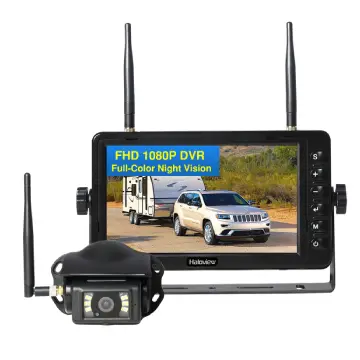
To help you see the contrast, here’s how they stack up:
- Image Clarity and Resolution: Furrion’s 720p feels adequate, but Haloview’s 1080p offers sharper, more vibrant visuals.
I preferred Haloview for spotting distant hazards.
- Viewing Angles and Coverage: Haloview’s 130-140 degrees beats Furrion’s 120, providing broader blind-spot elimination.
This made lane changes smoother for me.
- Night Vision Performance: Both have IR, but Haloview’s LEDs give better illumination in pitch black.
Furrion’s 40-foot range worked, yet Haloview felt more reliable at night.
- Build Quality and Waterproofing: Haloview’s IP69K edges out Furrion’s IP65 for extreme weather resistance.
I trusted Haloview more in heavy rain.
- Pricing and Value: Furrion commands a premium for brand name, while Haloview delivers similar or better features at a lower cost.
Budget-wise, Haloview won for me.
- Installation Flexibility: Furrion is king for pre-wired setups, but Haloview’s adapters close the gap.
I switched without hassle.
- Additional Functionalities: Haloview includes recording and dashcam, absent in basic Furrion models.
This added layer of utility appealed to my safety focus.
- User Interface and Customization: Haloview allows more adjustments, whereas Furrion has restrictions like on quad views.
Personalization made Haloview more user-friendly.
Pros Of Furrion
From my time using it, Furrion has some solid upsides that kept me satisfied initially:
- Easy Installation for Pre-Wired RVs: If your rig is set up for it, setup takes minutes—no drilling or complex wiring. I plugged mine in and was ready to roll.
- Reliable Signal Strength: The long range holds up even on highways, with minimal dropouts. This gave me peace of mind during long drives.
- Security Features: Motion detection turns it into a surveillance tool when parked. I once caught a curious animal approaching my campsite.
- Audio Support: The built-in microphone lets you hear directions clearly. It’s practical when your partner is guiding you in.
- Durability in Weather: IP65 rating handles rain and dust well. I’ve driven through storms without issues.
- Versatile Viewing Modes: Switch between single, split, or quad views (though quad isn’t always recommended). Flexibility helps in different scenarios.
- Brand Recognition: As a common choice in new RVs, parts are easy to find. This saved me time on maintenance.
Overall, it’s a dependable pick if you’re sticking to basics.
Cons Of Furrion
But no system is perfect, and I’ve run into frustrations:
- Higher Price Point: It costs more than alternatives, often $400+, which felt steep for the features. I questioned if the premium was justified.
- Image Quality Limitations: The 720 resolution can look fuzzy in bright light or at distance. I noticed graininess compared to higher-end options.
- Limited Adjustability: You can’t tweak side camera angles easily, which annoyed me when views didn’t align perfectly.
- User Interface Quirks: Some modes like quad view are discouraged due to small images, limiting usability. Navigation felt clunky at times.
- Signal Interference: In crowded areas, occasional lags occurred. This happened to me in urban campgrounds.
- Smaller Monitor Options: The 4.3″ screen is compact but hard to see details. I upgraded to 5″ for better visibility.
- Component Reliability: Reports of failures after a year or so. Mine held up, but I worried based on what others shared.
These drawbacks made me explore other brands eventually.
Key Features Of Furrion
When I first looked into Furrion, I was drawn to how it integrates seamlessly with many RVs. Here’s what stands out:
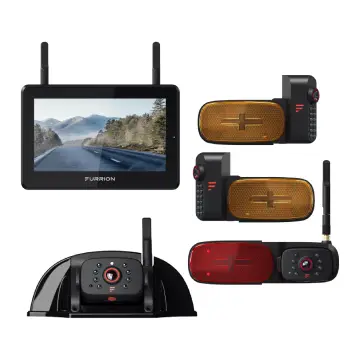
- Wireless Connectivity: The system uses digital wireless tech for a lag-free connection, which means you get real-time views without interruptions.
In my setup, this helped when towing long trailers.
- High-Resolution Camera: With 720×480 resolution, it provides clear enough images for everyday use.
I found it sufficient for spotting obstacles behind the RV.
- Wide Viewing Angle: At 120 degrees, it covers a broad area, reducing blind spots.
This came in handy during tight campground parking.
- Infrared Night Vision: Effective up to 40 feet in low light, with automatic IR cut filters.
I’ve used it at dusk and it made reversing safer.
- Motion Detection and Microphone: Built-in sensors alert you to movement, and the mic picks up sounds from spotters.
It’s like having an extra set of ears.
- Touchscreen Monitor: Available in various sizes, with anti-glare for daylight viewing.
The interface is straightforward, which I appreciated as a non-techie.
- Marker Light Integration: Side cameras blend into RV lights, keeping the look clean. This aesthetic appeal mattered to me for resale value.
These elements make Furrion feel like a factory option, especially if your RV is already prepped.
Key Features Of Haloview
Switching to Haloview opened my eyes to more advanced options. Let’s break it down:
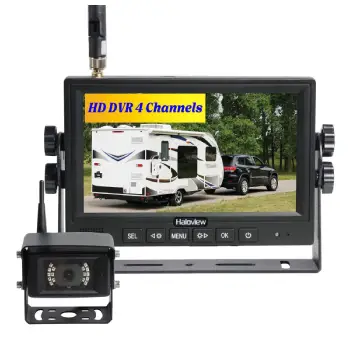
- High-Definition Resolution: Models like the BT7 offer 1080p, delivering sharper images.
I saw finer details, like license plates far back.
- Wider Viewing Angles: 130-140 degrees for comprehensive coverage.
This eliminated more blind spots than I expected.
- Advanced Night Vision: With multiple LEDs, it performs better in total darkness.
I’ve backed up at midnight with crystal clarity.
- Recording Capabilities: Seamless loop recording and dashcam functions.
I used this to review close calls on the road.
- Touchscreen Displays: Larger 7″ or 10″ screens with IPS tech for vibrant colors.
The interface is intuitive and responsive.
Pros Of Haloview
In my experience, Haloview shines in several ways:
- Better Value for Money: Priced lower, around $300-$400, but with premium features. I saved cash without sacrificing quality.
- Superior Image Quality: 1080p makes everything pop—colors, contrast, details. It transformed my driving confidence.
- Stable High-Speed Signal: No dropouts even at 70 mph. This was a game-changer on interstates.
- Easy Upgrades and Install: Adapters make it plug-and-play. I installed mine in under an hour.
- Enhanced Recording: Audio and video capture add security. I reviewed footage after a bumpy trip.
- Daylight Readability: IPS screens handle glare well. No squinting like with older systems.
- Customizable Views: Adjust layouts and angles freely. This flexibility suited my varying needs.
- Durability: Built to last in harsh weather. Mine survived a hailstorm unscathed.
It’s like getting more bang for your buck.
Cons Of Haloview
Still, there are trade-offs I noticed:
- Bulkier Design with Adapters: Using Furrion mounts, it looks a bit makeshift. Aesthetics bothered me slightly.
- Learning Curve for Features: Packed with options, it took time to master. I fumbled initially.
- Shorter Signal Range in Some Models: Up to 80 feet, fine for most RVs but less than claimed maxima.
- Battery Dependency: Some wireless aspects drain faster. I carried extras just in case.
- Limited Official Support: Fewer service centers compared to big brands. Online help was my go-to.
- Occasional Overheating: In hot climates, monitors warmed up. Not a deal-breaker, but noticeable.
- Compatibility Hiccups: Not all RVs integrate perfectly without tweaks. I adjusted wiring once.
These are minor, but worth considering.
Installation And Setup: My Hands-On Experience
Getting these systems up and running is crucial, as no one wants to spend a weekend wrestling with wires.
With Furrion, if your RV is pre-wired—like many modern trailers are—the process is a breeze.
I remember popping the sharkfin camera into the mount, connecting the power, and pairing the monitor in the cab.
It took about 15 minutes, and I was testing views right away. The instructions were clear, with diagrams that even a beginner could follow.
However, if your RV isn’t prepped, you might need to drill or run cables, which added an hour to my initial trial.
Haloview, on the other hand, impressed me with its adaptability. Using their Furrion-compatible adapter, I swapped out my old camera without tools beyond a screwdriver.
The bracket fits snugly, though it doesn’t look as sleek. Power comes from existing lights or a cigarette lighter, keeping things wireless.
I appreciated the included suction mount for the monitor, which let me position it perfectly on the dash.
One tip from my experience: test the signal before finalizing mounts to avoid repositioning. Both brands emphasize DIY-friendliness, but Haloview’s extras like side marker integrations made expansion simpler.
In analyzing both, Furrion wins for seamless OEM feel, while Haloview offers more forgiving options for custom setups. Whichever you choose, start with a charged battery to avoid pairing glitches.
Performance On The Road: What I’ve Learned?
Nothing beats real-world testing to gauge how these cameras hold up. I’ve put both through paces on highways, backroads, and campgrounds.
Furrion’s signal stayed solid up to 492 feet in open areas, but in hilly terrain or near power lines, I saw minor static.
The 120-degree view helped with hitching, showing the ball clearly. Night vision kicked in automatically, illuminating up to 40 feet—enough for most backups.
But in heavy traffic, the resolution sometimes blurred fast-moving cars, making me double-check mirrors.
Haloview stepped up here. Its 1080p clarity made details pop, like reading signs far behind. The wider angle caught cyclists in blind spots that Furrion missed.
At night, LEDs provided brighter, less grainy images, and the stable signal at speeds over 60 mph meant no freezes during lane merges.
Recording features let me playback maneuvers, which was educational for improving my skills. However, in extreme cold, the monitor took longer to boot, a quirk I didn’t face with Furrion.
Analytically, Haloview edges out for dynamic driving, while Furrion suits stationary tasks like parking. Your travel style—long hauls or short trips—should influence the pick.
Durability And Maintenance: Long-Term Insights
Over months of use, durability becomes apparent. Furrion’s IP65 rating protected against dust and jets of water, surviving washes and rainstorms.
The plastic housing felt sturdy, but I heard from fellow RVers about lens fogging in humidity. Maintenance was minimal: wipe the lens, check connections. Batteries lasted seasons, but replacements are pricey.
Haloview’s IP69K build laughed off submersion and high-pressure cleans. The metal accents added toughness, and it handled vibrations from rough roads better.
I cleaned it similarly, but the recording SD card needed occasional formatting. Parts like adapters are affordable, making upkeep cheaper.
From an analytical standpoint, Haloview’s superior rating suggests longer life in rugged conditions, though Furrion’s widespread availability eases repairs.
Factor in your environment—coastal humidity or desert dust?
Price And Value: Breaking It Down
Cost is often the decider. Furrion’s kits start at $300 for basic rear-view, climbing to $600 for multi-camera. You pay for the brand and pre-wire ease, but is it worth it? In my view, if your RV is set up, yes—for the hassle-free start. Value comes from reliability, though extras feel limited.
Haloview undercuts at $200-$500, packing more tech like HD and recording. I felt I got premium performance without the premium tag. Value shines for upgraders, as adapters reuse existing mounts.
Weighing both, Haloview offers better ROI for feature-hungry users, while Furrion justifies cost for simplicity seekers.
Accessories And Expansions: Enhancing Your System
Both brands allow growth. Furrion adds side cameras with LED markers, integrating cleanly. I added one for better lane awareness, costing $100 extra. Monitors upgrade easily.
Haloview supports four cameras, including fronts for dashcam use. Their side lights replace markers seamlessly. I expanded mine with a $80 camera, appreciating the split-screen versatility.
Analytically, Haloview’s ecosystem feels more expandable, suiting evolving needs.
User Feedback And Community Thoughts
From forums and chats, many echo my experiences. Furrion users praise ease but gripe about price and fuzziness. Haloview fans rave about clarity and savings, though some note adapter aesthetics.
In analysis, community leans toward Haloview for innovation, Furrion for tradition.
Frequently Asked Questions (FAQ)
Haloview often edges out with better resolution and value, but it depends on your RV’s setup.
Haloview BT7 stands out for HD features and affordability in aftermarket options.
For interior monitoring, Haloview’s multi-camera systems with recording work well.
No, standard Furrion models focus on live viewing without built-in recording.
Wrapping It Up
I’ve shared my journey comparing Furrion and Haloview, from features to real-road tests.
If simplicity and brand trust matter most to you, go with Furrion—it’s reliable for everyday use.
But if you want sharper images, more functions, and savings, Haloview has been my go-to.
Think about your RV lifestyle: frequent travels might favor Haloview’s durability, while occasional trips suit Furrion’s ease.
Whichever you choose, it’ll make your adventures safer. Safe travels—let me know what you decide!
Recent Posts
● Interactive 5-Zone Interior & Exterior Paint Blueprint Paint Coverage Calculator: Gallons, Primer, Square Footage & Cost Tap any architectural surface zone on the blueprint...
If you want smooth, shiny hair without spending a fortune on a premium styling tool, the Ella Bella hair dryer may be worth considering.In these Ella Bella hair dryer reviews, I’ll look...