
When I first set out to compare the Garmin Dash Cam X110 and the Garmin Dash Cam Mini 3, I genuinely expected to find two completely distinct cameras built for entirely different drivers. While they absolutely cater to different visual preferences inside the cabin, their core recording capabilities are surprisingly similar. In this comprehensive comparison, I break down everything from raw video clarity and physical footprint to software features and overall value. My main intent is to help you easily navigate these crucial differences, ensuring you confidently choose the perfect dashboard companion to protect your vehicle.
A Brief Comparison Table
| Feature | Garmin Dash Cam X110 | Garmin Dash Cam Mini 3 |
| Video Resolution | 1080p High Definition | 1080p High Definition |
| Field Of View | 140 Degrees | 140 Degrees |
| Built-In Display | Yes (2.4-Inch LCD) | No |
| GPS Logging | Yes (Built-In) | No |
| Driver Alerts | Yes (ADAS Included) | No |
| Voice Control | Yes | Yes |
| Polarizing Filter | Yes (Garmin Clarity) | Yes (Garmin Clarity) |
| Wi-Fi Connectivity | Yes (5GHz For App) | Yes (5GHz For App) |
| Parking Surveillance | Yes (Requires Hardwire) | Yes (Requires Hardwire) |
| Memory Card | Not Included | Not Included |
My Experience With Garmin Dash Cam X110
When I first unboxed the Garmin Dash Cam X110, I immediately recognized it as a serious piece of automotive technology. The build quality feels incredibly solid, featuring a robust plastic housing that easily withstands the extreme temperatures of a sun-baked dashboard without warping or creaking.
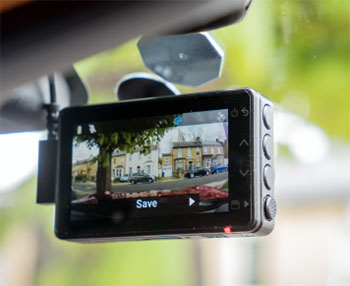
Setting it up was an absolute breeze. The thoughtfully included dual USB power adapter and the generously long thirteen-foot power cable gave me plenty of length to route the wire cleanly around the edges of my windshield, entirely hiding the cable from plain sight.
Once physically mounted and powered on, the vibrant 2.4-inch LCD screen instantly sprang to life, displaying a remarkably sharp and beautifully clear interface.
Navigating through the various system menus using the highly tactile side buttons felt incredibly intuitive, allowing me to quickly dial in my preferred recording settings, adjust audio levels, and format the necessary memory card without even glancing at the instruction manual.
I spent several rigorous weeks testing this unit during both my chaotic, traffic-heavy morning commutes and incredibly quiet, dark evening drives, and it never missed a single crucial beat. The advanced driver alerts genuinely surprised me with their overall accuracy and helpfulness.
Initially, I wrongly assumed the lane departure notifications and forward collision warnings would be overly sensitive and constantly annoying, but they were expertly calibrated. They provided gentle, highly useful auditory chimes right when I actually needed them, effectively keeping me safely focused during long stretches of monotonous, tiring highway driving.
The video quality itself is undeniably phenomenal. The crisp 1080p resolution combined with the proprietary Garmin Clarity polarizing filter ensures that every single recorded frame is rich in critical detail and completely free from blinding windshield reflections.
What truly solidified my deep appreciation for the Garmin Dash Cam X110, however, was the incredibly seamless integration of its internal GPS functionality. Knowing confidently that my exact traveling speed and precise geographical location were being meticulously stamped onto every single video file gave me an immense, comforting sense of security. It feels significantly less like a simple video camera and far more like an objective, highly reliable digital witness riding shotgun on every single journey.
Read More: My Thoughts On Rove R3 Dash Cam
Pros Of Garmin Dash Cam X110
- Vibrant Integrated Display: Featuring a bright 2.4-inch LCD screen, this model allows you to immediately review captured footage, align the camera angle perfectly, and adjust your settings without needing to pull out your smartphone. This built-in convenience makes on-the-fly operation incredibly straightforward and heavily reduces setup frustration for daily commuters who want instant access.
- Advanced Driver Alerts: The inclusion of sophisticated driver-assist features, such as forward collision warnings, lane departure notifications, and helpful movement prompts at traffic lights, provides an essential layer of road safety. This functionality actively works to ensure you stay highly aware of your surroundings, acting as a reliable co-pilot during long, exhausting highway drives.
- Crystal Clear Video Quality: Recording in crisp 1080p high definition combined with a wide 140-degree field of view, this dash cam reliably captures critical road details. It easily picks up distant license plates and crucial road signs in varied lighting, ensuring you have undeniable and highly accurate visual evidence in the unfortunate event of an accident.
- Built-In Polarizing Filter: The seamlessly integrated Garmin Clarity polarizing lens drastically reduces distracting windshield glare and annoying dashboard reflections. This crucial hardware addition guarantees that your recorded footage remains beautifully clear and perfectly usable, even when you are driving directly into bright, harsh sunlight during early morning commutes or late afternoon sunset drives.
- Responsive Voice Control: Hands-free operation is remarkably seamless thanks to highly accurate, easily recognizable voice commands. You can simply tell the camera to save a video clip, start audio recording, or take still pictures, allowing you to control vital functions while keeping both hands firmly and safely on the steering wheel at all times.
- Robust GPS Integration: Detailed internal GPS logging automatically embeds your exact geographical location, current vehicle speed, and accurate time data directly onto your recorded video files. This meticulous data collection gives you irrefutable proof of exactly when, where, and how fast you were traveling when a specific driving event or unexpected collision occurred.
- Cloud Storage Capability: Whenever the camera connects to an active Wi-Fi network, it automatically uploads securely saved incident clips to the encrypted Garmin Vault. This reliable cloud-based backup system ensures that you will never have to worry about permanently losing vital footage, even if the physical memory card is corrupted, damaged, or entirely destroyed.
- Parking Guard Monitoring: With an optional hardwire power connection, the camera diligently monitors your parked vehicle, instantly sending alerts to your smartphone if it detects physical impacts or suspicious movement. This dedicated surveillance feature provides absolute, unwavering peace of mind while you are away from your vehicle in busy public parking lots.
Cons Of Garmin Dash Cam X110
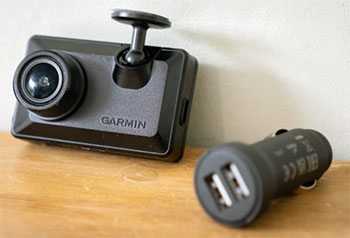
- Noticeably Bulky Design: Due to the integrated screen and internal components, the overall footprint is significantly larger than minimalist models. This increased size means the camera is quite visible from outside the vehicle, which might accidentally attract unwanted attention from potential thieves when you are parked in dark, unmonitored public areas.
- Requires Separate Memory Card: Despite the premium price tag, the manufacturer does not include a vital microSD card in the retail box. This glaring omission forces you to make an immediate secondary purchase before you can even begin using the device, adding an annoying hidden cost to your initial dash cam setup process.
- Constant Power Cable Extra: If you want to utilize the highly advertised Parking Guard surveillance features, you must purchase a specific constant power cable separately. Having to buy additional wiring hardware just to unlock the camera’s full security potential feels incredibly frustrating when you have already invested heavily in a premium Garmin product.
- Distracting Screen Glare: While the built-in display is incredibly useful for reviewing footage, it can sometimes be visually distracting during nighttime driving. Even with adjustable brightness settings, having an illuminated screen glowing right on your windshield may disrupt your focus on dark rural roads where ambient exterior lighting is essentially nonexistent.
- Subscription Required For Cloud: Accessing your automatically uploaded videos in the Garmin Vault requires a paid monthly subscription if you want to keep them stored for extended periods. This recurring digital cost can quickly add up over time, turning a one-time hardware investment into an ongoing financial commitment just to secure your incident footage.
- Premium Price Point: Retailing at a noticeably higher cost compared to basic entry-level competitors, this unit requires a serious financial commitment. For drivers who only want simple, no-frills background recording without advanced driver alerts or an integrated screen, the elevated price tag may feel largely unjustified and completely out of their target budget.
- Potential Overheating Issues: Because it packs a powerful processor, GPS module, and LCD screen into a relatively compact black plastic housing, the unit can get quite hot during summer months. If parked directly in the blistering sun for hours, the internal thermal protection may temporarily shut the device down to prevent permanent hardware damage.
- Proprietary Power Connector: The camera utilizes a specific power delivery method that may not play well with generic third-party USB chargers. If you accidentally lose the original included power cable, replacing it with an unbranded alternative might result in unstable power delivery, causing the camera to randomly reboot during critical driving moments.
My Experience With Garmin Dash Cam Mini 3
Transitioning from a traditional, fully screen-equipped dash cam to the Garmin Dash Cam Mini 3 was a genuinely fascinating and highly impressive experience. The sheer miniaturization of this sophisticated device is nothing short of modern engineering magic. It is roughly the exact same overall physical size as my standard car key fob, meaning the exact moment I attached it securely behind my vehicle’s rearview mirror, it practically vanished from existence.
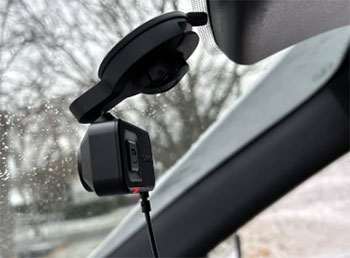
From the driver’s seat, I could not physically see it at all, completely eliminating the annoying visual clutter and dangerous blind spots that typical, bulky cameras often create on the windshield. Because the Garmin Dash Cam Mini 3 entirely lacks a physical display, I was completely forced to rely solely on the polished Garmin Drive smartphone application for the initial hardware setup and lens alignment process.
Thankfully, the integrated 5GHz Wi-Fi wireless connection proved to be incredibly fast, highly responsive, and delightfully stable throughout the entire procedure.
The high-definition live video feed loaded directly onto my phone screen almost instantly, allowing me to easily angle the adjustable lens to capture the absolute perfect 140-degree view of the busy road ahead.
Once perfectly configured, the tiny camera functioned completely autonomously in the background, quietly doing its essential job without ever demanding my direct attention.
During my daily, highly varied driving routines, I quickly found the integrated voice control functionality to be an absolute, undeniable lifesaver.
Without a physical screen to tap or obvious external buttons to easily reach while moving, being able to confidently say, “Okay Garmin, save video,” felt both brilliantly futuristic and incredibly practical for road safety. The tiny camera responded swiftly to my vocal instructions, accompanied by a reassuring, audible beep to confirm that my vital accident footage was locked safely away from the continuous background loop recording process.
Despite its remarkably minuscule footprint, the final video quality was exceptionally impressive and highly reliable. The premium 1080p High Dynamic Range imaging sensor handled incredibly challenging lighting scenarios with absolute, undeniable ease.
Driving directly into harsh, blinding morning sunlight or carefully navigating dimly lit, highly dangerous rural streets at night posed absolutely no problem for the capable Mini 3. The built-in Clarity polarizer effectively stripped away highly distracting dashboard reflections, consistently leaving me with sharp, contrast-rich footage that easily rivals security cameras nearly three times its physical size.
Pros Of Garmin Dash Cam Mini 3
- Incredibly Compact Size: Roughly the dimensions of a standard car key fob, this remarkably tiny dash cam hides perfectly out of sight directly behind your rearview mirror. Its stealthy, ultra-compact design ensures it never obstructs your forward visibility and remains virtually invisible to anyone peering into your vehicle from the outside.
- High-Quality 1080p Recording: Despite its incredibly small physical footprint, it compromises absolutely nothing when it comes to video resolution. It consistently records beautifully crisp 1080p high-definition footage with High Dynamic Range, ensuring that crucial details like license plates and street signs remain clearly legible in both bright daylight and challenging low-light conditions.
- Integrated Polarizing Filter: Just like its larger siblings, it features the outstanding Garmin Clarity polarizing lens built directly into the hardware. This brilliant addition effectively eliminates severe windshield glare and harsh dashboard reflections, guaranteeing that your captured video evidence looks professionally clear regardless of the sun’s intense angle or overall weather conditions.
- Seamless App Integration: Because there is no physical screen, the device relies entirely on the polished Garmin Drive smartphone application for all interactions. This wireless connection is remarkably fast via 5GHz Wi-Fi, allowing you to instantly view live camera feeds, adjust settings, and quickly export crucial incident clips directly to your phone’s memory.
- Reliable Voice Commands: Offering highly responsive hands-free control, you can simply use your voice to command the camera to save a critical video, take a quick snapshot, or start recording audio. This completely touchless interaction method ensures you remain focused on driving safely while still capturing unexpected roadside events at a moment’s notice.
- Automatic Incident Detection: Armed with an incredibly sensitive built-in G-sensor, the camera instantly detects sudden physical impacts or aggressive braking events. Once triggered, it automatically secures and locks the current video segment, ensuring that your most critical accident footage is never accidentally overwritten by the device’s continuous loop recording background process.
- Time-Lapse Recording Mode: If you are taking a long, scenic road trip and want to capture the entire journey without filling up your storage, the time-lapse feature is perfect. It seamlessly compresses hours of driving into a highly entertaining, fast-paced video summary that is incredibly easy to share with friends and family on social media.
- Unobtrusive Cabin Aesthetics: Unlike massive recording rigs that hang heavily from the glass, this model blends flawlessly into your car’s interior styling. The matte black finish and complete lack of glowing screens mean your cabin retains its clean, sophisticated look while you simultaneously gain all the undeniable security benefits of continuous digital surveillance.
Cons Of Garmin Dash Cam Mini 3
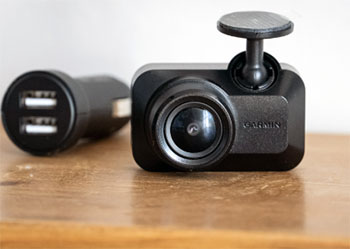
- Absolutely No Built-In Screen: The extreme miniaturization means there is no physical display to quickly check camera alignment or instantly review an accident clip. You are completely forced to pull out your smartphone, open the app, and connect wirelessly every single time you want to verify what the camera is actually looking at.
- Lacks Internal GPS Module: Unlike the more expensive models in the lineup, this tiny unit completely lacks built-in GPS tracking capabilities. If you get into an accident, your exported video file will not have your exact geographical coordinates or precise vehicle speed stamped on it, which can be crucial for difficult insurance claims.
- MicroSD Card Not Included: Following a frustrating trend with premium electronics, you must purchase a compatible high-endurance memory card entirely separately. Opening the box and realizing you cannot immediately install and use your brand new dash cam without running out to buy storage media is a highly annoying experience for any excited consumer.
- Requires Hardwiring For Parking: To activate the highly desired parking surveillance features, you must purchase an additional, somewhat expensive constant power cable. Furthermore, installing this cable often requires professional assistance or complicated routing into your vehicle’s fuse box, adding significant hassle and cost to what should be a simple plug-and-play security setup.
- Missing Advanced Driver Alerts: Because it strips away extraneous hardware to achieve its tiny size, you lose out on Garmin’s excellent advanced driver assistance systems. There are absolutely no forward collision warnings, lane departure alerts, or traffic movement notifications to help keep you focused and safe during long, exhausting highway commutes.
- Voice Commands Can Struggle: While the voice control feature is generally quite reliable in a quiet cabin, it can noticeably struggle if you are driving with the windows rolled down or playing loud music. Having to repeatedly yell commands at the camera during a stressful incident can be incredibly frustrating and highly distracting.
- Subscription Needed For Vault: To take full advantage of the automatic cloud backup functionality, you are forced to pay for a monthly Garmin Vault subscription. Locking essential video storage features behind a frustrating recurring paywall feels anti-consumer, especially when you have already paid a premium price for the physical camera hardware itself.
- Prone To Wi-Fi Interference: Because it relies entirely on a wireless connection to interact with your smartphone, dense urban areas with heavy radio interference can occasionally disrupt the app linking process. Dealing with a suddenly dropped connection while urgently trying to pull an accident video off the camera is an incredibly stressful and irritating scenario.
Also Read: My Thoughts On Fader Hawk Drone
Frequently Asked Questions (FAQ)
The Garmin Dash Cam Mini 3 is undeniably the superior choice for discreet installation. Thanks to its incredibly compact, key-fob-sized design, it tucks perfectly behind the mirror, remaining completely out of your direct line of sight while driving.
Yes, it actively records crisp cabin audio using a highly sensitive built-in microphone. However, if you prioritize passenger privacy, you can easily disable the audio recording feature using a quick voice command or through the companion smartphone application.
While both greatly benefit from the companion app, the Garmin Dash Cam X110 can be fully operated and reviewed using its integrated 2.4-inch physical screen. In stark contrast, the Mini 3 relies completely on your smartphone for alignment, settings, and video playback.
Both models capture outstanding 1080p high-definition video at 30 frames per second with a wide 140-degree field of view. Additionally, both feature the excellent built-in Garmin Clarity polarizing filter to drastically reduce windshield glare and blinding sun reflections.
No, neither the Garmin Dash Cam X110 nor the Garmin Dash Cam Mini 3 includes a memory card. You must purchase a high-endurance microSD card separately before you can begin recording your daily drives and securing incident footage.
Conclusion
After spending significant time testing both models, here is where I stand on this comparison. If you want a comprehensive, feature-rich device that offers helpful driver alerts, precise GPS location tracking, and the absolute convenience of an integrated display for immediate playback, the Garmin Dash Cam X110 is undoubtedly the superior choice. It serves as a complete, all-in-one digital witness that keeps you highly informed and incredibly secure on the road without needing a smartphone for everyday operation.
Conversely, if you strongly prefer a minimalist, set-it-and-forget-it approach to vehicle security, the Garmin Dash Cam Mini 3 is an absolute engineering marvel. It provides the exact same premium 1080p video quality and polarizing clarity as its larger sibling but does so in a microscopic package that virtually disappears behind your rearview mirror. Your final decision should solely depend on whether you prioritize robust on-device features or stealthy, invisible integration within your daily driver.
Recent Posts
● Interactive 5-Zone Interior & Exterior Paint Blueprint Paint Coverage Calculator: Gallons, Primer, Square Footage & Cost Tap any architectural surface zone on the blueprint...
If you want smooth, shiny hair without spending a fortune on a premium styling tool, the Ella Bella hair dryer may be worth considering.In these Ella Bella hair dryer reviews, I’ll look...