
I spent weeks wearing both the Garmin Lily 2 and the Vivomove Trend side by side, switching between them during daily walks, gym sessions, sleep tracking, and regular office hours.
My goal here is simple: help you decide which of these two stylish Garmin hybrids actually fits your wrist, lifestyle, and expectations without the usual marketing fluff.
Both deliver solid health tracking in attractive packages, yet they differ enough in design, sensors, and daily feel that one will clearly suit you better than the other.
| Feature | Garmin Lily 2 | Garmin Vivomove Trend |
| Release | January 2024 | February 2023 |
| Case size | 35.4 x 35.4 x 10.1 mm | 40.4 x 40.4 x 11.9 mm |
| Weight | 24 g (without strap) | 28.3 g case / 43.3 g with silicone strap |
| Display | 1-inch LCD, 240 x 201 | ~1.01-inch LCD, 254 x 346 (hidden) |
| Heart rate sensor | Elevate Gen 4 | Elevate Gen 3 |
| Extra sensors | SpO2, accelerometer, ambient light | SpO2, barometric altimeter, accelerometer, ambient light |
| Battery life | Up to 5 days | Up to 5 days smartwatch + extra week in watch mode |
| GPS | Connected GPS | Connected GPS |
| NFC / Garmin Pay | Classic models only | Yes |
| Charging | Clip charger | Clip + Qi wireless |
| Water resistance | 5 ATM | 5 ATM |
| Starting price | Around $250 | Around $270 |
Design And Everyday Wear
I noticed the size difference the moment I strapped them on. The Lily 2 sits smaller and lighter on my wrist, almost like a piece of jewelry.
Its anodized aluminum case and Gorilla Glass 3 lens give it a refined, fashion-forward look that works with both casual outfits and dressier ones.
I could swap between silicone sport bands and leather or nylon options without feeling like I was wearing a gadget.
The Vivomove Trend takes a different route. It leans into hybrid analog style with physical hands that move aside when the hidden touchscreen lights up.
The larger 40.4 mm case feels more traditional and unisex. Stainless steel bezel and fiber-reinforced polymer body give it a solid presence, though it weighs noticeably more once the strap is attached.
I found myself glancing at the analog hands more often during meetings because they never look out of place.
Both watches avoid the bulky sports-watch aesthetic. If you want something that disappears into your daily style, the Lily 2 edges ahead for smaller wrists.
The Trend feels better if you prefer a classic watch face that still hides smart features underneath.
Key Differences Between The Garmin Lily 2 And Vivomove Trend
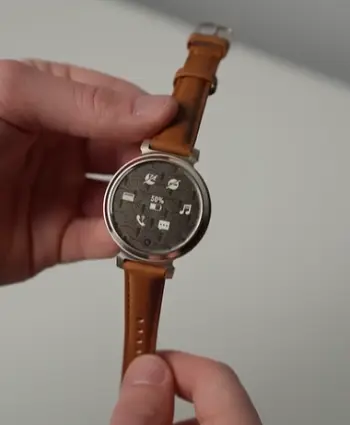
- Size and weight: The Lily 2 measures just 35.4 mm across. It weighs only 24 grams without the strap.
The Trend sits at 40.4 mm. It reaches 43.3 grams with its silicone band.
I felt the Lily 2 less during sleep and long desk days.
- Display approach: Lily 2 uses a straightforward 1-inch grayscale liquid crystal screen. Trend hides a higher-resolution 254 x 346 screen under analog hands.
Those hands slide out of the way when needed. The Trend’s screen feels sharper for reading longer notifications. The Lily 2 is quicker to check at a glance.
- Heart rate hardware: Lily 2 carries Garmin’s newer Elevate Gen 4 sensor.
Trend sticks with Gen 3. In my testing the Gen 4 stayed a bit more consistent during interval work. It also recovered faster after intense sessions.
- Elevation tracking: Only the Trend includes a barometric altimeter.
It counts floors climbed. It also tracks elevation gain. Lily 2 lacks this sensor entirely.
- Charging convenience: Trend supports Qi wireless charging on top of the usual clip. Lily 2 sticks to the proprietary clip only.
I appreciated dropping the Trend on a pad at my desk. No hunting for cables was required.
- Payment support: Both offer NFC on certain models.
Trend includes Garmin Pay across the lineup. Lily 2 limits it to Classic editions only.
- Overall daily feel: These differences shape daily use more than the shared 5 ATM water resistance. They also matter more than the connected GPS both models share.
Key Features Of Garmin Lily 2
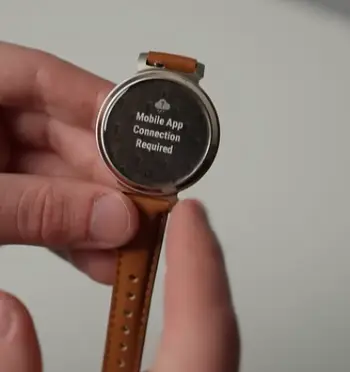
- Continuous heart rate and SpO2 monitoring: The Gen 4 sensor tracks heart rate all day. It also measures overnight blood oxygen.
I checked resting rates each morning. The numbers stayed consistent with my usual patterns.
- Body Battery and stress tracking: Body Battery estimates energy reserves based on activity, stress, and recovery. Stress scores update throughout the day.
They nudge me when levels climb too high.
- Sleep score and detailed stages: Overnight tracking produces a sleep score. It also breaks down light, deep, and REM stages.
The score helped me spot nights that left me dragging the next day.
- Expanded activity profiles: Lily 2 adds HIIT, dance fitness, indoor rowing, and meditation. It includes more options than the original Lily.
I used the HIIT and walk modes regularly.
- Smart notifications and calendar: Calls, texts, and app alerts arrive on the wrist.
Calendar events and weather appear with a quick swipe.
- Women’s health tracking: Cycle tracking and related insights sit in the Garmin Connect app.
They sync smoothly with the watch.
- Safety features: Incident detection and assistance can alert emergency contacts.
This happens when something goes wrong.
- Morning report: A quick daily summary of sleep, Body Battery, and calendar appears each morning. It sets the tone for the day.
Pros Of Garmin Lily 2
- Compact and lightweight design: At 24 grams it barely registers on the wrist. I slept in it every night without noticing the weight.
- Newer heart rate sensor: Gen 4 delivered smoother data during mixed intensity work. It outperformed the Trend’s Gen 3 in those moments.
- Stylish material options: Aluminum case and interchangeable bands let me match outfits. The watch never looked too sporty.
- More activity modes out of the box: HIIT, dance, and indoor options covered my weekly routine better. Logging sessions felt simple.
- Solid five-day battery: Real-world use matched the claim. This held true when I kept pulse ox and continuous tracking on.
- Lower starting price: The base model lands around $250. That makes it easier to justify as a style-focused tracker.
- Comfortable for all-day wear: The small size works well for smaller wrists. It stays comfortable from morning until night.
Cons Of Garmin Lily 2
- No barometric altimeter: Floors and elevation stay invisible. Stair-heavy days went completely untracked.
- Touchscreen only: No physical buttons means sweaty or gloved hands can frustrate menu navigation. Control feels less reliable then.
- Connected GPS only: Outdoor distance and routes need the phone nearby. Solo runs without a phone lose accuracy quickly.
- Limited NFC: Garmin Pay appears only on Classic versions. The base model skips contactless payments entirely.
- Grayscale display can wash out: Bright outdoor light sometimes forced me to cup my hand over the screen. Visibility drops in strong sun.
- No wireless charging: The clip works fine. Yet I missed the convenience of a simple charging pad.
- Fewer elevation insights: Without the altimeter the watch misses useful data for hilly routes or multi-level buildings.
Key Features Of Garmin Vivomove Trend
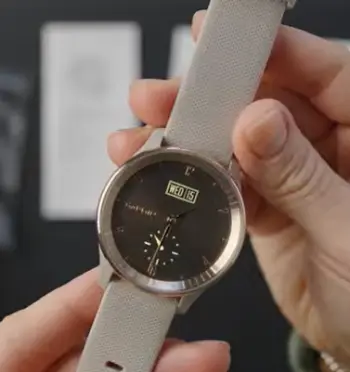
- Hybrid analog display with full-dial touchscreen: Physical hands give a classic look. Tapping or raising the wrist reveals the higher-resolution screen.
Stats and menus then become easy to read.
- Barometric altimeter: Floors climbed and elevation changes register automatically.
I used this on hilly walks. It also worked well in multi-story buildings.
- Body Battery, stress, and respiration tracking: The same core wellness suite as the Lily 2 is present.
Stress reminders and energy scores stayed useful across both devices.
- Sleep score: Overnight analysis produces a score and stage data.
It is similar to the Lily 2 results.
- Garmin Pay and wireless charging: Contactless payments work at supported terminals.
Qi charging removes the need for the clip most days.
- Connected GPS and activity tracking: Outdoor walks and runs pull location from the phone.
Indoor profiles cover cardio, strength, yoga, and pool swimming.
- Music controls and find-my-phone: Skip tracks or pause music from the wrist
The watch can also help locate a misplaced phone.
- Women’s health and hydration tracking: Cycle logging and hydration reminders sit in the same Garmin Connect ecosystem.
They keep daily habits on track.
Pros Of Garmin Vivomove Trend
- Classic hybrid look: Analog hands keep it looking like a regular watch. It stays discreet until you need the screen. I wore it to meetings without drawing tech comments.
- Barometric altimeter: Floors climbed and elevation data fill a gap the Lily 2 leaves open. The extra metric proves useful on active days.
- Wireless charging: Dropping it on any Qi pad became second nature. Travel days felt simpler without searching for cables.
- Higher-resolution hidden display: Text and graphs appeared sharper once the hands moved aside. Reading notifications felt clearer.
- Full NFC support: Garmin Pay works without choosing a special edition. Payments stay convenient across the lineup.
- Extra battery reserve: Switching to watch mode stretches life beyond the five-day smartwatch claim. That flexibility helps on longer trips.
- Traditional wrist presence: The larger case suits medium to larger wrists well. It feels balanced during daily movement.
Cons Of Garmin Vivomove Trend
- Larger and heavier: The 40.4 mm case and 43-gram weight felt bulkier on smaller wrists. It also showed more during sleep.
- Older heart rate sensor: Gen 3 performed adequately. Yet it showed more noise during rapid intensity changes than the Lily 2’s Gen 4.
- Touchscreen navigation can feel slow: Menus take a moment to respond. The hands must clear first before full interaction.
- No always-on digital face: You rely on the analog hands or a deliberate raise-to-wake. Instant digital checks are limited.
- Price sits slightly higher: Around $270 puts it above the base Lily 2. The cost difference appears for similar core tracking.
- Still no onboard GPS: Outdoor accuracy depends on the phone the same way the Lily 2 does. Independence stays limited.
- Bulk on smaller wrists: The extra size can feel less refined if you prefer minimal jewelry-style watches.
Battery Life And Charging Experience
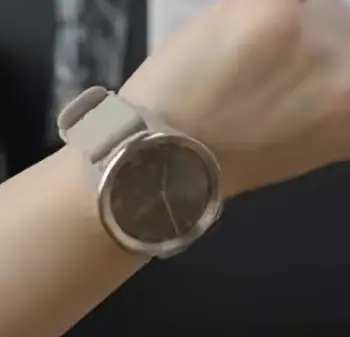
Both claim up to five days in smartwatch mode with continuous heart rate, notifications, and sleep tracking enabled.
In my testing the Lily 2 usually reached day four or five before dipping low. Enabling overnight pulse ox shortened that by roughly half a day.
The Trend matched the five-day figure and then offered an additional stretch in pure watch mode when I disabled smart features.
Charging differed more than runtime. The Lily 2 uses Garmin’s familiar clip. It works reliably but requires the cable. The Trend accepts the same clip and also sits on any Qi pad.
I left a pad on my nightstand and another at my desk. The Trend rarely needed the clip after the first week.
Fast charging on both restores a useful amount of battery in under an hour.
If you hate hunting for proprietary cables, the Trend’s wireless option becomes a quiet daily advantage.
Health And Fitness Tracking In Real Use
I treated both as all-day companions rather than dedicated sports watches. Steps, calories, and intensity minutes stayed consistent between them.
Body Battery scores moved in parallel and correctly reflected tough training days versus rest days. Stress tracking flagged the same high-pressure afternoon meetings on both wrists.
Sleep data proved useful on both. Scores and stage breakdowns matched my subjective recovery most mornings.
The Lily 2’s newer sensor gave slightly tighter resting heart rate numbers after intense evenings. The Trend’s altimeter added floors climbed that the Lily 2 simply ignored. On multi-story office days that extra metric mattered.
Neither replaces a full GPS sports watch for serious training. Connected GPS works for casual outdoor walks and runs when the phone is present, yet both lose independence the moment you leave the phone behind. Indoor profiles cover the gym well enough for most users.
I logged HIIT, strength, yoga, and dance sessions without issue on the Lily 2 and similar cardio and strength work on the Trend.
Women’s health tracking lives primarily in the Garmin Connect app for both. Cycle logging and related insights sync cleanly. Hydration and respiration tracking add small but useful daily reminders.
Smart Features And Daily Convenience
Notifications arrive on both with a raise of the wrist or tap. Calls, texts, and selected apps show enough detail to decide whether a full phone check is needed.
Calendar events and weather appear as widgets. Music controls let you skip or pause tracks playing on the phone. Find-my-phone works when the devices stay in range.
Garmin Pay requires the Classic Lily 2 or any Trend. Once set up it handles contactless payments at supported terminals.
Incident detection and assistance sit ready on both if you enable them.
Neither stores music or offers cellular connectivity. You stay tied to the phone for deeper smart functions. The experience feels lighter than a full smartwatch and more focused on health than constant interaction.
Who Should Choose The Lily 2?
Pick the Lily 2 if you want the smallest possible footprint, a newer heart rate sensor, and a more fashion-oriented look. Smaller wrists benefit most.
The extra activity modes and solid sleep tracking make it ideal for casual exercisers who value style and basic wellness insights over elevation data or wireless charging.
The lower starting price helps if budget sits near $250.
Who Should Choose The Vivomove Trend?
Choose the Trend when classic analog style, floors climbed, and wireless charging matter more.
The larger case suits medium to larger wrists and the hybrid design blends into professional or formal settings better.
If you already own Qi pads or value Garmin Pay without hunting for a special edition, the Trend delivers those conveniences cleanly.
Also Read: Is Ze Force Smartwatch Worth It?
Frequently Asked Questions (FAQ)
Lily 2 is smaller and lighter with a newer Gen 4 heart rate sensor and more activity modes. Trend is larger, hybrid analog, includes a barometric altimeter, and supports wireless charging plus full Garmin Pay.
Vivoactive models generally offer better sports tracking, built-in GPS, longer battery in some cases, and more advanced metrics. Lily prioritizes style and compact size for casual use.
No. The Vivomove Trend remains available, though older Vivomove models have been phased out over time.
Yes for users who want classic hybrid style, solid health tracking, wireless charging, and elevation data in a mid-range package.
Final Thoughts
After living with both, I reach for the Lily 2 more often because of its lighter feel and updated sensor.
Yet the Trend still wins specific days when I want elevation data or the convenience of wireless charging.
You should weigh size preference, sensor priorities, and charging habits against the shared strengths of reliable Garmin health tracking and five-day battery life. Both avoid the bulk of traditional sports watches while still feeding useful data into Garmin Connect.
Try them on if possible. The one that disappears on your wrist and matches your daily rhythm will be the right choice.
Once you decide, the data you collect will help you understand recovery, stress, and activity patterns in a way that feels natural rather than forced.
Recent Posts
● Interactive 5-Zone Interior & Exterior Paint Blueprint Paint Coverage Calculator: Gallons, Primer, Square Footage & Cost Tap any architectural surface zone on the blueprint...
If you want smooth, shiny hair without spending a fortune on a premium styling tool, the Ella Bella hair dryer may be worth considering.In these Ella Bella hair dryer reviews, I’ll look...