
I decided to put the HyperX Cloud Alpha and HyperX Cloud 2 side by side after years of rotating both through my own setup.
My goal here is straightforward: help you figure out which of these two long-standing gaming headsets actually fits the way you play, talk, and listen day after day, based on real differences in sound, comfort, build, and features rather than marketing claims.
| Feature | HyperX Cloud Alpha | HyperX Cloud 2 (Cloud II) |
| Drivers | 50 mm dual-chamber | 53 mm single-chamber |
| Frequency Response | 13 Hz – 27 kHz | 15 Hz – 25 kHz |
| Impedance | 65 ohms | 60 ohms |
| Weight | Around 298–336 g | Around 275–320 g |
| Cable | Detachable braided 3.5 mm + extension | Fixed main cable + USB sound card option |
| Surround Sound | Stereo only | Virtual 7.1 via USB sound card |
| Microphone | Detachable noise-cancelling boom | Detachable noise-cancelling boom |
| Frame | Aluminum | Aluminum |
| Controls | In-line volume and mute | USB sound card volume, mute, 7.1 toggle |
| Compatibility | PC, consoles, mobile via 3.5 mm | PC (full features via USB), consoles, mobile |
| Included Extras | Splitter cable, mic | USB sound card, extra ear pads, airline adapter |
Key Differences Between The Hyperx Cloud Alpha And Cloud 2
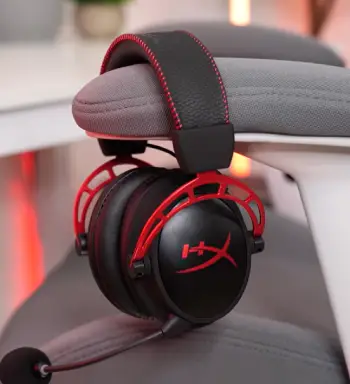
- Driver design and how it shapes the sound: The Alpha uses dual-chamber 50 mm drivers that physically separate bass from the mids and highs so distortion drops when loud effects hit.
The Cloud 2 relies on larger 53 mm drivers in a traditional layout that still delivers solid volume yet offers less precise separation once the audio mix grows busy.
- Surround processing versus pure stereo: Cloud 2 includes a USB sound card that enables virtual 7.1 which can widen the stage in some games.
Alpha stays strictly stereo and keeps positional cues tighter and less colored which many competitive players prefer.
- Cable and everyday durability: Alpha features a fully detachable cable so a frayed or damaged cord can be replaced without discarding the whole headset.
Cloud 2 uses a fixed main cable which means a break often forces retirement of an otherwise healthy unit.
- Weight and clamping feel: Both headsets sit in a similar weight range yet the Alpha’s deeper cups and more relaxed clamp reduce fatigue during long sessions.
Cloud 2 can feel slightly tighter on the sides of the head after several continuous hours.
- Accessory package and platform flexibility: Cloud 2 usually arrives with spare velour pads and the USB control box for added convenience.
Alpha keeps the package lighter with mainly a splitter and mic while working plug-and-play on more devices without extra hardware.
Key Features Of The Hyperx Cloud Alpha
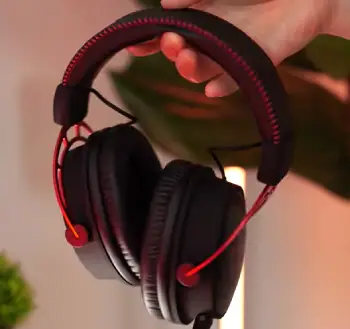
- Dual-chamber drivers that reduce mud: The internal wall inside each driver keeps low frequencies from bleeding into the rest of the range so gunshots stay sharp and dialogue remains clear even during heavy effects.
- Fully removable braided cable with smart in-line controls: The volume wheel and mute switch sit high enough on the cable for easy reach without looking away from the screen.
Swapping a damaged cable takes only seconds at the ear-cup connector.
- Memory-foam leatherette ear cups and padded headband: The foam still rebounds well after years of use and heat builds more slowly than on many cheaper headsets.
The aluminum frame keeps the structure rigid without adding unnecessary bulk.
- Detachable boom microphone with decent noise rejection: Voice comes through clearly for chat while background keyboard noise is reduced though not fully eliminated.
Removing the mic turns the Alpha into clean closed-back headphones for music or movies.
Wide frequency response and 65-ohm impedance: The extended range delivers tighter bass and a bit more air in the treble compared with many rivals.
Most motherboards and consoles drive the headset cleanly without strain.
Pros Of The Hyperx Cloud Alpha
- Clearer more controlled audio across games and music: Dual-chamber design keeps bass punchy without washing out midrange detail so competitive shooters gain precise positioning and story titles keep dialogue intelligible.
- Long-term durability thanks to the detachable cable: Replacing a worn cord costs far less than buying a new headset and the aluminum structure resists flexing better than many plastic competitors.
- Comfort that holds up through marathon sessions: Lower clamping force and deeper cups reduce the tight feeling after several hours so the headset often disappears until a break is needed.
- Simple reliable connectivity on almost any device: No drivers or extra software are required for basic use and the included splitter handles older motherboards with separate jacks without fuss.
- Natural stereo presentation that favors accuracy: Many players prefer the unprocessed stereo image for ranked play because virtual surround can sometimes smear directional cues.
Cons Of The HyperX Cloud Alpha
- No built-in virtual surround option: Users who specifically want a wider cinematic feel for certain single-player games will need software solutions or a different headset.
- Slightly higher average price than the Cloud 2: The gap is not huge yet budget shoppers may notice it when both models appear side by side on sale.
- In-line controls only with no on-cup buttons: Reaching the volume wheel becomes easy once the location is learned yet some users still prefer physical switches right on the ear cup.
- Leatherette pads can warm up in hot environments: Breathability is average so long summer sessions sometimes call for third-party fabric pads to improve airflow.
- No extra ear cushions included in the box: Cloud 2 often ships with a spare pair while Alpha leaves that purchase to the owner if a different material or backup set is desired.
Key Features Of The HyperX Cloud 2
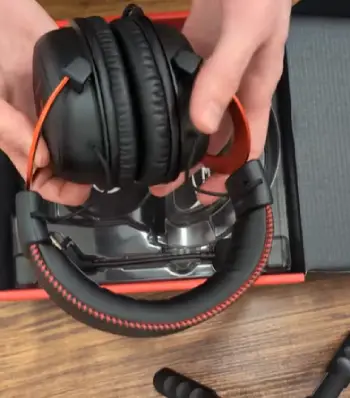
- 53 mm neodymium drivers tuned for gaming: The larger cones move more air so overall volume and low-end impact feel generous across most titles. Footsteps and environmental effects come across with good energy even if separation is not the strongest.
- USB sound card that unlocks virtual 7.1 and easy controls: The small box provides dedicated volume wheels for game and chat plus a mute switch and 7.1 toggle. Analog mode still works fine when the USB path is not needed.
- Detachable noise-cancelling microphone and extra ear pads: The mic quality stays solid for team talk and many packages include a second set of velour pads. Those alternative pads breathe better in warm rooms and change the pressure feel slightly.
- Aluminum frame and memory-foam construction: Build quality remains impressive after years of daily use and the padding supports multi-hour sessions for most head shapes. The overall structure resists the flex and creaks common in all-plastic designs.
- Broad platform reach with both 3.5 mm and USB options: The analog jack works on controllers phones and consoles while the USB card unlocks surround and cleaner conversion on desktop. Switching between the two connection methods stays simple.
Pros Of The Hyperx Cloud 2
- Virtual 7.1 surround via the included USB sound card: Certain games feel more enveloping and the effect adds atmosphere for exploration or horror titles when immersion matters more than pure competitive precision.
- Convenient on-board controls and chat game mix: Adjusting volume or muting the mic never requires opening software and the physical buttons on the USB box stay within easy desk reach.
- Generous accessory package including spare pads: Extra velour cushions provide a different comfort profile right out of the box and the airline adapter offers a small travel bonus.
- Proven long-term reliability and comfort: Thousands of users still run original units years later because the memory foam and aluminum construction age gracefully with reasonable care.
- Flexible connection options for mixed platforms: Analog mode works everywhere while USB mode unlocks the surround feature and often cleaner audio conversion on older PCs.
Cons Of The Hyperx Cloud 2
- Fixed main cable reduces repairability: A damaged cord usually means replacing the entire headset so careful cable management becomes more important over time.
- Virtual surround can feel artificial or less accurate: In competitive shooters the processed image sometimes softens precise left-right cues which leads many players to leave the 7.1 toggle off.
- Slightly tighter clamp for some head shapes: After four or more hours the sides of the head can notice more pressure than with the Alpha though it is not a deal-breaker for most users.
- Sound separation is good but not class-leading: Bass can bloom a little more into the midrange during chaotic scenes compared with the dual-chamber design of the Alpha.
- USB sound card adds another item to manage: The small box is handy yet it occupies a USB port and can get misplaced when traveling between different setups.
Sound Quality In Everyday Use
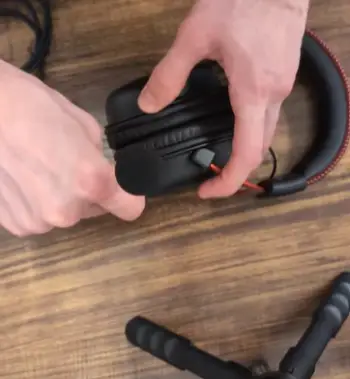
I spent weeks alternating between both headsets on the same desktop console and mobile sources.
On the Alpha the dual-chamber layout immediately stood out in titles like Valorant or Counter-Strike.
Enemy footsteps stayed distinct even when multiple players moved at once. Explosions hit with satisfying weight without masking higher-frequency details.
Music playback surprised me because the extended frequency claim actually shows up as tighter bass control and clearer cymbals than I usually hear from gaming gear.
Cloud 2 delivered a warmer fuller presentation. The larger drivers move more air so low-end rumble in open-world games felt more physical.
Virtual 7.1 widened the stage in single-player campaigns and made environmental audio more cinematic. In ranked matches though I often switched the surround off because positional accuracy suffered slightly. Both headsets reach high volumes cleanly and neither distorts at levels I find usable for long periods.
Microphone performance lands close. Both boom mics capture clear speech and reject a useful amount of keyboard and room noise.
Teammates rarely complained about either. The Alpha mic sounded a touch fuller to my ear while Cloud 2 sometimes edged ahead in raw clarity when the USB sound card handled the conversion.
Removing either mic is painless and turns the headset into regular closed-back headphones for casual listening.
Comfort And Build Over Long Sessions
Comfort remains one of HyperX’s strongest suits across both models. Memory-foam padding and well-shaped cups distribute weight evenly.
I finished several six-hour streams without the usual hot spots or jaw pressure. Alpha’s slightly more relaxed clamp and deeper cups gave it a narrow edge for all-day wear. Cloud 2 felt secure and supportive but required a small break sooner on hotter days.
Build quality on both is excellent for the money. Aluminum frames resist the flex and creaks that plague all-plastic headsets.
Ear-cup hinges and headband adjustment mechanisms still feel tight after years of daily use.
The Alpha’s detachable cable is the clear durability winner because I have replaced a frayed cord once and kept the same cups and drivers. Cloud 2 units I have owned or tested eventually developed cable issues that forced retirement of an otherwise healthy headset.
Who Should Choose Which Headset?
If you mainly play competitive multiplayer value accurate stereo imaging and want a headset that stays serviceable for years with simple part swaps the Cloud Alpha is the stronger daily driver.
Its cleaner separation and repair-friendly design match the way I actually game and listen.
If you prefer a slightly more immersive cinematic feel for story games appreciate physical controls on a USB box and like having spare pads in the box Cloud 2 still delivers excellent value.
The virtual surround and accessory package make it an easy recommendation for mixed single-player and multiplayer use especially when you find it on sale.
Both remain relevant years after launch because they focus on the fundamentals of sound that works comfort that lasts and construction that survives real use rather than chasing every new software feature or lighting trend.
Also Read: Comparison Of Crusher ANC 2 And Crusher Evo
Frequently Asked Questions (FAQ)
Yes. Its comfort build and solid audio keep it competitive especially if you want the USB surround option and spare pads.
It depends on priorities. Alpha usually wins for sound accuracy and durability while Cloud 2 wins for virtual surround convenience and included extras.
The original Alpha remains excellent value. Newer Alpha variants add wireless or other features but the wired Alpha still holds up strongly for most users.
Alpha focuses on refined stereo performance and dual-chamber clarity. Cloud 3 updates comfort and adds newer spatial audio options so choose based on whether you prioritize pure sound separation or modern surround features.
Wrapping Up
After living with both headsets across different systems and game types I keep coming back to the same conclusion.
You will get a capable comfortable gaming headset either way. The Alpha edges ahead for me because of its clearer audio presentation and the peace of mind that comes with a replaceable cable.
You may prefer the Cloud 2 if the virtual surround and extra pads matter more in your daily routine.
Pick the one that matches how you actually play and the features you will use every session and both will serve you well for a long time.
Recent Posts
● Interactive 5-Zone Interior & Exterior Paint Blueprint Paint Coverage Calculator: Gallons, Primer, Square Footage & Cost Tap any architectural surface zone on the blueprint...
If you want smooth, shiny hair without spending a fortune on a premium styling tool, the Ella Bella hair dryer may be worth considering.In these Ella Bella hair dryer reviews, I’ll look...