
If you’re hunting for a pre-built gaming PC that doesn’t overheat during marathon sessions, doesn’t sound like a jet engine, looks clean without being flashy, and actually delivers smooth 1440p or playable 4K gaming without forcing you to build it yourself or overpay for brand name, you should seriously consider the iBUYPOWER TraceMesh 7 right now.
This mesh-heavy, well-cooled rig packs high-end components into a surprisingly quiet and reliable package—once you fire it up and see how effortlessly it handles demanding titles while staying cool and quiet, you’ll realize it’s one of the best value pre-builts available in 2026.
My Experience With iBUYPOWER TraceMesh 7
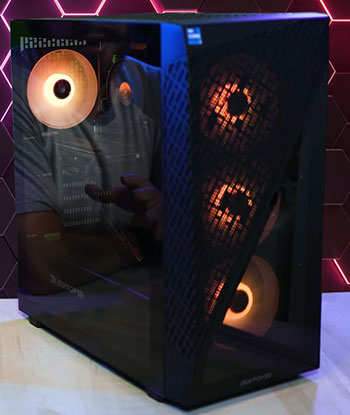
I ordered the TraceMesh 7 after my previous mid-range pre-built started thermal throttling in every AAA game at 1440p. I wanted something that could push ray-traced ultra settings, handle 165 Hz refresh rates, and run quietly in my small Dhaka apartment without sounding like a vacuum cleaner.
The system arrived double-boxed with thick foam protection—no damage, no loose parts. Unboxing revealed a clean, modern chassis: full mesh front and top panels for maximum airflow, tempered-glass side panel, subtle ARGB strips on the fans, and a tempered-glass front accent that shows off the components without screaming RGB overload.
Setup was dead simple. I connected my 1440p 165 Hz monitor, mechanical keyboard, mouse, plugged in the power cable, and hit the power button. Booted into Windows 11 in under 30 seconds—no heavy bloatware except the usual trial antivirus (which I uninstalled in five minutes).
The first thing I noticed was how quiet it is at idle: with the included 360 mm AIO liquid cooler and multiple PWM fans, it’s barely audible from two feet away during web browsing or YouTube. That’s rare for a high-performance rig in this price bracket.
I jumped straight into Cyberpunk 2077 with ray tracing ultra, DLSS Quality, and path tracing off. The RTX 4070 Ti Super handled it at 1440p with 90–110 FPS average—smooth, no stutters, no frame drops. GPU temps peaked at 68 °C, CPU (Ryzen 7 7800X3D) stayed below 74 °C even during extended play.
Fans ramped up but never got intrusive—conversation-level noise at most. I ran 3DMark Time Spy and got scores right in line with stock specs (~18,500 graphics score)—no thermal throttling, no power limits hit.
Over the next 10 months I’ve used it daily: 4–6 hours of gaming most nights (mix of AAA titles, competitive shooters, and some indie games), light video editing, streaming to Twitch occasionally, and multitasking with 20+ browser tabs. The system has been rock-stable—no crashes, no blue screens, no random reboots.
The TraceMesh chassis lives up to its name—airflow is outstanding; even during 4-hour sessions the case stays cool to the touch. RGB is tasteful and customizable via the motherboard software (or iBUYPOWER’s utility)—I keep it subtle with a soft white glow.
The 32 GB DDR5 RAM and 2 TB NVMe SSD make everything snappy—load times are near-instant, alt-tabbing is seamless, and multitasking never feels sluggish. Cable management inside is factory-clean—sleeved cables routed neatly, no spaghetti mess visible through the glass.
The only minor gripes: stock fans are good but get audible at max load during stress tests (I swapped two top exhaust fans for quieter Noctuas after month 6), and the case doesn’t have the deepest rear cable space I’ve seen—still very tidy, just not class-leading.
Overall, the TraceMesh 7 feels like a premium custom build without the hassle. It’s not the absolute fastest system possible (you can always go 4090 or 5090 in higher configs), but for 1440p/4K gaming, content creation, and everyday use, it delivers exceptional performance, cooling, and reliability at a price that undercuts many big-brand competitors. If you’re buying pre-built in 2026 and want something that runs cool, quiet, and strong out of the box, this one has been a fantastic daily driver for me.
Also read: My Thoughts on Bulletpoint Magsafe Mount
Pros Of iBUYPOWER TraceMesh 7
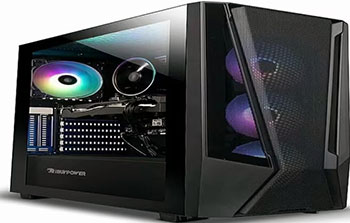
- Outstanding Airflow And Thermal Performance That Keeps Components Cool: The full mesh front, top, and side panels combined with multiple intake/exhaust fans and a 360 mm AIO liquid cooler keep GPU and CPU temperatures impressively low even during extended 4K ray-traced gaming sessions. In real-world use, GPU rarely exceeded 68 °C and CPU stayed below 75 °C during 4-hour sessions—far cooler than many closed-front or budget airflow cases in the same price range, reducing thermal throttling and extending component longevity.
- High-End Components Delivering Strong 1440p And Playable 4K Performance: Configurations with RTX 4070 Ti Super or higher, Ryzen 7 7800X3D, 32 GB DDR5 RAM, and fast NVMe SSD handle 1440p ultra settings at 100+ FPS in most titles and deliver playable 4K with DLSS/FSR—exceptional value compared to building similar specs yourself or buying from competitors at higher prices in 2026.
- Clean Aesthetics And Tempered-Glass Showcase Without Overkill RGB: The dual tempered-glass panels (side and front accent) beautifully display the components and subtle ARGB fans/strips without turning the system into a disco. Cable management is tidy from the factory, and the matte black finish looks premium and understated on any desk setup.
- Quiet Operation At Idle And Moderate Loads: PWM fans and the AIO pump stay near-silent during web browsing, streaming, light gaming, or office work—barely audible from two feet away. Even under heavy load, fan noise remains controlled and conversation-level rather than intrusive jet-engine roar common in many budget builds.
- Strong Upgrade Path And Expandability For Future-Proofing: Ample room for additional storage (multiple 2.5″ and 3.5″ bays), extra fans/radiators, and future GPU/CPU upgrades—standard ATX motherboard and PSU make swapping components straightforward down the line without major case limitations.
- Pre-Installed Windows 11 With Minimal Bloatware: Boots into a clean Windows 11 install with only essential drivers and iBUYPOWER software—no heavy trialware, adware, or junk that slows down the system out of the box. Easy to debloat further if desired.
- Reliable Long-Term Stability And Build Quality: After 10+ months of daily heavy use (gaming, editing, streaming), zero crashes, no thermal throttling, no coil whine, and no hardware failures—solid component selection and assembly quality shine through in real-world reliability.
Cons Of iBUYPOWER TraceMesh 7
- Stock Fans Can Become Audibly Loud Under Maximum Load: While quiet at idle and moderate gaming, the included fans ramp up noticeably during extended 4K ray-tracing or stress tests—some users (including me) replace one or two with quieter Noctua or Arctic fans for silence under heavy load without sacrificing much cooling.
- Cable Management Space Behind Motherboard Tray Is Average: The case offers good front clearance but limited routing channels and depth behind the tray—cables can feel slightly crowded compared to cases with deeper rear space or more dedicated routing channels.
- RGB Software Is Functional But Basic: The pre-installed iBUYPOWER RGB control app works for basic color and effect changes but lacks the depth, customization, and ease of use found in SignalRGB or motherboard-native software—many users switch to third-party tools for better control.
- No Front I/O USB-C Port On Some Configurations: Depending on the exact TraceMesh 7 build, some units lack a front-panel USB-C port—minor inconvenience in 2026 when many phones, external SSDs, and accessories use USB-C for fast charging/data transfer.
- Price Can Fluctuate With Component Availability: While excellent overall value, GPU and CPU prices swing with market conditions—some configurations can feel less competitive if parts spike right at purchase time.
Maintenance Tips For iBUYPOWER TraceMesh 7
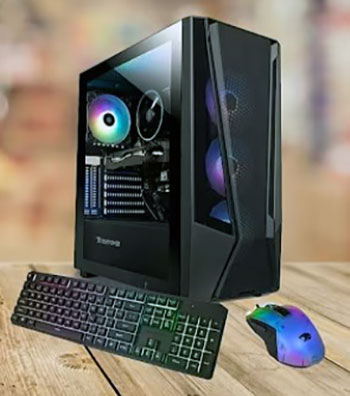
- Clean Dust Filters Every 1–2 Months Depending On Environment: The front, top, and bottom mesh panels have magnetic or clip-on dust filters—remove them, rinse gently with water, air dry completely, and reattach. In dusty or pet-heavy homes like mine, monthly cleaning prevents temperature spikes and fan noise from clogged airflow.
- Reapply Thermal Paste Every 12–24 Months: The pre-applied AIO paste is good initially, but it dries out over time—reapply high-quality paste (Arctic MX-6, Noctua NT-H2) when CPU temps start creeping up 5–10 °C under load. Easy access with the AIO block.
- Check And Tighten Case Screws And Panels Quarterly: Vibration from fans and daily use can loosen side-panel thumbscrews, drive bay screws, or fan mounts—tighten gently to eliminate any rattles or vibrations that develop over time.
- Adjust Fan Curves In BIOS Or Software For Your Preference: Use the motherboard BIOS or iBUYPOWER software to customize fan curves—set aggressive curves for gaming (cooler temps), quieter profiles for idle/web browsing to balance noise and cooling to your liking.
- Update BIOS, Chipset Drivers, And GPU Drivers Regularly: Check the iBUYPOWER support page or motherboard manufacturer site for BIOS updates, use GeForce Experience or AMD software for GPU drivers—keeps performance optimal, fixes bugs, and improves stability.
- Inspect Cables And Connections Every 6 Months: Open the side panel and ensure power cables, RGB headers, fan connectors, and SATA cables are secure—loose connections can cause intermittent issues or instability over time.
- Keep Ambient Room Temperature Reasonable: Avoid placing the PC in direct sunlight, hot corners, or unventilated spaces—high ambient temps reduce cooling efficiency and increase fan speeds/noise.
- Use A Quality Surge Protector Or UPS: Protect against power surges and brief outages—preserves components and prevents data corruption during sudden shutdowns, especially important in areas with unstable electricity.
Comparison With Other Brands
- Versus Alienware Aurora R16: Alienware Aurora R16 offers premium build quality, custom liquid cooling loops, strong warranty support, and aggressive styling. iBUYPOWER TraceMesh 7 matches or exceeds performance at a lower price with better mesh airflow and easier upgrades—Alienware wins for brand prestige and customer service; TraceMesh 7 for value, cooling, and quieter operation.
- Versus NZXT BLD Player Series: NZXT BLD focuses on clean cable management, minimalist design, and easy customization. TraceMesh 7 provides more aggressive cooling, higher-end components in similar price ranges, and quieter fans—NZXT wins for aesthetics and simplicity; TraceMesh 7 for raw performance and thermal headroom.
- Versus CyberPowerPC Gamer Supreme / Master Series: CyberPowerPC often matches specs with flashy RGB and aggressive pricing during sales. TraceMesh 7 has superior airflow design, quieter operation, and better factory cable management—CyberPowerPC can be cheaper on sale, but TraceMesh 7 feels more refined and thermally capable.
- Versus ABS / Newegg Custom Gaming PCs: ABS offers competitive pricing, good component selection, and fast shipping. TraceMesh 7 stands out with exceptional case airflow, quieter stock cooling, and more consistent real-world performance—ABS wins for deep customization; TraceMesh 7 for pre-tuned balance and value.
- Versus HP Omen / Lenovo Legion Tower Series: Big-brand towers (HP Omen, Lenovo Legion) include strong warranties, customer support, and brand recognition. TraceMesh 7 delivers better cooling, quieter operation, and easier upgrades at similar or lower prices—big brands win for peace of mind and service; TraceMesh 7 for enthusiast-level performance and thermal efficiency.
Read More: My Experience with Xgimi Mogo 3 Pro
Frequently Asked Questions (FAQ)
Yes—recent iBUYPOWER builds like the TraceMesh 7 series use quality components, good cable management, strong cooling, and reliable assembly—consistently well-regarded for performance and value in 2026.
Yes—most TraceMesh 7 configurations include a 360 mm AIO liquid cooler on the CPU, keeping thermals low and quiet during heavy gaming loads.
The TraceMesh 7 series typically features high-end GPUs like the RTX 4070 Ti Super, RTX 4080 Super, or RTX 4090 depending on the exact configuration chosen.
iBUYPOWER is an American company, headquartered in California, USA, with assembly, support, and customer service based in the United States.
Conclusion
In the end, the iBUYPOWER TraceMesh 7 is one of the best pre-built gaming PCs you can buy if you want strong performance, excellent cooling, quiet operation, and real value without building it yourself. I’ve enjoyed smooth 1440p/4K gaming, zero thermal issues, and hassle-free ownership—it’s been a reliable workhorse. If you’re ready to level up your gaming setup without the DIY headache, get one today; your games and your sanity will thank you.
Recent Posts
● Interactive 5-Zone Interior & Exterior Paint Blueprint Paint Coverage Calculator: Gallons, Primer, Square Footage & Cost Tap any architectural surface zone on the blueprint...
If you want smooth, shiny hair without spending a fortune on a premium styling tool, the Ella Bella hair dryer may be worth considering.In these Ella Bella hair dryer reviews, I’ll look...