
If you’re thinking about upgrading your home security with the Lockly Access Touch Pro, you’re probably hoping for convenience, reliability, and modern smart features all in one sleek lock.
I had the same expectations—but after using it extensively, I can tell you that while it promises a lot, it doesn’t always deliver where it matters most.
Before you spend your money, it’s worth understanding both the strengths and the real-world frustrations of this smart lock.
My First Experience Using The Lockly Access Touch Pro
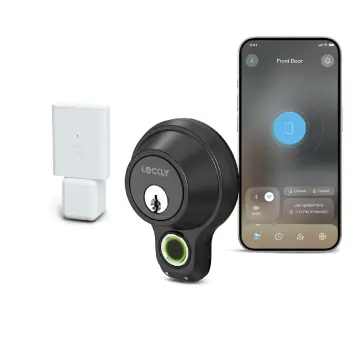
I installed the Lockly Access Touch Pro on my front door with high expectations. On paper, it sounded like the perfect solution—fingerprint access, PIN codes, smartphone control, and a stylish design.
Initially, I was impressed. The build quality felt solid, and the installation process was manageable if you’ve handled basic DIY tasks before.
The first few days were smooth. The fingerprint sensor worked decently, and unlocking the door felt futuristic. You just place your finger, and within a second, the lock disengages.
It felt like something straight out of a smart home dream.
But after about a week of consistent use, cracks started to show.
The fingerprint recognition began to feel inconsistent. Some days it worked instantly, and other days I found myself retrying multiple times just to get inside.
This became especially frustrating when my hands were slightly sweaty, dirty, or cold—situations that are very common in everyday life. You expect a fingerprint lock to simplify access, not slow you down.
The touchscreen keypad was another mixed experience. While the PIN Genie feature number is clever for security, it also makes quick unlocking harder when you’re in a hurry.
You can’t rely on muscle memory, so every entry requires your full attention.
The mobile app added another layer of complexity. While it offers remote access and monitoring, I found it occasionally laggy and not always reliable.
Notifications didn’t always come through in real time, which defeats part of the purpose of a smart lock.
Battery life was another concern. Compared to traditional electronic locks, this one seemed to drain batteries faster than expected. That means more frequent replacements, which can become annoying over time.
Overall, my experience shifted from excitement to mild frustration. The lock isn’t terrible—but it doesn’t feel dependable enough for something as important as home security.
Key Features Of The Lockly Access Touch Pro
Before breaking down the pros and cons, here’s what the lock offers on paper:
- Fingerprint sensor for biometric entry
- PIN Genie digital keypad
- Smartphone app control
- Voice assistant compatibility (with additional hub)
- Auto-lock functionality
- Offline access codes
These features sound impressive, but how they perform in real life is what truly matters.
Pros Of The Lockly Access Touch Pro
- Versatile Access Methods Give You Flexibility
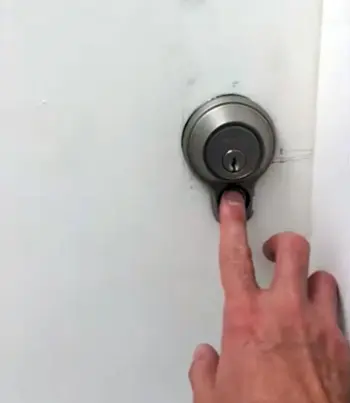
One thing I genuinely appreciated is how many ways you can unlock the door. You’re not locked into just one system.
You can use your fingerprint, enter a PIN code, unlock through the mobile app, or fall back on a physical key.
In real life, this flexibility matters more than you might think. If the fingerprint scanner fails sometimes you can quickly switch to a PIN.
If your phone is dead, you still have other options. For households with multiple users—family members, guests, or even short-term renters—this variety can be very convenient.
- Modern Aesthetic That Upgrades Your Door
Let’s be honest—appearance matters. When I installed the lock, it immediately made my door look more premium and high-tech.
The sleek finish, touchscreen keypad, and minimalistic design give off a strong “smart home” vibe.
If you care about curb appeal or want your home to feel more modern, this lock definitely delivers on looks. It doesn’t feel bulky or outdated like some older smart locks.
- PIN Genie Enhances Security
The PIN Genie feature is one of the most unique aspects. Instead of a fixed keypad, the numbers shuffle each time you use it.
That means someone watching you enter your code can’t easily memorize it, and fingerprint smudges on specific numbers won’t reveal your PIN.
From a security perspective, this is a strong advantage. It reduces common risks associated with traditional keypads. Even though it takes a bit longer to input your code, you’re trading speed for an added layer of protection.
- Auto-Lock Feature Adds Peace of Mind
If you’re like me, you’ve probably left your door unlocked at least once. The auto-lock feature solves that problem. You can set a timer, and the lock will automatically secure itself after a certain period.
This is especially useful when you’re rushing out or coming home with your hands full. You don’t have to double-check whether you locked the door—it handles that for you.
- Solid Build Quality and Durability
Physically, the lock feels strong and well-built. The materials don’t feel cheap, and once installed, it gives a sense of sturdiness. The deadbolt mechanism itself operates smoothly when aligned properly.
Even though the tech side has its flaws, the hardware gives the impression that it can hold up over time with regular use.
- Offline Access Codes Are Useful
Another feature I found helpful is offline access codes. You can generate codes that work without needing internet connectivity. This is great if you want to give temporary access to someone—like a cleaner or a guest—without relying on the app.
It’s a small detail, but it adds practicality, especially in situations where connectivity isn’t reliable.
Cons Of The Lockly Access Touch Pro
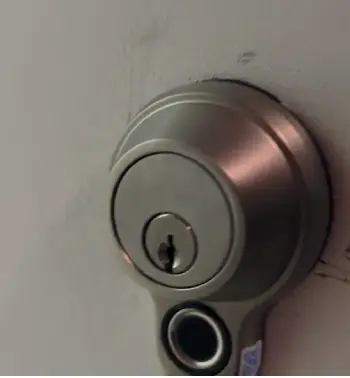
- Fingerprint Recognition Is Frustratingly Inconsistent
This is the biggest issue—and honestly, it overshadows many of the positives.
In theory, fingerprint access should be the fastest and most convenient way to unlock your door. But in practice, it often struggles. I found myself placing my finger multiple times before it worked, which completely defeats the purpose.
Things like sweaty hands, dirt, cold weather, or even slight misplacement can cause it to fail. When you’re standing outside your door after a long day, the last thing you want is to fight with your lock just to get inside.
- Mobile App Feels Unreliable
The app experience is another weak point. While it offers useful features like remote unlocking and activity logs, it doesn’t always perform smoothly.
There were times when the app lagged, failed to connect, or delayed notifications. That kind of inconsistency makes it hard to trust, especially if you’re relying on it for security monitoring.
You expect a smart lock app to feel seamless—but this one can feel clunky.
- Extra Hub Required for Full Functionality
If you want to use all the smart features—like remote access or voice assistant integration—you’ll need to purchase an additional hub.
This adds both cost and complexity. It’s not just plug-and-play; now you’re dealing with another device, more setup steps, and potential connectivity issues.
For a premium-priced lock, you’d expect these features to be included out of the box.
- Battery Life Is Shorter Than Expected
Battery performance is another concern. In my experience, it drains faster than many competing smart locks.
That means you’ll need to replace batteries more frequently, which can become annoying over time. And if you forget to do it, you risk being locked out or dealing with emergency access methods.
A smart lock should reduce stress—not add another maintenance task to your routine.
- Touchscreen Responsiveness Can Be Hit or Miss
The touchscreen keypad looks great, but it doesn’t always respond perfectly. Sometimes it takes multiple taps to register input, especially in less-than-ideal conditions like rain or extreme heat.
When you’re in a hurry, even a small delay like this can feel frustrating. It’s one of those issues that seems minor until you experience it regularly.
- Setup and Calibration Can Be Finicky
While installation is manageable, getting everything perfectly aligned can take effort. If the lock isn’t calibrated correctly, you might face issues with locking and unlocking.
Even after setup, occasional recalibration or adjustments may be needed to maintain smooth operation. That’s not something everyone wants to deal with.
- Not as Reliable as It Needs to Be
At the end of the day, the biggest drawback is overall reliability. A door lock is something you depend on every single day, multiple times a day.
When any part of it—fingerprint, app, or keypad—feels inconsistent, it creates doubt. And when it comes to home security, even small doubts can be a big deal.
Maintenance Tips For The Lockly Access Touch Pro
- Keep the Fingerprint Sensor Clean
You’ll want to regularly wipe the fingerprint sensor. Dirt, oil, and moisture can reduce accuracy significantly. I noticed better performance after cleaning it consistently.
- Replace Batteries Proactively
Don’t wait for low-battery warnings. Set a routine to replace batteries every few months to avoid unexpected lockouts.
- Update the Firmware
If you’re using the app, make sure the firmware is up to date. Updates can improve performance and fix bugs, although they don’t always solve everything.
- Protect from Extreme Weather
If your lock is exposed to direct sunlight or heavy rain, consider adding some form of protection. Extreme conditions can affect both the touchscreen and fingerprint sensor.
- Re-register Fingerprints Periodically
Sometimes the system seems to “forget” accuracy. Re-registering fingerprints can improve recognition rates.
- Check Alignment and Installation
If the lock isn’t perfectly aligned, performance can suffer. Make sure everything is installed correctly and the bolt moves smoothly.
Comparison Of Lockly Access Touch Pro Fingerprint Deadbolt With Other Brands
- Lockly Access Touch Pro Fingerprint Versus Schlage Smart Locks
When I compare Lockly to Schlage’s smart locks, the difference in reliability stands out.
Schlage locks may not have flashy fingerprint features, but they tend to be more consistent in everyday use.
If you value dependability over innovation, Schlage feels like the safer option.
- Lockly Access Touch Pro Fingerprint Versus August Smart Locks
August locks focus heavily on app control and seamless smart home integration.
In my experience, August’s app is far more stable and responsive.
While it lacks fingerprint access, the overall user experience feels more polished.
- Lockly Access Touch Pro Fingerprint Versus Ultraloq
Ultraloq also offers fingerprint smart locks, but I’ve found their fingerprint recognition to be slightly more reliable.
They also tend to provide better value for money, especially considering the issues with Lockly.
Is The Lockly Access Touch Pro Worth It?
From my experience, it’s hard to fully recommend this lock. While it has some innovative features and a stylish design, the inconsistency in performance is a serious drawback.
When it comes to home security, reliability matters more than anything. A lock should work every time without frustration. Unfortunately, the Lockly Access Touch Pro doesn’t consistently meet that expectation.
Frequently Asked Questions (FAQ)
In daily use, the fingerprint recognition is inconsistent. Sometimes it works instantly, but other times it requires multiple attempts. Factors like moisture, dirt, or temperature can affect accuracy, making it less reliable than expected.
Yes, it does. Without the additional hub, you won’t get full remote access or integration with voice assistants. This adds extra cost and setup complexity.
It offers advanced security features like PIN randomization and biometric access, which are strong in theory. However, security also depends on reliability, and inconsistent performance can reduce overall effectiveness compared to a high-quality traditional deadbolt.
The most common issues include fingerprint recognition problems, app connectivity issues, fast battery drain, and occasional touchscreen unresponsiveness. These problems can impact the overall user experience.
Wrapping Up
If you’re drawn to the Lockly Access Touch Pro because of its modern features and futuristic appeal, I completely understand—it looks great on paper.
But in real-world use, it struggles with consistency, and that’s a dealbreaker for something as critical as a door lock.
You deserve a product that works reliably every single time, and unfortunately, this one doesn’t always meet that standard.
I’d suggest exploring more dependable alternatives before making your final decision.
Recent Posts
● Interactive 5-Zone Interior & Exterior Paint Blueprint Paint Coverage Calculator: Gallons, Primer, Square Footage & Cost Tap any architectural surface zone on the blueprint...
If you want smooth, shiny hair without spending a fortune on a premium styling tool, the Ella Bella hair dryer may be worth considering.In these Ella Bella hair dryer reviews, I’ll look...