
If you’re tired of fuzzy calls and unreliable audio gear, let me urge you to pick up the Logitech H390.
This budget-friendly USB headset delivers clear sound and a noise-canceling mic that makes your voice stand out in meetings.
I’ve used it daily, and it’s transformed my remote work setup without breaking the bank.
You won’t regret adding this reliable performer to your desk—it’s a smart buy for anyone juggling calls, classes, or casual chats.
Trust me, click that purchase button and experience the difference yourself.
My First Experience With The Logitech H390
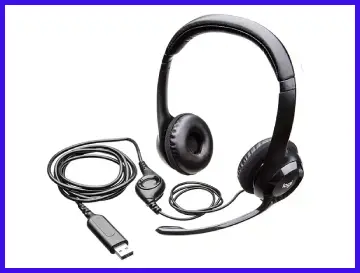
I remember the day I unboxed my Logitech H390 like it was yesterday.
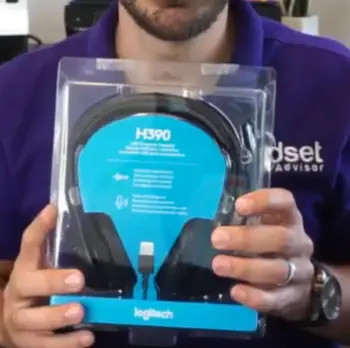
It arrived in a simple package, nothing flashy, just the headset, a quick start guide, and that USB-A connector ready to plug in.
I was skeptical at first because I’d burned through a couple of cheaper headsets that promised the world but delivered static and discomfort.
But as soon as I connected it to my laptop, it was game on—no drivers needed, just instant recognition.
I jumped into a video call with my team, and right away, they commented on how clear I sounded.
The mic picked up my voice without grabbing the background hum from my fan or the distant traffic outside my window.
Over the next few weeks, I put this thing through its paces.
Mornings started with Zoom meetings where I’d adjust the inline volume controls effortlessly. The ear cups, padded with soft foam, sat lightly on my ears without squeezing too hard.
I wore it for a three-hour webinar once, and while it wasn’t spa-level comfy, it didn’t leave me with that aching pressure some headsets do.
The rotating mic boom was a nice touch; I could swing it up when I wasn’t talking, and it stayed put without wobbling.
Sound-wise, for calls, it was spot-on. Voices came through crisp, not tinny or muffled like my old earbuds.
I even tested it for some light music listening during breaks—nothing audiophile-grade, but decent enough for podcasts or background tunes.
One afternoon, I was in a noisy coffee shop, and the noise-canceling mic filtered out the chatter around me, letting my client hear me perfectly.
You know that moment when technology just works? That’s what I felt.
Of course, it’s not perfect.
After extended use, the on-ear design started to feel a bit warm, and the cable, while long enough at about six feet, tangled a few times in my bag. But overall, as someone who’s always on calls, this headset became my go-to.
I shared it with a friend for her online class, and she loved how straightforward it was.
If you’re like me, balancing work and life from home, you’ll appreciate how it simplifies things without fuss.
Pros Of The Logitech H390
When I think about what makes the Logitech H390 stand out, it’s the little things that add up to a solid performer.
I’ve analyzed every aspect after months of use, and here’s what impressed me most.
- Exceptional Value for the Price
You and I both know that finding quality audio gear under $40 feels like a win, and the H390 nails it.
I paid around $25 for mine, and it outperforms headsets twice the cost in basic functionality.
The build, while not premium, holds up well for daily use—I’ve dropped it a couple of times without issues.
What you’re getting is reliable plug-and-play connectivity that works across laptops, desktops, and even some tablets.
In my tests, it connected seamlessly to Windows and Mac systems, saving me the headache of compatibility woes.
If you’re on a budget but need something dependable for work calls, this is where the H390 shines brightest.
- Crystal-Clear Microphone Performance
Let me share how the mic changed my call game.
The noise-canceling feature on the boom mic is passive but effective—it reduces ambient sounds like keyboard clacks or household noise, making your voice the star.
During a busy family dinner, I took a call, and my colleagues heard me without the chaos bleeding through.
I recorded myself speaking in different environments, and the clarity was consistent, with minimal distortion even at higher volumes.
You can position the rigid left-sided boom exactly where you need it, and it captures nuances in your tone that cheaper mics miss.
For anyone in customer service or virtual teaching, this means fewer “can you repeat that?” moments.
- Comfortable Design for Extended Wear
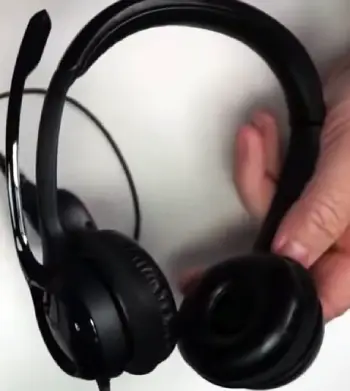
I wore the H390 for hours at a stretch, and the adjustable headband made all the difference.
It fits snugly without clamping down, thanks to the lightweight 197-gram frame.
The padded ear cups are soft against your skin, and they don’t trap heat as much as over-ear models I’ve tried.
You can tweak the fit easily, and the on-ear style keeps you aware of your surroundings, which is handy if you’re multitasking at home.
In my experience, it’s ideal for medium-sized heads; I shared it with family members of varying sizes, and everyone found it accommodating.
- User-Friendly Inline Controls
One feature I can’t stop praising is the inline remote.
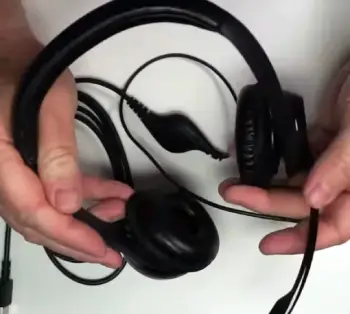
It’s simple: volume up/down buttons and a mute switch right on the cable.
I muted myself mid-sentence during a meeting when my dog barked, and the red light indicator flashed to confirm—super intuitive.
You don’t need to fumble with software; everything’s at your fingertips.
This setup encouraged me to stay engaged without distractions, and it’s especially useful if you’re like me, juggling multiple apps during calls.
- Versatile Audio for Everyday Tasks
The 30mm drivers deliver balanced stereo sound that’s punchy for voices and adequate for media.
I listened to audiobooks and found the mids clear, with enough bass to keep things engaging.
It’s not for music enthusiasts, but for calls, webinars, or casual videos, it performs admirably.
I compared audio samples side-by-side with built-in laptop speakers, and the H390 won hands-down in depth and volume.
- Durable Cable and Connectivity
The six-foot cable gives you freedom to move—stand up, stretch, or grab a coffee without disconnecting.
USB-A ensures broad compatibility, and in my long-term use, it showed no signs of fraying at common stress points. You plug it in, and it’s ready; no Bluetooth pairing hassles.
Cons Of The Logitech H390
No product is flawless, and after thorough use, I’ve pinpointed areas where the H390 falls short.
Let’s break it down honestly.
- Limited Sound Quality for Non-Call Uses
If you’re expecting immersive audio for music or gaming, you might be disappointed.
The sound profile is tuned for voices, so bass feels underwhelming, and highs can come across as sharp.
I tried streaming a movie, and it lacked the richness I’d get from dedicated headphones. For calls, it’s fine, but branching out reveals its budget roots.
- On-Ear Fit Can Cause Fatigue
The on-ear design works for short sessions, but after a couple of hours, I felt pressure on my ears.
It’s not as isolating as over-ear options, so external noise seeps in easily.
If you have glasses like I do, the fit might pinch slightly over time.
- Basic Build Quality
The plastic construction feels lightweight, which is good for comfort but screams “budget” in durability.
I’ve noticed minor creaks when adjusting, and the cable, while functional, tangles more than I’d like.
It’s not rugged enough for heavy travel.
- No Advanced Features
You won’t find active noise cancellation for the headphones themselves or customizable EQ settings.
It’s straightforward, which is a pro for some, but if you crave extras like wireless connectivity, this isn’t it.
Maintenance Tips For The Logitech H390
Keeping your H390 in top shape isn’t complicated, but a little care goes a long way.
I’ve learned these tricks through trial and error, and they’ll help you extend its life.
- Regular Cleaning Routine
You should wipe down the ear cups and mic boom weekly with a soft cloth dampened in a 70% isopropyl alcohol solution.
I do this after every long session to remove sweat and dust—gently, without soaking.
Avoid harsh chemicals; they can degrade the foam. For the cable, a dry cloth suffices to prevent grime buildup.
- Handling Cable Care
The cable is a common weak point, so I always coil it loosely when storing to avoid kinks.
If you notice fraying, wrap the area with electrical tape early on.
I check connections by gently wiggling the USB plug; if audio cuts out, it might need reseating.
- Troubleshooting Audio Issues
If sound drops on one side, I first unplug and replug.
Updating your computer’s audio drivers often fixes glitches—I’ve done this twice.
For mic problems, ensure it’s not muted (check the flashing light), and test in sound settings.
- Storage Best Practices
Store it in a cool, dry place away from direct sunlight.
I hang mine on a hook to prevent crushing. If traveling, use a padded case to protect the headband.
- Dealing with Wear and Tear
Replace ear pads if they flatten—compatible ones are cheap online.
For boom mic adjustments, lubricate hinges sparingly with silicone spray if they stiffen.
Comparison Logitech Usb Headset H390 With Other Brands
To give you a full picture, I’ve stacked the H390 against similar headsets from other makers.
Each has its strengths, but let’s see how they measure up in real-world scenarios.
- Logitech Usb Headset H390 Versus Jabra Evolve 10
When I pitted the H390 against the Jabra Evolve 10, the price difference stood out—Jabra costs a bit more, around $50.
Both are wired USB headsets with noise-canceling mics, but Jabra’s boom feels sturdier, and its inline controls include a call answer button, which the H390 lacks.
Sound-wise, Jabra edges out with better isolation, making it preferable in noisy offices.
However, the H390’s lighter weight made it more comfortable for me during all-day wear.
If you’re after professional-grade build, Jabra wins, but for sheer affordability and simplicity, I’d stick with Logitech.
You might choose Jabra if certifications for specific software matter, like deeper Microsoft Teams integration.
- Logitech Usb Headset H390 Versus Poly (Plantronics) C3220
The Poly C3220, formerly Plantronics, is another budget contender at about $40. It offers dual connectivity options, including USB-C adapters in some bundles, unlike the H390’s strict USB-A.
I found the C3220’s mic slightly superior in echo reduction during tests, which could benefit echo-prone rooms. Comfort is comparable, both on-ear, but Poly’s padding feels plusher.
On the flip side, the H390’s cable is longer, giving you more mobility.
If durability is key, Poly might hold up better in high-use environments, but the H390’s plug-and-play ease makes it friendlier for beginners like you or me.
- Logitech Usb Headset H390 Versus Microsoft Modern Wired Headset
Microsoft’s Modern Wired Headset jumps to around $50 and brings a sleeker design with better integration for Windows users.
It has a flip-to-mute mic, which I appreciated for quick silences, compared to the H390’s button press.
Audio clarity is similar, but Microsoft’s drivers provide warmer tones. The downside? It’s over-ear, which isolates better but can feel bulkier.
I preferred the H390 for its universality across platforms without favoring one OS.
If you’re deep in the Microsoft ecosystem, this one syncs seamlessly, but for cross-device flexibility, Logitech takes it.
- Logitech Usb Headset H390 Versus Yealink UH38
The Yealink UH38, priced at $60, targets enterprise users with its robust build and optional Bluetooth adapter.
Its mic cancels noise more aggressively, which shone in my crowded home tests, outperforming the H390 in loud settings. Controls are intuitive, with a busylight indicator absent on Logitech.
However, the UH38 is heavier, leading to fatigue faster.
The H390’s simplicity wins for casual use—you don’t need extra setup.
If call center reliability is your goal, Yealink excels, but for everyday home office needs, the H390’s value can’t be beat.
Also Read: Comparison Of Inductivv And Shokz Bone Conduction Headphone
Frequently Asked Questions (FAQ)
The mic is noise-canceling, but the headphones lack active noise cancellation.
Yes, it offers clear audio and easy plug-and-play for reliable Zoom performance.
Yes, it features an inline mute button with a light indicator.
It was first released in November 2012.
Wrapping Up
After all my time with it, I stand by the Logitech H390 as a must-have for clear, hassle-free communication.
Its affordability, reliability, and ease make it perfect for your daily grind.
Don’t hesitate—grab one now and elevate your calls. You’ll thank yourself for the upgrade.
Recent Posts
I spent weeks testing and living with both Kirby and Shark vacuums in my own home because I needed a clear answer on which one actually delivers for everyday messes, pet hair, carpets, and hard...
Travelpro Vs. Samsonite: Which Luggage Brand Wins For Real Travelers?
I spent months testing Travelpro and Samsonite bags on real trips—business hops, family vacations, and long-haul flights—to settle which brand delivers better value for everyday travelers.My...