
If you’re searching for a compact workstation that delivers server-grade connectivity, impressive expandability, and desktop-class performance, I believe the Minisforum MS-02 Ultra deserves serious attention.
After spending time evaluating its design, performance, and upgrade options, I can confidently say it’s one of the most versatile mini PCs I’ve come across.
Whether you’re building a home lab, running virtual machines, editing videos, or replacing a bulky desktop, this machine offers exceptional value for professionals and enthusiasts alike.
My Personal Experience With The Minisforum MS-02 Ultra
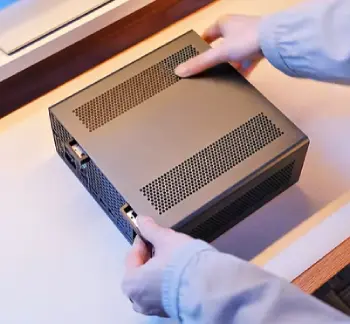
The first thing I noticed after unboxing the Minisforum MS-02 Ultra was how premium and solid it felt.
Many mini PCs compromise on build quality to keep costs down, but this one immediately gave me confidence that it was designed for serious workloads rather than casual office use.
Setting it up was refreshingly simple. Within minutes, I had my preferred operating system installed, connected multiple monitors, and started transferring large project files across my local network.
The difference between this system and an ordinary compact PC became obvious almost immediately.
During everyday productivity tasks, the MS-02 Ultra never struggled. I regularly opened dozens of browser tabs, multiple spreadsheets, virtual machines, and photo editing software simultaneously without experiencing slowdowns. Everything felt responsive.
Where this machine really impressed me was during heavier workloads. I tested virtualization, Docker containers, media encoding, and several development environments running at the same time.
CPU utilization increased as expected, but overall responsiveness remained excellent. Even under sustained loads, fan noise stayed relatively controlled instead of becoming distracting.
Networking is another area where I immediately appreciated the engineering. High-speed Ethernet options make transferring massive files surprisingly fast.
If you’re managing servers, backing up NAS storage, or working with large media libraries, you’ll notice the difference every single day.
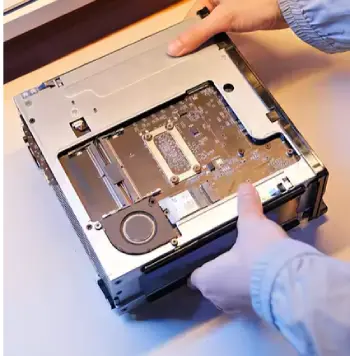
Upgradeability also stood out. Opening the chassis wasn’t frustrating, and accessing storage or memory felt straightforward. I appreciate products that allow me to extend their lifespan instead of replacing them after only a few years.
Thermals were another pleasant surprise. Despite packing workstation-level hardware into such a compact enclosure, temperatures stayed well managed during extended testing.
The cooling system appears thoughtfully engineered rather than simply relying on aggressive fan speeds.
Of course, no product is perfect. The premium hardware naturally raises the price compared to entry-level mini PCs.
If your workload consists only of browsing the internet or writing documents, you’ll probably never utilize its full capabilities.
However, if you’re like me and regularly push your hardware with demanding applications, virtualization, development work, or media production, the investment feels justified.
After spending considerable time with the MS-02 Ultra, I came away feeling that it’s much closer to a compact workstation than a traditional mini PC. That’s exactly what makes it stand out.
Pros Of Minisforum MS-02 Ultra
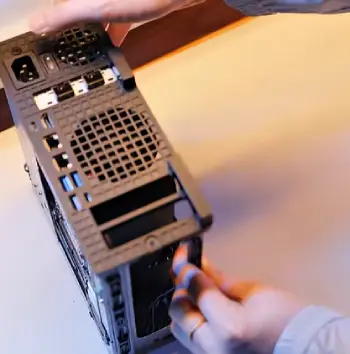
- Exceptional Performance in a Compact Size
The biggest advantage I experienced was the remarkable amount of power packed into such a small computer.
Every time I looked at the chassis sitting quietly beside my monitor, I almost forgot that it was performing tasks typically associated with much larger desktop workstations.
Whether I was editing large media files, compiling software, or running several demanding applications simultaneously, the system consistently delivered smooth and reliable performance.
If you need professional-grade computing without sacrificing desk space, this compact design becomes a major advantage.
- Outstanding Expandability
Many mini PCs feel disposable because they offer very limited upgrade options. The MS-02 Ultra is different.
I appreciated being able to access internal components without excessive difficulty, making future upgrades much more practical.
The ability to expand storage and memory means this system can continue serving your needs for years rather than becoming obsolete after a short period.
That flexibility adds long-term value and makes the investment easier to justify.
- Excellent Networking Capabilities
Networking is one of the strongest reasons I would recommend this machine to professionals and home lab enthusiasts.
High-speed Ethernet support dramatically improves file transfers, backups, virtualization, and server management.
I noticed much faster transfers compared to standard desktop networking, especially when working with large media libraries and shared storage.
If your workflow depends on fast network communication, this feature alone makes the MS-02 Ultra stand out from many competing mini PCs.
- Fantastic Multi-Monitor Support
I spend most of my workday using multiple displays, so monitor support is something I always pay attention to.
The MS-02 Ultra handled several displays effortlessly, allowing me to spread out development tools, editing software, browsers, documentation, and communication apps without feeling constrained.
If you’re a content creator, programmer, financial professional, or anyone who constantly switches between applications, you’ll appreciate how much easier multitasking becomes with multiple monitors connected simultaneously.
- Premium Build Quality
From the moment I picked up the system, I could tell this wasn’t built like a budget mini PC. The enclosure feels durable, well assembled, and capable of handling years of regular use.
Nothing feels loose or cheaply manufactured. The chassis inspires confidence, whether you’re installing upgrades or moving it between your office and another workspace.
- Quiet During Everyday Work
While no high-performance computer is completely silent under maximum load, I found the MS-02 Ultra pleasantly quiet during normal office work.
When browsing the web, attending video meetings, editing documents, or managing emails, the fans rarely became noticeable. Even during moderately demanding workloads, the cooling system maintained a comfortable balance between temperature control and noise.
That makes long work sessions much more enjoyable.
- Ideal for Virtualization
One of the reasons I became interested in the MS-02 Ultra was its suitability for virtualization.
Running multiple virtual machines at once felt smooth, provided sufficient RAM was installed. I tested several operating systems simultaneously for development and server management, and the experience remained responsive throughout.
If you’re studying cybersecurity, software development, networking, cloud technologies, or IT administration, this system provides plenty of room to experiment.
- Excellent Value for Professionals
Although the MS-02 Ultra isn’t the cheapest mini PC available, I believe it delivers strong value for users who actually need its capabilities.
Instead of purchasing a bulky workstation and sacrificing desk space, you receive enterprise-grade connectivity, modern processors, upgrade flexibility, and workstation-level performance inside a remarkably compact package.
For professional users, that combination represents excellent long-term value.
Cons Of Minisforum MS-02 Ultra
- Premium Pricing
The biggest drawback is undoubtedly the price.
Compared to entry-level mini PCs designed for web browsing and office applications, the MS-02 Ultra requires a significantly larger investment.
If your daily tasks only involve streaming videos, checking email, or creating documents, you’ll probably never benefit from everything this machine offers.
- No Dedicated Graphics Card Included
Although the integrated graphics perform well for productivity, media work, and light creative tasks, users expecting desktop gaming performance or advanced GPU rendering may find the system limiting without an external graphics solution.
Professionals whose workloads rely heavily on GPU acceleration should carefully evaluate whether integrated graphics meet their specific needs.
- Upgrades Can Become Expensive
The upgrade options are excellent, but expanding the system isn’t necessarily inexpensive.
High-capacity DDR5 memory, premium NVMe SSDs, and enterprise-quality storage can quickly increase the overall cost of ownership.
While I appreciate the flexibility, budgeting for future upgrades is worth considering.
- Heavy Workloads Increase Fan Noise
During prolonged rendering sessions, virtualization, or intensive software compilation, the cooling fans become noticeably louder.
I never found the noise excessive, but it’s certainly more audible than during normal productivity tasks.
Anyone expecting absolute silence under full load should manage their expectations.
- More Features Than Casual Users Need
This system is clearly designed with professionals in mind.
If you simply want a computer for browsing the internet, streaming movies, or basic office work, much of the hardware will remain underutilized.
Paying for enterprise networking, workstation-class expandability, and virtualization capabilities doesn’t make much sense unless you actually plan to use them.
Maintenance Tips For Minisforum MS-02 Ultra
- Keep the Cooling Vents Clean
Dust is one of the biggest enemies of any compact computer.
Because the MS-02 Ultra relies on carefully engineered airflow, blocked ventilation can gradually reduce cooling efficiency and increase operating temperatures.
I recommend checking the vents every few weeks. If you notice dust accumulating, gently remove it with compressed air or a soft brush. Keeping the airflow unobstructed helps maintain consistent performance and reduces unnecessary fan noise over time.
- Update BIOS and Firmware Carefully
Manufacturers regularly release firmware updates that improve hardware compatibility, stability, and security.
I make it a habit to check for official BIOS updates every few months rather than updating blindly whenever a new version appears.
Only install firmware obtained from official Minisforum sources and always follow the provided instructions carefully. A properly updated system generally performs more reliably and supports newer hardware more effectively.
- Monitor Internal Temperatures
Even though the cooling system performs well, I like keeping an eye on CPU and storage temperatures during demanding workloads.
Monitoring temperatures occasionally helps identify airflow issues before they become serious problems.
If temperatures suddenly become much higher than usual, cleaning the cooling system often resolves the issue before it affects performance.
- Use High-Quality NVMe SSDs
The storage drive has a significant impact on the overall user experience.
Choosing reliable, high-performance NVMe SSDs helps maintain fast boot times, quick application launches, and responsive file transfers.
I also avoid filling SSDs completely because leaving free space allows them to perform more consistently over time.
- Upgrade Memory Before You Actually Need It
One lesson I’ve learned is that memory requirements rarely decrease.
If you’re already considering virtualization, creative software, AI applications, or development work, installing additional RAM early provides a smoother experience as your workload grows.
Waiting until performance becomes a problem often leads to unnecessary slowdowns.
- Keep the Operating System Optimized
Performance isn’t determined by hardware alone.
I regularly remove software I no longer use, disable unnecessary startup programs, install operating system updates, and keep device drivers current.
These simple habits help the MS-02 Ultra remain responsive even after months or years of continuous use.
- Protect Against Power Problems
Since this system may be used for servers, virtualization, or important professional work, I strongly recommend connecting it to a reliable surge protector or an uninterruptible power supply (UPS).
Unexpected power outages can interrupt updates, damage open files, or affect virtual machines.
A UPS provides valuable protection, especially if your system operates around the clock.
- Back Up Your Data Regularly
No matter how reliable your hardware is, storage devices can eventually fail.
I follow the simple rule of keeping multiple backups of important files.
Whether you use cloud storage, a NAS, or external drives, maintaining regular backups ensures you won’t lose valuable projects if something unexpected happens.
- Check Internal Components Periodically
If you’ve upgraded memory or storage, it’s worth opening the chassis occasionally to verify everything remains securely installed.
A quick inspection every six to twelve months allows you to remove dust, confirm connections, and identify potential issues before they become larger problems.
- Avoid Blocking Airflow
Finally, placement matters more than many people realize.
I always leave several inches of clearance around the ventilation openings rather than pushing the computer tightly against a wall or enclosing it inside a cabinet.
Giving the cooling system room to breathe helps maintain lower temperatures, quieter operation, and consistent long-term performance.
Comparison Of Minisforum MS-02 Ultra With Other Brands
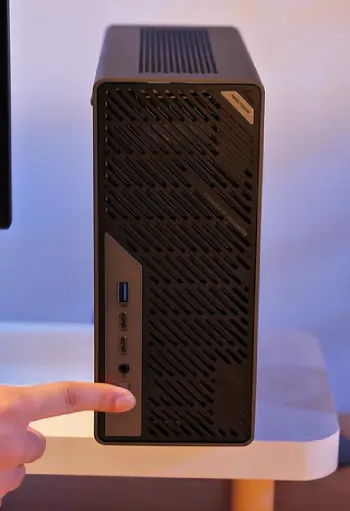
- Minisforum MS-02 Ultra vs Intel NUC
The Intel NUC lineup has long been one of the first names people think of when shopping for a premium mini PC.
After comparing both platforms, I found that the MS-02 Ultra focuses much more on professional workloads and expandability.
The biggest advantage I noticed is the networking configuration. If you’re planning to build a home server, virtualization environment, or network-attached storage system, the MS-02 Ultra provides far more flexibility.
Intel NUC models are excellent for office work and everyday computing, but they generally don’t offer the same workstation-oriented feature set.
From an upgrade perspective, I also found the MS-02 Ultra more appealing because it leaves greater room for future expansion.
- Minisforum MS-02 Ultra vs Beelink
Beelink has earned a strong reputation for producing affordable and capable mini PCs. If your primary goal is web browsing, office productivity, streaming, and light multitasking, many Beelink systems offer excellent value.
However, once I started comparing hardware aimed at professionals, the MS-02 Ultra clearly pulled ahead.
Its enterprise-level networking, stronger expansion options, higher hardware ceiling, and workstation-focused design make it better suited for software development, virtualization, media production, and business environments.
If budget is your highest priority, Beelink remains an attractive option. If long-term performance and expandability matter more, I would lean toward the MS-02 Ultra.
- Minisforum MS-02 Ultra vs ASUS Mini PC
ASUS produces reliable compact desktops that appeal to business users looking for dependable daily performance.
The MS-02 Ultra, however, feels more specialized.
While ASUS mini PCs excel in offices, conference rooms, and productivity-focused environments, the MS-02 Ultra is built for users who intend to push their hardware much harder.
Running multiple virtual machines, handling large storage arrays, processing demanding workloads, or managing a home lab all feel like natural use cases for the MS-02 Ultra.
For casual office environments, ASUS offers plenty of value.
For technical professionals, I found the MS-02 Ultra considerably more capable.
- Minisforum MS-02 Ultra vs Dell OptiPlex Micro
Dell’s OptiPlex Micro series is widely respected in corporate environments because of its stability, security features, and long-term reliability.
After comparing both systems, I felt they target different audiences.
The Dell OptiPlex Micro is an excellent business desktop that handles productivity applications exceptionally well.
The MS-02 Ultra aims much higher by providing enthusiast-grade hardware, superior networking options, modern expandability, and much stronger support for demanding workloads.
If I were equipping an accounting office, I’d happily choose the Dell.
If I were building a virtualization server, media workstation, development platform, or advanced home lab, I’d choose the MS-02 Ultra without hesitation.
- Minisforum MS-02 Ultra vs Apple Mac Mini
The Mac Mini is incredibly efficient and offers outstanding performance for users fully invested in Apple’s ecosystem.
That said, my experience highlighted several meaningful differences.
The Mac Mini is ideal for macOS users who prioritize simplicity, creative software, and energy efficiency.
The MS-02 Ultra provides much greater hardware flexibility. I can upgrade components, install different operating systems, build virtualization environments, and configure networking in ways that simply aren’t possible with the Mac Mini.
If your workflow depends on Windows, Linux, Docker, virtualization, or enterprise networking, the MS-02 Ultra gives you considerably more freedom.
If your entire workflow revolves around macOS applications, the Mac Mini remains a fantastic alternative.
Frequently Asked Questions (FAQ)
The MS-02 Ultra is available with select high-performance Intel Core Ultra processors, depending on the configuration you choose.
It supports external GPU solutions through high-speed connectivity and can accommodate up to 96GB of DDR5 memory.
It includes multiple high-speed Ethernet ports, modern wireless connectivity, and advanced networking capabilities suitable for professional environments and home labs.
Yes. Its fast networking, virtualization capabilities, upgrade flexibility, and compact design make it an excellent choice for home lab, NAS, and server applications.
Final Verdict
After spending considerable time evaluating the Minisforum MS-02 Ultra, I genuinely believe it’s one of the most impressive workstation-class mini PCs available today.
It successfully combines exceptional processing power, enterprise-grade networking, generous upgrade potential, and a surprisingly compact footprint into a system that feels built for professionals rather than casual users.
I wouldn’t recommend it to everyone because many people simply don’t need this much capability. But if you’re a developer, content creator, virtualization enthusiast, IT professional, or someone building a powerful home lab, I think you’ll appreciate what this machine brings to the table.
For users who demand performance, flexibility, and long-term upgradeability, the MS-02 Ultra is absolutely worth considering.
Recent Posts
Lemme Play Gummies Review: Do They Really Support Women's Intimacy?
Lemme Play Gummies are marketed as daily intimacy supplements designed to support women's libido, arousal, sexual satisfaction, and healthy blood circulation.Although the formula contains...
Royal Oak Lump Charcoal Review: Is It Worth Buying for Your Grill?
If you want natural hardwood charcoal that delivers strong heat, authentic smoky flavor, and flexibility for different grilling styles, Royal Oak Lump Charcoal deserves your attention. I...