
I spent weeks switching between the Razer Naga V2 HyperSpeed and the Naga V2 Pro during intense MMO raids, daily work tasks, and casual gaming sessions.
If you are trying to decide between these two capable wireless MMO mice, I wrote this article to share exactly what I learned so you can pick the right one for your setup and playstyle.
Both deliver excellent sensor performance and tons of programmable buttons, but they target slightly different needs.
| Feature | Naga V2 HyperSpeed | Naga V2 Pro |
| Weight | ~95g (with AA battery) | ~134g |
| Battery | Single AA (up to 400 hours) | Rechargeable (up to 300 hours) |
| Side Buttons | Fixed 12 + 2 edge buttons | Swappable 2/6/12-button plates |
| Scroll Wheel | HyperScroll (tactile/free-spin) | HyperScroll Pro (adjustable tension) |
| Switches | Mechanical Gen-2 | Optical Gen-3 |
| RGB Lighting | None | Full Chroma |
| Onboard Profiles | Limited | More (up to 5) |
| Price (approx.) | Lower | Higher |
Why I Compared These Two Mice?
As someone who logs long hours in games like World of Warcraft and handles productivity work that benefits from extra buttons, I needed a mouse that felt reliable without constant compromises.
The V2 series caught my attention because both models promise top-tier tracking with the Focus Pro 30K optical sensor.
I wanted to see if the premium features of the Pro justified its higher cost or if the lighter, battery-friendly HyperSpeed was the smarter daily driver for me.
Key Differences Between The Naga V2 HyperSpeed And Pro
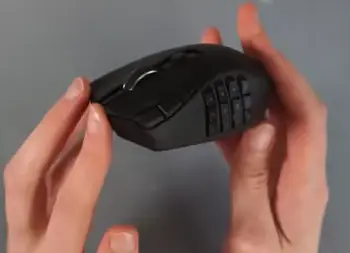
- Modular Side Panels vs Fixed Layout: The Pro lets you swap between plates with two, six, or twelve side buttons magnetically.
This flexibility meant I could use the minimal two-button setup for lighter games or work and switch to the full twelve for MMOs.
The HyperSpeed sticks with a fixed twelve-button grid plus two extra reachable buttons on the left click edge, which I found handy for quick binds but less adaptable overall.
- Battery and Charging Approach: The HyperSpeed runs on a single AA battery and lasts an impressive 400 hours in some modes.
I loved popping in a fresh battery and forgetting about charging for weeks.
The Pro uses a built-in rechargeable battery with wireless charging support, offering convenience if you have a charging dock but requiring more frequent top-ups during heavy use.
- Scroll Wheel Experience: Both have HyperScroll technology for free-spinning, but the Pro’s version adds adjustable tension and more modes.
I found myself tweaking the Pro wheel during long documents or rapid inventory scrolling in games, while the HyperSpeed’s wheel felt capable but less refined.
- Switch Feel and Durability: Optical switches on the Pro actuate faster with less debounce, giving crisp clicks that held up through thousands of actions.
The HyperSpeed’s mechanical switches felt solid but slightly heavier, which some players might prefer for tactile feedback.
- Weight and Handling: The lighter HyperSpeed surprised me with quicker flicks and less fatigue in extended sessions.
The Pro’s extra weight gave it a planted, stable feel that suited precise aiming in MOBAs.
- Lighting and Extras: Only the Pro offers customizable RGB, which looks great in a dark setup. The HyperSpeed skips this to prioritize battery life and affordability.
Key Features Of The Razer Naga V2 HyperSpeed
- Exceptional Battery Life: Up to 400 hours meant I rarely thought about power. I used it for marathon sessions without swapping batteries often.
- Lightweight Build: At around 95 grams, it felt agile compared to many MMO mice. This helped during fast-paced action where I needed to reposition quickly.
- Fixed but Effective Button Layout: The 12 side buttons are well-spaced and programmable via Synapse software. The two additional edge buttons added extra macros without clutter.
- Reliable HyperScroll Wheel: Free-spin mode made scrolling through long ability lists effortless. It toggled smoothly between modes.
- Strong Wireless Performance: HyperSpeed wireless delivered low latency, and Bluetooth mode worked well for connecting to multiple devices.
- Focus Pro 30K Sensor: Tracking stayed accurate across different surfaces, which I tested on cloth pads, hard desks, and even glass. DPI adjustments felt precise for everything from sniping to broad movements.
Pros Of The Naga V2 HyperSpeed

- Exceptional Battery Life: The standout advantage here is how the single AA battery powers the HyperSpeed for up to 400 hours in optimized modes.
In my testing, this translated to weeks of consistent daily use without ever needing a recharge mid-session. I could play extended raid nights, handle work spreadsheets, and browse for hours across multiple days on one battery.
This freedom from constant charging cables or docks made it ideal for travel or setups where power outlets are not always convenient.
Using rechargeable AA batteries further made it economical and eco-friendly over time, giving me peace of mind that the mouse would simply keep working when I needed it most.
- Lightweight Build: Weighing in at roughly 95 grams with the battery installed, this mouse feels noticeably nimble in the hand.
The reduced weight helped me execute faster movements and flicks without the arm fatigue I sometimes experience with heavier models.
During long gaming marathons or precision work tasks, my hand stayed comfortable longer, allowing better focus on gameplay or productivity instead of physical strain.
It strikes a great balance where it remains stable enough for accurate tracking but light enough to feel responsive and modern.
- Fixed but Effective Button Layout: The consistent 12 side buttons plus two edge buttons create a layout that quickly becomes second nature.
Once I programmed my macros and keybinds, I could access them instinctively without thinking. This predictability boosted my performance in games and made repetitive tasks faster.
The spacing prevents crowding, and the additional edge buttons proved useful for commonly used functions like voice chat without reaching far.
- Reliable HyperScroll Wheel: The wheel offers smooth toggling between tactile and free-spin modes, making it versatile for different needs.
In games, free-spin let me zip through long ability bars or maps effortlessly. For work, the tactile mode provided satisfying clicks for precise scrolling through documents.
It performed reliably without excessive noise or inconsistency, adding real utility to daily use.
Cons Of The Naga V2 HyperSpeed
- Fixed Button Configuration Limits Adaptability: Because the side buttons are permanent, you cannot easily simplify the mouse for different activities.
I sometimes wished for fewer buttons during casual use or non-gaming tasks to avoid accidental presses.
This lack of modularity means the layout is either perfect for your needs or requires workarounds, unlike more flexible options.
- No RGB Lighting: Skipping RGB helps battery life but removes the visual customization and immersion many gamers enjoy.
In a dark room, the mouse lacks that extra personality and subtle feedback that lighting can provide for locating buttons quickly. It feels more utilitarian as a result.
- Mechanical Switches Feel Less Refined: The Gen-2 mechanical switches are durable and clicky, but they have more travel and a slightly heavier feel compared to optical versions.
In rapid-fire situations, I noticed they did not register quite as instantly, which could matter in high-stakes moments.
While reliable long-term, they lack the premium crispness some users crave.
- Battery Swaps Introduce Minor Interruptions: Although rare thanks to the long life, changing the AA battery requires opening the compartment and a brief pause.
Carrying spares adds a small bit of planning, and not all batteries perform identically, leading to occasional weight or duration variations.
- Scroll Wheel Less Tunable: The HyperScroll works well but lacks the adjustable tension and extra modes of higher-end wheels.
I occasionally experienced minor overshoot in free-spin or less control in certain scenarios, making it good but not the most polished option available.
- Potentially Overkill Simplicity for Some: For users who want extensive customization out of the box, the straightforward design might feel basic.
It excels at core functions but does not offer as many bells and whistles for tinkerers.
Key Features Of The Razer Naga V2 Pro
- Swappable Side Plates: This is the standout feature. Changing plates takes seconds and completely alters the mouse’s capability. I kept the 12-button plate for raiding and switched to six for general productivity.
- HyperScroll Pro Wheel: More customization options here, including variable tension. It felt like a tool I could fine-tune to my exact needs rather than settling for defaults.
- Optical Gen-3 Switches: Clicks registered instantly with excellent consistency. After weeks of heavy use, they showed no signs of wear or double-clicking issues.
- Rechargeable Convenience: Pairing with a wireless charger meant I could keep it topped up without interrupting gameplay. Battery life reached solid numbers even with RGB on.
- Full Chroma RGB: Lighting synced nicely with my other Razer gear, adding immersion during night sessions.
- Advanced Onboard Memory: More profiles stored directly on the mouse let me switch setups without relying on software every time.
Pros Of The Naga V2 Pro
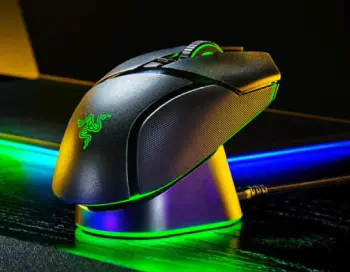
- Swappable Side Plates Provide True Versatility: The magnetic plates that let you switch between 2, 6, or 12 buttons transform this mouse into a multi-tool.
I swapped configurations depending on whether I was raiding in an MMO, doing office work, or playing lighter games.
This adaptability meant one mouse handled everything I threw at it, saving space and money compared to owning multiples.
The quick swap process encouraged experimentation with different setups.
- HyperScroll Pro Wheel Offers Superior Control: With adjustable tension and multiple modes, this wheel became one of my favorite features.
I could dial it in for precise work scrolling or loosen it for gaming frenzy. It responded exactly as I wanted, reducing errors and improving speed across tasks.
The added customization made it feel tailored to me personally.
- Optical Gen-3 Switches Deliver Crisp Performance: These switches actuate faster with excellent consistency and no debounce issues.
Every click felt immediate and satisfying, holding up flawlessly over extended use.
This reliability gave me confidence in critical moments and contributed to a higher-quality overall experience.
- Rechargeable Battery with Wireless Charging Convenience: The internal battery paired with easy charging options kept the mouse ready without hassle.
I could top it up overnight or between sessions using a dock, maintaining good runtime even with features enabled.
It integrates smoothly into a desktop setup.
- Full Chroma RGB Enhances Immersion and Usability: Customizable lighting not only looks fantastic but helps with visibility and profile identification.
Syncing with other devices created a cohesive setup that boosted my enjoyment during evening sessions.
- Advanced Onboard Memory and Build Quality: Storing multiple profiles directly on the mouse allowed instant switching without software.
The premium materials and solid construction made it feel durable and high-end, inspiring long-term confidence.
Cons Of The Naga V2 Pro
- Higher Weight Can Cause Fatigue: At around 134 grams, the Pro feels substantial, which aids stability but can tire your hand and arm during very long sessions or fast movements.
Users sensitive to weight might notice the difference compared to lighter mice.
- Premium Price Tag: The cost is significantly higher, which may not justify the extras if you do not use the modularity or RGB often.
It represents a bigger investment that needs to match your usage patterns to feel worthwhile.
- Shorter Battery Life in Demanding Modes: While solid, runtime is less than the HyperSpeed, especially with RGB or high polling active.
This requires more frequent charging attention during heavy use periods.
- Swappable Plates Require Care: The plates are convenient but add responsibility to avoid loss or damage.
Frequent swapping, though quick, can become a small routine to manage.
- Potential Over-Engineering for Simple Needs: If your button requirements are straightforward, the extra features and weight might feel unnecessary, making the mouse more complex than needed for basic tasks.
- Learning Curve for Full Customization: Getting the most out of plates, wheel settings, and profiles takes time to master, which might overwhelm users seeking plug-and-play simplicity.
Performance In Real-World Use

I tested both mice across different scenarios to get a full picture. In MMOs, the Pro’s 12-button plate combined with Hypershift gave me easy access to dozens of abilities without keyboard reliance.
The HyperSpeed handled the same tasks competently with its fixed layout, and its lighter weight made dodging mechanics feel snappier.
For productivity, the Pro shone when I swapped to the six-button plate for browser shortcuts and document navigation.
The HyperSpeed still worked fine but required more creative binding since the layout stayed fixed.
Sensor performance was nearly identical thanks to the shared 30K Focus Pro unit. Both tracked flawlessly at high speeds and various sensitivities. I noticed no meaningful difference in latency during competitive play.
Comfort-wise, the ergonomic shape suits larger hands well on both. The thumb rest and button placement felt natural after a short adjustment period. I preferred the Pro’s texture for grip during sweaty sessions, while the HyperSpeed’s lighter body reduced overall strain.
Who Should Buy The HyperSpeed?
If you want maximum battery life, a lighter mouse, and strong value without needing constant customization, go for the HyperSpeed.
It excels for players who stick to one main game or setup and appreciate simplicity.
Students, casual gamers, or anyone on a budget will find it delivers premium performance without the premium cost.
Who Should Buy The Pro?
Choose the Pro if you switch between different game genres frequently or value the ability to tailor the mouse exactly to your workflow.
Content creators, serious MMO raiders, and enthusiasts who enjoy RGB and top-tier switches will appreciate the extra polish. The modularity future-proofs it for changing needs.
Frequently Asked Questions (FAQ)
What is the difference between Naga HyperSpeed and Naga V2 Pro?
The HyperSpeed is lighter with a fixed button layout and AA battery for longer life, while the Pro offers swappable side plates, optical switches, and a rechargeable battery with more customization.
What is the difference between V2 Pro and HyperSpeed?
Main differences include modularity (Pro has interchangeable plates), scroll wheel refinement, switch type (optical vs mechanical), weight, RGB support, and price. The Pro feels more premium; HyperSpeed prioritizes lightness and value.
Is Razer Naga V2 Pro worth it?
Yes, if you need the modular plates and extra features for varied use. It is worth the investment for dedicated users, but the HyperSpeed provides similar core performance at a lower cost if flexibility is not essential.
Which Razer Naga is the best?
It depends on your priorities. The V2 Pro stands out for versatility and premium features, making it the best overall for most enthusiasts. The HyperSpeed wins for budget-conscious or weight-sensitive users.
Wrapping Up
I have covered my experiences with these mice thoroughly, sharing the strengths, weaknesses, and real usage scenarios that helped me decide.
Whether you go for the agile HyperSpeed or the adaptable Pro, both elevate your control in games and work.
Consider your hand size, primary games, and budget, then pick the one that matches your style best. You will likely enjoy either choice given their solid engineering.
Recent Posts
● Interactive 5-Zone Interior & Exterior Paint Blueprint Paint Coverage Calculator: Gallons, Primer, Square Footage & Cost Tap any architectural surface zone on the blueprint...
If you want smooth, shiny hair without spending a fortune on a premium styling tool, the Ella Bella hair dryer may be worth considering.In these Ella Bella hair dryer reviews, I’ll look...