
I set out to help you decide between the HP OfficeJet Pro 8610 and the newer HP OfficeJet Pro 9135e by sharing what I learned after testing both in a real small-office setup.
My goal is to show you which one fits your daily print, scan, and fax needs based on speed, capacity, reliability, and long-term cost so you can pick the right machine without guesswork.
| Feature | HP OfficeJet Pro 8610 | HP OfficeJet Pro 9135e |
| Print Speed (ISO) | Up to 19 ppm black / 14.5 ppm color | Up to 25 ppm black / 20 ppm color |
| Paper Input Capacity | 250 sheets | 500 sheets (250 + 250) |
| ADF Capacity | 35 sheets | 35 sheets (single-pass duplex) |
| Display | 2.65-inch color touchscreen | 4.3-inch color touchscreen |
| Duplex Printing | Automatic | Automatic |
| Duplex Scanning | Dual-pass | Single-pass |
| Connectivity | Wi-Fi, Ethernet, USB | Wi-Fi, Ethernet, USB, advanced mobile |
| Monthly Duty Cycle | Up to 30,000 pages | Up to 30,000 pages |
| Recommended Monthly Volume | 250–1,500 pages | Higher sustained office use |
| Security & Software | Basic | HP Wolf Pro Security, HP+, AI formatting |
| First Page Out | Around 12–15 seconds | Around 10–11 seconds |
| Functions | Print, copy, scan, fax | Print, copy, scan, fax |
Key Differences Between The Officejet Pro 8610 And 9135e
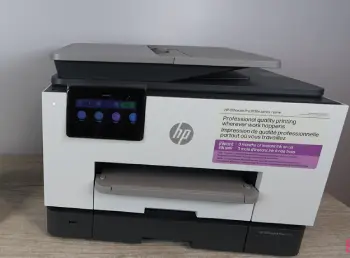
- Age and Technology Generation: The 8610 belongs to an earlier generation of OfficeJet Pro machines while the 9135e feels current the moment you power it on with faster processors and more reliable wireless.
- Paper Handling Capacity: One 250-sheet tray on the 8610 forces more frequent reloads during busy periods whereas the 9135e doubles capacity with a second tray that keeps work flowing longer.
- Scanning Experience: Dual-pass scanning on the 8610 flips pages twice for two-sided jobs but single-pass on the 9135e handles both sides in one smooth pass that saves time on contracts and forms.
- Screen Size and Interface: The smaller screen on the 8610 requires extra taps through menus while the 4.3-inch display on the 9135e makes job selection quicker and clearer when your hands are full.
- Print Speed in Real Work: The 8610 handles light days without issue yet the 9135e pulls ahead by several pages per minute once volume rises and long reports start stacking up.
- Software and Smart Features: The older model relies on traditional drivers and basic apps while the newer one adds HP+ options Instant Ink support and AI-assisted formatting tools that actually help daily tasks.
- Security Posture: Office environments need stronger protection now and the 9135e includes built-in security tools that the 8610 never received during its support life.
- Overall Daily Friction: Small interruptions like tray refills and slower scans add up on the 8610 while the 9135e removes most of those pauses so the machine stays in the background where it belongs.
Key Features Of The HP OfficeJet Pro 8610
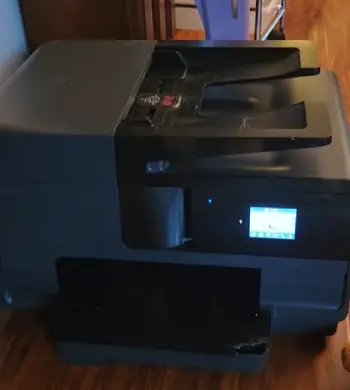
- Solid All-in-One Foundation: Print copy scan and fax still work reliably years after launch which is why many users keep these machines running with only basic care.
- Automatic Two-Sided Printing: Duplex comes standard so you save paper without thinking about it and that feature alone made the unit practical for daily reports.
- Wireless and Ethernet Options: You can place it on the network without cables or hard-wire it for rock-solid stability and both methods perform as expected for its generation.
- Touchscreen Control: Even the smaller screen lets you start jobs without a computer which remains convenient for quick copies and simple scans throughout the day.
- Respectable Duty Cycle: Rated up to 30,000 pages a month the machine handles typical home-office and small-team volumes without strain when kept inside recommended ranges.
- Ink System Compatibility: It uses the familiar 950 and 951 series cartridges and high-yield versions keep cost per page reasonable if you buy carefully and track usage.
- Compact Footprint for Its Class: The unit fits on a desk or shelf without dominating the room which mattered in tighter office layouts where space was limited.
- Proven Core Reliability: Text stays sharp on plain paper and color output remains clean enough for internal documents and basic marketing pieces over long periods of use.
Pros Of The HP Officejet Pro 8610
- Proven Longevity: These printers earned a reputation for lasting and mine ran for years with only routine cleaning and cartridge swaps which still makes used units attractive.
- Lower Upfront Cost: You can often find working examples for a fraction of a new 9135e price so the savings feel real when budgets stay tight and volume stays moderate.
- Familiar Interface: Anyone who used HP inkjets in the mid-2010s feels at home immediately and training time drops to almost zero for returning users.
- Adequate Speed for Light to Medium Use: For a few hundred pages a month the 19 and 14.5 ppm numbers never felt slow and first-page-out times stayed acceptable in daily practice.
- No Forced Subscription: You buy ink only when you need it and no monthly plan is required to keep the printer alive which some people still prefer for full control.
- Still Capable of Professional Output: Black text looks sharp on plain paper and color graphics for internal reports or simple flyers stay clean enough for everyday business needs.
- Easy Parts Familiarity: Cartridges remain widely available and basic maintenance steps stay simple which reduces downtime when something eventually needs attention.
Cons Of The HP Officejet Pro 8610
- Slower Throughput on Busy Days: When the office hits a rush the lower ISO speeds become noticeable and waiting for a long document feels longer than it should in current workflows.
- Limited Paper Capacity: One 250-sheet tray means more interruptions and if you print mixed sizes or keep letterhead separate you end up swapping trays by hand more often.
- Older Scanning Method: Dual-pass ADF scanning takes extra time and can introduce slight skew on thicker stacks while single-pass machines simply feel more modern and efficient.
- Aging Connectivity and Support: Wireless setup grows more finicky on current routers and firmware updates slowed years ago so newer security features never arrived for this model.
- Smaller Control Screen: Navigating menus requires more taps and on a busy morning that extra friction adds up across repeated jobs throughout the day.
- Parts and Long-Term Availability: As the model ages genuine high-yield cartridges stay available yet some mechanical parts become harder to source when repairs eventually arise.
- Higher Daily Friction Overall: The combination of slower scans more frequent paper loads and older software creates small pauses that modern machines largely eliminate.
Key Features Of The HP OfficeJet Pro 9135e
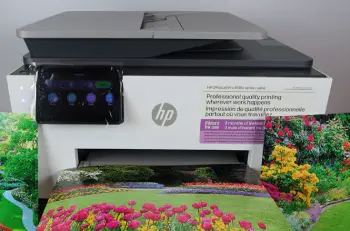
- Faster Print Engine: 25 ppm black and 20 ppm color change the daily rhythm so long jobs finish before you finish your coffee and shared offices feel the difference immediately.
- Expanded Paper Capacity: Two 250-sheet trays give you 500 sheets total and I load letter in one and legal or letterhead in the other then forget about refills for days at a time.
- Single-Pass Duplex Scanning: Both sides of a page travel through in one pass so contracts invoices and multi-page forms move faster with fewer jams and less waiting.
- Larger 4.3-Inch Touchscreen: Clearer icons easier job previews and quicker access to settings make the interface feel designed for people who actually use the printer every hour.
- Modern Connectivity and Mobile Support: Reliable Wi-Fi Ethernet and strong mobile printing options keep the machine connected even when the office network gets crowded with other devices.
- HP+ and Instant Ink Options: You can enroll for automatic ink delivery and extra features while the AI formatting tools help keep documents looking consistent without extra software.
- Stronger Security Suite: HP Wolf Pro Security tools give small offices better protection against common network risks that older models never addressed in the same way.
- Refined Paper Path Design: Trays feel more solid and the overall feed consistency handles mixed paper types with fewer misfeeds during extended print runs.
Pros Of The HP OfficeJet Pro 9135e
- Noticeably Quicker Workdays: Higher speeds and faster first-page-out times reduce waiting so in a shared office that difference is felt by everyone who sends jobs.
- Higher Capacity Means Fewer Interruptions: 500 sheets and better output tray capacity keep the machine running longer between interventions which protects focus during busy stretches.
- Better Scanning Workflow: Single-pass duplex scanning stands out as the biggest upgrade for anyone who digitizes paperwork regularly and needs clean results without extra steps.
- Future-Ready Software: AI-assisted features and ongoing app support mean the printer stays useful longer as your document needs and mobile habits continue to evolve.
- Improved Build and Reliability Feel: The trays feel more solid the paper path more consistent and the overall package more refined than the older model under daily pressure.
- Stronger Security Out of the Box: You receive tools that the 8610 never offered and for any office that connects to a network this extra layer brings real peace of mind.
- Smoother Shared Use: Faster completion times and larger trays reduce the line of people waiting which improves the whole office rhythm without anyone noticing the printer itself.
Cons Of The HP OfficeJet Pro 9135e
- Higher Purchase Price: You pay more upfront for the extra tray faster engine and newer features and the gap stays noticeable when you compare current street prices side by side.
- Potential Subscription Dependency: Some HP+ features and Instant Ink plans work best when you stay enrolled and users who prefer pure cartridge ownership may find the ecosystem a bit pushy.
- Slightly Larger Footprint: The second tray adds height and depth so measure your space carefully before ordering if the desk or shelf is already crowded with other equipment.
- Learning Curve for New Features: The extra software options take a short time to explore yet most people settle in quickly once they run a few jobs and adjust the defaults.
- Ink Cost Management Still Required: Even with Instant Ink available high-volume color work can add up so you still need to watch usage if monthly budgets remain tight.
- Feature Overlap for Light Users: If your volume stays very low some of the advanced capacity and speed advantages go unused and the extra cost may not justify itself fully.
Real-World Performance And Daily Use
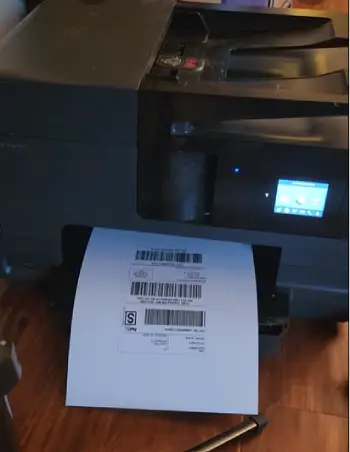
I ran both machines side by side for several weeks. The 8610 handled my baseline mix of invoices internal reports and occasional color flyers without complaint.
Text stayed crisp. Color held up for office needs. The moment volume climbed though the waiting started. A 30-page duplex report felt slower than it should.
Scanning a stack of signed contracts required patience because of the dual-pass method.
Switching to the 9135e changed the rhythm. Jobs finished sooner. The second tray let me keep going through a busy afternoon without stopping.
Single-pass scanning turned a ten-minute task into something closer to five. The larger screen made it easier to confirm settings before hitting start.
Wireless connections stayed solid even when the office network got crowded with other devices.
Print quality differences are smaller than the speed and convenience differences. Both produce sharp black text and acceptable color for business documents.
Photo-quality output is not the point of either machine. They are office tools first. Where the 9135e pulls ahead is consistency under load and the reduced friction of daily tasks.
Noise levels are comparable. Both settle into a steady hum during long jobs. The newer model feels a bit more refined when the ADF is running but neither will disturb a quiet office if placed a few feet away from desks.
Who Should Choose The 8610?
If your monthly volume stays under a few hundred pages your budget is limited and you already know the older interface the 8610 still makes sense.
Many small home offices and solo operators keep these units running successfully. Just accept that you will reload paper more often and that scanning will take a little longer.
Check the condition of any used unit carefully—look at the printhead health and make sure the ADF still feeds reliably.
Who Should Choose The 9135e?
If you share the printer with a few people print more than a thousand pages a month or simply want fewer interruptions the 9135e is the clearer choice.
The extra tray faster speeds and single-pass scanning pay for themselves in time saved. The modern security and software features add peace of mind.
For most small businesses in 2026 this is the more practical daily driver.
Running Costs And Longevity Considerations
Both machines use pigment-based inks that resist fading and smudging better than dye inks. Cost per page depends heavily on whether you use high-yield cartridges or a subscription plan.
The 8610’s 950/951 series remains widely available. The 9135e works with current Instant Ink options that can lower costs if your volume is steady.
Calculate your actual monthly pages before deciding. A subscription that looks cheap at low volume can become expensive if you suddenly print more.
Duty cycles are listed similarly at 30,000 pages but the recommended monthly volume for comfortable long-term use sits lower on both.
Stay inside the recommended range and either machine should last years. The 9135e benefits from newer mechanical design and ongoing firmware support which tilts the longevity advantage in its favor.
Setup And Everyday Convenience
Setting up the 8610 feels familiar if you have done it before. Drivers install you connect to Wi-Fi or Ethernet and you are printing.
The 9135e streamlines the process further with clearer on-screen guidance and stronger mobile app support. Once running both support common mobile printing methods.
The newer model simply stays connected more reliably in mixed Wi-Fi environments.
Maintenance is similar—occasional printhead cleaning cycles and paper path checks. The 9135e’s design seems to handle dust and occasional thicker paper a bit better but neither is maintenance-free.
Keep a spare set of cartridges on hand and you avoid most downtime.
Frequently Asked Questions (FAQ)
OfficeJet models target lighter home use with simpler features. OfficeJet Pro models add faster speeds stronger paper handling better duty cycles and more business-oriented tools for small offices.
The HP OfficeJet Pro 8610 launched in 2014.
The 9135e offers higher print speeds a second 250-sheet paper tray for 500-sheet total capacity a larger 4.3-inch touchscreen and single-pass duplex scanning. The 9125e is the more compact value version with one tray and dual-pass scanning.
Later OfficeJet Pro models such as the 8710 series and eventually the 90xx and 91xx series took its place. The 9125e and 9135e sit in the current generation that fills the same small-office role.
Final Thoughts
After living with both I reached a clear preference for the 9135e in any setting that prints regularly.
The combination of speed capacity and single-pass scanning removes the small daily frustrations that the 8610 still carries. You will notice the difference every time you send a multi-page job or scan a stack of two-sided documents.
That said if your needs are light and the price difference is significant a well-maintained 8610 can still serve you well for years.
Match the machine to your actual volume and tolerance for interruptions. Once you do that either choice becomes straightforward.
You now have the side-by-side picture. Weigh the features against your typical week of printing and scanning. The right printer is the one that disappears into the background and just works when you need it.
Recent Posts
Lemme Play Gummies Review: Do They Really Support Women's Intimacy?
Lemme Play Gummies are marketed as daily intimacy supplements designed to support women's libido, arousal, sexual satisfaction, and healthy blood circulation.Although the formula contains...
Royal Oak Lump Charcoal Review: Is It Worth Buying for Your Grill?
If you want natural hardwood charcoal that delivers strong heat, authentic smoky flavor, and flexibility for different grilling styles, Royal Oak Lump Charcoal deserves your attention. I...