
If you’re tired of plugging your iPhone into your car every time you drive, the Ottocast U2 Air Pro may seem like an attractive solution.
It promises to convert wired Apple CarPlay into wireless CarPlay in just a few minutes.
After spending considerable time researching user feedback and examining its real-world performance, I found that while the device offers convenience, recurring complaints about connection stability, lag, and reliability make it difficult for me to recommend it over competing options.
Before spending your money, it’s important to understand both its strengths and its shortcomings.
My Personal Experience With The Ottocast U2 Air Pro
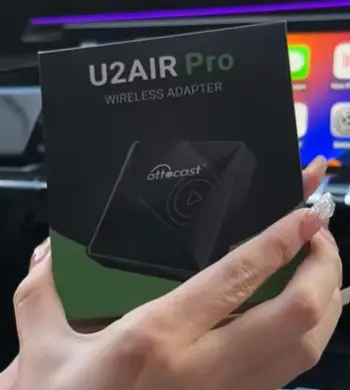
When I first came across the Ottocast U2 Air Pro, I was intrigued by the idea of eliminating the cable clutter inside my vehicle.
Like many drivers, I wanted the convenience of getting into my car and having Apple CarPlay connect automatically without plugging in my phone every single time.
The initial setup was surprisingly simple. I connected the adapter to my vehicle’s USB port, paired it with my iPhone, and within a few moments, wireless CarPlay appeared on my infotainment screen.
The first impression was positive. The interface looked identical to wired CarPlay, and I appreciated the cleaner dashboard setup.
For the first few days, the device performed reasonably well. Music streamed smoothly, navigation apps launched correctly, and phone calls sounded clear.
During short commutes, I almost forgot the adapter was even there. This is where the U2 Air Pro shines. When it works correctly, it genuinely improves the driving experience.
However, as I continued using it, I started noticing issues that many other users have reported online. The most common problem was inconsistent connectivity.
Some mornings the adapter connected instantly, while other times I had to wait significantly longer.
Occasionally, I found myself restarting Bluetooth or disconnecting and reconnecting the adapter to get CarPlay working.
Another issue was audio lag. When watching content while parked or switching between apps, there was often a noticeable delay between actions and responses.
Although this may not bother every user, it became increasingly frustrating over time.
Navigation performance was generally acceptable, but there were moments when maps appeared slightly delayed compared to my actual location.
While the delay wasn’t severe enough to make navigation unusable, it certainly wasn’t as responsive as a direct wired connection.
I also observed that software updates seemed to be a mixed experi
ence. Some users reported improvements after updates, while others encountered new bugs. This inconsistency creates uncertainty regarding long-term reliability.
The biggest concern for me was overall dependability. Wireless technology is supposed to make life easier.
When I have to troubleshoot connection issues before driving, the convenience factor starts disappearing.
Several times I found myself wishing I had simply plugged in a cable instead.
Battery consumption was another consideration. Since wireless CarPlay continuously relies on Bluetooth and Wi-Fi communication, my iPhone battery drained faster than usual during longer drives.
This isn’t unique to Ottocast, but it’s still worth mentioning.
After several weeks of evaluation, my impression became clear. The Ottocast U2 Air Pro delivers convenience when everything works correctly, but the inconsistent performance prevents it from being a truly seamless experience.
For some users it may function perfectly, while others may experience the connectivity frustrations frequently discussed in customer reviews.
Key Features Of Ottocast U2 Air Pro
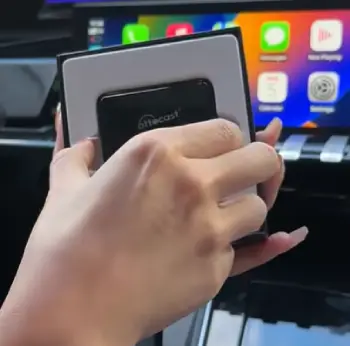
- Wireless Apple CarPlay Conversion
The primary function of the U2 Air Pro is transforming factory wired CarPlay into wireless CarPlay.
This allows drivers to leave their phones in their pockets or bags while maintaining access to CarPlay functionality.
- Automatic Reconnection
The device is designed to reconnect automatically whenever you start your vehicle. In ideal conditions, this creates a smooth hands-free experience.
- Compact Design
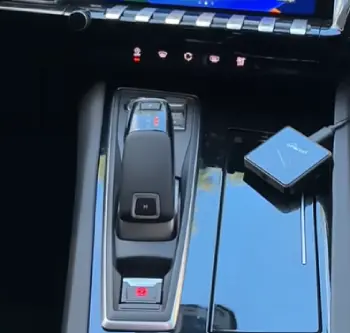
The adapter is relatively small and discreet. It can be tucked away inside most vehicle interiors without creating visual clutter.
- Broad Vehicle Compatibility
Ottocast advertises compatibility with numerous vehicles equipped with factory-wired Apple CarPlay systems.
- Firmware Updates
The company provides firmware updates intended to improve stability and compatibility over time.
Pros Of Ottocast U2 Air Pro
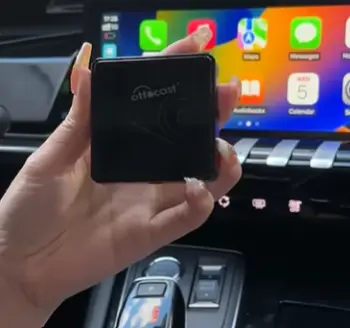
- Cable-Free Driving Experience
The most obvious advantage is convenience. Not needing to plug in your iPhone every time you enter your vehicle creates a cleaner and more comfortable driving experience.
I appreciated being able to start the car and access CarPlay automatically.
- Quick Initial Setup
Most users can complete setup within minutes. The pairing process is straightforward and doesn’t require advanced technical knowledge.
- Clean Dashboard Appearance
Without charging cables hanging around the center console, the vehicle interior feels more organized. This may seem minor, but it contributes to a more premium experience.
- Maintains Familiar CarPlay Interface
Unlike some aftermarket solutions that introduce complicated menus, the U2 Air Pro preserves the standard Apple CarPlay environment. Everything feels familiar from the beginning.
- Decent Performance During Stable Connections
When the connection remains stable, navigation, calls, messaging, and music playback work reasonably well. Short daily commutes often deliver satisfactory results.
- Portable Between Vehicles
If multiple vehicles support wired CarPlay, the adapter can be moved relatively easily between compatible cars.
- Useful for Frequent Drivers
People who enter and exit their vehicles multiple times daily may appreciate eliminating repetitive cable connections.
- Reduced Wear on Charging Ports
Repeated plugging and unplugging can contribute to charging port wear over time. Wireless operation helps reduce physical strain on both cables and device ports.
- Compact Hardware
The adapter occupies minimal space and does not significantly alter the appearance of the vehicle interior.
- Potential Convenience Improvement
For users whose vehicles and smartphones maintain a stable connection, the convenience factor can be substantial. Unfortunately, this benefit depends heavily on compatibility and consistency.
Cons Of Ottocast U2 Air Pro
- Frequent Connectivity Complaints
The most common criticism involves connection instability. Numerous users report random disconnections, failed automatic connections, and pairing issues.
- Performance Can Be Inconsistent
One day the device may work perfectly, while the next day it may require troubleshooting. This inconsistency is a recurring complaint.
- Audio Delay
Some users experience noticeable lag when using media applications. While not always severe, it can affect the overall experience.
- Slower Than Wired CarPlay
Wireless CarPlay adapters inevitably introduce some latency. The U2 Air Pro is no exception.
- Software Update Concerns
Firmware updates do not always resolve existing issues. In some cases, updates appear to introduce new bugs.
- Increased Phone Battery Usage
Wireless communication requires additional power, leading to faster battery consumption during longer trips.
- Premium Pricing
The device often costs significantly more than many consumers expect for a wireless adapter. Considering the reported reliability concerns, the value proposition becomes questionable.
- Compatibility Variations
Performance can vary depending on vehicle model, infotainment system, and smartphone version. What works well in one vehicle may perform poorly in another.
- Customer Support Criticism
Some customers report difficulties obtaining timely support when encountering technical issues.
- Reliability Questions
For a device designed to simplify driving, reliability should be its strongest feature. Unfortunately, reliability is one of the areas most frequently criticized.
Maintenance Tips For Ottocast U2 Air Pro
- Keep Firmware Updated Carefully
Firmware updates can improve performance and compatibility. Before updating, I recommend reviewing user feedback regarding the latest release to avoid introducing new issues.
- Clean USB Connections Regularly
Dust and debris can affect connectivity. Periodically inspect and clean the adapter’s USB connection points.
- Avoid Extreme Temperatures
Electronic devices perform best within recommended temperature ranges. Excessive heat inside parked vehicles may impact long-term durability.
- Restart the Device Periodically
Occasional reboots can help clear temporary software glitches and improve performance consistency.
- Maintain Updated iPhone Software
Keeping iOS updated helps ensure compatibility with wireless CarPlay accessories and may reduce connection issues.
- Limit Wireless Interference
Multiple Bluetooth and Wi-Fi devices operating simultaneously can sometimes interfere with performance. Reducing unnecessary wireless activity may improve stability.
- Secure the Adapter Properly
Avoid placing stress on USB ports. Secure positioning can help prevent accidental disconnections and hardware damage.
- Monitor Battery Consumption
Wireless CarPlay increases battery usage. During longer drives, consider keeping a charging option available.
- Check Compatibility Before Vehicle Changes
If you upgrade your vehicle or infotainment system, verify compatibility before expecting identical performance.
- Store Properly When Not in Use
If you remove the adapter for extended periods, store it in a dry location away from excessive heat and moisture.
Comparison Of Ottocast U2 Air Pro With Other Brands
- Ottocast U2 Air Pro vs Carlinkit
Carlinkit adapters are among the most frequently compared alternatives.
While neither brand is perfect, many users report more consistent long-term performance from Carlinkit products.
Carlinkit devices often receive praise for connection stability, though setup experiences can vary.
- Ottocast U2 Air Pro vs AAWireless
AAWireless has developed a strong reputation for reliability in the wireless connectivity market.
Many technology enthusiasts favor AAWireless products due to responsive software support and active development.
Compared with Ottocast, AAWireless often receives fewer complaints about random disconnections.
- Ottocast U2 Air Pro vs Motorola MA1
The Motorola MA1 is frequently regarded as one of the better wireless adapters available.
It tends to deliver a more polished user experience with fewer connectivity concerns.
Although availability can sometimes be limited, many consumers consider it a safer purchase.
- Ottocast U2 Air Pro vs Wired CarPlay
This comparison may seem unfair, but it is important. A direct wired CarPlay connection remains the most reliable solution.
Wired connections offer lower latency, faster responsiveness, and greater consistency.
If reliability is your top priority, staying wired may actually provide a better overall experience.
Is Ottocast U2 Air Pro Worth Buying?
Based on my research and analysis, I would approach the Ottocast U2 Air Pro cautiously. The convenience factor is undeniably appealing, and some users report positive experiences.
However, the large number of complaints regarding connection reliability, lag, and inconsistent performance make it difficult for me to recommend confidently.
When spending premium money on a wireless adapter, I expect dependable performance every day. Unfortunately, the U2 Air Pro appears to deliver mixed results depending on the vehicle and usage scenario.
If reliability is your highest priority, exploring alternative wireless adapters or simply using wired CarPlay may provide better long-term satisfaction.
Who Should Avoid The Ottocast U2 Air Pro?
- Drivers Who Need Maximum Reliability
If you rely on Apple CarPlay every day for navigation, business calls, or long commutes, the Ottocast U2 Air Pro may not be the best choice. Reports of random disconnections and inconsistent performance can become frustrating when you need your infotainment system to work flawlessly every time you start your vehicle.
- People Who Are Happy With Wired CarPlay
If plugging in your iPhone doesn’t bother you, there may be little reason to switch.
Wired CarPlay remains faster, more stable, and more dependable than most wireless adapters.
You may end up spending extra money for a convenience that doesn’t significantly improve your driving experience.
- Users Who Expect Instant Connections Every Time
The U2 Air Pro works well when everything goes according to plan, but connection times can vary.
If you expect your phone to connect immediately every single time you enter your vehicle, the occasional delays may become annoying.
- Budget-Conscious Buyers
Considering its premium price, the U2 Air Pro may not offer the best value for money.
If you’re shopping on a tight budget, there are alternative wireless adapters that often deliver similar or better performance at a lower cost.
- Owners of Vehicles With Known Compatibility Issues
Because wireless adapters can behave differently depending on the vehicle’s infotainment system, drivers whose vehicles already have occasional CarPlay compatibility problems should be cautious.
Adding another layer of wireless technology could potentially introduce additional issues.
- Users Looking for a Long-Term Set-and-Forget Solution
If your goal is to install a device once and never think about it again, the U2 Air Pro may not meet your expectations.
The mixed reliability record suggests that some owners may need ongoing maintenance, updates, or troubleshooting to keep it functioning smoothly.
Also Read: Comparison Of Ottocast U2 Air And Pro
Frequently Asked Questions (FAQ)
Ottocast products that support camera integration generally function as advertised when installed correctly. However, user experiences vary significantly depending on vehicle compatibility, firmware versions, and installation quality.
The main advantages include wireless Apple CarPlay functionality, simple setup, reduced cable clutter, automatic reconnection capabilities, and a cleaner vehicle interior. When operating correctly, it offers a convenient driving experience.
In my opinion, the answer depends on your expectations. If convenience is your primary goal and you are willing to accept occasional connectivity issues, it may be worthwhile. However, considering the number of negative reviews and reliability complaints, many buyers may find better value elsewhere.
Yes, most users leave the adapter connected permanently. It is designed for continuous installation. However, prolonged exposure to excessive vehicle heat may impact long-term durability.
Wrapping Up
The Ottocast U2 Air Pro promises a convenient wireless CarPlay experience, but the reality is less impressive than the marketing suggests.
While I appreciate the cable-free convenience and easy setup, the recurring reports of connection instability, lag, and inconsistent performance are difficult to ignore.
For drivers who prioritize reliability, there are stronger alternatives available.
Unless you specifically want to experiment with wireless CarPlay and accept potential frustrations, I would not recommend the Ottocast U2 Air Pro as my first choice.
Recent Posts
● Interactive 5-Zone Interior & Exterior Paint Blueprint Paint Coverage Calculator: Gallons, Primer, Square Footage & Cost Tap any architectural surface zone on the blueprint...
If you want smooth, shiny hair without spending a fortune on a premium styling tool, the Ella Bella hair dryer may be worth considering.In these Ella Bella hair dryer reviews, I’ll look...