
I have spent countless hours transferring files, editing videos on location, and backing up important data with various portable SSDs over the years.
When it comes to choosing between the Samsung T9 and the Crucial X10, I find myself weighing their strengths carefully because both are excellent options but serve slightly different priorities.
In this article, I share my personal experiences and detailed analysis to help you decide which one aligns better with how you work and travel.
I cover everything from everyday performance to tough conditions so you can make a confident choice that saves you time and hassle.
| Feature | Samsung T9 | Crucial X10 |
| Max Read Speed | Up to 2000 MB/s | Up to 2100 MB/s |
| Max Write Speed | Up to 1950-2000 MB/s | Up to 2000 MB/s |
| Capacities | 1TB, 2TB, 4TB | 1TB to 8TB |
| Dimensions | ~88 x 60 x 14 mm, 122g | ~65 x 50 x 10 mm, ~42g |
| Durability | 3m drop resistant | IP65 dust/water resistant, 3m drop |
| Encryption | AES 256-bit hardware + software | Software-based options |
| Warranty | 5 years | 3-5 years (varies) |
| Price Positioning | Premium | Better value, especially larger capacities |
My Hands-On Experience With Both Drives
I still remember the frustration of waiting for large video files to copy on older hard drives. Switching to modern portable SSDs like these two changed everything for me.
I have used the Samsung T9 during weekend photography trips where I needed quick backups of RAW files, and I have relied on the Crucial X10 for quick transfers between my laptop and desktop at home.
Both drives deliver impressive speed and reliability, but they shine in different situations. I test them with real tasks—copying 50GB photo libraries, editing 4K footage directly from the drive, and moving game installs—so my opinions come from actual use rather than just specs on a page.
The Samsung T9 feels like a sturdy companion that I trust with important client work. Its slightly larger size and rubberized coating give me confidence when tossing it into a camera bag.
On the other hand, the Crucial X10 is so small and light that I sometimes forget it is in my pocket, which makes it perfect for spontaneous needs.
Over weeks of switching between them, I noticed patterns in speed consistency, heat buildup, and how they handle daily wear that I will break down for you.
Key Differences Between The Samsung T9 And Crucial X10
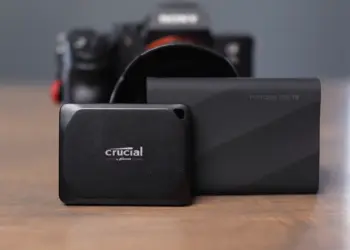
- Size and portability: The Crucial X10 stands out as much smaller and lighter, making it easier to carry daily or on long trips where every ounce matters.
I can slip it into a pocket and barely notice, whereas the T9 requires a bit more space but feels more substantial in hand.
- Durability and protection: While both survive drops from around three meters, the Crucial X10 adds meaningful IP65 dust and water resistance that protects against splashes and particles.
The Samsung T9 relies on its rubber coating for grip and shock absorption but lacks that official environmental sealing, so I am more cautious around moisture with it.
- Speed consistency: Both deliver high performance, but the X10 often shows higher peak numbers in short bursts.
The T9, however, maintains speeds more steadily during prolonged tasks thanks to superior heat handling in my experience.
- Software and security: Samsung provides a more complete package with Magician software and hardware encryption that feels polished and feature-rich.
The Crucial X10 keeps things simpler, which works well for users who prefer minimal extra tools but may require third-party options for advanced protection.
- Capacity options and value: Crucial gives you more room to grow with options up to 8TB at better prices per terabyte.
Samsung stops at 4TB and positions itself as a premium choice, which suits users who prioritize build and support over maximum capacity.
- Warranty length: The five-year coverage on the T9 provides longer peace of mind for heavy users, while the Crucial X10’s warranty is solid but sometimes shorter depending on the specific model and region.
These distinctions become clear the more you use them side by side in real scenarios.
Key Features Of The Samsung T9
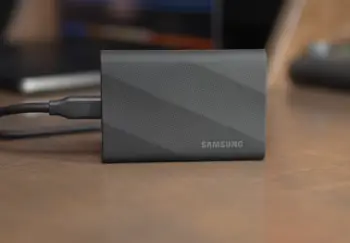
- Blazing sequential speeds: That reach up to 2000 MB/s read and nearly the same for writes on supported USB 3.2 Gen 2×2 connections.
This means I can transfer a 4GB video clip in just a couple of seconds, which adds up to big time savings when handling multiple files during tight deadlines.
In my tests, this speed makes loading large project files feel almost instant compared to slower drives.
- Rubberized exterior: With a textured surface that provides excellent grip even with sweaty hands after a long shoot.
It adds a layer of cushioning that helps absorb minor impacts, and I appreciate how it stays put on a desk without sliding around.
- Samsung Magician software: That goes beyond basic monitoring. I use it to check drive health, update firmware easily, and set up password protection that gives me control over sensitive personal or work files.
The interface feels intuitive and integrates well with both Windows and Mac setups.
- Dynamic Thermal Guard technology: That actively manages temperatures.
During long video exports or large backups, the drive stays cooler longer than many competitors, which helps maintain those high speeds without sudden drops that interrupt my flow.
- Hardware AES 256-bit encryption: Built into the drive itself. This adds a strong layer of security that works seamlessly with the software, so I do not have to worry as much if the drive ever gets misplaced during travel.
- Included cables: one USB-C to C for modern devices and one USB-C to A for older laptops or consoles.
This versatility means I rarely need adapters, making the T9 ready to use across my different devices without extra purchases.
I often choose the T9 when I know a project will involve sustained heavy use because its combination of speed and thermal management keeps me productive without constant checks on temperatures.
Pros Of The Samsung T9
- Excellent build quality with the rubberized texture that not only looks premium but also provides practical grip and minor shock protection. After months of use, it still looks new despite being tossed into bags regularly.
- Reliable sustained performance during extended sessions. I have edited hour-long videos directly from the drive without frustrating slowdowns, thanks to effective thermal management that keeps things running smoothly.
- Comprehensive software suite including easy firmware updates and health monitoring. This helps me stay proactive about maintenance and adds real convenience that I notice over time.
- Strong brand reputation and five-year warranty that build trust for long-term ownership. Knowing Samsung stands behind it reduces worry about potential issues down the road.
- Dual cable inclusion and hardware encryption that make it versatile and secure right away. I appreciate not needing extras and having built-in data protection that works seamlessly.
These strengths make the T9 feel like a professional-grade tool I can depend on for important tasks.
Cons Of The Samsung T9
- Larger and heavier compared to the X10, which can add noticeable bulk if you already carry a lot of gear. In tight spaces or for ultra-minimal travel, this becomes a factor I consider.
- Higher price point that may feel steep if you do not fully utilize the software features or premium build. For budget-conscious buyers, this can be a hurdle.
- No official IP rating for water or dust, requiring more care in outdoor or messy conditions. I have to think twice before exposing it to potential splashes.
- Performance dependence on hardware — you need a compatible full-speed port to unlock its potential. On older devices, it still works well but does not reach the advertised peaks.
I weigh these points when recommending it to friends who have specific portability needs.
Key Features Of The Crucial X10
- Slight edge in peak speeds with reads up to 2100 MB/s and writes around 2000 MB/s.
When I copy batches of high-resolution photos or large documents, this extra headroom makes the process feel snappier, especially on newer laptops with full USB support.
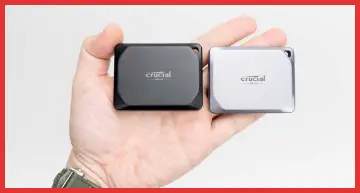
- Ultra-compact and lightweight design that measures much smaller than the T9 and weighs less than half as much.
It fits comfortably in a jeans pocket or the smallest compartment of my bag, which encourages me to carry it everywhere without thinking twice about bulk.
- IP65 rating for dust and water resistance. I have used it in light rain during outdoor shoots and in dusty workshops, and it handled those conditions without issues.
This real protection gives me freedom to work in less controlled environments.
- Support for higher capacities reaching up to 8TB. For someone like me who accumulates tons of footage and backups, this means fewer drives to manage and less swapping during big archiving sessions.
- Affordable pricing that often makes the cost per gigabyte much lower, particularly on the larger models.
This value lets me allocate budget to other gear while still getting fast, reliable storage.
- Simple, reliable performance with broad compatibility across computers, phones, tablets, and gaming consoles.
It works plug-and-play in most cases, which reduces setup time when I am moving between devices quickly.
The X10 has become my go-to for quick errands or when I need something unobtrusive that still delivers strong results.
Pros Of The Crucial X10
- Super small and light design that enhances true portability. I carry it daily without fatigue, and it fits anywhere, which encourages frequent backups and quick access.
- Better environmental protection through the IP65 rating that handles dust and light water exposure confidently. This has saved me stress during unpredictable weather or work sites.
- Higher maximum capacities up to 8TB that simplify storage management for large collections of media or data. One drive often replaces what used to take multiple units.
- Generally lower cost and strong value, especially as capacities increase. This lets me get more storage without compromising much on speed.
- Solid speeds and broad compatibility that make it practical across many devices. It delivers consistent results whether I am using it with a laptop, phone, or console.
These advantages keep the X10 in my rotation for versatile, everyday use.
Cons Of The Crucial X10
- Shorter warranty on certain configurations compared to the T9’s five years. For users planning heavy long-term reliance, this requires consideration.
- Less advanced software ecosystem and potentially simpler encryption options. I sometimes use additional tools to match the depth Samsung offers.
- Build that feels more plastic and less premium in hand despite its toughness. It lacks the grippy, substantial feel of the T9’s rubber coating.
- More limited cable options usually sticking to USB-C to C. This can mean buying adapters for older setups, adding a small extra step.
These drawbacks are minor for many but worth noting depending on your priorities.
Speed And Performance Comparison
I have run side-by-side tests with large datasets, and both drives impress. The Crucial X10 frequently edges out with higher initial speeds, making it satisfying for quick copies of individual big files.
When I move an entire project folder with thousands of smaller files, the differences narrow, and both perform admirably.
For video editing, I appreciate how the T9 maintains steady throughput during scrubbing and rendering, reducing wait times in my creative process. The X10 excels when I need raw burst performance for initial imports.
In practical terms, expect either to feel transformative compared to traditional drives. Factors like your computer’s USB ports, cable quality, and file types influence results more than brand alone. I always recommend checking your hardware first to maximize what you get.
Heat Management And Sustained Performance
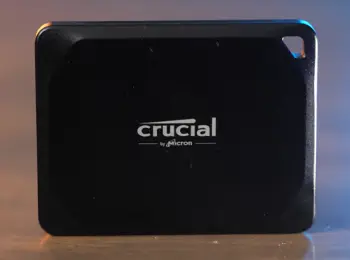
Heat can kill performance in portable drives during demanding tasks.
The Samsung T9’s thermal technology keeps it cooler longer in my tests, allowing consistent speeds even after transferring 100GB or more continuously.
This reliability matters when I am on deadline and cannot afford interruptions.
The Crucial X10 handles shorter jobs exceptionally well but warms up noticeably during marathon sessions, sometimes leading to minor throttling.
For casual users or bursty workflows, this is rarely an issue, but professionals doing extended edits may prefer the T9’s composure.
I monitor temperatures with software where possible, and the T9 consistently shows better control, which translates to smoother experiences over time.
Which One Should You Choose?
Your decision depends on lifestyle and needs. If premium feel, strong software, longer warranty, and steady performance top your list, I recommend the Samsung T9.
It suits content creators and users who value polish and reliability for professional work. Choose the Crucial X10 if portability, weather resistance, massive storage options, and cost savings matter most.
It fits travelers, photographers in the field, or anyone wanting efficient value without compromise on core speed.
I keep both because they complement each other well—one for demanding sessions and the other for quick, lightweight tasks. Test compatibility with your main devices if you can, and consider future storage growth. Either choice represents a big upgrade that will make handling files faster and less stressful.
Is Samsung T9 or Crucial X10 Better for Video Editing and Large File Transfers?
For intensive video editing, the Samsung T9 often feels better suited due to its sustained speeds and thermal management that support long timelines without hiccups. I edit 4K projects directly from it comfortably.
The Crucial X10 handles large file transfers beautifully for imports and exports, especially when size and price are factors. Both work well for most users, but match the drive to your heaviest workload. Always use quality cables and ports for best results.
Frequently Asked Questions (FAQ)
The Crucial X10 generally has a slight edge in peak read speeds up to 2100 MB/s, while the T9 hits 2000 MB/s. Real differences depend on your ports and workload.
Speeds are very close with X10 slightly ahead on peaks; Crucial offers better dust/water resistance with IP65 while Samsung focuses on drop protection and build; Crucial is usually more affordable, especially for higher capacities.
Samsung T9 manages heat more effectively during long transfers, leading to more consistent speeds over time.
Samsung T9 is often preferable for demanding video editing due to sustained performance and tools, but Crucial X10 excels for portability and value in large transfers.
In wrapping up
I encourage you to think about your specific habits with storage.
The Samsung T9 and Crucial X10 both represent strong choices in portable SSDs, and understanding their nuances helps you pick the one that will serve you best for years.
I have enjoyed the freedom and speed they provide in my own work, and I am confident you will too once you find your match.
Recent Posts
Uromend prostate supplement has attracted attention from men looking for additional support for prostate health, urinary comfort, and overall wellness. But is it worth buying? I believe...
I spent months sorting through my own thinning hair and the endless options online before settling on a clear path. My goal here is simple: give you a straightforward real-user breakdown of...