
I set out to compare the Skylight Calendar and the Echo Show 15 because both promise to organize family life on a large touchscreen, yet they take very different paths.
After living with each one in my home for weeks, I wanted to share what actually works day to day so you can decide which fits your routines better.
| Feature | Skylight Calendar (15″) | Echo Show 15 |
| Screen size | 15-inch Full HD touchscreen | 15.6-inch Full HD touchscreen |
| Primary focus | Family calendar, chores, lists, meal planning | Smart home hub, Alexa, Fire TV, video calls |
| Voice control | None | Full Alexa |
| Camera | None | 13MP with auto-framing and privacy shutter |
| Photo display | Built-in photo screensaver (Plus plan) | Amazon Photos slideshow and artwork |
| Calendar sync | Google, Apple, Outlook, Cozi and more (two-way) | Google, Apple, Outlook via Alexa |
| Extra hardware | Wall mount and stand included | Wall mount included; stand sold separately |
| Subscription | Optional Plus (~$79/year) for advanced tools | None required for core features; some Alexa extras optional |
| Smart home | None | Zigbee, Thread, Matter hub + Alexa control |
| Streaming | None | Full Fire TV with remote |
| Price range | Around $300 | Around $300 |
Key Differences Between The Skylight Calendar And Echo Show 15
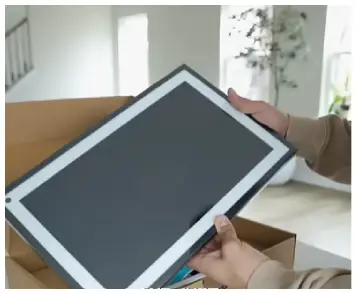
- Purpose-built versus multi-purpose design: The Skylight Calendar exists only for schedules and lists. The Echo Show 15 tries to do everything at once.
My kitchen felt calmer with the focused screen.
- Interface simplicity: Skylight shows clear color-coded views right away. Echo relies on widgets that need more taps.
Daily checks stay faster on Skylight.
- Hardware extras: Echo adds speakers and a camera. Skylight keeps things quiet and private.
No extra noise or lenses appear in the frame.
- Setup and ongoing cost: Both start near the same price. Skylight includes the stand.
Echo often needs an extra purchase for countertop use.
- Privacy and data: Skylight has no camera or always-on mic. Echo requires more trust.
I used the shutter every day on the Show.
- Family versus individual use: Skylight works best for shared boards.
Echo favors one person who already uses Alexa daily. Group visibility wins on Skylight.
- Daily distraction level: Skylight stays on task. Echo tempts people toward videos.
Focus remains stronger with the calendar device.
- Mounting flexibility: Both hang on walls easily.
Skylight includes a stand in the box. Placement options feel complete from day one.
Key Features Of The Skylight Calendar
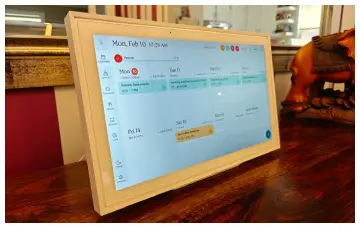
- Large color-coded calendar view: Each person gets a clear color.
Events stand out at a glance. Morning checks take only seconds.
- Two-way calendar sync: Changes on the wall appear on phones.
Phone updates show on the display. Nothing stays missing anymore.
- Task and chore charts: Kids mark items complete with a tap.
Stars appear with the Plus plan. Motivation rises without nagging.
- Custom lists and meal planning: Grocery items update from the store.
Meals plan for the whole week. Shopping trips grow smoother.
- Photo screensaver mode: Family pictures cycle when idle.
The screen looks warm and personal. Guests often smile at the photos.
- Companion app and multi-user access: Everyone edits from their phones.
Unlimited profiles stay separate. Access feels open yet organized.
- Weather and basic routines: Current conditions sit beside the schedule.
Simple daily habits appear clearly. The whole family sees the same facts.
- Parental locks and views: Adults can lock certain sections.
Day week or month layouts switch fast. Control stays in the right hands.
- Reliable storage and sync: Local storage holds data safely.
Cloud updates keep everything current. Offline glances still work for cached items.
Pros Of The Skylight Calendar
- Focused design that reduces distraction: No streaming apps appear on screen. Attention stays on the schedule. Arguments over videos drop quickly.
- Excellent shared visibility: Anyone walking by reads the board. Color codes remove confusion. Questions about plans decrease a lot.
- Flexible mounting options right out of the box: Wall mount and stand arrive together. I tested both spots easily. No extra shopping was needed.
- Strong free core features: Basic calendar and lists work without pay. The Plus plan stays optional. Everyday use feels complete already.
- Clean frame-like appearance: Slim edges blend into the room. Magnetic frames swap styles fast. Guests think it is just art at first.
- Reliable two-way sync across major platforms: Google Apple and Outlook all connect well. Events push both ways cleanly. Manual fixes almost vanish.
- Kid-friendly interaction without voice commands: Simple taps work for young users. No failed voice tries happen. Checks feel natural for everyone.
- Quiet operation in busy spaces: No speakers play music or ads. The kitchen stays peaceful. Background noise never increases.
- Long return window and support: Trial time feels generous. Help arrives when questions come up. Confidence grows during setup.
Cons Of The Skylight Calendar
- Optional subscription for the most useful extras: Meal tools and photo uploads need Plus. Core functions still run free. Full value costs a bit more yearly.
- No voice control or smart-home integration: Hands-free adds never work. Lights stay separate. Taps or the app handle everything.
- Requires constant power and Wi-Fi: Outages blank the screen. Phones still show the app. Backup power would help a lot.
- Touchscreen collects fingerprints easily: Smudges show after a few uses. Wiping becomes routine. Glass would look cleaner longer.
- Limited offline capability: Cached data stays visible. New events need internet. Full function depends on connection.
- Higher upfront cost for a specialized display: Price matches full smart screens. Extra features stay limited. Value depends on pure organization needs.
- No built-in speakers for alerts: Sounds stay soft or silent. Important reminders need visual checks. Audio cues would help more.
- Plastic surface feels less premium: The screen resists scratches okay. Fingerprints mark faster. A glass top would improve the feel.
Key Features Of The Echo Show 15
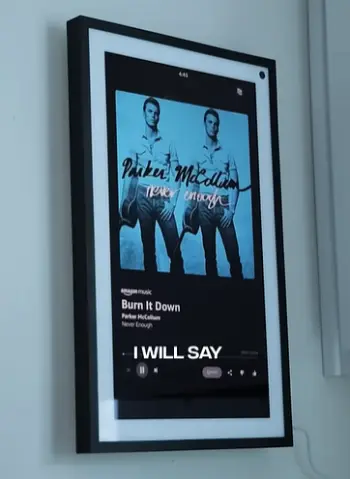
- Full Alexa voice assistant: Hands stay free while cooking.
Timers and lists add by voice. Daily tasks move faster overall.
- Built-in Fire TV with remote: Shows and recipes play on the same screen.
The remote works from across the room. Kitchen viewing feels natural.
- 13-megapixel camera with auto-framing: Calls keep people centered.
The shutter closes for privacy. Family chats become simple.
- Customizable widgets and home screen: Calendar weather and lists sit side by side.
Layout flips to portrait if needed. Information stays organized.
- Smart-home hub capabilities: Lights locks and sensors connect directly.
No extra bridges are required. Control grows over time.
- Photo Frame mode using Amazon Photos: Albums cycle when the screen idles.
Artwork options appear too. The display doubles as décor.
- Visual ID personalization: Faces trigger personal greetings.
Reminders match the person nearby. The experience feels tailored.
- Improved speakers on later models: Sound clears up for music and video.
Volume reaches the whole kitchen. Quality improves over the first version.
- Matter and Thread support: Future devices join easily.
Compatibility expands each year. The hub stays useful longer.
Pros Of The Echo Show 15
- Genuine multi-function versatility: One screen handles many jobs. Kitchen clutter drops. Several gadgets become unnecessary.
- Seamless Alexa ecosystem integration: Existing speakers and plugs work together. Setup stays quick. The whole system feels connected.
- Strong streaming experience: Fire TV apps load cleanly. Recipes play while cooking. Casual viewing needs no second device.
- High-resolution camera for calls and monitoring: Auto-framing keeps everyone visible. Privacy shutter works with one move. Chats feel more natural.
- Flexible orientation and wall-mount design: Landscape or portrait fits most walls. Brightness adjusts to light. Placement options feel wide.
- No mandatory subscription for core tools: Widgets and Alexa run free. Optional services stay avoidable. Daily use costs nothing extra.
- Expanding smart-home support: New standards keep arriving. Compatibility grows steadily. The device ages well.
- Included remote for easy control: Navigation works from a distance. Touch is not always required. Comfort rises during use.
- Adaptive brightness for kitchens: The screen stays readable in sunlight. Night mode softens the glow. Eyes feel less strained.
Cons Of The Echo Show 15
- Stand sold separately and pricey: Wall mount comes free. Countertop use needs an extra buy. Total cost climbs fast.
- Audio quality remains average: Sound distorts at high volume. Bass stays weak. Music never matches a real speaker.
- Occasional on-screen suggestions and ads: Home screen feels busy at times. Settings can reduce the clutter. Clean looks take effort.
- Calendar features feel secondary: Color coding stays basic. Chore rewards are missing. Pure planning tools lag behind.
- Privacy considerations with always-on mic and camera: Shutters help but trust is required. Some family members stay cautious. Daily habits form around privacy.
- Dependence on Amazon services: Photos lean on Amazon accounts. Many perks assume that ecosystem. Outside options feel limited.
- Slight lag in touch response at times: Big screens respond well overall. Occasional delays appear. Smooth flow breaks now and then.
- Thicker profile than pure frames: Wall presence feels bulkier. Slimmer designs blend better. Looks favor function over pure décor.
Everyday Use From A Real User Perspective
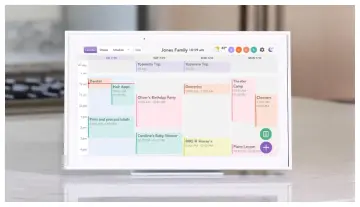
I installed both devices in the same high-traffic kitchen spot at different times. With the Skylight Calendar the mornings felt calmer.
Everyone could see the shared board without asking what was happening that day. Color coding made it obvious whose activity was next.
Adding a last-minute appointment from my phone and watching it appear on the wall removed friction. Chore charts turned into a quiet competition among the kids once the star system was active.
The photo mode kept the screen pleasant when no one needed the calendar. The biggest adjustment was remembering that voice commands were unavailable. Everything required a touch or the app.
Switching to the Echo Show 15 changed the rhythm. Alexa handled timers and shopping-list additions while my hands were messy.
Fire TV meant I could follow a cooking video on the same screen I used for the calendar widget. Video calls with grandparents became spontaneous because the camera and speakers were already there. The downside appeared in the evenings.
The device tempted people to stream instead of checking the schedule. The widget layout sometimes felt less scannable than Skylight’s dedicated calendar view.
Privacy shutters became a daily habit. Both devices solved the where is everyone supposed to be problem. Yet they solved different secondary problems.
Which One Fits Different Households?
If your main goal is a shared family planner that stays focused and looks like home décor, the Skylight Calendar delivers.
Families with multiple kids overlapping activities and a desire to keep screens limited to organization tend to prefer it.
The optional subscription becomes worthwhile once meal planning and photo mode enter regular use.
If you already live with Alexa want streaming and video calls in the same device and value smart-home control the Echo Show 15 makes more sense.
It rewards households that treat the kitchen as both a command center and a casual entertainment space. The extra camera and speakers justify the purchase when those features get weekly use.
Budget-conscious buyers should note that both start near $300. Skylight includes the stand. Echo usually requires an additional purchase for countertop placement.
Long-term costs favor Echo if you skip optional Alexa services. Skylight’s Plus plan stays optional for basic calendar needs.
Frequently Asked Questions (FAQ)
It depends on priorities. Skylight wins for pure family calendar and chore management. Echo Show 15 wins if you want Alexa streaming and smart-home control in one device.
It can display calendars and lists. The interface and chore tools stay less specialized than Skylight’s dedicated system.
For focused family organization on a wall display few options match its combination of sync color coding and chore features at this size.
Larger Echo models or competing smart displays may suit different rooms. The 15-inch size remains one of the strongest all-in-one kitchen hubs currently available.
Final Thoughts
I started this comparison wanting a clear winner and ended with a clearer understanding of two solid but different tools.
The Skylight Calendar became the quieter more reliable organizer in my home. The Echo Show 15 became the more capable multitasker.
You should weigh how much you value focus versus versatility camera and speakers versus simplicity and optional subscriptions versus ecosystem lock-in.
Once you match the device to the way your household actually moves through the day either one can reduce the daily scramble of schedules and lists.
Choose the one that removes the most friction for the people who will look at it every morning.
Recent Posts
● Interactive 5-Zone Interior & Exterior Paint Blueprint Paint Coverage Calculator: Gallons, Primer, Square Footage & Cost Tap any architectural surface zone on the blueprint...
If you want smooth, shiny hair without spending a fortune on a premium styling tool, the Ella Bella hair dryer may be worth considering.In these Ella Bella hair dryer reviews, I’ll look...