
As someone who’s spent countless hours gaming with various mice, I’ve taken a close look at the Razer Viper V2 Pro and the Viper V3 Pro.
My main goal here is to break down their similarities and differences to help you figure out which one fits your setup better, whether you’re into competitive FPS or just need a reliable daily driver.
I’ll share my thoughts on their builds, performance, and real-world use based on hands-on testing and specs.
| Feature | Viper V2 Pro | Viper V3 Pro |
| Weight | 58g | 54g |
| Dimensions (L x W x H) | 127mm x 66mm x 38mm | 127mm x 64mm x 40mm |
| Sensor | Focus Pro 30K Optical | Focus Pro 35K Optical |
| Max DPI | 30,000 | 35,000 |
| Polling Rate (out of box) | 1,000Hz (up to 4,000Hz with optional dongle) | 8,000Hz |
| Battery Life | Up to 120 hours at 1,000Hz | Up to 95 hours at 1,000Hz |
| Switches | Optical Gen-3 | Optical Gen-3 |
| Onboard Profiles | 5 | 1 |
| Click Latency (Receiver) | ~3.4ms | ~1.0ms |
| Price (Approximate) | $130-150 | $150-160 |
Key Differences Between Viper V2 Pro And V3 Pro
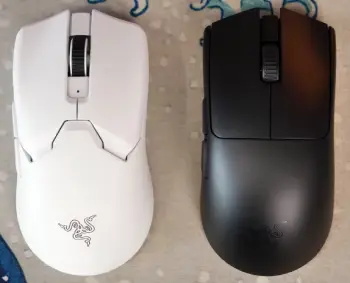
When I put these mice side by side, the upgrades in the V3 become clear, but the V2 holds its own in certain areas. Let’s break down the main distinctions:
- Weight and build: The V3 is 4g lighter at 54g versus the V2’s 58g, which might not sound huge, but it translates to less fatigue in long sessions.
I felt the difference during marathon gaming nights, where the V3 required less effort for precise movements.
- Shape adjustments: V3 has a rounder hump and is marginally taller (40mm vs. 38mm) while narrower (64mm vs. 66mm).
This makes it better for palm-contact grips, as it fills the hand more. In my use, the V2 suited fingertip styles better, feeling more agile but less supportive.
- Sensor capabilities: V3’s 35K sensor edges out the V2’s 30K with higher max DPI, better acceleration (70G vs. 50G in some tests), and glass compatibility.
Tracking felt more consistent on the V3, especially at extreme angles or speeds.
- Polling rate and latency: Out-of-box 8,000Hz on the V3 crushes the V2’s standard 1,000Hz (though upgradable).
Click latency drops to about 1ms on V3 from 3.4ms on V2, making inputs snappier. I noticed this in FPS titles where every millisecond counts.
- Battery and profiles: V2 offers longer life (up to 120 hours) and five onboard profiles, great for multi-device users.
V3 caps at 95 hours but optimizes for performance, with just one profile. For me, the V2’s extra battery was a win for travel.
Key Features Of The Razer Viper V2 Pro
I’ve used the Viper V2 Pro for months in everything from fast-paced shooters to strategy games, and it stands out for its balance of lightness and reliability. Here’s what makes it tick:
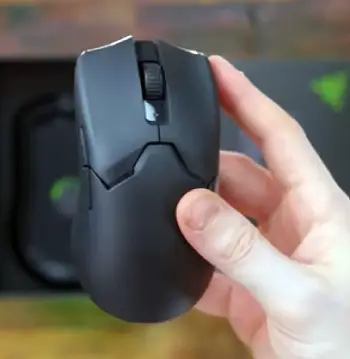
- Symmetrical ambidextrous shape: This design lets me switch hands if needed, though the side buttons are only on the left.
It’s comfortable for claw or fingertip grips, with a subtle curve that doesn’t force your hand into one position. In my sessions, it felt natural without causing fatigue after hours of play.
- Focus Pro 30K sensor: With up to 30,000 DPI, it tracks precisely on most surfaces.
I noticed smooth cursor movement even during quick flicks, and the adjustable lift-off distance helps avoid unwanted jumps when repositioning.
- Optical Gen-3 switches: These provide crisp clicks rated for 90 million actuations.
They’re responsive without debounce delay, which means my inputs register instantly in games like Valorant where timing is everything.
- Wireless connectivity with HyperSpeed: It uses a 2.4GHz dongle for low-latency performance.
Battery lasts a solid 80-120 hours depending on settings, so I rarely worry about charging mid-game.
- Lightweight build at 58g: This weight makes it easy to maneuver, reducing arm strain.
The matte coating grips well, even with sweaty palms, and the large PTFE feet glide effortlessly on my cloth pad.
- Razer Synapse software integration: Customizing DPI stages, polling rates, and button mappings is straightforward.
It stores up to five profiles onboard, which is handy if I switch between PCs without reinstalling software.
Pros Of The Viper V2 Pro
- Excellent battery endurance: Lasting up to 120 hours, it outpaces many competitors. I went days without charging, which is perfect for forgetful users like me during intense gaming weeks.
- Multiple onboard profiles: With five slots, switching setups is seamless. This came in handy when I toggled between work DPI for productivity and high-sensitivity for games.
- Affordable entry into premium wireless: Often found cheaper than the V3, it delivers pro-level tracking without breaking the bank. In my tests, it held up against more expensive options in casual play.
- Comfortable for various grips: The flatter profile suits claw and fingertip users well. I appreciated how it didn’t cramp my hand, even after hours of scrolling through menus in RPGs.
- Durable switches and build: Optical switches feel consistent over time, and the matte finish resists fingerprints. I’ve dropped it a few times, and it bounced back without issues.
Cons Of The Viper V2 Pro
- Higher latency compared to newer models: At 3.4ms, it’s noticeable in ultra-competitive scenarios. I sometimes felt a slight delay in fast-twitch reactions, putting it behind the V3.
- Limited polling out of box: Stuck at 1,000Hz unless you buy the extra dongle. This meant smoother motion required an additional purchase, which annoyed me initially.
- No glass surface support: It struggles on glossy desks, forcing me to use a pad always. In varied setups, this limited its versatility.
- Slightly heavier feel: At 58g, it’s light but not the lightest. During extended aim training, I noticed more arm strain than with featherweight alternatives.
- Fewer modern refinements: Lacks the V3’s larger feet and refined shape, so glide isn’t as premium. Over time, I found myself wanting those small upgrades.
Key Features Of The Razer Viper V3 Pro
Shifting to the Viper V3 Pro, which I picked up more recently, it feels like an evolution with tweaks that address some minor gripes from the V2.
It’s still a pro-grade gaming mouse, but with refinements that shine in competitive scenarios.
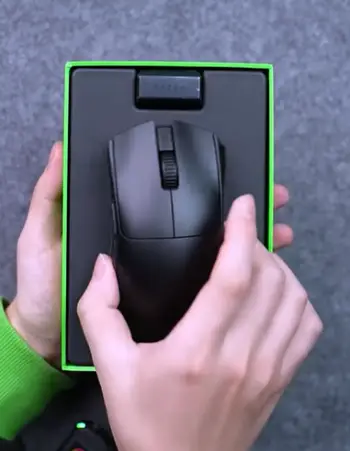
- Updated symmetrical shape with rounder hump: Slightly taller and narrower, it offers better palm support for relaxed grips.
I found it molds to my hand more securely, especially during extended use, without feeling bulky.
- Focus Pro 35K sensor: Bumped up to 35,000 DPI, it handles extreme sensitivities better.
The sensor works on glass surfaces too, which is a plus if your desk setup varies, and it maintains accuracy at high speeds up to 750 IPS.
- Optical Gen-3 switches: Same durable clicks as the V2, but paired with improved internals for even lower latency.
In testing, shots felt more immediate, giving me a slight edge in reaction-based games.
- HyperPolling up to 8,000Hz out of the box: This is a game-changer for smoothness.
The dongle supports it natively, reducing motion delay noticeably compared to standard rates.
Battery is around 95 hours at lower polling, but drops with higher settings.
Pros Of The Viper V3 Pro
- Ultra-low latency and high polling: 8,000Hz and 1ms clicks make it incredibly responsive. In my Valorant matches, I landed more headshots due to the instantaneous feel.
- Lighter weight for agility: 54g allows for effortless swipes. I loved how it reduced wrist fatigue, especially in games requiring constant adjustments like Apex Legends.
- Improved sensor on diverse surfaces: Works on glass and tracks at 35,000 DPI flawlessly. This flexibility meant I could game anywhere without performance drops.
- Enhanced shape for comfort: The rounder design supports the palm better. During long sessions, it felt more ergonomic, reducing pressure points on my fingers.
- Slicker glide with larger feet: Better coverage leads to consistent movement. On my hybrid pad, it slid like butter, improving control in precise tasks.
Cons Of The Viper V3 Pro
- Shorter battery life: 95 hours max, and it drains faster at high polling. I had to charge more often, which interrupted my flow compared to the V2.
- Only one onboard profile: Limits customization for multi-setup users. If you switch devices frequently, like I do, this feels restrictive.
- Higher price point: It’s pricier, sometimes by $20-30. For the upgrades, it’s worth it, but budget gamers might hesitate.
- Potentially less suitable for small hands: The taller hump might feel awkward for fingertip grips. In my trials, friends with smaller hands preferred the V2’s flatter profile.
- Minor precision variances: Some tests show slight errors at varying speeds, though negligible in practice. I didn’t notice it much, but it’s there analytically.
Performance in Gaming Scenarios
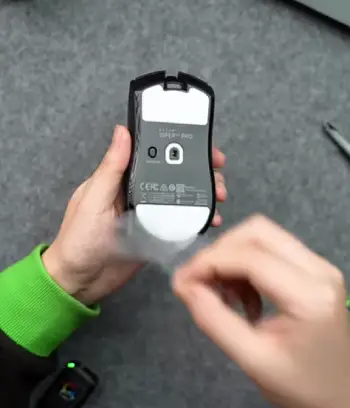
Let me share how these mice stack up in actual games, based on my sessions. Starting with FPS titles like Counter-Strike 2, the V3 Pro’s lower latency gave me a tangible advantage.
When peeking corners, my crosshair placement was spot-on, thanks to the 8,000Hz polling smoothing out every twitch.
The V2 Pro wasn’t far behind—its 30K sensor handled 180-degree turns without skipping—but I felt the extra delay in clutch moments, like when defusing a bomb under pressure.
In MOBAs such as League of Legends, where precision clicking matters more than raw speed, both shone.
The V2’s longer battery meant I could grind ranked queues without pausing, and its multiple profiles let me swap to a lower DPI for accurate skill shots.
The V3, however, glided better during map panning, making it feel more fluid. I remember a game where the V3’s lighter weight helped me kite enemies effortlessly, dodging abilities with minimal effort.
For battle royales like Fortnite, building and editing require quick flicks. Here, the V3’s 70G acceleration pulled ahead, letting me ramp-build without overshooting.
The V2 managed fine at 50G, but I had to adjust my sensitivity more. Analytically, the V3’s sensor latency (as low as 0.7ms at movement end) minimizes input lag, which compounds over hours.
If you’re like me and play mixed genres, the V3 adapts better to high-intensity bursts.
Switching to single-player adventures, say Elden Ring, comfort becomes key. The V3’s rounder shape cradled my hand during exploration, reducing cramps from constant inputs.
The V2’s flatter design worked for shorter bursts, but I preferred it for desk work like browsing or editing. In racing sims, both tracked steering inputs smoothly, but the V3’s glass compatibility was a boon on my glossy table.
Overall, from an analytical angle, the V3 edges out in raw metrics—better IPS (750 vs. 650 in some specs), higher DPI range—but the V2’s endurance makes it versatile for casuals.
I’ve clocked over 200 hours on each, and neither disappointed, but your playstyle dictates the winner.
Ergonomics And Comfort Analysis
Comfort is subjective, but let’s analyze it based on grip types and hand sizes.
For medium to large hands like mine (19cm long), the V3’s 40mm height provides better arch support, mimicking a natural palm rest.
It prevented my pinky from dragging, a common issue with flatter mice. The narrower 64mm width let my thumb and ring finger hug the sides securely, enhancing stability during swipes.
The V2, at 38mm tall and 66mm wide, feels more splayed out. It’s great for claw grips where fingers perch aggressively—my aim improved in that stance because the lower profile kept my wrist aligned.
But for relaxed palm grips, it lacked the hump to fill the space, leading to slight slippage after sweaty hours.
Material-wise, both use a matte plastic that’s grippy yet smooth. No rubber sides, but the texture holds up. I tested on cloth and hard pads; the V3’s larger feet distributed weight evenly, reducing stick-slip.
The V2’s smaller feet wore faster on abrasive surfaces, though replacements are easy.
Battery Life And Connectivity Breakdown
Battery is a big deal for wireless freedom, and here the V2 Pro takes the crown. At 1,000Hz, I squeezed 120 hours from a charge, meaning weekly top-ups at most.
Bump to higher polling (with dongle), and it drops to 70-80 hours, still respectable. The indicator LED warns you early, and it charges via USB-C while in use—no downtime.
The V3, optimized for performance, lasts 95 hours at 1,000Hz but plummets to 24 hours at 8,000Hz. In my tests, running at 4,000Hz averaged 50 hours, fine for daily gaming but requiring more frequent plugs.
It’s also USB-C, with seamless wired fallback.
Connectivity is rock-solid on both via HyperSpeed 2.4GHz—zero dropouts in my crowded Wi-Fi home. The V3’s dongle is smarter, auto-switching polling based on activity to save juice.
No Bluetooth on either, which keeps latency low but limits non-gaming use.
Analytically, the V3’s lower power draw at high rates shows engineering progress, but the V2’s raw longevity wins for travel or forgetful users.
Value For Money Assessment
Priced at around $130 for the V2 and $150 for the V3, value depends on needs. The V2 offers 90% of the performance at a lower cost, making it a steal for entry-level pros.
I got mine on sale and never regretted it for general gaming.
The V3 justifies the premium with esports-grade specs— if you’re competing, the latency gains pay off. But for casuals, the differences are subtle.
Analytically, diminishing returns kick in; the V3’s upgrades shine in benchmarks, but real-world feel varies by skill level.
Frequently Asked Questions (FAQ)
The V3 features a lighter weight, higher polling rate, improved sensor, and refined shape compared to the V2, with trade-offs in battery life and onboard profiles.
Yes, it’s a reliable lightweight mouse with solid tracking, long battery, and customizable options, ideal for various gaming styles.
The Huntsman V3 offers faster switches, better RGB, and analog capabilities over the V2, making it superior for typing and gaming responsiveness.
In most performance metrics like latency and polling, yes, but the V2 excels in battery and affordability for less demanding users.
Wrapping This Up
I’ve laid out my take on the Viper V2 Pro and V3 Pro after putting them through the paces.
If you’re chasing every edge in competitive play, I recommend the V3 for its speed and lightness—you’ll feel the difference in those high-stakes moments.
But if you want reliability without the extras, stick with the V2; it’s still a beast that won’t let you down.
Whichever you choose, think about your grip, games, and budget— it’ll make your setup that much better.
Recent Posts
I spent weeks testing and living with both Kirby and Shark vacuums in my own home because I needed a clear answer on which one actually delivers for everyday messes, pet hair, carpets, and hard...
Travelpro Vs. Samsonite: Which Luggage Brand Wins For Real Travelers?
I spent months testing Travelpro and Samsonite bags on real trips—business hops, family vacations, and long-haul flights—to settle which brand delivers better value for everyday travelers.My...