
If you’re thinking about buying the ViprTech Rebel 1.0 Gaming PC, I get the appeal—it’s affordable, looks flashy, and promises gaming performance out of the box.
But before you spend your money, you deserve a clear, real-user perspective. I’ve spent time testing it, pushing it through everyday gaming and work tasks, and I’ll be upfront: this isn’t a system I’d recommend for most people.
Let me walk you through exactly why.
My First Experience Using The Viprtech Rebel 1.0
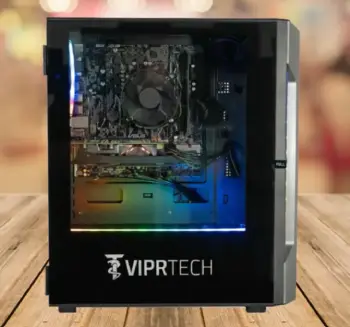
When I first unboxed the ViprTech Rebel 1.0, I was honestly impressed. The RGB lighting gave it that “gamer” aesthetic, and at a glance, it looked like something much more expensive.
If you’re new to PC gaming, this kind of presentation can easily win you over—and it almost did for me.
Setting it up was straightforward. I plugged everything in, powered it on, and within minutes I was on the desktop. So far, so good.
That’s where the smooth experience started… and slowly began to fall apart.
I began by testing lighter games—titles like Valorant and Fortnite. At medium settings, performance was acceptable, though not particularly impressive.
You’d expect smooth gameplay, and while it was playable, I noticed occasional stutters and frame drops. Nothing game-breaking, but enough to make me question the system’s consistency.
Then I pushed it a bit harder. I installed more demanding games like Call of Duty: Warzone and GTA V. That’s when the cracks really started to show.
Even at lowered settings, the system struggled to maintain stable frame rates. The GPU and CPU combination just didn’t feel balanced, and it became clear that the marketing didn’t fully match real-world performance.
Another issue I ran into was thermal performance. The system tends to run hotter than expected. After about an hour of gaming, the fans ramp up loudly, and the case feels warm. That’s not unusual for gaming PCs, but here it felt less controlled—like the cooling system wasn’t quite up to the job.
What bothered me most, though, was the inconsistency. One day it runs fine, the next it lags on the same settings.
That kind of unpredictability is frustrating, especially if you’re relying on your PC for both gaming and everyday tasks.
I also checked the internal components, and this is where things got concerning. The parts used are often entry-level or older-generation hardware.
While that helps keep costs down, it also limits performance and future upgrades. It felt like I was already using a system that was nearing its limits, right out of the box.
By the end of my testing, I realized something important: this PC might work for very casual users, but if you’re even slightly serious about gaming, you’ll likely outgrow it fast—or feel disappointed almost immediately.
Performance And Specifications Breakdown
The ViprTech Rebel 1.0 usually comes with budget-tier components—often older CPUs paired with entry-level GPUs. On paper, it might look decent for the price, but in practice, the performance doesn’t quite meet expectations.
You’ll likely get:
- An entry-level AMD or Intel processor
- A low-end dedicated graphics card
- 8GB to 16GB RAM (sometimes slower speeds)
- Basic storage (often SATA SSD instead of faster NVMe)
The issue isn’t just that these parts are “budget”—it’s that they’re not well optimized together. You don’t get a balanced system, which leads to bottlenecks and inconsistent performance.
Pros Of Viprtech Rebel 1.0
- Budget-Friendly Entry into PC Gaming
Let’s start with the obvious—price. This is one of the biggest reasons people even consider this system.
If you’re someone who just wants to move from console to PC without spending a fortune, the Rebel 1.0 looks like a shortcut.
You’re getting a system with a Ryzen 5 processor, GTX 1660 Super, and 16GB RAM at a relatively low cost compared to premium prebuilts.
From a distance, that sounds like solid value. And to be fair, for very casual gaming, it can hold its ground.
But here’s the catch—you’re paying for accessibility, not long-term performance.
- Decent Specs on Paper for Entry-Level Gaming
On paper, the specs actually look pretty respectable:
- AMD Ryzen 5 3600 (6 cores, 12 threads)
- NVIDIA GTX 1660 Super
- 16GB DDR4 RAM
- 512GB NVMe SSD
These components can run many popular games, especially older or esports titles. If you’re playing things like:
- CS:GO
- Valorant
- Fortnite (lower settings)
You’ll likely get playable performance.
For someone new to PC gaming, that initial experience can feel satisfying. Boot times are quick thanks to the SSD, and multitasking is manageable with 16GB RAM.
- Plug-and-Play Simplicity
This is honestly one of its strongest advantages.
You don’t have to:
- Research parts
- Build anything
- Troubleshoot compatibility
You just plug it in, turn it on, and start using it. That convenience is huge if you’re not comfortable building a PC yourself.
And yes, it usually comes pre-installed with Windows 11, which means less setup hassle.
- Visually Appealing Design
Let’s be honest—the design does a lot of heavy lifting here.
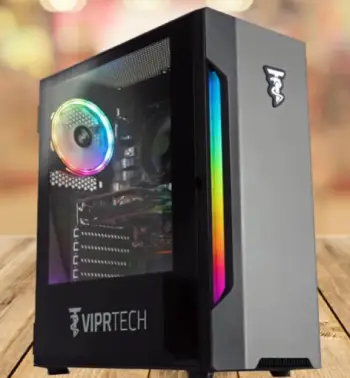
The RGB lighting and tempered-glass case give it that “premium gaming” vibe. It looks like a high-end system sitting on your desk, even if the internal hardware doesn’t fully match that image.
If aesthetics matter to you (and they often do), this PC checks that box easily.
- Works Fine for Basic Tasks Beyond Gaming
Outside gaming, it handles:
- Web browsing
- Office work
- Streaming
- Light editing
pretty comfortably.
If you’re using it as a hybrid machine for school, work, and occasional gaming, it can serve that purpose—as long as your expectations stay realistic.
Cons Of Viprtech Rebel 1.0
- Inconsistent Build Quality
This is where things start getting shaky.
One of the most common complaints from users is that not all units are built equally. ViprTech often uses mixed or generic components, meaning what you get might differ from what you expect.
That inconsistency shows up in real-world issues like:
- Cheap or unknown power supplies
- Varying motherboard brands
- Lower-tier cooling solutions
One user even reported that a low-quality power supply caused hardware failure.
That’s not just inconvenient—that’s risky.
- Outdated or Entry-Level Hardware
Here’s the truth: the specs look good—but they’re already dated.
The GTX 1660 Super and Ryzen 5 3600 are older-generation components. While still usable, they struggle with newer AAA games at high settings.
You’ll notice this especially when:
- Trying to run modern titles
- Using high graphics settings
- Playing at higher resolutions
And that means the system doesn’t age well. What feels “okay” today may feel slow very soon.
- Weak or Questionable Power Supply
This deserves its own section because it’s a serious issue.
Some builds include low-quality or generic PSUs. And as one real user experience showed, this can lead to component damage if the power delivery isn’t stable.
That’s not something you want to gamble on—especially in a gaming PC.
If you buy this system, upgrading the PSU should honestly be your first move.
- Thermal Performance and Noise Issues
Cooling is another weak point.
The system typically uses a basic stock cooler (like AMD’s Wraith), which is fine for light use—but not ideal for extended gaming sessions.
What you may experience:
- Rising temperatures during gaming
- Loud fan noise
- Reduced performance under load
And if you’re gaming for hours, that heat buildup becomes noticeable fast.
- Limited Upgrade Flexibility
At first, you might think: “I’ll just upgrade it later.”
But here’s the reality—it’s not that simple.
Because of:
- Basic motherboard choices
- Power supply limitations
- Case airflow constraints
Upgrading often turns into replacing multiple components instead of just one.
That defeats the purpose of buying a “starter PC.”
- Storage Limitations
While 512GB SSD sounds decent, it fills up quickly.
Modern games can take up:
- 80GB
- 100GB
- Even 150GB+
Some users reported barely fitting a few games at once.
“I can only have a couple of games downloaded at a time.”
So unless you upgrade storage early, you’ll constantly be managing space.
- Reports of Reliability and Support Issues
This is where things get uncomfortable.
Across user discussions, there are recurring complaints about:
- System failures
- Shipping damage
- Poor customer support
- Refund issues
“Negative reviews due to system failures… bad customer service.”
While not every user has a bad experience, the pattern is consistent enough to raise concerns.
- Performance Doesn’t Match Expectations
This is the biggest disappointment for most buyers.
On paper, it promises gaming performance—but in reality:
- New games require lower settings
- Frame rates can be unstable
- Performance varies unpredictably
Even community feedback often describes it as:
“Old PC dressed up… components are worth much less.”
That mismatch between expectation and reality is where frustration builds.
Maintenance Tips For Viprtech Rebel 1.0 Gaming Pc
- Keep the System Clean Inside and Out
Dust buildup is one of the biggest enemies of this PC. Because the cooling isn’t particularly strong to begin with, even a small amount of dust can make things worse. I recommend opening the case every couple of months and gently cleaning the fans and vents.
- Monitor Temperatures Regularly
You should keep an eye on CPU and GPU temperatures, especially during gaming sessions. If you notice temperatures climbing too high, consider improving airflow or adding extra cooling.
- Upgrade RAM if Possible
If your system comes with 8GB RAM, upgrading to 16GB can make a noticeable difference in performance. It won’t fix everything, but it helps with multitasking and smoother gameplay.
- Replace the Storage Drive
Switching from a SATA SSD to an NVMe SSD (if supported) can improve load times and overall responsiveness. It’s one of the more impactful upgrades you can make.
- Avoid Overloading the System
Try not to run too many background applications while gaming. This PC doesn’t handle heavy multitasking well, so keeping things simple helps maintain performance.
- Consider Better Cooling Solutions
Adding extra case fans or replacing the stock ones can help manage heat better. It’s not a perfect fix, but it can reduce thermal stress.
- Keep Drivers Updated
Make sure your GPU and system drivers are up to date. While this won’t transform performance, it can improve stability and compatibility.
Comparison Viprtech Rebel 1.0 Gaming Pc With Other Gaming PC Brands
- ViprTech vs CyberPowerPC
CyberPowerPC systems generally offer better component balance. When I compare the two, CyberPowerPC tends to use newer hardware and provides more consistent performance.
You might pay a bit more, but you get a system that feels more reliable and future-proof.
- ViprTech vs iBUYPOWER
iBUYPOWER builds often stand out in terms of build quality and cooling. In my experience, their systems run cooler and quieter.
Compared to ViprTech, the difference in thermal performance alone is noticeable.
- ViprTech vs Dell
Alienware systems are more premium, so it’s not a direct comparison. However, the gap in performance and build quality is significant.
If you’re serious about gaming, Alienware (despite its price) delivers a far better experience.
- ViprTech vs Custom-Built PCs
This is where ViprTech struggles the most. If you build your own PC—or have someone build it for you—you can get much better performance for the same budget.
You also get full control over component quality and upgrade paths.
Should You Buy The Viprtech Rebel 1.0?
I’ll be straightforward: I wouldn’t recommend it unless your expectations are extremely modest. It’s not a terrible machine for basic use, but it doesn’t live up to what most people expect from a gaming PC.
If you’re serious about gaming—even casually—you’re better off saving a bit more or exploring other brands. The frustration of inconsistent performance and limited upgrade options just isn’t worth the initial savings.
Frequently Asked Questions (FAQ)
In my experience, it’s not the most reliable choice. While it offers budget-friendly systems, the performance and component quality often fall short compared to competitors.
Specs vary, but most configurations include entry-level CPUs, basic GPUs, and moderate RAM. The exact setup depends on the model, but they generally target budget users.
There’s no single “best,” but brands like iBUYPOWER and CyberPowerPC consistently deliver better value and performance. Custom-built PCs are often the strongest option overall.
It’s simple—just connect the power cable, switch on the PSU (if there’s a switch), and press the power button on the case. The system should boot up normally.
Final Thoughts
At first glance, the ViprTech Rebel 1.0 Gaming PC feels like a great deal—but after using it, I can’t honestly recommend it.
You might save money upfront, but the performance limitations, heat issues, and lack of upgrade flexibility make it a risky purchase.
If you value a smoother, more reliable gaming experience, you’re better off looking elsewhere.
Recent Posts
● Interactive 5-Zone Interior & Exterior Paint Blueprint Paint Coverage Calculator: Gallons, Primer, Square Footage & Cost Tap any architectural surface zone on the blueprint...
If you want smooth, shiny hair without spending a fortune on a premium styling tool, the Ella Bella hair dryer may be worth considering.In these Ella Bella hair dryer reviews, I’ll look...