
I have spent months testing both the Vizio Quantum and Vizio Quantum Pro in my living room setup.I wanted a solid QLED TV that delivers vibrant pictures without breaking the bank. After side-by-side comparisons with movies, sports, and games, I can share exactly which one suits different needs better.Vizio Quantum serves as the more affordable entry into QLED technology with strong color performance.Vizio Quantum Pro steps up with higher brightness, local dimming, and enhanced gaming features.
The main intent of this article is to help you decide between these two based on real-world use so you pick the right TV for your space and budget.I set up both TVs in the same room under identical lighting conditions. The differences showed up immediately in everyday content.
A Brief Comparison Table
| Feature | Vizio Quantum | Vizio Quantum Pro |
| Brightness | Moderate peak brightness suitable for dimmer rooms | Up to 1000 nits peak brightness, handles bright rooms well |
| Local Dimming | Basic or none | Active Full Array with local dimming for better contrast |
| Refresh Rate | Standard 60Hz or limited higher modes | 120Hz at 4K, 240Hz at 1080p with VRR and FreeSync Premium Pro |
| HDR Support | Dolby Vision, HDR10 | Enhanced Dolby Vision, HDR10, HDR10+ |
| Gaming Ports | Limited HDMI 2.1 | Four HDMI 2.1 ports, one full bandwidth for 4K 120Hz |
| Viewing Angle | Good wide angle | Excellent with anti-reflective film and wide angle tech |
| Smart Platform | SmartCast | SmartCast with IQ Ultra+ processor |
| Sizes Available | 55, 65, 75 inches | Primarily 65 and 75 inches |
| Price Positioning | More budget-friendly | Higher but still value-oriented |
My Experience With Vizio Quantum

I bought the 65-inch Vizio Quantum last year for my main living area. From unboxing to daily use, it felt approachable and delivered on color promises right away.
Streaming shows in Dolby Vision brought rich tones that made evenings more enjoyable without needing perfect darkness.
Gaming on my PS5 worked smoothly for single-player titles. Input lag stayed low enough that I never felt delayed reactions.
However, when friends came over for multiplayer, the limited advanced ports meant we could not push everything to maximum settings simultaneously.
The SmartCast platform handled my main apps well most days. Occasional slowdowns happened during peak hours, but restarting fixed them quickly. Voice commands via the remote saved time when searching for content.
In bright daylight, I noticed the need to adjust curtains more often than with brighter sets. Evening movie sessions revealed the contrast limits, yet colorful scenes still impressed me and my family.
After several months, the TV continues performing reliably. I appreciate its slim profile on the stand and how it blends into the room. Sound needed boosting with a soundbar, but that is common at this level.
Overall, the Quantum gave me solid satisfaction for the price. It handles family movie nights and casual viewing effectively while keeping costs reasonable. I would recommend it to anyone prioritizing vibrant colors over ultimate black depth.
Pros Of Vizio Quantum
- Vibrant Quantum Color Performance: The Quantum delivers punchy colors thanks to its QLED panel. I watched nature documentaries where greens and blues popped without looking artificial. This makes it enjoyable for casual viewing where vivid hues matter more than perfect blacks.
- Affordable Entry Into QLED: You get quantum dot technology at a lower price point. For families on a budget, this means better color volume than standard LEDs without spending extra. I appreciated not feeling like I overpaid for features I might not fully use daily.
- Wide Viewing Angle: Sitting off to the side with friends during movie nights, the picture stayed consistent. Colors and brightness did not wash out much, which is great for larger living rooms where everyone cannot sit dead center.
- Decent Gaming Features For Casual Players: Low input lag keeps responses quick in games. I played some fast-paced titles and noticed smooth enough performance for non-competitive sessions. It handles 1080p at higher refresh rates in a pinch.
- Easy Setup And SmartCast Integration: The interface connects quickly to my WiFi and streaming apps. Voice remote makes navigation simple when I want to switch between Netflix and YouTube without hunting for buttons.
- Good For Bright Colorful Content: SDR content like regular TV shows looks clear and engaging. In my tests, daytime sports broadcasts came through with solid visibility even with some window light.
- Slim Design That Fits Modern Spaces: The ThinFrame looks clean on my wall mount. It does not dominate the room visually, which I like when the TV is off.
- Reliable For Family Use: Multiple users in the house found the remote intuitive. Kids could launch their shows easily, and the overall build felt sturdy enough for daily handling.
Cons Of Vizio Quantum
- Limited Brightness In Bright Rooms: Direct sunlight or strong lamps wash out the image somewhat. I had to close curtains during afternoon movies to enjoy proper contrast, which can frustrate in sunny homes.
- Weaker Contrast And Black Levels: Dark scenes in films like thrillers show more gray than true black. This reduces immersion when watching at night, as shadows lack depth compared to higher-end models.
- No Advanced Local Dimming: Without full array dimming, blooming around bright objects appears in mixed scenes. Lights in a dark room sometimes halo noticeably, pulling me out of the story.
- Basic Gaming Capabilities For Serious Gamers: Only limited HDMI 2.1 support means you cannot fully utilize next-gen consoles at peak settings. I noticed more motion blur in demanding titles than I prefer.
- SmartCast Interface Can Feel Buggy: Apps occasionally lag or crash during updates. Switching between services takes longer than expected, especially when the TV has been on for hours.
- Average Sound Quality From Built-In Speakers: Dialog sounds clear but bass lacks punch for action movies. I quickly added a soundbar because explosions felt flat and thin.
- Fewer Sizes For Flexibility: Missing smaller options limits choices if you need a compact TV for a kitchen or office. The available sizes force bigger commitments in space.
Also Read: Comparison of Sennheiser Accentum And Sennheiser Accentum Plus
Maintenance Tips For Vizio Quantum
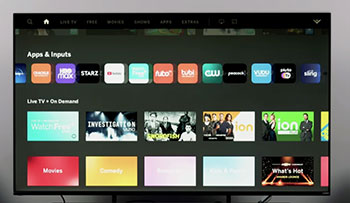
- Clean The Screen Gently With Microfiber: Use a soft microfiber cloth slightly dampened with distilled water or screen cleaner. I wipe in circular motions weekly to avoid dust buildup that dulls colors over months.
- Avoid Harsh Chemicals On The Panel: Never spray glass cleaner directly on the screen. It can seep into edges and damage the coating. I keep sprays away and use only approved solutions.
- Dust The Vents Regularly: Keep rear vents clear of pet hair and dust for proper cooling. Every few months I use compressed air gently to prevent overheating during long sessions.
- Update Firmware Promptly: Check for updates through the menu monthly. New versions fix bugs and improve performance. I set reminders so I do not miss improvements to SmartCast stability.
- Position Away From Direct Heat Sources: Keep the TV at least a foot from heaters or fireplaces. Excessive heat can affect panel longevity, as I learned from past electronics.
- Use Surge Protection Always: Plug into a quality surge protector. Power spikes damage internals, and I protect all my AV gear this way after one bad storm incident years ago.
- Adjust Picture Settings For Your Room: Calibrate brightness and contrast based on lighting. I tweak settings seasonally as natural light changes to maintain optimal viewing.
- Turn Off When Not In Use: Avoid leaving the TV on standby for days. This saves energy and reduces wear on components. I use smart plugs for easy scheduling.
- Handle The Remote With Care: Keep batteries fresh and avoid dropping it. Sticky buttons from spills cause frustration, so I clean it occasionally with isopropyl wipes.
- Monitor For Software Glitches: Restart the TV weekly if apps slow down. A simple power cycle clears temporary issues and keeps SmartCast responsive.
- Secure Wall Mount Properly: If mounting, use studs and check weight limits. I double-check bolts every six months to ensure stability, especially with kids around.
- Keep Software Apps Updated: Update individual streaming apps regularly. This prevents compatibility issues and ensures smooth 4K playback.
My Experience With Vizio Quantum Pro
Switching to the 65-inch Quantum Pro after the standard Quantum felt like a clear upgrade.
Brightness made a huge difference in my sunlit room, and local dimming added depth to nighttime viewing that I immediately noticed during films.
Gaming sessions became more fluid with the higher refresh rate and multiple ports. I connected everything easily and enjoyed reduced motion blur in racing games and shooters.
The processor handled streaming smoothly most times, though SmartCast still needed occasional restarts. HDR content gained real vibrancy that enhanced my movie nights significantly.
Build quality felt solid, and the anti-reflective screen helped during varied lighting. Sound still benefited from a soundbar, but the visuals carried the experience.
After extended use, the Pro continues to impress with its balance of features. It handles daily demands reliably while delivering noticeable improvements over the base model.
I recommend it for anyone wanting stronger performance in brighter environments or with gaming priorities.
Pros Of Vizio Quantum Pro

- Higher Peak Brightness For Any Lighting: The Pro reaches up to 1000 nits, cutting through glare effectively. I watched daytime sports with windows open and the picture stayed visible and punchy without major adjustments.
- Active Full Array Local Dimming: This feature improves contrast noticeably. Dark scenes gain better depth, and bright highlights stand out more in HDR content. Movies feel closer to cinematic quality in my setup.
- Superior Gaming Performance: With 120Hz at 4K and 240Hz at 1080p plus FreeSync Premium Pro, motion looks smoother. I played fast action games with less blur and responsive controls across four HDMI 2.1 ports.
- Enhanced HDR With Dolby Vision And HDR10+: Colors and highlights pop vividly. Explosions and sunlight reflections deliver real impact, making blockbuster films more engaging during evening sessions.
- Excellent Wide Viewing Angle With Anti-Reflective Film: Friends sitting at angles still see consistent colors and brightness. The coating reduces reflections better, which helps in my living room with multiple light sources.
- IQ Ultra+ Processor For Better Processing: Upscaling and motion handling feel refined. Lower quality sources look cleaner, and fast action stays sharp without excessive soap opera effect.
- WiFi 6E Compatibility: Connections stay stable even with many devices online. 4K streams buffer less, providing reliable performance during busy household hours.
- Four Full HDMI 2.1 Ports: I connect my console, soundbar, and other devices without swapping cables. This flexibility makes setup cleaner for a full entertainment center.
- Bluetooth Headphone Support: Late-night viewing with wireless headphones works seamlessly. Audio pairs quickly and maintains sync without issues.
- Sturdy Build With Modern Aesthetics: The design looks premium on my stand or wall. Dual height options for the stand allow easy soundbar placement underneath.
- Strong SDR Performance In Bright Rooms: Regular TV and sports look clear and detailed. The brightness advantage makes all-day viewing comfortable.
- Future-Ready Features For Gamers: Variable refresh rate support reduces tearing in supported games. This adds longevity as console capabilities advance.
Cons Of Vizio Quantum Pro
- Higher Price Point Limits Accessibility: It costs more than the base Quantum, which might stretch budgets for some buyers. I felt the upgrade justified the extra spend, but not everyone will.
- Local Dimming Can Introduce Blooming: Bright objects against dark backgrounds sometimes show halos. This effect appears in certain scenes, though less distracting than on weaker sets.
- SmartCast Still Has Occasional Bugs: The platform improves with the better processor but can lag or require restarts. App switching is not always instant during heavy use.
- Limited Size Options: Mainly 65 and 75 inches means fewer choices for smaller rooms. Buyers needing compact sizes may look elsewhere.
- Blacks Not As Deep As Premium Rivals: While improved, contrast does not reach OLED levels. Nighttime viewing in pitch black reveals some limitations in shadow detail.
- Sound Remains Average Without External Audio: Built-in speakers handle dialog but lack deep bass for immersive experiences. A soundbar becomes essential quickly for movies.
- Minor Uniformity Variations Possible: Some panels show slight inconsistencies in dark scenes under testing. Real content rarely highlights this, but perfectionists may notice.
- Automatic Picture Adjustments Can Annoy: The TV sometimes changes presets unexpectedly. I disabled a few features to keep settings consistent across sessions.
- No ATSC 3.0 Tuner In Some Configurations: Over-the-air broadcast features may feel dated compared to newer standards on competing brands.
- Potential For Firmware Tweaks Needed: Early units benefited from updates for optimal performance. This requires initial monitoring to get the best results.
- Larger Sizes Increase Weight And Handling Care: The 75-inch model needs careful installation. Wall mounting requires sturdy brackets due to the size.
Maintenance Tips For Vizio Quantum Pro
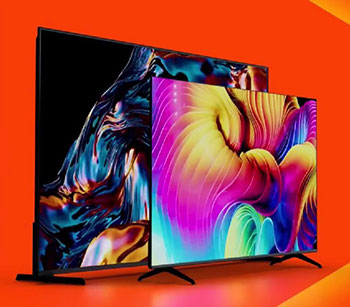
- Gentle Cleaning Of The Anti-Reflective Surface: Use microfiber and avoid abrasive materials. The coating helps with glare, so I clean it carefully every week to preserve its effectiveness.
- Ensure Proper Ventilation Around The TV: Leave space behind for airflow, especially with the local dimming zones that generate more heat. I check clearances monthly.
- Keep Firmware And Apps Current: Regular updates optimize the IQ Ultra+ processor and fix any SmartCast issues. I check the menu bi-weekly.
- Protect HDMI Ports During Connections: Insert cables straight and avoid forcing them. With four ports in use, I label them to prevent wear from frequent swaps.
- Calibrate For Room Lighting Changes: Adjust settings as seasons shift. I use built-in tools or simple test patterns to maintain accurate colors and brightness.
- Use Quality Surge Protection: The advanced features make it worth protecting against power fluctuations. My setup includes a dedicated protector for all components.
- Monitor Local Dimming Performance Over Time: Note any changes in blooming and restart if needed. This keeps contrast performance consistent.
- Pair Bluetooth Devices Mindfully: Disconnect unused headphones to save battery and reduce interference. I test connections periodically for smooth operation.
- Dust Internal Components Indirectly: Use air cans on vents without opening the unit. Preventing dust buildup maintains cooling during high-brightness use.
- Secure Cabling To Avoid Strain: Route HDMI and power cords neatly. This prevents accidental pulls that could damage ports over years.
- Reset Picture Modes Periodically: If automatic changes occur, I reapply my preferred settings. This ensures consistent viewing across content types.
- Check Stand Or Mount Stability: For larger sizes, verify tightness every few months. The weight requires secure installation for safety.
Read More: Comparison of Sole Wellfit And Deer Run
Comparison With Other Brands
Vizio Quantum Pro Versus TCL QM Series: TCL often provides more dimming zones and deeper blacks at competitive prices. The Pro counters with better viewing angles and anti-reflective handling, which helped in my side-by-side tests with friends.
Vizio Quantum Pro Versus Hisense U Series: Hisense frequently achieves higher brightness peaks. The Pro offers strong gaming features and color accuracy that feel more balanced for mixed use, though Hisense can edge out in pure contrast.
Vizio Quantum Pro Versus Samsung Mid-Range: Samsung’s Tizen platform runs smoother for many. The Pro delivers comparable or better gaming specs at a lower cost, making it attractive for console users.
Vizio Quantum Pro Versus LG QLED Models: LG emphasizes processor smarts and webOS. The Pro stands out with its 120Hz gaming focus and wide angle tech, suiting group viewing better in my room.
Vizio Quantum Pro Versus Sony Alternatives: Sony excels in processing and accuracy. The Pro provides more affordable brightness and ports, appealing when budget matters alongside performance.
Vizio Quantum Pro Versus Roku-Powered TVs: Roku offers simpler interfaces. The Pro brings superior QLED brightness and local dimming that elevate picture quality noticeably.
Vizio Quantum Pro Versus Mini-LED Competitors: True Mini-LED sets from various brands deliver tighter control over zones. The Pro serves as a capable QLED alternative without the full premium price jump.
Gaming Comparisons Across Brands: Many rivals match the 120Hz but fewer combine it with four HDMI 2.1 ports at this value. The Pro feels ready for current consoles.
Build And Feature Trade-Offs: Some brands include better native audio. The Pro requires a soundbar like most in class but compensates with modern connectivity like WiFi 6E.
Value Proposition In The Market: The Pro positions Vizio as a strong contender for performance seekers. It trades some refinement for accessible pricing and practical features that work well in real homes.
Frequently Asked Questions (FAQ)
The Quantum Pro offers higher brightness, active local dimming, better gaming specs like 120Hz with more HDMI 2.1 ports, and improved HDR compared to the standard Quantum.
Yes, it provides strong brightness, vibrant colors, and solid gaming features at a reasonable price, making it a good choice for most users seeking value.
Options from TCL, Hisense, or Samsung in similar price ranges may offer deeper contrast or smoother interfaces, while premium OLEDs deliver superior blacks for those with bigger budgets.
Conclusion
I have shared my honest experiences with both the Vizio Quantum and Vizio Quantum Pro so you can see their strengths clearly. If you want an affordable way to enjoy vibrant QLED colors for everyday streaming and casual viewing, the Quantum makes a practical choice that fits many budgets without major disappointments.When you need more brightness for lively rooms, smoother gaming, and better contrast through local dimming, the Quantum Pro steps up and delivers noticeable improvements that enhance your overall enjoyment.You should consider your room lighting, seating arrangement, and whether you play games often before deciding. Both TVs bring reliable performance from Vizio, but the Pro gives you more headroom for future content and demanding setups.Whichever you pick, I believe these models offer solid value that will satisfy for years with proper care. Take time to match the right one to your space, and you will likely feel good about the purchase just as I did after testing them side by side.
Recent Posts
I spent months comparing budget options against established names after my last set of tires wore out sooner than expected.My goal here is to share what I learned from putting Dextero and...
AquaTru Carafe Vs. Classic: Which Is Actually Fits Your Kitchen?
I decided to write this comparison after months of testing both the AquaTru Carafe and the Classic in my own kitchen. Tracking covered daily use.Taste stayed consistent. Refill frequency...