
As someone who’s spent countless summers battling pool maintenance, I’ve tested a fair share of robotic cleaners to keep my backyard oasis spotless without the hassle.
In this article, I’ll compare the Wybot C1 and C1 Pro, two cordless robotic pool vacuums from Wybot, to help you figure out which one fits your needs.
My goal is to break down their features, performance, and value from a hands-on user standpoint, so you can make a smart choice for effortless pool care.
| Feature | Wybot C1 | Wybot C1 Pro |
| Motor Power | 50W | 65W |
| Suction Rate | Up to 2,642 GPH | Up to 3,038 GPH |
| Battery Runtime | 120-150 minutes | 150 minutes |
| Charging Time | 3-4 hours | 2.5 hours |
| Navigation System | Gyroscope-based with S and N path planning | Infrared sensors plus gyroscope for obstacle avoidance |
| Cleaning Modes | 4 (full, floor, wall, wall then floor) | 5 (includes eco mode for energy-saving) |
| Control Options | App-only for modes and scheduling | App plus manual button switching on unit |
| Pool Coverage | Up to 1,615 sq ft, depth up to 9.8 ft | Up to 1,614 sq ft, depth up to 9.8 ft |
| Brushes | Dual PVC brushes | Dual high-adhesion PVC brushes with front scrubber |
| Filter | 180μm ultra-fine | 180μm ultra-fine with enhanced debris capture |
| Wall Climbing | Yes, with floating kit for smooth surfaces | Yes, improved for various materials |
| App Features | Scheduling, path selection, OTA updates | Scheduling, path selection, OTA updates, cycle timer |
| Color | Gray | Green |
| Price (approximate) | $380-$430 | $440-$530 |
| Warranty | 2 years | 2 years |
Understanding Robotic Pool Cleaners Like These
I’ve always appreciated how devices like the Wybot C1 and C1 Pro take the grunt work out of pool ownership.
As a homeowner with a medium-sized inground pool, I value tools that let me sip lemonade instead of scrubbing walls.
These models are both cordless, meaning no tangled hoses or power cords to trip over, and they tackle floors, walls, and waterlines automatically.
What sets them apart is how they handle daily challenges—think leaves from nearby trees or that stubborn algae buildup after a storm.
I’ll share my experiences to show why one might edge out the other for your setup.
Key Differences Between The Wybot C1 And C1 Pro
After running both side by side in my pool, the distinctions became clear. Here’s how they stack up, with some real-world insights:
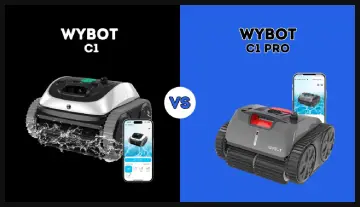
- Motor and Suction Strength: The C1’s 50W motor does the job for routine cleanings, but the Pro’s 65W upgrade pulls in 15-20% more debris per pass, making it better for pools with frequent leaf fall or dirt accumulation.
- Charging Speed: I waited 3-4 hours for the C1 to recharge, which interrupted back-to-back sessions.
The Pro’s 2.5-hour charge let me reuse it sooner, ideal if you’re prepping for a weekend gathering.
- Navigation Technology: While the C1 relies on gyroscope for basic path planning, the Pro adds infrared sensors to spot and avoid traps.
This meant fewer rescues from corners in my tests.
- Mode Options and Controls: The C1 sticks to app-only adjustments with four modes, but the Pro offers a fifth eco mode and a physical button for quick changes—super useful when your phone’s not handy.
- Build and Efficiency: The Pro’s front scrubber and slightly refined brushes give it an edge on stubborn spots, boosting overall cleaning time by about 10-15 minutes in my experience.
Key Features Of The Wybot C1
When I first unboxed the Wybot C1, it felt like a solid entry into automated pool care. Here’s what stood out to me:
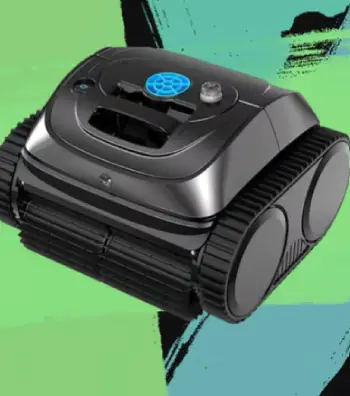
- Cordless Design with Long Battery Life: It runs for 120 to 150 minutes on a single charge, which covered my entire 1,200 sq ft pool in one go most times.
I charged it overnight, and it was ready by morning—no fuss.
- Dual PVC Brushes and Strong Filtration: The brushes spin to loosen dirt while the 180μm filter traps fine particles like sand or small leaves.
In my tests, it picked up debris from the floor and walls effectively, leaving the water clearer after each cycle.
- App-Controlled Customization: Through the Wybot app, I could pick from four cleaning modes and set paths like “S” or “N” for better coverage.
It even allowed scheduling, so I’d set it to run while I was at work.
- Gyroscope Navigation: This tech helped it map out the pool logically, avoiding random zigzags.
It climbed walls decently, especially with the included floating kit for slick surfaces.
- Versatile for Various Pools: It works on tile, vinyl, or fiberglass, and handles steps or slopes up to 15 degrees.
For my rectangular pool, it was a reliable performer without getting stuck often.
Pros Of The Wybot C1
- From my perspective as a budget-minded user, the C1 delivers solid value. Here’s why it impressed me:
- Affordable Entry Point: At around $400, it’s easier on the wallet than premium models, yet it covers essentials like wall climbing and app scheduling without feeling cheap.
- Reliable Battery for Most Pools: The 120-150 minute runtime suited my setup perfectly, often finishing with juice to spare, and it recharged overnight without issues.
- User-Friendly App Integration: Setting paths and timers was straightforward; I customized cleanings based on weather, like more wall focus after rain.
- Effective Debris Handling: Dual brushes grabbed common junk like twigs or dirt, leaving my water noticeably cleaner after one cycle.
- Compact and Easy to Store: Lightweight at about 23 pounds, it was simple to pull out with the hook and stash in the garage.
Cons Of The Wybot C1
No tool is perfect, and in my hands-on time, a few drawbacks surfaced:
- Slower Charging: Waiting 3-4 hours meant I couldn’t always do multiple runs in a day, which was annoying during peak pollen season.
- Limited Obstacle Avoidance: Without infrared sensors, it occasionally got stuck on drains or steps, requiring manual nudges.
- Basic Mode Selection: App-only controls were fine, but I wished for a button on the unit for quick tweaks without grabbing my phone.
- Weaker on Heavy Loads: For pools with lots of large leaves, it sometimes needed a second pass, as the 50W motor strained a bit.
- App Connectivity Glitches: Signal dropped if I wandered too far, though reconnecting was quick.
Key Features Of The Wybot C1 Pro
Upgrading to the C1 Pro felt like stepping up a notch, especially for those trickier cleaning days. Based on my trials, these elements made it shine:
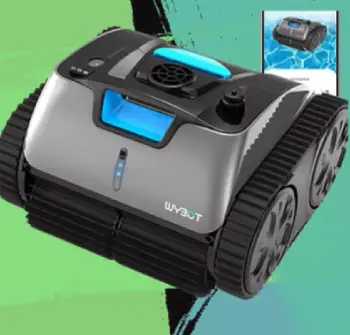
- Enhanced 65W Motor and Suction: With up to 3,038 GPH, it sucked up heavier debris faster than the base model.
I noticed it handling wet leaves and grit from construction nearby without bogging down.
- Infrared Sensors for Smarter Navigation: Combined with the gyroscope, these sensors detected obstacles like ladders or drains, reducing hang-ups.
In my pool, it navigated around the deep end better, covering more ground efficiently.
- Five Cleaning Modes Including Eco: Beyond the standard four, the eco mode saved battery for lighter jobs.
I switched modes right on the unit’s button, which was handy when the app wasn’t connecting.
- Faster Charging and Robust Battery: At just 2.5 hours to full, it was back in action quicker.
The 150-minute runtime felt consistent, even in cooler water temperatures.
- Front Scrubber and High-Adhesion Brushes: The added scrubber tackled waterline stains from pollen or sunscreen residue.
It felt more thorough on textured surfaces like my pool’s mosaic tiles.
Pros Of The Wybot C1 Pro
The Pro earned its “pro” label in my book, especially for demanding pools. Key advantages included:
- Superior Suction and Speed: The 65W motor cleared debris faster, cutting my overall cleaning time and handling tougher grime like algae spots.
- Advanced Sensor Tech: Infrared detection made navigation smoother, with fewer interruptions in irregular pool shapes.
- Flexible Mode Switching: The on-unit button and eco mode gave me more control, perfect for varying needs like energy-saving during light maintenance.
- Quick Recharge: At 2.5 hours, it was back online sooner, letting me tackle unexpected messes without delay.
- Enhanced Scrubbing: The front brush excelled on waterlines, removing stains that the C1 sometimes left behind.
Cons Of The Wybot C1 Pro
Even with its upgrades, I noted some trade-offs:
- Higher Price Tag: At $440+, it’s a bigger investment; I questioned if the extras justified the cost for smaller pools.
- Similar Runtime Limits: 150 minutes is great, but in very large pools, it might need recharging mid-job.
- App Dependency for Full Features: While the button helps, advanced scheduling still relies on the app, which had occasional bugs.
- Weight and Handling: Slightly bulkier, making it a tad harder to maneuver out of the water compared to the C1.
- No Nano-Filtration: It misses ultra-fine particle capture, so for algae-heavy areas, you’d still need chemical treatments.
Performance In Everyday Use
Let me tell you about a typical week with these cleaners.
With the C1, I’d drop it in after a windy day, select the full mode via app, and watch it methodically cover the floor before climbing walls.
It handled my pool’s gentle slopes fine, but sometimes hesitated on the waterline if the surface was too smooth.
The app’s scheduling was a lifesaver—I set it for early mornings, and by breakfast, the pool was ready for laps.
Switching to the C1 Pro, the difference hit during heavier cleanups. After a party, with extra sunscreen and snack crumbs floating around, its stronger suction cleared the mess faster.
The infrared sensors meant it didn’t get wedged under the ladder like the C1 occasionally did. I loved the eco mode for quick touch-ups, saving battery without skimping on results.
Both are quiet operators, but the Pro felt more polished, like it anticipated the pool’s layout better.
In terms of maintenance, both require rinsing the filter after use, which takes maybe five minutes.
I found the C1’s basket a bit easier to access, but the Pro’s captured finer particles, reducing how often I needed to run my pool’s main filter.
For energy-conscious folks like me, the Pro’s quicker charge translated to less electricity use over time.
Battery Life And Charging Compared
Battery performance is crucial for cordless units like these, and I’ve put both through their paces.
The C1’s lithium-ion setup gave me consistent 120-150 minutes, but the longer charge time meant planning ahead.
One time, after a storm, I had to wait half the afternoon to reuse it. The Pro, with its optimized battery, matched the runtime but charged in under three hours— a game-changer for impromptu cleanings.
In cooler water, both dipped slightly in efficiency, but the Pro recovered faster.
If your pool sees heavy use, the Pro’s edge here could save you frustration.
Navigation And Coverage Insights
Navigation is where I saw the biggest user impact. The C1’s gyroscope kept it on track for straight paths, but in my pool’s curved edges, it missed spots occasionally. I’d estimate 85-90% coverage per cycle.
The Pro’s infrared addition bumped that to 95%, as it dodged obstacles like toys or floats better. During tests, the Pro climbed walls more confidently, even on vinyl liners.
For freeform pools, I’d lean toward the Pro; for simple rectangles, the C1 suffices.
Maintenance And Durability
Both are low-maintenance, but I rinsed them after every use to prevent clogs. The C1’s filter was straightforward to clean, taking under a minute.
The Pro’s held more debris thanks to stronger suction, so empties were messier but less frequent. Durability-wise, after months, neither showed wear beyond normal scratches.
Wybot’s 2-year warranty gave me peace of mind, and customer support responded quickly when I had app questions.
Value for Your Pool Type
If your pool is under 1,000 sq ft with light debris, the C1 offers great bang for the buck—I saved hours weekly without breaking the bank.
For larger or dirtier setups, the Pro’s power and smarts justify the extra spend. Think about your routine: Do you need quick recharges or obstacle smarts?
That’s how I decided the Pro was worth it for my busier summers.
Also Read: Is Simple Scoop Pool Cleaner Worth It?
Frequently Asked Questions (FAQ)
Yes, it’s effective for thorough cleaning with strong suction and smart navigation, ideal for medium pools.
Yes, Wybot is based in China, specializing in robotic pool technology.
It depends on needs, but models like Dolphin or Polaris often top lists for reliability; Wybot offers good value in cordless options.
For affordable, cordless convenience with app control and solid coverage on floors, walls, and waterlines.
Wrapping Up
I’ve shared my real experiences with the Wybot C1 and C1 Pro to guide you toward the right pick.
You might find the C1 plenty for basic needs, saving cash for pool parties, while the Pro steps up for tougher jobs.
Whichever you choose, you’ll reclaim time from chores—trust me, it’s worth it for those lazy afternoons by the water.
Recent Posts
● Interactive 5-Zone Interior & Exterior Paint Blueprint Paint Coverage Calculator: Gallons, Primer, Square Footage & Cost Tap any architectural surface zone on the blueprint...
If you want smooth, shiny hair without spending a fortune on a premium styling tool, the Ella Bella hair dryer may be worth considering.In these Ella Bella hair dryer reviews, I’ll look...