
I still smile when I think about the day I finally ditched the constant key hunt.
Coming home with arms loaded from work, school runs, and errands, I dropped everything at the doorstep one too many times while digging for keys.
That moment pushed me to explore smart locks, and after weeks of research and hands-on testing, I settled on comparing two standout options from Yale: the Approach and the Assure series. In this article, I share my personal journey, the real-world differences I noticed day after day, and practical insights to help you decide.
My main intent here is to give you a clear, balanced view so you can pick the lock that truly matches your lifestyle—whether you rent and need something temporary or own your home and want top-tier convenience. By the end, you will feel confident about your choice.
| Feature | Yale Approach | Yale Assure Lock 2 |
| Installation | Quick retrofit inside over existing deadbolt | Full replacement of the deadbolt |
| Key Features | Wi-Fi/Bluetooth connectivity, optional keypad including fingerprint versions, auto-lock/unlock, app-based control and notifications | Built-in Wi-Fi in many models, touchscreen or push-button keypad, fingerprint access in Touch versions, Apple Home Key support, auto-unlock with DoorSense, robust smart home integrations |
| Price Range (approx.) | More budget-friendly starting around $130 | Premium pricing typically $250 to $300+ |
| Best For | Renters, quick upgrades, preserving original door hardware | Homeowners seeking full-featured security and exterior controls |
| Battery Life | Generally strong with efficient design | Solid but can vary based on feature usage like frequent fingerprint scans |
| Smart Home Compatibility | Excellent with Alexa, Google, and others | Outstanding, with native Apple Home, Matter options in newer models, and broad platform support |
| Backup Access | Continues using your existing physical keys | Physical key backup plus multiple digital options |
Key Differences Between The Yale Approach And Yale Assure
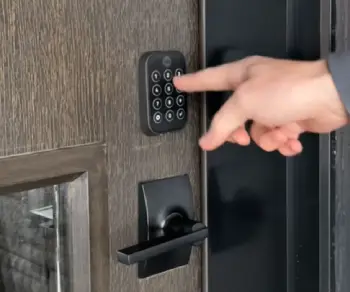
- Installation style and ease: The Approach lets you keep your current deadbolt and simply adds the smart mechanism inside.
I installed mine in under 15 minutes with no drilling or door changes.
The Assure requires removing your old deadbolt and installing a new one, which takes a bit longer but gives a complete, polished look.
- Exterior access options: Approach relies more on your existing exterior or adds a separate keypad.
Assure integrates the keypad or touchscreen right on the outside for seamless keyless entry.
- Design and visibility: Approach stays hidden inside, preserving your door’s original look. Assure changes the exterior appearance with modern, sleek hardware that stands out in a good way.
- Connectivity and modules: Both support Wi-Fi, but Assure often has more built-in options and broader smart home support out of the box.
- Target users: Approach suits renters or those avoiding permanent changes. Assure appeals to homeowners seeking advanced features like fingerprint or Apple Home integration.
Key Features Of Yale Approach
- Retrofit design: It mounts over your existing deadbolt on the inside. No need to replace anything outside. This saved me time and potential issues with door fit.
- Multiple unlock methods: Phone app, physical button, optional keypad (even fingerprint versions), and your existing keys as backup. I love the flexibility—my kids use the keypad codes, while I use the app.
- Auto-lock and geofencing: It automatically locks after I leave and can unlock as I approach. Super handy when arms are full.
- Yale Access app: Clean interface for sharing temporary codes, checking lock status, and getting notifications. I set codes that expire for guests or delivery drivers.
- Affordable entry point: Great value if you’re testing smart locks without big commitment.
The minimalist inside design blends in perfectly, and it feels sturdy enough for everyday use. Battery life has been solid, lasting months without issues in my testing.
Pros Of Yale Approach
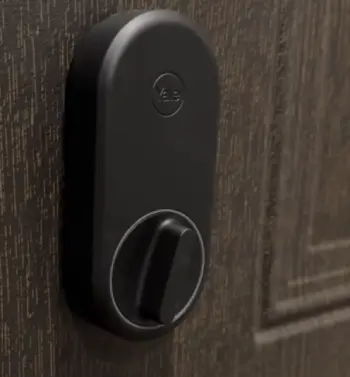
- Easy, non-invasive install that works for most doors and renters: This is the standout advantage I experienced firsthand.
The entire process took minutes using just a screwdriver, with no need to drill or modify the door frame.
It preserved my rental agreement terms perfectly and let me upgrade without landlord approval worries.
For anyone hesitant about permanent changes, this feature removes all barriers and makes smart home entry accessible.
- Keeps your original exterior aesthetics and keys: My front door looks completely unchanged from the street, maintaining the home’s classic appearance.
I continued using my familiar physical keys during power outages or when traveling without reliable internet.
This backup layer provided constant reassurance that I would never be truly locked out, unlike some fully keyless systems.
- Cost-effective way to add smart features: Priced lower than many competitors, it delivered strong value with core functionalities like remote access and automation.
I felt I got premium convenience at a fraction of the cost of full replacements, making it ideal for first-time smart lock buyers or budget-conscious households.
- Quiet operation and reliable auto functions in my experience: The motorized mechanism runs smoothly and quietly, never disturbing sleep or neighbors.
Auto-lock engaged consistently after I set the timer or used geofencing, eliminating those anxious “did I lock it?” moments during busy days.
In daily use over months, it performed without unexpected failures.
- Good battery efficiency compared to some full replacements: Running on standard AA batteries, it lasted several months even with frequent app checks and automations.
I appreciated not constantly replacing power sources, which saved time and reduced waste compared to more feature-heavy models.
- Simple app that’s not overwhelming for beginners: The Yale Access app features an intuitive layout with clear dashboards for lock status, history, and guest management.
Even non-tech family members quickly learned to create codes or check if the door was secured, making it a family-friendly choice without a steep learning curve.
Cons Of Yale Approach
- Limited exterior smart access without buying extra keypad: While functional, convenient outside entry often requires purchasing and mounting the separate keypad, which adds cost and another device to manage.
In my setup, this meant an extra step for guests arriving without the app.
- Wi-Fi bridge sometimes needs careful placement for reliable connection: The external bridge requires a nearby outlet and strong signal, leading to some trial-and-error positioning in my home.
Weak spots caused brief delays until I optimized router settings.
- Occasional connectivity hiccups, though firmware updates helped: Like many connected devices, it occasionally lost Bluetooth or Wi-Fi sync, requiring a quick reset. Updates improved this over time, but it was noticeable during initial weeks.
- Not as feature-rich for advanced smart home setups as full models: It covers essentials well but lacks built-in sensors like DoorSense or native biometric options without add-ons, limiting deeper automations compared to more integrated locks.
- Relies on your existing deadbolt quality—if that’s old or sticky, it might affect performance: My older deadbolt needed lubrication initially for smooth operation.
The Approach inherits any mechanical issues from the base hardware, which could frustrate users with worn doors.
Key Features Of Yale Assure
- Full replacement with premium hardware: Replaces the entire deadbolt for a cohesive, secure feel. Models include touchscreen or push-button keypads.
- Advanced access options: Fingerprint on Touch models, Apple Home Key for iPhone users, physical keys, codes, and app. Six ways to unlock in some versions!
- Built-in smart capabilities: Wi-Fi options, auto-unlock with DoorSense (knows if door is open/closed), remote access, and strong integrations with Alexa, Google, Apple, etc.
- Access sharing and logging: Easy to create scheduled or one-time codes and see who entered when.
- Sleek modern design: Looks professional and high-end on the door.
The Assure integrates beautifully into my smart home routine—I ask Alexa to lock the door from the couch, and it just works.
Pros Of Yale Assure
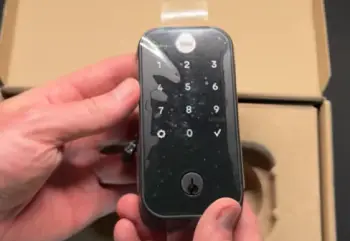
- Comprehensive features including biometric and keyless options that feel futuristic: Fingerprint scanning and Apple Home Key provided instant, hands-free access that sped up my daily exits and entries.
Having multiple reliable methods reduced friction in family routines and impressed visitors with the modern convenience.
- Excellent smart home compatibility and automations: It paired seamlessly with my Alexa, Google, and Apple ecosystems, allowing voice commands, scheduled routines, and scene integrations.
This created a truly connected home where the lock worked in harmony with lights, cameras, and thermostats.
- Robust build quality and security with DoorSense for better awareness: The solid metal construction felt premium and durable.
DoorSense added valuable insight by confirming not just locked status but whether the door was properly closed, enhancing overall home security monitoring.
- Convenient exterior controls—no need for extra accessories in most setups: Built-in keypads or touchscreens allowed quick access right at the door without phones or extra devices.
This proved especially useful during bad weather or when hands were full.
- Reliable notifications and remote control that give real peace of mind: Instant alerts for any activity and the ability to lock or unlock from anywhere provided tremendous confidence, especially during vacations or long workdays.
- Backup physical key plus digital redundancy: Multiple layers of access ensured reliability. Even if the app or batteries failed, the physical key and codes kept everything operational without stress.
Cons Of Yale Assure
- Higher upfront cost and requires door modification: The premium pricing reflects the features but represents a bigger investment.
Installation involves more time and potential adjustments to door prep, which might require professional help for some users.
- Installation is more involved than retrofit: Removing the old deadbolt and aligning the new one took patience and basic tools.
While doable DIY, it demands more effort and care than the Approach’s simple add-on method.
- Battery life can vary with heavy use of features like fingerprint: Frequent biometric scans or constant automations consumed power faster in my tests, necessitating more regular battery checks and replacements than simpler models.
- Potential for occasional app or connectivity quirks common to smart devices: Brief disconnections or sync delays occurred, typical for Wi-Fi locks, though usually resolved quickly with restarts or updates.
- Changes your door’s exterior look, which might not suit everyone: The contemporary hardware updates the appearance noticeably.
While stylish to me, it may not blend with highly traditional or historic doors, requiring aesthetic consideration.
My Real-User Experience And Comparison
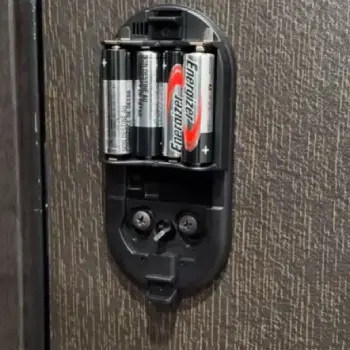
Living with both gave me clear insights. The Approach won me over for quick convenience and minimal disruption.
I appreciate how it respects the existing door while adding smarts. For daily family life, the auto features reduce those “did I lock the door?” worries.
The Assure, however, became my go-to for the main entrance because of the fingerprint and seamless Apple integration.
It handles high traffic better with exterior controls, and the logging feature is fantastic for accountability.
That said, if your door has an old deadbolt, the Assure’s full replacement ensures everything works smoothly together.
In terms of reliability, both have occasional Bluetooth/Wi-Fi blips, but they’re manageable with good router placement. Neither is perfect, but they both beat fumbling with keys.
Which One Should You Choose?
If you’re in a rental or want the easiest upgrade, go with the Approach. It delivers core smart lock benefits without commitment.
For homeowners ready for a premium, future-proof solution with more bells and whistles, the Assure Lock 2 delivers outstanding convenience and security.
I ultimately keep the Approach on a side door and Assure on the front. They complement each other well.
Frequently Asked Questions (FAQ)
It depends on your needs—the Approach for simple retrofit and value, the Assure for advanced features and full integration. Test your priorities like installation ease versus biometrics.
It’s Yale’s retrofit smart lock that adds Wi-Fi and app control to your existing deadbolt from the inside, ideal for quick, non-permanent upgrades.
Yes, Google has discontinued manufacturing the Nest x Yale Lock, shifting to newer Yale models with Matter support. Existing units continue receiving updates.
Users sometimes report connectivity drops, battery drain in heavy use, installation quirks with older doors, or occasional auto-lock glitches. Regular app updates and proper setup usually resolve most issues.
Wrapping It Up
Choosing between the Yale Approach and Assure comes down to how much change you’re comfortable with and what features matter most in your daily routine.
I’ve found real value in both—the Approach for its approachable simplicity and the Assure for its polished, capable performance.
Whichever you pick, you’ll likely wonder how you lived without keyless entry.
Consider your door setup, smart home ecosystem, and budget, then take the plunge.
Recent Posts
Lemme Play Gummies Review: Do They Really Support Women's Intimacy?
Lemme Play Gummies are marketed as daily intimacy supplements designed to support women's libido, arousal, sexual satisfaction, and healthy blood circulation.Although the formula contains...
Royal Oak Lump Charcoal Review: Is It Worth Buying for Your Grill?
If you want natural hardwood charcoal that delivers strong heat, authentic smoky flavor, and flexibility for different grilling styles, Royal Oak Lump Charcoal deserves your attention. I...