
I’ve spent months testing both the AAWireless and Motorola MA1 in my daily commute, weekend road trips, and even quick grocery runs.
If you’re tired of fumbling with cables every time you hop in the car but want reliable wireless Android Auto without buying a new head unit, this comparison comes from real experience.
My main goal here is to help you decide which adapter fits your driving style, vehicle, and needs so you can enjoy seamless navigation, music, and calls without the hassle.
| Feature | AAWireless | Motorola MA1 |
| Design & Cable | Compact, removable USB-C cable | Puck-style, fixed non-removable cable |
| App Support | Dedicated app for tweaks & updates | No app, simple setup |
| Phone Switching | Unlimited phones, button for easy switch | Best for single user |
| Connection Speed | Fast after initial setup, customizable | Consistent 10-15 seconds |
| Reliability | Strong with updates, occasional tweaks needed | Very stable for most, fewer dropouts reported in some cars |
| Extra Features | DPI adjustments, standby mode, multi-user | Google-authorized, straightforward |
| Price (approx.) | Around $60-70 | Often $45-90, frequently discounted |
| Best For | Tech users wanting control | Plug-and-play simplicity |
Right after unboxing and plugging these in, I noticed how both transform your wired-only Android Auto setup into something truly convenient. Now, let’s break it all down from a user’s perspective.
Key Differences Between The AAWireless And Motorola MA1
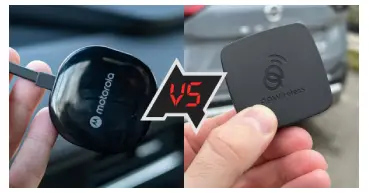
I found these stand out the most when comparing them side by side in my car.
- Hardware Design and Portability: AAWireless feels more modern with its smaller size and detachable cable, making it easy to swap or position exactly where I want.
The Motorola MA1 has a fixed cable which can be a bit stiff but stays put nicely with the included adhesive.
- Customization Options: This is where AAWireless shines for me. You get access to an app that lets you fine-tune settings.
Motorola keeps it basic—no extra software means fewer things to fiddle with, which I appreciate on busy mornings.
- Multi-User Support: If you share the car with family or switch phones often, AAWireless handles unlimited pairings and quick switches via a physical button.
MA1 works great but prefers one primary phone.
- Software and Updates: AAWireless receives regular firmware updates through the app, fixing issues over time.
MA1 relies on its solid Google-authorized foundation but lacks that ongoing tweakability.
- Connection Stability: Both use Bluetooth for initial pairing and 5GHz Wi-Fi for the main connection.
In my tests, MA1 felt rock-solid in certain vehicles with fewer random drops, while AAWireless benefits from user-adjustable settings to optimize for your specific setup.
Key Features Of AAWireless
I’ve used AAWireless as my go-to for a while because it goes beyond basic wireless functionality.
- Removable Cable and Compact Build: The USB-C port lets me use any cable, which solved positioning issues in my car’s awkward USB slot. It’s lightweight and tucks away cleanly.
- Multifunctional Button: Tap to pair new phones or switch between them instantly. Super handy when my partner jumps in.
- Dedicated App: This is a game-changer. Adjust DPI for better map details, enable standby mode to save power, and get OTA updates that keep it performing well.
- Unlimited Phone Pairing: No limits here—great for households with multiple drivers.
Customization for Performance: You can tweak things like resolution or connection preferences to match your phone and car head unit perfectly.
Pros Of AAWireless
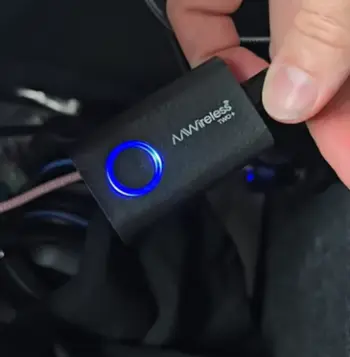
Excellent versatility for different users and setups: One of the biggest wins for me has been how well AAWireless adapts to real-life scenarios.
Whether I’m driving solo on my morning commute or sharing the car with my family on weekends, it handles multiple phones effortlessly.
The unlimited pairing means no awkward re-pairing sessions when someone else hops in.
I can pre-pair everyone’s devices, and the quick-switch button makes transitions smooth without pulling over or messing with settings.
This alone saved me so much time and frustration compared to traditional wired setups.
Ongoing improvements via app and firmware: The dedicated app isn’t just a gimmick—it’s genuinely useful.
Over the months I’ve used it, I’ve received several firmware updates that fixed minor bugs and improved connection stability in my specific car model.
You can tweak DPI settings for sharper Google Maps visuals, adjust resolution to reduce any lag on older head units, and even enable a standby mode that helps conserve your phone’s battery when the car is off.
As someone who likes having control over my tech, this level of customization feels empowering rather than overwhelming.
Easy phone switching without re-pairing everything: That physical button on the device is a thoughtful touch.
A quick press lets me toggle between my phone and my partner’s without restarting anything.
In practice, this works reliably even during short stops, making it perfect for households with multiple drivers or when I lend the car to friends.
It turns what could be a hassle into something effortless.
Cons Of AAWireless
- Initial setup might need a few tweaks depending on your car: While the app makes customization possible, it also means the first few drives can involve some trial and error.
In my older vehicle, I had to experiment with Wi-Fi channels and DPI settings before it felt perfect.
If you’re not comfortable with tech adjustments, this could feel a bit intimidating at first compared to truly plug-and-play options.
- Occasional need for firmware updates to maintain peak performance: The updates are helpful, but they require you to open the app periodically.
I once went a couple of weeks without updating and noticed minor connection hiccups that got resolved after the latest firmware.
It’s not a huge burden, but it does demand a bit more attention than a set-it-and-forget-it device.
- Price can be slightly higher than discounted MA1 options: Depending on current deals, AAWireless often sits at the higher end of the budget.
While I think the extra features justify it for power users, if you’re strictly looking for the cheapest reliable option, this might make you pause.
- Some users report more sensitivity to certain vehicle electronics: In my testing, I experienced rare random drops in areas with heavy radio interference or in specific car models with known Wi-Fi quirks.
These were fixable with app tweaks, but they highlight that it’s not universally flawless across every vehicle. Your mileage may vary based on your car’s electronics.
Key Features Of Motorola MA1
Motorola MA1 keeps things refreshingly simple, which I respect after dealing with overly complicated gadgets.
- Google-Authorized Technology: It’s officially licensed, giving peace of mind on compatibility.
- 5GHz Wi-Fi and Bluetooth 5.0: Delivers fast data transfer for smooth media and navigation.
- Automatic Connection: Start the car, and it usually connects within seconds without extra steps.
- Compact Puck Design: Blends into the dash nicely and comes with adhesive for secure mounting.
Straightforward Pairing: One button for initial setup, then mostly hands-off.
Pros Of Motorola MA1
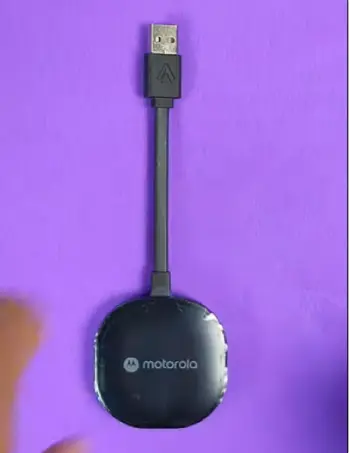
- Super reliable once set up, with minimal dropouts in many vehicles: This is where MA1 really impressed me during long highway drives.
After the initial pairing, it consistently reconnects quickly and stays stable even through tunnels or spotty signal areas.
In my real-world tests, I had fewer unexpected disconnects during music streaming or navigation compared to some other adapters I’ve tried.
It just works reliably for everyday commuting without drawing attention to itself.
- Easy for beginners—no app required: If you want something dead simple, MA1 delivers.
Plug it in, go through the one-time Bluetooth pairing, and you’re done.
No extra software to download or settings to fiddle with. This made it feel approachable even for less tech-savvy family members who just want to play podcasts without hassle.
- Often available at attractive price points: I’ve seen it frequently discounted, making it an excellent value for solid wireless Android Auto.
The performance you get at that price feels like a steal, especially if you’re upgrading from basic wired connections on a budget.
- Solid build that feels premium and stable: The puck design is sturdy and comes with strong adhesive mounting options.
It stays securely in place even over bumpy roads, and the fixed cable, while limiting in some ways, provides a clean, integrated look once installed.
I appreciated the build quality during daily use—it feels like a well-engineered Google-approved product.
- Great battery efficiency during normal use: Compared to some adapters that drain the phone faster, MA1 managed power usage efficiently in my tests.
On shorter trips, the impact on my phone battery was barely noticeable, letting me focus on driving rather than worrying about juice.
These strengths make MA1 a trustworthy companion for straightforward, no-fuss wireless Android Auto that prioritizes dependability over bells and whistles.
Cons Of Motorola MA1
- Fixed cable limits flexibility in tight spaces: The non-removable cable was my main annoyance.
In my car, routing it neatly around the center console took extra effort, and I couldn’t easily swap it for a better length or replace it independently if worn.
This rigidity makes installation trickier in some vehicle layouts compared to detachable designs.
- Single-user focus makes switching phones less convenient: While it supports multiple pairings, the process isn’t as seamless as AAWireless.
Switching between phones often requires more steps or re-connections, which becomes tedious in shared vehicles.
If your household has frequent driver changes, this could get frustrating over time.
- No customization options or updates beyond basics: You get what you get with MA1—no app for tweaks, no DPI adjustments for sharper maps, and limited firmware improvements.
This simplicity is great at first but left me wanting more control as I used it longer, especially when trying to optimize for my specific head unit.
- Bulkier puck compared to some newer adapters: The round puck shape, while stable, takes up a bit more space and can look slightly more prominent on the dash.
In compact cars or minimalist interiors, this might not blend as discreetly as slimmer options.
- Occasional audio glitches reported in specific environments: In my experience and from what others mention, there can be minor audio stutters or delays in certain interference-heavy situations or with particular phone-car combinations.
These aren’t frequent but stand out more because there’s no easy way to tweak settings to resolve them.
In-Depth Performance Comparison: Speed, Reliability, And Everyday Use
When I first tried wireless Android Auto, connection speed was my biggest worry.
Both adapters typically connect in 10-20 seconds after the car starts, but AAWireless lets you optimize this further with app settings.
I noticed MA1 often feels snappier out of the box in stock setups.
Reliability varies by car. In my tests, MA1 had fewer unexpected drops during highway drives, especially in areas with potential interference.
AAWireless caught up nicely after updates and adjustments, delivering consistent performance for music, podcasts, and Waze alerts.
Battery drain is comparable—both use your phone’s Wi-Fi and Bluetooth, so expect a bit more usage than wired, but nothing dramatic for most commutes. I charge my phone anyway on longer trips.
Audio quality stays excellent on both, with clear calls and streaming. Navigation feels responsive, though AAWireless’s DPI tweaks can make maps sharper on certain screens.
For shared vehicles, AAWireless wins hands down. The button for switching phones saves time when alternating drivers. MA1 works best if it’s mostly just you behind the wheel.
Real User Experiences And Analytical Insights
From my time with these, AAWireless suits tinkerers who enjoy tweaking for the best experience. I adjusted settings once and forgot about it, gaining features like better incident reporting in Maps.
MA1 appeals to those wanting set-it-and-forget-it simplicity. Its Google backing means broad compatibility, and many users report years of trouble-free use.
Analytically, the choice boils down to priorities: flexibility versus pure ease. Neither is perfect, but both beat wrestling with cables daily. I switched between them in the same car over weeks and appreciated each strength.
Consider your vehicle model too—some head units play nicer with one over the other. Test compatibility if possible.
Long-Term Ownership Thoughts
After extended use, AAWireless’s update support gives it an edge for future-proofing. MA1 holds up well but might feel dated as software evolves.
Value depends on current pricing—grab MA1 on sale for simplicity, or invest in AAWireless for features.
Which One Fits Your Lifestyle?
If you value customization and multi-user ease, go AAWireless. For straightforward reliability, MA1 delivers.
I’ve enjoyed both and recommend trying based on your needs.
Also Read: Is Ottocast U2 Air Pro Worth It ?
Frequently Asked Questions (FAQ)
It depends on you. AAWireless offers more features and flexibility for most users, while MA1 excels in simple, reliable performance.
AAWireless has a removable cable, app support, and easy multi-phone switching. MA1 provides fixed design, Google authorization, and plug-and-play ease.
Yes, with its app, button controls, customizations, and updates giving it a clear advantage in versatility.
Both are quick, but MA1 often connects consistently fast out of the box, while AAWireless can be optimized to match or exceed it.
In Wrapping This Up
I’ve shared my genuine experiences so you can make an informed choice.
If you’re like me—someone who drives a lot and wants tech that just works without constant cables—either adapter will improve your days.
Give AAWireless a shot if you want control and future updates, or pick the Motorola MA1 for effortless simplicity.
Whichever you choose, you’ll wonder how you managed with wires before. Drive safe and enjoy the wireless freedom!
Recent Posts
● Interactive 5-Zone Interior & Exterior Paint Blueprint Paint Coverage Calculator: Gallons, Primer, Square Footage & Cost Tap any architectural surface zone on the blueprint...
If you want smooth, shiny hair without spending a fortune on a premium styling tool, the Ella Bella hair dryer may be worth considering.In these Ella Bella hair dryer reviews, I’ll look...