
When safety is my priority, I want a GPS tracker that offers more than a simple location dot on a map.
AngelSense is designed for caregivers who want to monitor a loved one’s whereabouts, receive alerts, and gain extra peace of mind, particularly when caring for children with special needs.
In my view, it’s worth considering if you need detailed location monitoring and caregiver-focused features.
If you’re looking for a dependable tracking system with added safety tools, AngelSense deserves a place on your shortlist.
My First Experience With The AngelSense Tracker
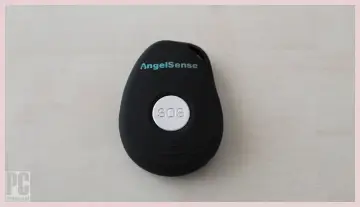
When I evaluate a personal GPS tracker like AngelSense, I look beyond its advertised features. I want to understand how it fits into everyday life, how easily caregivers can use it, and whether its subscription costs make sense over time.
AngelSense is designed primarily for children with autism, developmental disabilities, and other needs that may make independent movement or communication challenging.
It can also be useful for families who need additional support monitoring a loved one’s daily activities.
Unlike a basic Bluetooth tag, AngelSense uses GPS and cellular connectivity to provide location information over a much wider area, subject to coverage and device conditions.
What stands out to me is its focus on caregiver support. Instead of simply showing a location, the system offers features such as location history, customizable alerts, and tools that can help caregivers understand when a person arrives at or leaves familiar places.
Depending on the service plan and device configuration, additional safety features may also be available.
I would pay particular attention to the alerts. For example, knowing that a child has arrived at school or left a familiar location can be more useful than repeatedly opening an app to check their position.
That extra awareness can help families organize busy mornings, school pickups, and transitions between caregivers.
I also appreciate the idea of having a dedicated tracking device rather than relying entirely on a child’s smartphone.
Not every child carries a phone consistently, keeps it charged, or knows how to use it during a stressful situation. A purpose-built tracker can offer an alternative, although its effectiveness still depends on wearing the device, maintaining its battery, and having adequate network coverage.
However, I wouldn’t treat AngelSense as a guarantee of safety. GPS positions can be delayed or inaccurate, cellular service can be interrupted, and alerts may not arrive instantly.
I would test the system in the places where I expect to use it most, including school, home, transport routes, and crowded public areas.
My overall assessment is that AngelSense is most appealing when a family needs more than occasional location checks. Its caregiver-oriented features can justify considering a dedicated tracking service, but the subscription, device comfort, battery routine, and privacy implications all deserve careful thought before purchasing.
Pros Of Angelsense Tracker
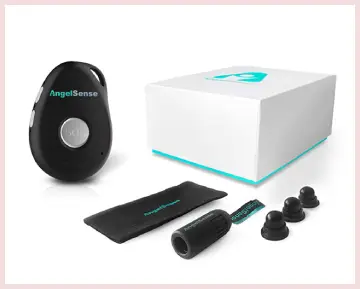
- Specialized Design for Children With Additional Needs
One of AngelSense’s biggest advantages is that it was developed with vulnerable users and their caregivers in mind.
A conventional smartwatch may assume that the wearer can answer calls, read messages, navigate menus, and remember to charge the device independently.
AngelSense approaches the problem differently. Its emphasis is on helping caregivers monitor someone who may not always be able to communicate their location or ask for help.
For me, that distinction matters. If a child tends to wander, becomes disoriented in unfamiliar surroundings, or has difficulty communicating during stressful situations, a purpose-built tracking system may be more appropriate than a general-purpose wearable.
Of course, every child has different needs. I would consider sensory sensitivities, clothing preferences, device size, and the child’s willingness to wear the tracker before making a decision.
- Location Monitoring Beyond Short-Range Tracking
Basic Bluetooth tags are helpful for finding nearby belongings, but they are not designed to provide the same type of wide-area tracking as a GPS device with cellular connectivity.
AngelSense can provide location information across greater distances when its positioning and network connections are working properly. That makes it potentially useful for school commutes, family outings, and other situations where a caregiver and wearer are separated.
I would still remember that GPS isn’t infallible. Location updates may be less precise indoors, and network outages can interrupt reporting. Even so, the ability to check a device’s reported location remotely is a meaningful advantage over relying on a short-range tag alone.
- Customizable Safety Alerts
I consider customizable alerts one of the most practical features of AngelSense. Rather than manually checking a map every few minutes, caregivers can configure notifications around important locations and routines, depending on the plan and app features available.
For example, a caregiver may want to know when a child arrives at school, leaves a familiar place, or deviates from an expected routine. These notifications can make a busy day more manageable.
The key is to personalize them. I would begin with a small number of essential alerts and add more only when they provide genuine value. That approach can help prevent notification fatigue and make important messages easier to notice.
- Helpful for Coordinating Multiple Caregivers
Family safety often involves more than one person. Parents, relatives, school staff, and other trusted adults may all participate in a child’s daily routine.
A shared tracking arrangement can help authorized caregivers coordinate pickups and transitions without relying exclusively on repeated phone calls or text messages. Location information may also help clarify whether a person has reached an expected destination.
I would establish clear rules about who can access the information and when it should be used. Tracking technology works best when everyone understands their responsibilities and the child’s privacy is respected.
- Potential Communication and Emergency-Support Features
Depending on the device and plan, AngelSense may provide additional communication tools and safety features beyond location monitoring. These can be especially relevant when a wearer cannot reliably use a conventional phone.
I would check the exact functions available on the model I’m considering, including whether two-way communication, assistance features, or other options are included. I wouldn’t assume every feature is available with every subscription.
These capabilities may offer additional reassurance, but they should complement rather than replace appropriate supervision and emergency planning.
Cons Of Angelsense Tracker
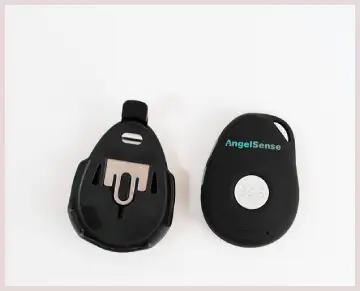
- Ongoing Subscription Costs
The most obvious drawback is the recurring service fee. GPS and cellular tracking generally require an active service plan, so the total cost extends beyond the initial device purchase.
I would calculate the expense over an entire year rather than focusing only on the upfront price.
A tracker that seems affordable initially may become a substantial household expense after monthly fees accumulate.
If you only need occasional location checks, a less expensive alternative may be sufficient.
If you depend on specialized alerts and caregiver support every day, the additional cost may be easier to justify.
- Battery Life Requires Attention
A tracking device is only useful when it has enough power to operate. Frequent location updates and cellular communication can consume energy, meaning charging needs depend on usage and device configuration.
For a busy family, remembering another device’s charging schedule can become frustrating. If the battery runs out before school pickup, you may lose access to the information you expected to have.
I would build charging into an established daily routine and monitor battery notifications carefully.
- GPS Accuracy Is Not Perfect
I wouldn’t expect AngelSense to show an exact position every second in every environment. GPS performance can vary indoors, around tall buildings, and in areas with limited reception.
A location marker may also take time to update. If a person is moving quickly, even a modest delay can make the displayed position less useful for immediate decisions.
For that reason, I would interpret location data as helpful information rather than a guarantee of someone’s precise current position.
- The Device May Not Feel Comfortable to Everyone
A tracker that works well technically can still be difficult to use if the wearer dislikes its size, attachment method, or contact with the body.
Children with sensory sensitivities may find some wearables uncomfortable. Others may repeatedly remove the device or object to having it attached to clothing.
I would prioritize comfort and the wearer’s preferences. A device that remains in a drawer because it feels unpleasant provides little practical value.
- Cellular Coverage Can Affect Performance
Because AngelSense depends on connectivity to communicate location information, its performance can suffer in areas with weak or unavailable cellular service.
I would verify network compatibility and coverage in the places where the tracker will be used most often. This is especially important if school, home, or regular travel routes include areas with inconsistent reception.
Maintenance For The AngelSense Tracker
- Establish a Consistent Charging Routine
My first maintenance priority would be battery management. I would choose a regular charging time that fits naturally into the household schedule, such as after the wearer returns home or before bedtime.
The exact charging frequency depends on the device, battery condition, and how frequently it reports its location. I would follow the manufacturer’s charging instructions instead of assuming that every model has identical battery performance.
Before leaving home, I would check the battery level in the app or through the available device indicators. This small habit can help prevent an avoidable loss of tracking during school hours, appointments, or family outings.
I would also avoid leaving the device charging unattended for unnecessarily long periods if the manufacturer’s instructions advise against it. Consistent, appropriate charging is a better strategy than waiting until the battery is completely depleted.
- Inspect the Device and Its Attachment
I would regularly check the tracker, charging port, casing, and any attachment accessories for visible wear. Small problems can become inconvenient if they go unnoticed until the device is needed.
For example, a loose attachment may allow the tracker to shift or become detached during ordinary movement. A damaged casing or charging connector may also affect everyday usability.
If the tracker uses a specialized attachment or clothing accessory, I would inspect that component according to its care instructions. I would replace worn accessories when necessary and avoid improvised attachments that might damage the device or make it uncomfortable to wear.
Most importantly, I would make sure the tracker remains securely attached without creating discomfort or restricting movement.
- Keep the App and Device Software Updated
Software updates can improve compatibility, resolve technical problems, and sometimes introduce changes to available features. I would periodically check for updates to the AngelSense app and follow any instructions provided for the tracker itself.
After an update, I would confirm that the app opens correctly, the device appears connected, and location information is updating as expected.
If a feature behaves differently after an update, I would review the current settings before assuming that the tracker is defective. I would also keep my phone’s operating system reasonably up to date to reduce avoidable compatibility issues.
- Test Location Accuracy in Familiar Places
I wouldn’t wait for an emergency to discover how the tracker performs. I would test it during ordinary activities, including at home, near school, and along common travel routes.
During these checks, I would compare the reported location with the actual location and observe how quickly updates appear. I would also test important notifications to confirm that they work as expected.
If the location appears delayed or inaccurate, I would check the battery, connectivity, app permissions, and device placement before contacting customer support.
These routine tests can help me understand the tracker’s limitations. They also prevent me from assuming that every alert or location update will be instantaneous.
- Clean the Device Carefully
Because a wearable tracker may encounter sweat, dust, and everyday dirt, occasional cleaning is sensible. However, I would never assume that a particular model is waterproof or safe to immerse in water.
I would use only the cleaning method recommended by the manufacturer, keeping moisture away from charging ports and other openings unless the device instructions explicitly permit it.
I would avoid abrasive cleaners, harsh chemicals, and excessive pressure. Before cleaning, I would disconnect the device from its charger and follow any relevant safety instructions.
After cleaning, I would make sure the device is completely dry before charging or returning it to use, as appropriate for the model.
- Review Alerts and Safe-Place Settings
Maintenance isn’t limited to the physical device. The tracking settings need attention, too.
As routines change, I would review saved locations, notification preferences, and any designated safe-place settings. A child may start attending a new school, visit a relative more frequently, or follow a different transportation schedule.
Outdated settings can lead to unnecessary alerts or missed notifications. I would remove obsolete locations, add relevant new ones, and check that the correct caregivers receive the appropriate notifications.
I would also review account permissions periodically to ensure that only authorized people have access.
- Protect Account Access and Personal Information
Since location data is sensitive, I would use a strong, unique account password and enable any additional security protections the service offers.
I would avoid sharing login credentials casually. If another caregiver needs access, I would use the service’s supported account-sharing or permission controls wherever available.
I would also review who can view location information and remove access when it is no longer needed. These steps help reduce unnecessary exposure of the wearer’s movements and routines.
Comparison Of AngelSense Tracker With Other Brands
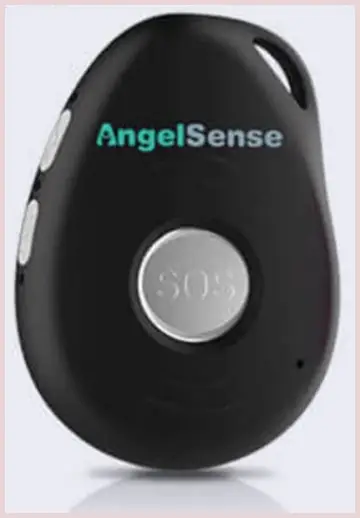
- AngelSense vs. Jiobit
Jiobit is another dedicated tracking option designed for keeping track of children and other loved ones.
Both products aim to help caregivers locate a person without relying entirely on a smartphone carried by the wearer.
The difference I would investigate most carefully is the overall monitoring experience.
AngelSense emphasizes specialized caregiver tools and safety-oriented features, while Jiobit has focused on compact tracking and family location monitoring.
If I needed more specialized supervision features, I would examine AngelSense first. If a small, discreet tracker and straightforward location monitoring were my main priorities, I would also consider Jiobit.
Before deciding, I would compare current device availability, supported networks, subscription terms, battery performance, and the exact features offered in my region.
- AngelSense vs. Apple AirTag
Apple AirTag is designed primarily to help people find personal belongings through Apple’s Find My network. It is not equivalent to a dedicated GPS tracker with a cellular subscription.
An AirTag may help locate a bag or other item, but its location updates depend on nearby compatible Apple devices and network conditions. It does not provide the same dedicated cellular tracking arrangement or specialized caregiver functionality as AngelSense.
For monitoring a child who may wander or need consistent caregiver support, I would not treat an AirTag as a direct substitute for AngelSense. For finding a misplaced backpack, however, an AirTag may be a more economical choice.
- AngelSense vs. Apple Watch
An Apple Watch with supported cellular service and location-sharing features can help families stay connected with a child who can wear, charge, and use it appropriately.
The watch offers a broader range of communication and smartwatch features. However, its usefulness depends on the particular model, service configuration, and the wearer’s ability to interact with it.
AngelSense may be more appropriate when the priority is a dedicated tracking arrangement with specialized caregiver-oriented features. An Apple Watch may be preferable for an older child who can manage a wearable and benefit from calls, messages, and other everyday functions.
I would compare their total costs, comfort, charging requirements, and emergency-support capabilities before choosing either.
- AngelSense vs. Garmin Bounce
Garmin Bounce is a children’s smartwatch designed around communication, location features, and family management. It may appeal to families who want a more conventional watch with additional functions.
AngelSense has a more specialized emphasis on caregiver monitoring and safety support. Garmin Bounce may be better suited to a child who enjoys wearing a watch and can manage its interface.
I would assess whether the child is comfortable with a screen-based wearable and whether the available features match the family’s supervision needs. Subscription requirements, cellular compatibility, and feature availability should also be checked before purchase.
- AngelSense vs. Basic GPS Trackers
Basic GPS trackers can offer location reporting without all the specialized tools associated with AngelSense. Depending on the model, they may cost less and provide enough functionality for straightforward monitoring.
However, I wouldn’t compare devices based only on their advertised tracking range. I would also examine update frequency, network support, alert customization, location history, battery life, and customer support.
If I only needed occasional location checks, a basic tracker could be sufficient. If I wanted a more comprehensive caregiver-oriented service, AngelSense might offer a better fit despite its additional cost.
Overall, I would choose the simplest reliable device that meets the wearer’s actual safety needs rather than automatically selecting the tracker with the longest feature list.
Also Read: Is PetLink GPS Tracker Worth It?
Frequently Asked Questions (FAQ)
Yes, it may be worth it for families who need specialized caregiver alerts and location monitoring, particularly for children with additional support needs.
It can track over wide areas using GPS and cellular connectivity, rather than being limited to Bluetooth range. Performance depends on coverage and device conditions.
There is no single best tracker for everyone. AngelSense, Jiobit, and other GPS devices serve different needs, so compare features, reliability, costs, and current customer ratings.
The monthly subscription price depends on the current plan and billing terms. Check the latest pricing before purchasing, including any upfront device costs.
Wrapping Up
After weighing the features, limitations, and ongoing expenses, I believe AngelSense is worth considering for families who need specialized GPS tracking and caregiver-focused safety tools.
Its location monitoring and customizable alerts may make everyday routines easier to manage. I would recommend buying it if those features match your needs and the subscription fits your budget.
Before committing, verify network compatibility, battery expectations, device comfort, and the current plan details so you can make a confident decision.
Recent Posts
A corduroy bean bag can be a smart choice if you want comfortable seating that looks stylish without taking up the visual space of a traditional armchair.I like the idea of combining soft, ribbed...
In my search for a simpler, less messy laundry routine, ECOS laundry sheets caught my attention because they promise convenient detergent dosing without the heavy plastic jugs.I like the idea of...