
I spent weeks printing the same models on both the Anycubic Kobra S1 and the Bambu Lab P1S to settle the question for myself.
My goal here is simple: give you a clear, real-world breakdown of how these two enclosed CoreXY machines stack up so you can decide which one actually fits your desk, materials, and patience level.
| Feature | Anycubic Kobra S1 | Bambu Lab P1S |
| Build Volume | 250 × 250 × 250 mm | 256 × 256 × 256 mm |
| Max Print Speed | 600 mm/s (recommended ~300 mm/s) | 500 mm/s |
| Acceleration | Up to 20,000 mm/s² | Up to 20,000 mm/s² |
| Hotend Max Temp | 320 °C | 300 °C |
| Bed Max Temp | 120 °C | 100 °C |
| Enclosure | Fully enclosed with carbon filter | Fully enclosed with carbon filter |
| Multi-Color System | ACE Pro (active drying, 4–8 colors) | AMS / AMS 2 Pro (up to 16 with stacking) |
| Screen | 4.3-inch color touchscreen | Small monochrome LCD with D-pad |
| Noise (quiet mode) | ~44 dB | ~50–55 dB |
| Camera | HD monitoring camera | 720p low-frame-rate chamber camera |
| Typical Street Price (solo) | Lower, often under $500 | Higher, frequently $450–700 |
| Ecosystem Maturity | Growing | Very mature with large community |
Key Differences between the Anycubic Kobra S1 And Bambu P1S
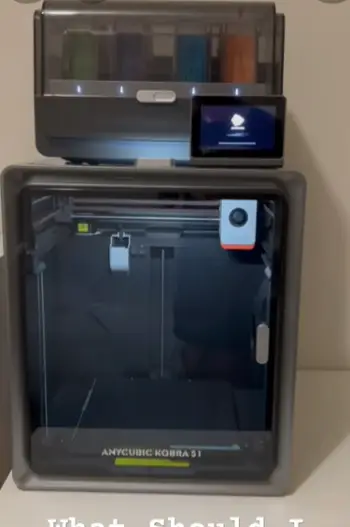
- Temperature headroom: The Kobra S1 pushes the hotend to 320 °C and the bed to 120 °C. That extra range lets me run higher-temp engineering filaments with less struggle.
The P1S tops out at 300 °C and 100 °C, which still covers ABS and ASA comfortably but leaves less margin for PC or certain nylons.
- Speed claims versus real output: Anycubic advertises 600 mm/s while Bambu lists 500 mm/s. In practice both settle around 150–300 mm/s for clean results.
The Kobra S1 feels snappier on pure PLA runs while the P1S keeps surface quality more consistent when I push acceleration.
- Multi-color approach: ACE Pro on the Kobra S1 actively heats and dries filament while it prints. AMS on the P1S relies on desiccant and is more polished in software.
Color changes on the Bambu side waste less time overall, but the Anycubic dryer has saved more of my humidity-sensitive spools.
- User interface and daily feel: The 4.3-inch touchscreen on the Kobra S1 is genuinely pleasant to poke.
The P1S still uses a tiny screen and directional pad that feels dated. I reach for the Anycubic panel more often for quick adjustments during a long job.
- Software and community depth: Bambu Studio and the surrounding profiles are battle-tested over years of use.
Anycubic’s slicer works well enough for most tasks, but I still export to Orca more often for complex jobs.
The Bambu community has years of shared settings while Anycubic’s is catching up fast.
- Noise and presence in the room: Quiet mode on the Kobra S1 drops it to a level I can ignore while working nearby.
The P1S is louder during travels and AMS operations, enough that I notice it in a small office space.
Key Features Of The Anycubic Kobra S1
- CoreXY motion with high claimed speeds: The rigid frame and direct-drive extruder deliver smooth movement across the build plate.
I regularly run 250–300 mm/s on PLA without visible ringing when input shaping is dialed in properly.
- LeviQ 3.0 automatic leveling: One-touch mesh and Z-offset calibration has been reliable from the first day.
First layers stick consistently across the PEI plate with almost no manual tweaks after the initial setup routine.
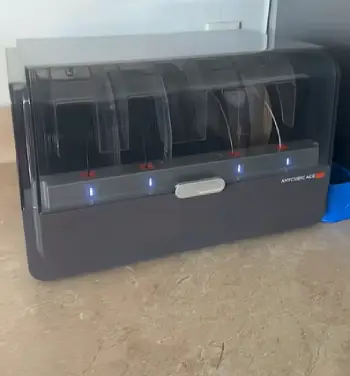
- ACE Pro multi-color unit with active drying: The heated chamber keeps filament dry during long multi-color jobs.
Stacking a second unit for eight colors is straightforward, though purge towers still eat a noticeable amount of filament.
- 4.3-inch responsive touchscreen and built-in camera: Navigating menus feels modern and lag-free compared with older machines.
The camera lets me check progress from my phone without walking over every ten minutes during a long print.
- Higher temperature limits and quiet mode: The 320 °C hotend and 120 °C bed open more material options than many printers in this class.
Quiet mode is useful when the printer shares space with people working or studying nearby.
Pros Of The Anycubic Kobra S1
- Strong value for the feature set: You get an enclosed CoreXY, high-temp capability, and multi-color option at a lower entry price than the equivalent Bambu combo. That matters when I am building a small print farm or testing the waters with a limited budget.
- Quieter operation: Quiet mode keeps the machine from dominating the room during overnight runs. I can leave it running without the constant reminder of a fan or stepper drone in the background.
- Better temperature ceiling: Printing materials that prefer hotter nozzles and beds is simpler with the extra headroom available. I have had fewer failed high-temp jobs compared with the tighter limits on the P1S.
- Larger, more usable screen: Adjusting settings mid-print or checking status is faster and less frustrating than the small interface on the competing machine. The touch response feels modern and practical for daily use.
- Active filament drying in the ACE Pro: Humidity is less of a constant battle when working with moisture-sensitive materials. PETG and nylon stay usable longer without needing separate dryers for every spool.
Cons Of The Anycubic Kobra S1
- Less refined multi-color software: Purge amounts are harder to predict in advance, and color-change times can stretch a one-hour model into several hours of total runtime. The slicer still lags behind more mature options for complex multi-material tools.
- Younger ecosystem and smaller community: Finding exact profiles for third-party filaments takes more searching and testing on my part. Firmware updates arrive regularly, but the shared knowledge base is still thinner than the competition.
- Some proprietary elements and occasional remote quirks: The app and camera feed have been less reliable in my testing over weeks of use. Maintenance access to the toolhead is a bit tighter than I prefer when swapping nozzles or clearing clogs.
- Filament waste on color jobs: Like every single-nozzle multi-color system, purge towers and cleaning cycles consume plastic that cannot be recovered easily. The ACE Pro does not eliminate that ongoing cost during multi-color runs.
Key Features Of The Bambu Lab P1S
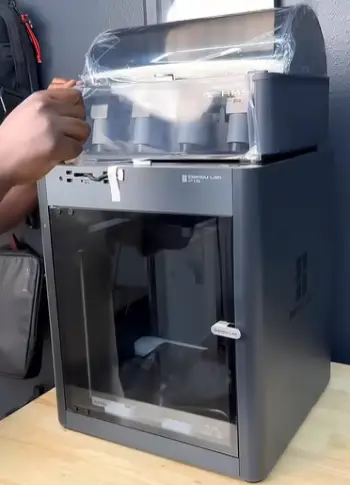
- Mature enclosed CoreXY platform: The fully sealed chamber holds heat well for ABS and ASA without extra modifications.
Vibration compensation and pressure advance are tuned from the factory so most prints look good on the first try.
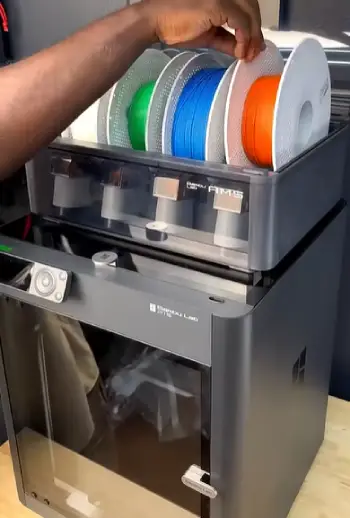
- AMS multi-material system: Loading four spools is nearly automatic and the software manages tool changes smoothly.
Stacking additional units expands the color count up to sixteen when needed for complex projects.
- Automatic calibration suite: Bed leveling, flow rate, and resonance tests run before most jobs with minimal input from me.
I rarely need to intervene once the machine is set up and profiles are loaded.
- Integrated camera and remote monitoring: The low-frame-rate feed is basic but functional for checking failures or creating simple time-lapses of successful prints.
It covers the essential monitoring needs without extra hardware.
- Large profile library and ecosystem: Official and community profiles for hundreds of filaments reduce trial-and-error time significantly.
The app and cloud features feel polished even if they keep some control on Bambu’s servers.
Pros Of The Bambu Lab P1S
- Excellent out-of-the-box reliability: Most prints succeed with default profiles and minimal tweaking required. The combination of enclosure, input shaping, and automatic calibration removes a lot of the usual 3D-printing friction for everyday users.
- Polished multi-color workflow: AMS integration feels tighter and more predictable than many competing systems. Color changes are smoother, and the software gives clearer estimates of waste and total time before the job starts.
- Huge community and profile library: Almost any filament I try already has a proven starting point shared by other users. Shared projects and troubleshooting advice are abundant and easy to find when issues appear.
- Consistent surface quality at speed: Even when I push toward the upper end of practical speeds, walls stay cleaner and corners sharper than I expected for this price class. The factory tuning holds up well across different materials.
- Strong enclosure performance: Heat retention is solid for ABS and ASA without extra mods or aftermarket panels. The carbon filter helps keep the room usable even during longer high-temperature prints.
Cons Of The Bambu Lab P1S
- Higher typical cost: The printer and AMS combo often sits above the equivalent Kobra S1 package on the market. That premium buys polish and ecosystem depth, but it is noticeable when working on a tighter budget.
- Louder in daily use: Travels, AMS movements, and chamber fans are more audible during operation. In a quiet workspace the difference is clear and can become distracting over long sessions.
- Lower temperature limits: Certain engineering materials sit closer to the edge of capability on this machine. I have had to slow down or adjust more carefully than on the Kobra S1 for the same filaments.
- Dated interface and proprietary leanings: The small screen and reliance on Bambu’s software ecosystem can feel restrictive after using more modern touch panels. Some users dislike the closed aspects of the platform over time.
- Multi-color waste and occasional AMS quirks: Purge still happens on every color change, and filament path issues appear from time to time. Softer or irregular spools can cause more interruptions than expected during complex jobs.
Real-World Prining Experiance
When I load a simple PLA Benchy, both machines finish in roughly the same window once I settle on practical speeds.
The Kobra S1 edges ahead on pure speed runs while the P1S produces slightly cleaner overhangs and less stringing without extra tuning.
For multi-color models the Bambu system wins on total time and predictability. The Anycubic dryer, however, has kept more of my PETG and TPU spools printable during humid weeks.
ABS and ASA behave well inside both enclosures. The extra bed heat on the Kobra S1 helps larger parts stay stuck through the full height of the print.
Flexible filaments feed cleanly through both direct-drive systems, though the ACE Pro has restrictions on certain soft TPU grades that the AMS handles more gracefully in daily use.
Daily ownership feels different between the two machines. The Kobra S1 rewards me with a better screen and quieter background presence during long sessions.
The P1S rewards me with fewer failed starts and a deeper well of community knowledge when something needs adjustment.
Neither is completely maintenance-free, but both require less babysitting than the open-frame machines I used five years ago.
Who should choose which machine?
If you want maximum temperature flexibility, a quieter machine, and lower upfront cost while still getting an enclosed CoreXY and multi-color option, the Kobra S1 makes strong sense for most hobby setups.
If you value the most refined software experience, the largest community, and the most consistent multi-color results right out of the box, the P1S remains the safer long-term pick for many users who print regularly.
Budget, available desk space for the multi-color unit, and how often you switch materials will decide the winner more than any single spec sheet number.
Both printers deliver solid results once matched to the right projects and expectations.
Also Read: Comparison Of Creality K2 And Bambu Lab P1S
Frequently Asked Questions (FAQ)
Yes for most users seeking enclosed CoreXY speed, higher temperature limits, and multi-color capability at a competitive price. It delivers solid quality once profiles are dialed in.
Neither is universally better. Bambu currently leads in software polish and community depth. Anycubic offers stronger temperature range, quieter operation, and often better value.
Multi-color purge times can be long, the slicer still needs refinement for complex color jobs, and remote monitoring has been less reliable than expected in some setups.
The company has faced criticism over open-source licensing practices, restrictions on third-party software access, and a more closed ecosystem approach that some users find limiting.
Wrapping Up
I tested both printers side by side because the marketing claims alone never tell the full story.
You now have the practical differences that matter on a real desk. Choose the Kobra S1 when temperature headroom, noise, and price drive the decision.
Choose the P1S when you want the smoothest possible daily experience and the deepest support network.
Either machine will print well if you match it to your actual projects. The best printer is the one that stays on your desk and keeps producing parts without constant frustration.
Recent Posts
● Interactive 5-Zone Interior & Exterior Paint Blueprint Paint Coverage Calculator: Gallons, Primer, Square Footage & Cost Tap any architectural surface zone on the blueprint...
If you want smooth, shiny hair without spending a fortune on a premium styling tool, the Ella Bella hair dryer may be worth considering.In these Ella Bella hair dryer reviews, I’ll look...