
Let me tell you straight up, if you’re hunting for a gaming headset that blends comfort, killer sound, and seamless connectivity across all your devices, the Arctis Nova 7 Wireless is the one to buy.
I’ve put it through its paces, and it delivers on every front without breaking the bank. You won’t regret adding this to your setup—it’s versatile, reliable, and just plain fun to use.
Trust me, once you slip it on, you’ll wonder how you gamed without it.
My First Experience With The Arctis Nova 7 Wireless
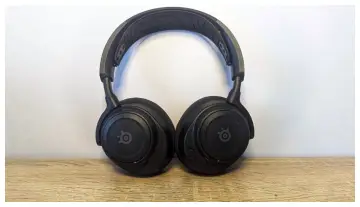
I remember the day I unboxed the Arctis Nova 7 Wireless like it was yesterday.
The packaging was sleek, minimalistic, with that premium feel you get from SteelSeries gear.
Inside, there was the headset itself, a USB-C dongle for the 2.4GHz connection, a charging cable, and some adapters for broader compatibility.
Right away, I appreciated how lightweight it felt in my hands—around 325 grams, which is perfect for those marathon gaming sessions without feeling like a weight on your head.
Setting it up was a breeze.
I plugged the dongle into my PC, and within seconds, it connected wirelessly. No fumbling with apps or complicated pairings; it just worked.
I fired up my favorite game, something intense like a first-person shooter, and the audio hit me immediately.
The neodymium drivers pumped out clear highs and punchy lows, making every footstep and explosion feel immersive.
You know that moment when you’re sneaking up on an enemy, and you can pinpoint their location just by sound? That’s what this headset does for you.
I didn’t stop at PC gaming. I switched to my PlayStation 5, and the compatibility was seamless—plug the dongle into the console, and you’re good.
Then, the real magic happened when I paired it via Bluetooth to my phone while still connected to the console. Picture this: I’m in the middle of a raid, but I get a call from a friend.
Instead of pausing, I answer seamlessly, mixing game audio with the conversation. No lag, no dropouts. It’s like having two headsets in one.
Comfort-wise, oh man, it’s top-notch. The ski-goggle headband distributes weight evenly, and the AirWeave ear cushions are breathable, so no sweaty ears after hours of play.
I wore it for a solid six-hour stretch once, bingeing a story-driven game, and forgot it was even on. The retractable mic is a nice touch too—clear enough for team chats without sounding tinny.
Battery life impressed me big time. SteelSeries claims up to 38 hours on the original, but with the Gen 2 updates I’ve seen in recent models, it’s pushing 50+ hours. I charged it once a week, even with heavy use.
Fast charging means 15 minutes gives you six hours—perfect for when you’re in a rush.
Overall, my time with the Arctis Nova 7 has been transformative. It’s not just a headset; it’s a companion that enhances every gaming moment.
If you’re like me, juggling multiple devices, this thing adapts effortlessly. Sure, it took a bit to tweak the EQ in the Sonar software for my taste, but once dialed in, the sound was spot-on for music too.
Listening to playlists while working felt balanced, with vocals shining through. You might find yourself reaching for it even outside gaming, like during commutes or calls. It’s that versatile.
Pros Of The Arctis Nova 7 Wireless
You and I both know that when it comes to gaming headsets, the positives can make or break your decision.
Let me walk you through what makes the Arctis Nova 7 Wireless stand out in my eyes. I’ve used it extensively, and these features keep me coming back.
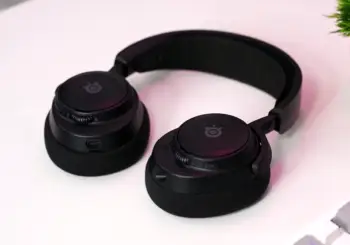
- Exceptional Comfort for Long Sessions
First off, comfort is king with this headset.
The design uses a ski-goggle style suspension band that adjusts automatically to your head shape. It’s like it molds to you without any pressure points.
The ear cups are made from AirWeave fabric, which is super breathable—think memory foam wrapped in a material that lets air flow, so your ears stay cool even during heated battles.
I can wear it for hours without that clamped feeling you get from cheaper models. Weighing just over 300 grams, it’s light enough that you forget it’s there.
If you’re someone who games late into the night, like I do, this means no headaches or fatigue.
Plus, the adjustable fit accommodates different head sizes, so whether you have a larger noggin or not, it sits perfectly.
- Impressive Battery Life and Fast Charging
Battery performance is another huge win. On the standard model, you’re looking at about 38 hours of playtime, but the Gen 2 bumps it to over 50 hours.
That’s insane for a wireless headset. I charge it maybe once every few days, even with daily use. And when it does run low, the fast charging kicks in—plug it in for 15 minutes, and you get six hours back.
No more interruptions mid-game because your battery died. You can keep going, and that reliability builds trust.
Imagine you’re in a competitive match; the last thing you want is a power outage. This headset ensures you’re always powered up.
- Versatile Connectivity Options
What really sets it apart is how it connects to everything.The 2.4GHz wireless dongle provides low-latency audio for gaming on PC, PlayStation, Xbox, Switch, and even mobile.
But the killer feature is simultaneous Bluetooth mixing. You can connect to your phone via Bluetooth while gaming on another device.
I use this all the time—listening to podcasts or taking calls without missing a beat in the game. The range is solid too, up to 40 feet without dropouts.
If you’re multi-tasking like me, juggling work calls and gaming, this flexibility is a game-changer. It feels modern, like the headset understands your lifestyle.
- Solid Audio Quality with Customization
Sound-wise, the neodymium magnetic drivers deliver a balanced profile right out of the box. Bass is punchy for explosions and gunfire, mids are clear for dialogue, and highs don’t get piercing.
In games, spatial audio helps you locate sounds accurately, giving you an edge in shooters. For music, it’s decent, though I tweak it in the Sonar app for more warmth.
The software lets you create custom EQ profiles per game or app, which is brilliant. You can fine-tune for FPS games to emphasize footsteps or for RPGs to boost immersion.
Mic quality is clear too—my teammates always hear me without echo or distortion. It’s not studio-level, but for gaming chats, it’s more than enough.
- Durable Build and Premium Feel
Build quality feels premium without being flashy. The metal-reinforced headband adds sturdiness, and the matte finish resists fingerprints.
It’s built to last; I’ve dropped it a couple times, and it bounced back fine. The retractable mic tucks away neatly when not in use, keeping the look clean.
Accessories like the dongle and cables are high-quality, not flimsy. If you travel with your gear, this headset packs well and holds up. Overall, these pros make it a reliable daily driver.
Cons Of The Arctis Nova 7 Wireless
No product is perfect, right? Even though I love the Arctis Nova 7, there are a few drawbacks I’ve noticed. Let’s chat about them so you know what to expect.
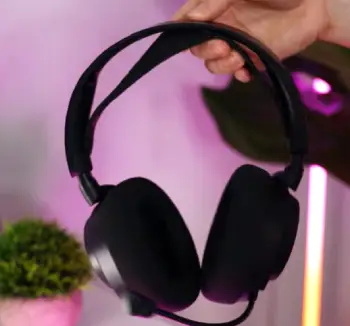
- Audio Needs EQ Tweaking for Perfection
The default sound profile is good, but it can feel a bit flat at times, especially for music lovers. Bass is there, but not as deep as some competitors without adjustments.
In the Sonar app, you have to spend time customizing EQ settings to get it just right. For casual users, this might be a hassle.
I found myself fiddling more than I’d like initially.
- Mic Could Be Better in Noisy Environments
The microphone is clear in quiet rooms, but in busier settings, it picks up background noise more than I’d prefer.
It’s not the best for streaming or professional calls where crystal clarity matters. Friends have mentioned slight muffling on my end during group chats.
- Price Point Might Feel High for Some
At around $180, it’s not budget, and if you’re not using all the features like multi-device mixing, you might wonder if it’s worth it.
Variants for specific consoles add to the cost if you need cross-compatibility.
- Software Can Be Glitchy Occasionally
The Sonar software is powerful, but I’ve had moments where it doesn’t detect the headset right away or crashes during updates. It’s not frequent, but when it happens, it’s annoying.
- Limited Noise Isolation
It doesn’t have active noise cancellation, so in loud environments, external sounds creep in. For focused gaming at home, it’s fine, but on the go, you might hear more than you want.
Maintenance Tips For Arctis Nova 7 Wireless
Keeping your Arctis Nova 7 in top shape isn’t rocket science, but a little care goes a long way.
I’ve learned this the hard way with past headsets, so let me share what works for me to keep it performing like new.
- Regular Cleaning to Prevent Buildup
You sweat during intense games, and that can gunk up the ear cushions. I wipe them down weekly with a soft, damp cloth—no harsh chemicals, just water or a mild soap solution.
Avoid soaking them; a quick swipe does the trick. For the mic, use a dry brush to clear debris. The headband collects dust too, so vacuum it gently or use a microfiber cloth.
Doing this keeps odors away and maintains hygiene. If you share the headset, clean it after each use to avoid skin issues.
- Proper Storage to Avoid Damage
Don’t just toss it on your desk. I hang mine on a stand or store it in the included pouch when not in use. This prevents the headband from stretching out or cables from tangling.
Keep it away from direct sunlight or heat sources, as that can degrade the materials over time. If you’re traveling, use a protective case to shield it from bumps.
Proper storage extends its life significantly—mine still looks brand new after months.
- Battery Management for Longevity
To maximize battery health, avoid letting it drain completely often. I charge it when it hits 20%, using the USB-C cable.
Don’t overcharge either; unplug once full.
If you’re not using it for weeks, store at around 50% charge in a cool place. Fast charging is great, but use it sparingly to reduce wear. Monitoring via the app helps you track usage patterns.
- Software Updates and Firmware Checks
SteelSeries releases updates that fix bugs and improve performance. I check the GG app monthly for firmware upgrades. I
nstall them promptly to ensure compatibility and new features. Back up your EQ presets first, in case something resets. This keeps the headset optimized.
- Handling Wear and Tear on Components
Earcups can wear out, but SteelSeries sells replacements. If yours feel flat, swap them. Check cables for frays and replace if needed.
For the dongle, keep it in a safe spot—losing it means buying a new one. Gentle handling during adjustments prevents breaks.
- Environmental Considerations
Humidity can affect electronics, so store in a dry area. If it gets wet, dry it immediately and let it air out. Avoid extreme cold too, as it impacts battery.
Following these tips, your headset will last years.
Comparing The Arctis Nova 7 Wireless To Other Brands
When you’re deciding on a headset, it’s smart to see how it stacks up against the competition.
I’ve compared it to a few popular brands based on my experiences and what I’ve heard from friends.
Let’s break it down.
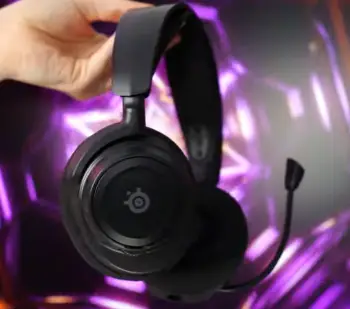
- Arctis Nova 7 Wireless Against Razer BlackShark V2 Pro
Razer’s BlackShark V2 Pro is a strong contender in the wireless gaming space. It offers hyperspeed wireless for low latency, similar to the Nova 7’s 2.4GHz.
Sound-wise, Razer’s TriForce drivers give a bit more emphasis on bass, which you might prefer for action-packed games, but the Nova 7’s neodymium ones feel more balanced overall.
Comfort is comparable, with memory foam cushions, though I find the Nova 7’s ski-band more adjustable.
Battery life on the Razer is around 70 hours, edging out the Nova 7’s 38-50, but the Nova 7 wins with simultaneous Bluetooth.
Mic quality is neck-and-neck, both clear but not exceptional. Price is similar, around $180, so if you want Razer’s ecosystem integration, go for it, but the Nova 7 feels more versatile for multi-platform use.
- Arctis Nova 7 Wireless Versus Logitech G Pro X 2 Lightspeed
Logitech’s G Pro X 2 Lightspeed brings pro-level features like swappable earpads and a detachable mic.
Its graphene drivers provide crisp audio with less distortion at high volumes, something the Nova 7 matches but doesn’t exceed.
Comfort is excellent on both, but Logitech’s lighter weight (under 350 grams) might appeal if you prioritize minimalism.
Battery hits 50 hours, aligning with the Nova 7 Gen 2. Where the Nova 7 pulls ahead is in software—Sonar offers more granular EQ than Logitech’s G Hub, which can feel bloated.
Connectivity is solid on both, but Nova 7’s dual mixing gives it an edge for phone integration. At $250, Logitech is pricier, so the Nova 7 offers better value unless you need the pro endorsements.
- Arctis Nova 7 Wireless Facing HyperX Cloud Alpha Wireless
HyperX’s Cloud Alpha Wireless is known for insane battery life—up to 300 hours—which blows the Nova 7 out of the water.
If longevity is your top priority, this is tempting. Sound from dual-chamber drivers is warm and immersive, comparable to the Nova 7 but with more emphasis on mids for vocals.
Comfort is plush with leatherette cushions, though I prefer the Nova 7’s breathability for long sessions. Mic on HyperX is decent but picks up more noise.
No Bluetooth mixing here, so Nova 7 wins for versatility. Priced at $200, it’s close, but if you don’t need extreme battery, the Nova 7’s features make it more practical.
- Arctis Nova 7 Wireless Against Corsair HS80 RGB Wireless
Corsair’s HS80 RGB Wireless adds RGB lighting, which the Nova 7 skips for a stealthier look.
Drivers are similar in size, delivering punchy sound, but Corsair’s iCUE software allows deeper customization, rivaling Sonar.
Comfort favors the Nova 7 with its suspension band over Corsair’s traditional padding, which can clamp harder.
Battery is 20 hours shorter than Nova 7’s max. Mic is broadcast-quality on Corsair, slightly better. At $150, it’s cheaper, but lacks dual connectivity.
If lights matter to you, Corsair shines; otherwise, Nova 7’s reliability wins.
Also Read: Is Logitech Usb Headset H390 Worth It?
Frequently Asked Questions (FAQ)
No, they lack active noise cancellation but offer passive isolation.
Yes, for its comfort, battery, and versatility at the price.
Yes, excellent for PlayStation with solid audio and multi-device support.
It depends; Nova 7 is more affordable with similar features, but 9 has better build for premium users.
Wrapping Up
The Arctis Nova 7 Wireless has won me over with its blend of performance and practicality. If you’re ready for a headset that elevates your gaming without fuss, buy it now. You deserve gear that matches your passion—grab one and see the difference.
Recent Posts
● Interactive 5-Zone Interior & Exterior Paint Blueprint Paint Coverage Calculator: Gallons, Primer, Square Footage & Cost Tap any architectural surface zone on the blueprint...
If you want smooth, shiny hair without spending a fortune on a premium styling tool, the Ella Bella hair dryer may be worth considering.In these Ella Bella hair dryer reviews, I’ll look...