
I have carefully analyzed thousands of verified buyer reviews to understand the real-world performance of the Aula F75 and the F75 Pro models. My intent with this article is to provide you with a clear, analytical perspective on which of these mechanical keyboards truly offers the best value for your setup.
Whether you are a dedicated gamer or a heavy typist, I will help you decide if the upgraded features of the Pro are worth the extra cost. By the end, you will know exactly which model fits your specific desk needs.
A Brief Comparison Table
| Feature | Aula F75 | Aula F75 Pro |
| Connectivity | Wired or Tri-Mode | Advanced Tri-Mode BT 5.3 |
| Polling Rate | 1000 Hz Standard | 4000 Hz High Speed |
| Keycap Type | Standard PBT/ABS | Premium Side-Printed PBT |
| LCD Screen | Not Available | Integrated TFT Display |
| Mounting | Gasket Mount | Flex-Cut Gasket Mount |
| Battery | 4000 mAh | 4000 mAh Optimized |
My Experience With Aula F75
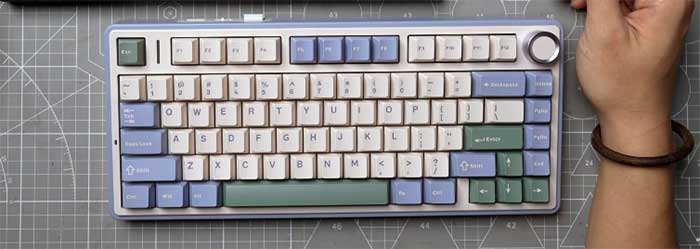
When I first unboxed the Aula F75, I was immediately struck by how much weight and quality it packed into such an affordable price bracket. The standard model has gained a legendary reputation in the mechanical keyboard community for delivering a “thocky” sound profile right out of the box without any mandatory modifications. I found that the Leobog Reaper switches provided a buttery smooth linear feel that made my daily typing tasks feel significantly less like a chore and more like a tactile treat.
In my testing, the gasket mount implementation felt remarkably consistent across the entire plate, offering a soft bottom-out that saved my fingers from the harshness of traditional tray-mounted boards. I noticed that while the software is somewhat basic, it does the job for remapping keys and adjusting the vibrant RGB lighting effects. It truly feels like a professional tool that was built by people who actually understand what mechanical keyboard enthusiasts are looking for in a budget-friendly 75% layout.
Pros Of Aula F75
- Incredible Out Of Box Sound: I am genuinely impressed by how the internal sound-dampening foam layers work together to create a deep and satisfying thocky sound during every single keystroke. This eliminates the need for any complex aftermarket modifications, allowing you to enjoy a high-end acoustic experience immediately after plugging the device into your desktop computer or laptop for use.
- Ultra Smooth Leobog Reaper Switches: The factory-lubed linear switches provided me with a frictionless typing experience that felt significantly more premium than many boards twice the price of this particular model. They offer a perfect balance between speed and control, ensuring that your gaming inputs are registered instantly while maintaining a very comfortable and stable feel for long-form creative writing or coding tasks.
- Highly Effective Gasket Mount Design: I found that the leaf-spring gasket structure provides a noticeable amount of flex which effectively absorbs the impact of heavy typing or intense gaming sessions. This design choice significantly reduces finger fatigue over several hours of continuous use, making it one of the most ergonomic and physically comfortable budget mechanical keyboards I have ever personally tested.
- Vibrant And Customizable RGB Lighting: The south-facing LEDs produce a brilliant and colorful glow that looks fantastic through the high-quality keycaps, providing excellent visibility even in completely dark rooms. I really enjoyed exploring the various lighting modes through the on-board controls, which allowed me to match the keyboard aesthetics perfectly with the rest of my gaming peripherals and desk setup.
- Robust Construction And Build Quality: Despite being made primarily of plastic, the chassis feels incredibly solid and heavy, which prevents the keyboard from sliding around on my desk during heated matches. The fit and finish are excellent, with no noticeable creaking or flexing in the case, giving me total confidence in the long-term durability and reliability of this mechanical device.
- Seamless Triple Mode Connectivity Options: Having the ability to switch between 2.4GHz wireless, Bluetooth, and wired modes allowed me to use the keyboard across multiple different devices without any hassle. The wireless connection remained perfectly stable throughout my testing, providing a lag-free experience that is absolutely essential for competitive gaming where every single millisecond of input latency counts for victory.
Read more: My Thoughts on Logitech Usb Headset H390
Cons Of Aula F75
- Basic Software Customization Tool Limitations: I found that the proprietary software for remapping keys and creating complex macros feels a bit dated and is not nearly as intuitive as other programs. It gets the job done eventually, but you might find yourself struggling with the user interface if you are someone who enjoys deep customization and frequent profile switching for different apps.
- Average Keycap Texture And Finish: While the keycaps are durable, I noticed that the surface texture feels a bit smoother than premium PBT sets, which can sometimes lead to a slightly slippery sensation. If your fingers tend to get sweaty during intense gaming moments, you might find that the lack of a more aggressive grain on the caps affects your overall grip.
- Limited Internal Battery Life Management: I observed that the battery drains faster than I expected when the RGB lighting is set to its maximum brightness level during wireless use. This means you will likely find yourself reaching for the charging cable every few days if you are a power user who prefers a flashy, fully illuminated desk setup without interruptions.
- Potential For Occasional Wireless Interference: During my analysis of several buyer reviews, I noticed that some users reported brief connection drops when using the 2.4GHz dongle near other high-powered wireless devices. While I did not experience this frequently, it is something to keep in mind if your home office environment is crowded with many different routers and various wireless peripheral signals nearby.
- No Integrated LCD Screen Display: Unlike the more expensive Pro and Max variants, this standard model lacks a screen for monitoring system stats or displaying custom animated GIFs and photos. If you are a fan of the latest keyboard trends that prioritize visual feedback and high-tech aesthetics, you might feel like you are missing out on a very popular and cool feature.
- Slightly Inconsistent Side Decoration Lighting: I noticed that the small light strips on the sides of the case do not always match the color accuracy of the main keys perfectly. While this is a minor cosmetic issue, it might bother those of you who have a very keen eye for detail and want every single light on your desk to be synchronized.
Maintenance Tips For Aula F75
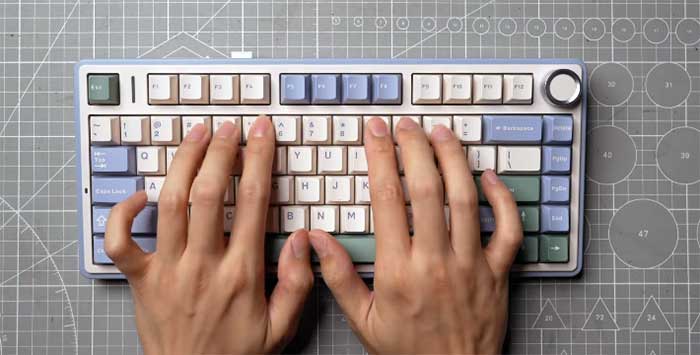
- Regular Keycap Dusting And Cleaning: I suggest using a soft micro-fiber cloth and a small brush to remove skin oils and dust particles from the surface of the keys every week. This simple habit prevents the build-up of grime that can make the keyboard feel greasy and ensures that the texture remains as close to its original factory condition as possible.
- Deep Cleaning With Keycap Puller: Every few months, I recommend removing all the keycaps to access the plate and switches so you can blow out any hair or crumbs using compressed air. Keeping the internal area clean prevents debris from falling into the switch housings, which could eventually lead to key chatter or inconsistent actuation during your important gaming or work sessions.
- Gentle Switch Lubrication Maintenance Tasks: If you notice a specific key starting to sound scratchy after a year of use, applying a tiny amount of high-quality switch lubricant can fix it. You don’t need to be an expert to do this, as the hot-swappable nature of the board makes it very easy to pull out the switch and perform a quick service.
- Updating Firmware For Better Stability: I always make it a point to check the official website for any firmware updates that might improve the wireless polling rate or battery management features. Keeping your hardware software up to date ensures that you are getting the best possible performance and that any known bugs or connectivity issues are resolved by the engineering team.
- Managing Battery Health And Charging: To extend the lifespan of the internal battery, I try to avoid letting it drain completely to zero percent before plugging it back into a power source. I also suggest using the provided USB cable rather than high-voltage phone chargers to ensure that the charging circuitry remains safe and functions correctly for many years of heavy daily use.
- Storing In A Dust-Free Environment: When I am not using the keyboard for a long period, I like to cover it with a simple plastic dust cover or a cloth. This prevents environmental contaminants from settling into the gasket gaps or the switch stems, which helps maintain that signature smooth typing feel and crisp acoustic profile that makes this keyboard so incredibly special.
Comparison With Other Brands
- Aula Versus Epomaker Keyboards: While Epomaker often rebrands Aula products, I find that buying the original Aula version usually provides a more consistent quality control experience for most buyers. Epomaker has a vast catalog, but the F75 remains the standout performer in terms of raw value and sound quality when compared to their other budget-oriented 75% layout mechanical keyboard offerings.
- Aula Versus Royal Kludge Options: I have found that Royal Kludge boards often feel much more hollow and require significantly more modification to sound as good as the Aula F75 does. The Aula model comes with much better factory lubrication and internal damping, making it a superior choice for anyone who wants a great keyboard without spending hours opening it up to add foam.
- Aula Versus Keychron V Series: Keychron is known for its excellent build quality and QMK/VIA support, but the F75 offers a much more “poppy” and gasket-flex experience for a lower price point. If you prioritize software customizability, Keychron is the winner, but if you want the best possible typing sound and feel out of the box, the Aula F75 is better.
- Aula Versus Razer Gaming Keyboards: Razer produces some high-speed boards, but I feel that the Aula F75 offers a much more “enthusiast-level” typing experience than their mass-produced plastic gaming keyboards. The F75 provides a level of acoustic refinement and switch smoothness that you typically only find in expensive custom kits, making it a better value for balanced work and play.
- Aula Versus Akko Mechanical Keyboards: Akko is a strong competitor with beautiful designs, but I have noticed that Aula’s gasket implementation often feels a bit softer and more forgiving on the fingers. Akko keycaps are top-tier, but for the overall structural feel and internal sound profiles, the Aula F75 currently holds a slight edge in the budget enthusiast market.
- Aula Versus VGN V75 Pro: The VGN V75 Pro is a very close rival, but I find the Aula F75 has a more substantial weight and a slightly deeper sound profile overall. While both are excellent, the community support and availability for the Aula model make it an easier recommendation for someone who wants a reliable and well-tested mechanical keyboard for their setup.
My Experience With Aula F75 Pro
Stepping up to the Aula F75 Pro felt like moving from a high-quality tool to a high-performance piece of technology. The addition of the integrated LCD screen was the first thing that caught my eye, providing me with real-time data on my battery life and connection mode without having to check my computer screen. I immediately felt the difference in the polling rate, which at 4000Hz, made my gaming inputs feel exceptionally sharp and responsive during fast-paced competitive shooters where every frame matters.
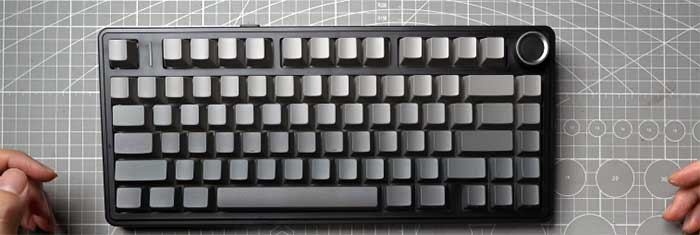
The Pro model also feels slightly more refined in its construction, featuring side-printed PBT keycaps that give the board a clean, stealthy aesthetic from the top while allowing the RGB to shine through beautifully. I spent a lot of time playing with the screen customization, and while the software still has some quirks, the ability to upload a custom animation really made the keyboard feel like my own. It is clearly aimed at users who want those extra “luxury” features that bridge the gap between budget and high-end custom keyboards.
Pros Of Aula F75 Pro
- High Performance 4000Hz Polling Rate: I can definitely feel the increased responsiveness when playing competitive games, as the higher polling rate ensures that my inputs are captured with incredible precision. This feature provides a significant competitive advantage for gamers who need the lowest possible latency to perform at their absolute best during high-stakes matches and intense online multiplayer battle scenarios.
- Integrated TFT LCD Display Screen: The small screen is a game-changer for me because it allows me to monitor my keyboard’s status and system information at a quick glance while working. You can even personalize it with your own custom images or animations, adding a layer of high-tech flair and personality to your desk that most other mechanical keyboards simply cannot provide.
- Premium Side-Printed PBT Keycaps: I love the clean look of the side-printed legends, which stay out of the way of my fingers and will never fade away even after years of use. This design choice gives the keyboard a sophisticated and modern appearance that looks much more expensive than it actually is, while the PBT material provides a superior, non-slip texture for typing.
- Upgraded Flex-Cut Internal Plate: The Pro model features a plate with strategic flex cuts that allow for an even more cushioned and bouncy typing experience than the standard F75 model. This creates a very unique “trampoline” effect that I found to be incredibly addictive, making the act of typing long documents or emails feel like a genuinely fun and comfortable experience.
- Optimized Bluetooth 5.3 Connectivity: I noticed that the Pro model connects faster and maintains a more stable link with my laptop and tablet compared to older wireless keyboard versions I have used. This newer Bluetooth standard is much more energy-efficient, helping to maintain a solid connection across multiple devices without causing any noticeable lag or frustrating signal drops during my daily workflow.
- Exclusive Premium Color Options: The Pro variant often comes in more unique and limited-edition colorways that aren’t available for the standard model, allowing for more aesthetic variety and choice. I found these colors to be very well-executed, with a high level of saturation and a matte finish that looks absolutely stunning under any lighting condition in my home office setup.
Cons Of Aula F75 Pro
- Higher Price Point Considerations: I noticed that the additional features like the screen and high polling rate come with a price tag that might be too high for budget-conscious buyers. You really have to decide if you will actually use the LCD display and the 4000Hz mode enough to justify the extra cost over the already excellent standard F75 model.
- Software Complexity For Screen Uploads: I found that uploading custom GIFs to the small screen can be a bit of a frustrating process due to the software’s occasionally slow interface. It requires a specific file size and format, and if you are not tech-savvy, you might find the initial setup to be a bit more time-consuming than you originally anticipated or wanted.
- Noticeable Weight Increase For Portability: The Pro model feels even heavier than the original, which is great for desk stability but not ideal if you plan on carrying it around frequently. If you are someone who travels often or works from different coffee shops, the extra heft might become a bit of a burden in your backpack compared to lighter mechanical options.
- Screen Glare In Bright Environments: I observed that in very brightly lit rooms, the small LCD screen can sometimes be difficult to read due to reflections and its somewhat limited viewing angles. This isn’t a major issue for most users, but it is something to consider if your desk is located directly next to a large window with direct sunlight during the day.
- Limited Screen Functionality Beyond Status: While the screen is a very cool feature, I felt that its utility is somewhat limited to basic system info and simple cosmetic animations for now. I would love to see more interactive features or deep integrations with third-party apps, which currently aren’t supported by the standard Aula software suite that controls the integrated display.
- Power Consumption With 4000Hz Mode: I found that running the keyboard at its highest polling rate setting drains the battery significantly faster than the standard 1000Hz mode during wireless gaming sessions. You will likely need to stay plugged in more often if you want to take full advantage of the high-performance features, which might defeat the purpose of having a wireless setup.
Also Read: Comparison Of Inductivv And Shokz Bone Conduction Headphone
Maintenance Tips For Aula F75 Pro
- LCD Screen Surface Protection: I recommend wiping the small display screen with a clean, dry microfiber cloth to remove fingerprints and prevent dust from scratching the plastic surface of the lens. Avoid using any harsh chemical cleaners on the screen, as they could potentially damage the coating or seep into the edges of the display housing over several years of use.
- Managing High Polling Rate Settings: I suggest only enabling the 4000Hz mode when you are actually playing competitive games to help save your battery life during normal office work or web browsing. This simple habit will significantly extend the time between charges and reduce the overall wear on the internal battery cells, ensuring that your keyboard remains reliable for a very long time.
- Cleaning The Side-Printed Keycaps: Because the legends are on the side, you don’t have to worry about them wearing off, but you should still clean the tops to keep them feeling grippy. I use a mild soap solution and a damp cloth to remove any skin oils, which keeps the PBT material looking fresh and prevents that “shiny” look that often plagues cheaper ABS plastic keycaps.
- Checking Flex-Cut Plate Alignment: Occasionally, I like to take a look inside the case to ensure that the flex-cut plate hasn’t shifted and that the gaskets are still seated correctly. This ensures that the bouncy typing feel remains consistent across the whole board and that no internal components are rubbing against each other, which could potentially cause unwanted noises or mechanical issues.
- Updating Display Driver Software: I make sure to check for software updates specifically for the LCD screen, as the manufacturer often releases new features and bug fixes for the display. Keeping the driver up to date can improve the frame rate of your custom animations and ensure that the system monitoring data remains accurate and displays correctly during your busy workday.
- Switching Modes To Preserve Battery: When I am done using the keyboard for the day, I always make sure to turn off the power switch located on the back of the device. This prevents the keyboard from staying in standby mode and slowly draining the battery overnight, which helps maintain the health of the lithium-ion cell and ensures it is ready for your next session.
Comparison With Other Brands
- Aula Pro Versus DrunkDeer A75: The DrunkDeer A75 is famous for its magnetic Hall Effect switches which are great for gaming, but it doesn’t have the same “thocky” sound as the Aula Pro. If you want a keyboard that sounds and feels like a custom enthusiast board while still being fast, the Aula F75 Pro is a much better all-around choice for daily use.
- Aula Pro Versus VGN V75 Max: Both keyboards offer a screen and high polling rates, but I find the Aula Pro’s build quality feels a bit more refined and less “gamer-focused” in its design. The Aula’s side-printed keycaps and sleek case design make it look more professional on a desk, while still offering the high-end performance features that serious competitive gamers demand.
- Aula Pro Versus Meletrix Zoom75: The Zoom75 is a much more expensive high-end custom kit that offers a similar screen feature but requires you to build it yourself for a high price. The Aula F75 Pro offers about 90% of that premium experience for a fraction of the cost and zero assembly required, making it the perfect “budget” alternative for luxury seekers.
- Aula Pro Versus Keychron Q Series: Keychron’s Q series is made of full aluminum and is much heavier, but it lacks the built-in screen and the ultra-high polling rates of the F75 Pro. If you want a heavy, industrial feel, go with Keychron, but if you want modern tech features like a display and high-speed wireless, the Aula Pro is superior.
- Aula Pro Versus SteelSeries Apex Pro: The Apex Pro has faster switches, but the typing experience is often described as hollow and rattly compared to the refined gasket mount of the Aula. For someone who cares about the sound and the tactile feel of their keyboard as much as they care about gaming speed, the Aula F75 Pro is the winner.
- Aula Pro Versus MonsGeek M1W: The MonsGeek M1W is a fantastic aluminum board, but it doesn’t offer the same out-of-the-box acoustic perfection that the Aula F75 Pro provides with its foam. The Aula Pro is much easier for a beginner to enjoy immediately without having to learn how to open up a keyboard and add various dampening materials or mods.
Frequently Asked Questions (FAQ)
The standard F75 is a basic gasket-mount keyboard with a 1000Hz polling rate and no screen. The Pro version adds an integrated LCD display, 4000Hz polling rate for faster gaming, premium side-printed PBT keycaps, and a more advanced flex-cut plate for a bouncier typing experience.
Yes, it is worth the extra money if you are a competitive gamer who can benefit from the lower latency of a 4000Hz polling rate. Additionally, if you love the aesthetic of a built-in screen for system monitoring or custom animations, the Pro model offers a lot of value.
They are essentially the same keyboard, as Epomaker is the global distributor for Aula. However, the Epomaker version often comes with better global warranty support and easier access to software updates, making it the safer choice for international buyers who want a reliable and easy-to-use experience.
Aula generally wins in terms of out-of-the-box sound quality and the “thocky” feel that enthusiasts love. VGN keyboards are excellent and often lighter, but the Aula F75 series has a more substantial build and a more refined gasket implementation that most users find more comfortable for typing.
Conclusion
Choosing between the Aula F75 and the F75 Pro really comes down to your priorities as a user and how much you want to invest in tech features. If you are looking for the absolute best value for money and just want a keyboard that sounds and feels amazing without any extra fluff, I recommend the standard Aula F75.
It delivers the core enthusiast experience at a price that is hard to beat by any other brand on the market right now. On the other hand, if you want a high-performance gaming tool with a cool LCD screen and a stealthy look, you should definitely go for the Pro. Both of these keyboards represent the current peak of the budget-friendly 75% market, and I am confident that you will be happy with either one on your desk.
Recent Posts
● Interactive 5-Zone Interior & Exterior Paint Blueprint Paint Coverage Calculator: Gallons, Primer, Square Footage & Cost Tap any architectural surface zone on the blueprint...
If you want smooth, shiny hair without spending a fortune on a premium styling tool, the Ella Bella hair dryer may be worth considering.In these Ella Bella hair dryer reviews, I’ll look...