
I spent weeks testing both the Creality K2 Plus and Bambu Lab H2D side by side in my workshop, printing everything from large functional parts to multi-material prototypes.
My goal here is simple: give you a clear, real-user breakdown of how these two high-end enclosed CoreXY machines stack up so you can decide which one fits your projects, budget, and workflow without the usual marketing fog.
| Feature | Creality K2 Plus | Bambu Lab H2D |
| Build Volume | 350 × 350 × 350 mm | Single: 325 × 320 × 325 mm Dual: 300 × 320 × 325 mm Total reach: 350 × 320 × 325 mm |
| Max Print Speed | 600 mm/s | Toolhead up to 1000 mm/s |
| Acceleration | 30,000 mm/s² | 20,000 mm/s² |
| Nozzle Temperature | ≤ 350 °C | 350 °C (dual nozzles) |
| Bed Temperature | ≤ 120 °C | 120 °C |
| Chamber Heating | Active, ≤ 60 °C | Active, ≤ 65 °C |
| Extruder | Dual-gear direct drive (single) | Dual-nozzle direct drive |
| Multi-Material | CFS (up to 16 colors with expansions) | AMS system (up to 16 with multiples) + native dual nozzle |
| Extra Capabilities | AI cameras, RFID filament, air filter | Optional laser (10W/40W), cutting, plotting |
| Approx. Starting Price | Lower (often under $1,500 for combo) | Higher (around $1,900 base) |
Key Differences Between The Creality K2 Plus And Bambu Lab H2D
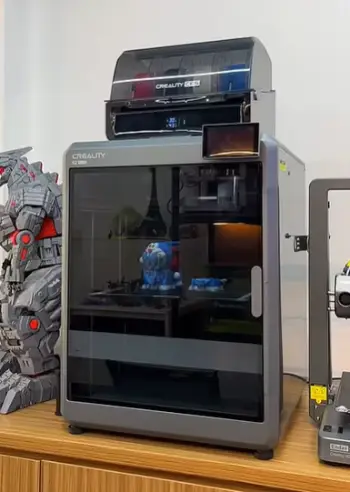
- Build volume shape and usable space: The K2 Plus offers a true cubic 350 mm workspace that feels more forgiving for tall or wide single-piece prints without forced orientation changes.
The H2D provides a rectangular volume that is slightly shorter in depth and height, and dual-nozzle mode reduces the reachable area further even though the total envelope matches the K2 Plus in width.
- Extrusion approach: The K2 Plus relies on one high-flow dual-gear head and uses the CFS system for color or material changes which can create more purge waste.
The H2D runs two independent nozzles on the same toolhead so material switches happen with far less filament waste during multi-material jobs.
- Motion system priorities: Creality emphasizes higher acceleration numbers that allow quicker direction changes and often shorter overall print times on complex geometry.
Bambu focuses on peak toolhead speed combined with optical motion calibration that delivers more consistent accuracy across the entire bed surface.
- Ecosystem extras: The K2 Plus stays focused on pure FDM performance with an expandable multi-color system that scales cleanly.
The H2D can accept optional laser, cutting, and plotting modules which turns the machine into a multi-process fabrication station beyond simple plastic printing.
- Software and setup feel: Both machines arrive largely assembled and ready to run, yet Bambu’s closed ecosystem and polished app experience usually feel smoother from the first print.
Creality’s Klipper-based system leaves more room for advanced users who enjoy deeper customization and tuning.
Key Features Of The Creality K2 Plus
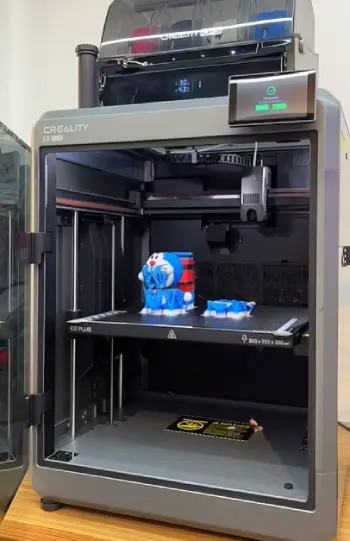
- Large cubic build volume with active heating: The 350 mm cube paired with an actively heated chamber that reaches 60 °C supports bigger single-piece parts and reduces warping on materials such as ABS and ASA during longer prints.
- High-flow dual-gear direct-drive extruder: The extruder is rated for strong volumetric flow and nozzle temperatures up to 350 °C which lets the machine push engineering filaments with good reliability and fewer clogs in daily use.
- Closed-loop step-servo motors on all axes: These motors deliver precise control and high acceleration while keeping noise levels reasonable and reducing the chance of skipped steps under demanding loads.
- Dual AI cameras for calibration and monitoring: One camera handles nozzle-level calibration and the other watches the entire print so the machine can detect common failures and improve first-layer consistency automatically.
- Full-auto leveling with active compensation: The system performs bed tilt correction and belt tensioning without manual intervention which shortens setup time and keeps results stable across multiple print sessions.
- Expandable CFS multi-filament system: The Creality Filament System supports up to sixteen spools when additional units are added and includes RFID recognition for automatic profile loading on supported materials.
- Solid connectivity and interface options: A 4.3-inch color touchscreen, dual-band Wi-Fi, Ethernet, and generous internal storage make file transfer and remote monitoring straightforward for most workshop environments.
The matrix-style die-cast aluminum frame feels rigid under high acceleration.
I ran several ABS parts with the chamber at temperature and observed almost no warping once the machine settled into its thermal equilibrium.
The quick-swap tri-metal nozzle also made material changes less of a chore than older Creality designs I have used.
Pros Of The Creality K2 Plus
- Larger true cubic volume: The square 350 mm workspace simplifies big single-piece prints and reduces the need to split models or change orientation for height-critical parts.
- Higher claimed acceleration: Strong acceleration numbers help the machine change direction quickly which often results in shorter print times on models with many sharp corners or detailed geometry.
- Lower entry price for core capability: The base printer and multi-color combo typically cost less than the H2D which leaves more budget for extra filament systems or material stock.
- Expandable CFS system that scales cleanly: Adding further CFS units increases the filament count to sixteen without requiring a different toolhead or major hardware changes.
- Solid support for engineering filaments: Once the chamber reaches temperature the machine handles ABS, ASA, and reinforced materials with good dimensional stability and surface quality.
- More open firmware path: Users who like to adjust settings or explore advanced tuning have greater flexibility compared with more closed platforms.
I appreciated the volume most on cosplay pieces and furniture-scale functional parts. The price difference also left room in my budget for extra CFS units and a wider selection of filament.
Cons Of The Creality K2 Plus
- Single extruder increases purge waste: Color or material changes require more filament purging and longer transition times than a dual-nozzle system which adds cost and time on multi-material jobs.
- Chamber maximum sits slightly lower: The 60 °C chamber limit is adequate for many materials yet falls a few degrees short of the H2D which can matter for the most temperature-sensitive engineering filaments.
- Software experience feels less polished for beginners: New users may need more time to become comfortable with the interface and ecosystem compared with the more refined Bambu experience.
- No native laser or cutting options: The machine remains focused on FDM printing and cannot expand into engraving or blade work without completely separate equipment.
- Slightly higher noise under full acceleration: The servo motors stay quiet at rest yet become more noticeable when the machine pushes peak acceleration during complex toolpaths.
Color changes on multi-material jobs took longer and produced more waste towers than on the H2D. That difference adds up quickly if your workflow includes frequent multi-color or dual-material prints.
Key Features Of The Bambu Lab H2D
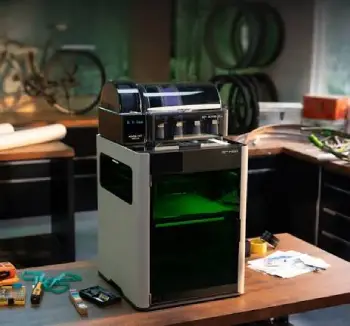
- Dual-nozzle toolhead with independent hotends: Each nozzle reaches 350 °C and the dual arrangement allows true multi-material printing with minimal purge waste compared with single-extruder machines that must switch filaments repeatedly.
- Active chamber heating and high bed temperature: The chamber climbs to 65 °C while the bed reaches 120 °C which expands the range of engineering materials that print reliably without excessive warping or delamination.
- Vision-assisted optical motion calibration: The system claims fine motion accuracy across the full workspace and helps maintain consistent dimensional results even on larger models that span most of the bed.
- High peak toolhead speed and strong flow options: The machine can move the toolhead at up to 1000 mm/s and supports high-flow hotends that keep up with demanding speed settings on suitable geometries.
- Native dual-material printing plus expandable AMS: The dual nozzles handle two materials directly while additional AMS units expand the color and material count for more complex jobs without constant manual intervention.
- Modular tool system for laser and cutting: Optional 10 W or 40 W laser modules along with blade cutting and pen plotting turn the printer into a broader fabrication device when the project needs more than extruded plastic.
- Multiple cameras and polished software integration: Several camera views support AI failure detection and the Bambu Studio plus Handy app combination provides a refined remote experience that many users find reliable day after day.
The dual-nozzle setup is the standout feature for me in daily work.
Printing a dual-material part that needs support material or two different colors wastes far less filament than a single-nozzle machine that purges on every switch.
When I added the laser module the same machine became a light fabrication station which is something the K2 Plus simply cannot match.
Pros Of The Bambu Lab H2D
- Dual nozzles cut material waste and switch time: Independent nozzles allow clean material changes with far less purge volume which saves both filament cost and overall job duration on multi-material projects.
- Higher chamber temperature and optical calibration: The 65 °C chamber and vision-based accuracy system improve results with demanding materials and help maintain tighter dimensional consistency across the bed.
- Optional laser, cutting, and plotting modules: Adding these tools expands the machine beyond pure 3D printing and creates a more versatile workshop station for mixed fabrication tasks.
- Extremely refined out-of-box experience: Most users can start productive printing quickly thanks to the polished software, automatic calibration routines, and reliable remote monitoring features.
- High peak toolhead speed and strong flow options: The machine sustains high speeds on suitable geometries and the high-flow hotend choices keep extrusion consistent even at aggressive settings.
- Excellent multi-camera AI failure detection: Several camera views work together to catch common print problems early and reduce the number of failed jobs that waste time and material.
The dual-nozzle advantage showed up immediately on support-material prints and multi-color figures. I also liked the tighter integration when I used the laser for marking finished parts or creating custom labels.
Cons Of The Bambu Lab H2D
- Higher starting price especially with modules: The base machine costs more than the K2 Plus and the price climbs further once AMS units or laser packages are added which can stretch the budget for some users.
- Slightly smaller usable volume in dual-nozzle mode: The effective print area shrinks when both nozzles are active which forces careful model orientation or splitting on larger designs.
- Lower acceleration numbers than the K2 Plus: Peak acceleration sits below the Creality figure so some complex models may take a bit longer even if peak travel speed is higher.
- More closed ecosystem that can feel restrictive: Advanced users who want deep customization or third-party modifications may find the platform less flexible than more open systems.
- Laser and cutting add complexity and safety needs: Using the optional modules requires additional safety awareness and workspace planning that pure FDM machines do not demand.
The price jumps quickly once the machine is equipped the way most people eventually want it. The dual-nozzle volume reduction also forced me to rethink a few larger models that fit easily on the K2 Plus.
Real-World Printing Performance
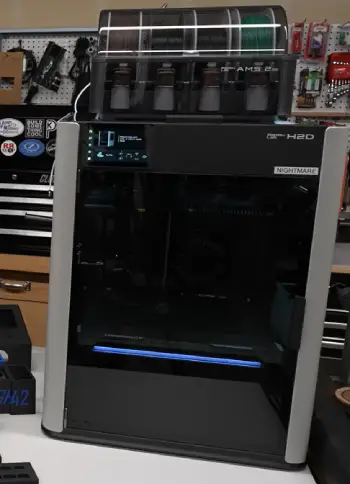
I ran the same set of test models on both machines including a large ABS enclosure, a multi-color PLA figure, a PETG functional bracket, and a carbon-fiber nylon part.
Print times on pure single-material jobs stayed close with the K2 Plus often finishing a few minutes ahead thanks to the higher acceleration.
Multi-material jobs flipped the result because the H2D saved significant time and filament by avoiding full purges between every color or material change.
Surface quality looked excellent on both printers once the profiles were tuned to each machine.
The H2D’s optical calibration produced slightly more consistent dimensional accuracy across the full bed according to my caliper measurements.
The K2 Plus handled tall vertical features with less layer shifting once the active belt tensioning system settled in during the first few layers.
Noise levels favored the H2D during most travel moves. The K2 Plus servo motors remain quiet when the machine is idle yet become more noticeable at peak acceleration.
Both machines kept the chamber warm enough for ABS and ASA without major warping once I allowed proper preheating time before starting the print.
Who Should Choose Which Machine?
If your main need is large single-piece prints, maximum volume for the money, and the ability to expand multi-color capacity later, the K2 Plus makes strong practical sense.
It feels like the logical step up for users already comfortable with Creality hardware or anyone who wants a true cubic volume without paying a premium for dual nozzles or laser modules.
If you value seamless dual-material printing, a more polished daily experience, and the option to add laser engraving or cutting later, the H2D is hard to overlook.
It costs more up front yet the dual-nozzle efficiency and multi-process potential can justify the difference for workshops that need greater versatility beyond pure FDM output.
I keep both machines in the shop right now. The K2 Plus handles the big functional parts and bulk PLA production jobs.
The H2D receives the multi-material prototypes and any project that benefits from the laser or cleaner dual-material results.
Also Read: Comparison Of Anycubic Kobra S1 And Bambu P1S
Frequently Asked Questions (FAQ)
It depends on your priorities. Choose the K2 Plus for larger cubic volume and better value. Choose the H2D for dual-nozzle efficiency and optional laser capabilities.
Both brands have improved dramatically. Bambu Lab currently edges out for polished out-of-box reliability, while Creality has closed the gap significantly with the K2 series and offers more open repair options.
The H2S is a different machine in the Bambu lineup with its own strengths. Against the K2 Plus, the volume and price advantage still lean toward the Creality for pure large-format FDM work.
Yes. It delivers strong speed, solid engineering-material performance, and excellent volume at a competitive price for anyone who prioritizes pure FDM output.
Final Thoughts
After living with both machines, I can say neither is a clear loser. The Creality K2 Plus wins on raw volume and everyday value for large prints.
The Bambu Lab H2D wins on multi-material efficiency and future expandability into laser and cutting work. Your choice comes down to whether you need the biggest possible cube at a lower cost or a more versatile dual-nozzle platform that can grow beyond plastic.
Whichever you pick, you will be working with one of the strongest enclosed CoreXY printers available right now.
I hope this side-by-side helps you land on the machine that actually matches the work you plan to do.
Recent Posts
I spent months sorting through my own thinning hair and the endless options online before settling on a clear path. My goal here is simple: give you a straightforward real-user breakdown of...
Blood Balance Plus Reviews: Is This Blood Support Supplement Worth Buying?
Blood Balance Plus is marketed as a natural supplement designed to support healthy blood sugar levels, blood pressure, and metabolic wellness.However, after examining its product information,...