
I’ve been carrying portable SSDs in my backpack for years now—whether backing up photos from weekend hikes, editing videos on the go, or needing extra space for massive project files.
When Crucial released the X9 and X9 Pro, I grabbed both to test them side by side in my daily workflow. The main intent of this article is to help you decide which drive truly fits your needs based on honest, practical experience rather than specs alone.
I’ll walk through real performance, build quality, when one outperforms the other, and why the differences matter for users like us who rely on these drives every day.
| Feature | Crucial X9 | Crucial X9 Pro |
| NAND Type | QLC | TLC |
| Max Read/Write Speeds | Up to 1050 MB/s read | Up to 1050 MB/s read/write |
| Sustained Performance | Drops after cache (~50-60 MB/s) | Consistent high speeds (~975 MB/s write) |
| Build Material | Plastic | Anodized aluminum + rubber base |
| Durability | Drop-proof to 7.5 ft | IP55 water/dust resistant + drop-proof |
| Encryption | None | 256-bit AES hardware + password |
| Warranty | 3 years | 5 years |
| Weight | ~32g | ~38g |
| Capacities | 1TB, 2TB, 4TB | 1TB, 2TB, 4TB |
| Best For | Budget backups, light transfers | Pro workflows, reliability |
Key Differences Between The Crucial X9 And X9 Pro
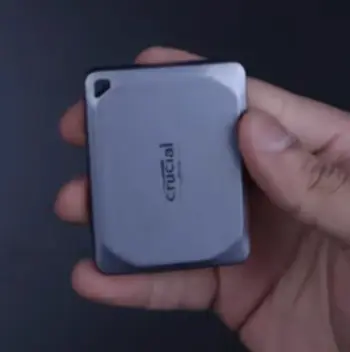
- NAND Flash Technology: The X9 relies on QLC NAND, which allows manufacturers to offer higher capacities at lower costs by storing four bits per cell.
This works well for read-heavy or archival purposes but comes with drawbacks in write endurance and long-term speed consistency.
In contrast, the X9 Pro uses TLC NAND with three bits per cell, delivering noticeably better durability over thousands of write cycles and more stable performance during extended sessions.
From my testing, this single choice affects everything from how the drive handles large video exports to how long it stays reliable as your storage needs grow.
- Build Quality and Protection: The standard X9 features a lightweight plastic enclosure that prioritizes minimal weight and affordability.
While it feels modern and grippy, it offers no official resistance to dust or water, making it less ideal for unpredictable environments.
The X9 Pro steps up with an anodized aluminum body paired with a soft-touch rubber base, creating a premium feel and adding practical IP55 certification.
This means it can handle splashes, dust, and sand without issue, which gave me confidence during outdoor shoots and travel where the X9 would have required more careful handling.
- Performance Consistency: On paper, both advertise strong peak speeds around 1050 MB/s, but real usage reveals a big gap.
The X9 performs admirably at first thanks to its SLC cache but slows dramatically to around 50-60 MB/s once that cache fills during big transfers.
The X9 Pro maintains much higher sustained writes closer to 975 MB/s throughout its capacity thanks to the superior TLC memory and controller optimization.
This difference turned 30-minute waits into quick jobs in my workflow.
- Security Features: The base X9 keeps things basic with no built-in hardware encryption, leaving you to rely on operating system tools or third-party software for sensitive files.
The X9 Pro includes robust 256-bit AES hardware encryption along with straightforward password protection that works across platforms.
For anyone handling client data, contracts, or personal information, this built-in layer removes friction and adds genuine protection without extra steps.
- Warranty and Reliability: Crucial backs the X9 with a 3-year limited warranty, which is standard but feels short when you’re trusting it with irreplaceable files.
The X9 Pro comes with a 5-year warranty, reflecting greater manufacturer confidence in its components and construction.
Over months of use, this longer coverage reduced my worry about potential failures down the line.
- Price Positioning: The X9 wins for pure value, often available at a noticeable discount that makes high-capacity storage accessible.
The X9 Pro costs more upfront but delivers features that justify the premium for users who push their drives hard.
In my experience, the price gap narrows quickly when you consider longevity, reduced frustration, and fewer potential replacements.
These distinctions aren’t just checklist items—they directly impact daily satisfaction and productivity depending on how you work.
Key Features Of The Crucial X9
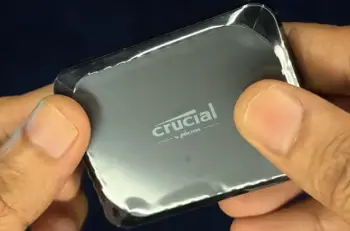
- Compact and Lightweight Design: Measuring a slim 65x50x10mm and weighing only about 32 grams, the X9 disappears in your pocket or bag.
The integrated lanyard hole makes it easy to attach to keys or a bag strap for quick access.
I found myself reaching for it constantly during travel because it adds almost no bulk, unlike bulkier older drives I’ve used in the past.
This portability encourages consistent backups since there’s no excuse about forgetting a heavy device.
- Solid Peak Speeds: It delivers up to 1050 MB/s reads under ideal conditions, which feels responsive when pulling up individual files or smaller folders.
In practice, this made loading photo libraries or game installs noticeably faster than traditional hard drives.
For quick transfers where the cache hasn’t been exhausted, it performs admirably and gives that satisfying speed boost many users expect from modern portable storage.
- Broad Compatibility: The X9 works right out of the box with Windows, Mac, Android devices, iPads, gaming consoles like PlayStation and Xbox, and Linux systems.
The included USB-C cable ensures plug-and-play convenience, and it even supports reformatting for specific needs.
I switched between my laptop, desktop, and phone multiple times without any driver issues or compatibility headaches, which is exactly what you want from a portable solution.
- Affordable High Capacity: Available in 1TB, 2TB, and 4TB options, it lets you store thousands of high-resolution photos, hours of 4K video, or large game libraries without ongoing cloud subscription costs.
For budget-conscious users building a media archive or expanding console storage, this capacity range at an accessible price point makes it a practical choice that scales with your collection over time.
- Drop Protection: Rated to survive drops from up to 7.5 feet, it handled a couple of accidental tumbles on my desk and in transit without data loss.
While not invincible, this level of resilience provides reassurance for everyday carry where minor bumps are inevitable.
In my experience, the X9 shines brightest when used primarily for storage and occasional transfers rather than constant heavy editing workloads.
Pros Of The Crucial X9
- Excellent value for the storage you get, especially on sale: You receive substantial capacity without breaking the bank, making it easy to justify multiple drives for different purposes like one for backups and another for active projects.
This affordability opened options for me to keep redundant copies of important files.
- Super portable and discreet—feels like carrying nothing extra: Its minimal weight and size mean it fits seamlessly into any setup, from a photographer’s vest to a student’s backpack.
I often forgot it was there until I needed extra space, which is the highest compliment for a portable drive.
- Fast enough for most everyday backups and transfers before cache exhaustion: When dealing with documents, smaller media files, or incremental updates, the performance remains snappy and reliable.
Many users will find this more than adequate for typical home or light professional use.
- Simple, no-frills reliability for non-intensive use: It does exactly what it promises without complexity, which appeals to users who want dependable storage without learning new software or worrying about advanced features.
- Easy on the wallet compared to premium competitors: The lower entry price lets you allocate budget elsewhere, such as accessories, additional capacity, or other gear, while still getting modern SSD benefits over older mechanical drives.
Cons Of The Crucial X9
- Write speeds tank to HDD levels after filling the SLC cache during large transfers: This became noticeable with big video projects or full system backups, where performance dropped sharply and extended what should have been quick jobs.
It required planning transfers around cache management, which added unnecessary steps to my routine.
- No dust or water resistance means extra care in outdoor or travel scenarios: Exposure to elements during shoots or commutes made me more cautious than I’d prefer, limiting spontaneous use compared to more protected options.
- Lacks hardware encryption, so sensitive data needs extra software steps: Setting up protection felt cumbersome across different devices, reducing convenience when handling confidential work.
Shorter 3-year warranty feels limiting for a drive relied on daily: It created a subtle underlying concern about longevity as files accumulated over years of use.
- QLC NAND has lower endurance over years of heavy rewriting: Frequent updates to active project folders highlighted potential wear concerns faster than TLC alternatives, influencing how I allocated data types between drives.
Key Features Of The Crucial X9 Pro
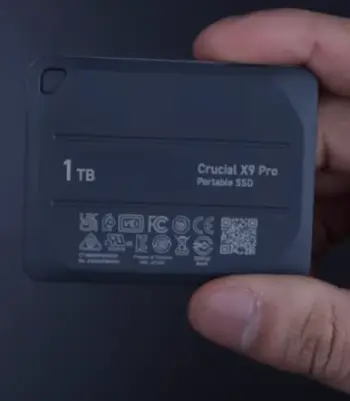
- Premium Build: The combination of anodized aluminum and rubberized base creates a solid, high-quality feel that inspires confidence.
It looks professional while providing practical grip and protection, elevating it beyond basic storage accessories.
- Consistent High Performance: Thanks to TLC NAND and optimized controller, it sustains strong speeds even during demanding tasks like direct editing of large files or batch processing.
This reliability kept my creative flow uninterrupted during tight deadlines.
- Advanced Security: Hardware-based 256-bit AES encryption with password support integrates smoothly and works across ecosystems.
It gave me immediate peace of mind for client deliverables and personal archives without relying on external tools.
- Durability Focus: IP55 rating combined with drop protection up to 7.5 feet (and better real-world resilience due to the metal shell) made it suitable for varied conditions.
I confidently used it in less controlled environments where the standard model would have stayed packed away.
- Longer Support: The 5-year warranty, paired with robust internals, translates to reduced replacement risk and better overall ownership experience for heavy users.
The Pro quickly became my primary drive for important work because it simply performed without caveats.
Pros Of The Crucial X9 Pro
- Reliable speeds even during marathon transfers: No sudden drops meant consistent productivity, whether moving hundreds of gigabytes or working directly from the drive. This feature alone saved noticeable time across projects.
- Tough enough for real adventures or fieldwork: The environmental protection let me focus on the task instead of protecting the hardware, proving valuable during travel and location work.
- Hardware encryption adds professional-grade protection I actually use: Easy setup and cross-platform functionality encouraged better security habits without added hassle.
- Feels solid and premium in hand, with a lanyard hole for easy carrying: The thoughtful design details made daily handling more enjoyable and practical.
- Better longevity from TLC and longer warranty means lower long-term stress: Knowing the drive can handle years of use with confidence reduced mental overhead about data safety.
Cons Of The Crucial X9 Pro
- Higher price tag, which might stretch budgets for light users: The premium comes at a cost that casual users may not fully utilize, making the standard X9 more sensible in those cases.
- Slightly heavier than the base X9, though still pocket-friendly: The added durability adds a small amount of weight that most won’t notice but exists compared to the absolute lightest option.
- Needs a good USB 3.2 Gen 2 port to hit full speeds: Older connections limit performance like any modern drive, requiring some users to check or upgrade ports for best results.
- Short included cable—plan on grabbing a longer one for desk use: While functional, the brevity meant sourcing an extension for comfortable workstation setups.
- Overkill if you only do occasional backups: For very light use, many advanced features remain unused, potentially making the extra investment less worthwhile.
Real User Scenarios: How I Use Them?

In photography, the X9 handles quick offloads of daily shots effectively when batches stay manageable.
For video editing with large raw files, the X9 Pro’s sustained performance prevented workflow interruptions that plagued the base model.
During travel, the Pro’s protection allowed risk-free use in varied conditions, while I reserved the X9 for hotel backups.
Both excel at console game storage expansions, but the Pro’s consistency shines with frequent updates.
For general file hoarding, either works, though the X9’s price makes it easier to own several.
Performance Deep Dive From Daily Testing
Benchmarks showed strong peaks, but sustained real-world transfers highlighted the Pro’s advantages in mixed workloads like photo libraries and video projects. Both stay cool and efficient, preserving laptop battery life during extended sessions. Random access feels quick enough for everyday creative apps on either drive.
Who Should Buy Which?
Choose the X9 for cost-effective high-capacity storage focused on lighter, read-heavy tasks or budget setups. Opt for the X9 Pro when consistency, toughness, security, and longevity matter more than initial savings—ideal for creators, travelers, and professionals.
Also Read: Comparison Of Samsung T9 And Crucial X10
Frequently Asked Questions (FAQ)
The X9 uses QLC NAND with plastic build and basic protection, while the X9 Pro offers TLC NAND, aluminum IP55-rated enclosure, hardware encryption, sustained speeds, and longer warranty for better overall performance and durability.
Key distinctions include NAND type affecting endurance and speed consistency, build materials and environmental resistance, security capabilities, and warranty length that impact long-term ownership.
Yes, it excels with reliable speeds, rugged construction, strong security, and professional features that make it a top performer for creators and mobile users seeking dependable portable storage.
The X9 Pro uses USB 3.2 Gen 2 for up to 1050 MB/s, while the X10 Pro supports USB 3.2 Gen 2×2 for higher potential speeds up to 2100 MB/s, requiring compatible hardware to take full advantage.
Wrapping Up
After extensive side-by-side use, the X9 serves as an excellent accessible entry into fast portable storage, while the X9 Pro stands out as the more capable, worry-free choice for serious needs.
Evaluate your file transfer sizes, usage environments, and security requirements to pick the right fit—you’ll appreciate the match daily.
Recent Posts
Uromend prostate supplement has attracted attention from men looking for additional support for prostate health, urinary comfort, and overall wellness. But is it worth buying? I believe...
I spent months sorting through my own thinning hair and the endless options online before settling on a clear path. My goal here is simple: give you a straightforward real-user breakdown of...