
I spent weeks switching between the Razer DeathAdder V3 Pro and the Viper V3 Pro to settle which one actually belongs on my desk for competitive play and long sessions.
My goal here is straightforward: give you a clear side-by-side breakdown of shape, weight, sensor performance, battery behavior, and real-world feel so you can decide which mouse matches your grip, hand size, and game style without wasting money on the wrong one.
Both are flagship wireless options from the same company, yet they serve different players in important ways.
| Feature | DeathAdder V3 Pro | Viper V3 Pro |
| Weight | 63 g (black) / 64 g (white) | 54 g (black) / 55 g (white) |
| Shape | Right-handed ergonomic | Right-handed symmetrical |
| Sensor | Focus Pro 30K (up to 30,000 DPI) | Focus Pro 35K Gen-2 (up to 35,000 DPI) |
| Max Polling Rate (Wireless) | 1000 Hz standard (8000 Hz with separate dongle) | 8000 Hz (dongle included) |
| Battery Life (1000 Hz) | Up to 90 hours | Up to 95 hours |
| Dimensions (L x W x H) | 128 x 68 x 44 mm | 127.1 x 63.9 x 39.9 mm |
| Switches | Optical Gen-3 (90 million clicks) | Optical Gen-3 (90 million clicks) |
| Programmable Buttons | 5 (+ DPI on underside) | 6 |
| Feet | 100% PTFE | 100% PTFE |
| RGB | None | None |
| Connectivity | HyperSpeed Wireless + USB-C | HyperSpeed Wireless + USB-C |
Key Differences Between The DeathAdder V3 Pro And Viper V3 Pro
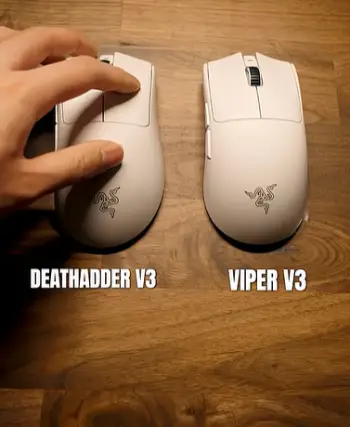
- Shape and hand support: The DeathAdder V3 Pro keeps the classic ergonomic curve that fills your palm and supports the full hand especially useful if you rest your entire palm on the mouse.
The Viper V3 Pro uses a more neutral symmetrical form with a higher central hump and flatter sides that let your hand sit without forced angles.
- Weight and movement speed: At 54 to 55 grams the Viper is noticeably lighter and that difference of nearly 10 grams shows up the moment you start moving.
Micro-adjustments cost less effort on the Viper while the DeathAdder still sits in the light category yet the extra mass gives a more planted feeling that some players prefer for control.
- Sensor ceiling and polling: Both sensors track cleanly on almost any surface including glass.
The Viper’s 35K sensor and native 8000 Hz support give it a slight edge in raw numbers and out-of-box high-polling readiness while the DeathAdder’s 30K sensor is already overkill for most players but you need to buy the HyperPolling dongle if you want anything above 1000 Hz.
- Battery behavior under load: At standard 1000 Hz both last around three to four days of heavy use.
Once you push polling rates higher the battery drops fast on either mouse yet the Viper starts with a small advantage and includes the high-speed dongle from the start.
- Button layout and reach: Side buttons sit higher and more accessible on the DeathAdder for larger hands.
The Viper’s buttons feel slightly closer and work better for claw or fingertip grips where the thumb stays lower during fast actions.
Key Features Of The DeathAdder V3 Pro
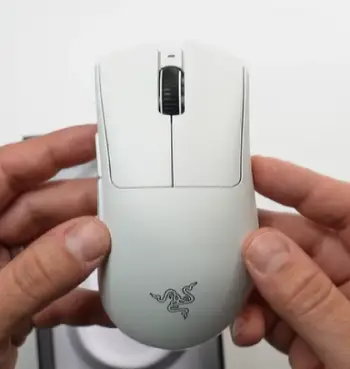
- Refined ergonomic shell: The redesign removed older flare and raised the hump slightly toward the left side.
This change makes the mouse more neutral than previous DeathAdders while still giving solid palm contact and I noticed less pinky drag and better thumb placement after the first hour of use.
- Focus Pro 30K optical sensor: It delivers 30,000 DPI, 750 IPS, and 70 G acceleration with 99.8 percent resolution accuracy.
Tracking stays consistent even during rapid direction changes and lift-off distance can be tuned while the sensor works on glass thicker than 2 mm without issues.
- Optical Gen-3 switches: Rated for 90 million clicks with near-zero debounce delay.
Clicks feel crisp and consistent from the first day to hundreds of hours later and I never experienced double-clicks or mushiness in any testing session.
- Long battery and simple charging: Up to 90 hours at 1000 Hz keeps the mouse ready for an entire competitive week.
The Speedflex USB-C cable is flexible enough that playing while charging feels almost wireless and the power plus DPI button lives on the underside which prevents accidental presses during matches.
- 100 percent PTFE feet: Large skates give smooth quiet glides on cloth or hard pads.
They wear slowly and keep the same low-friction feel for months of regular competitive play.
Pros Of The DeathAdder V3 Pro
- Exceptional palm comfort: If your hand measures 19 cm or longer and you use a full palm grip the shape locks in naturally. After four-hour sessions my hand felt less strained than with flatter mice and the support stayed consistent throughout long ranked blocks.
- Stable tracking for controlled aim: The slightly higher weight and ergonomic support reduce overshoot on long tracking lines. In games that reward smooth movement over pure speed this mouse feels more precise and predictable under pressure.
- Strong battery life without extras: You get nearly 90 hours at standard polling without buying anything else. For players who travel or hate frequent charging this is a real advantage that keeps the mouse ready for multi-day events.
- Proven optical switches: Clicks stay consistent and free of double-click issues even after heavy use. The tactile feedback remains sharp and reliable across hundreds of hours of competitive play.
- Glass surface compatibility: The sensor tracks reliably on clear glass which expands desk options and removes the need for specialized pads in many setups.
Cons Of The DeathAdder V3 Pro
- Higher weight than pure esports options: The 63 to 64 gram figure is light by older standards yet heavier than current 50-gram class mice. Fast flick players may notice the difference after switching from lighter options and the extra mass can feel present during rapid turns.
- Separate dongle for high polling: To reach 4000 or 8000 Hz you must purchase the HyperPolling Wireless Dongle. That adds cost and an extra item to manage which can feel inconvenient for pure out-of-box high-speed users.
- Fewer programmable buttons: Only five fully programmable buttons plus the underside DPI switch. Players who rely on many mouse binds feel limited and may need to map extra actions to the keyboard instead.
- Size may overwhelm smaller hands: The height and width work best for medium-to-large hands. Smaller hands or pure fingertip users can feel the shell is bulky and less natural during extended sessions.
- No onboard storage for the dongle: Travel requires carrying the receiver separately which adds one more small item to keep track of when packing gear.
Key Features Of The Viper V3 Pro
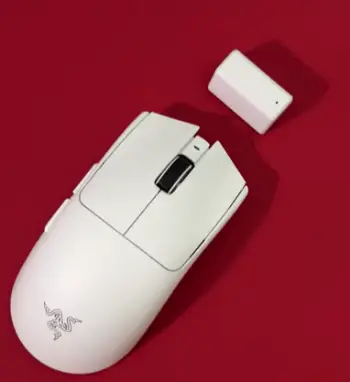
- Ultra-light symmetrical body: At 54 to 55 grams this is one of the lightest flagship mice available.
The shape sits between older Vipers and something closer to a modern esports standard and it works for claw fingertip and even relaxed palm grips without forcing a specific style.
- Focus Pro 35K Gen-2 sensor: Maximum 35,000 DPI with 1 DPI steps same 750 IPS and 70 G limits plus improved motion sync and smart tracking.
The extra resolution headroom is rarely needed yet the sensor feels slightly more refined in high-speed tracking tests I ran across multiple surfaces.
- Native 8000 Hz HyperPolling: The dongle comes in the box.
You can switch between 1000 2000 4000 and 8000 Hz without buying extras and higher rates reduce motion-to-photon latency in a measurable way though the difference is most obvious on high-refresh monitors.
- Optical Gen-3 switches and six programmable buttons: Same reliable switches as the DeathAdder.
The extra button flexibility helps if you bind more actions to the mouse and side buttons have a short travel with solid actuation that stays consistent under pressure.
- Battery and PTFE feet: Up to 95 hours at 1000 Hz and still usable at higher polling rates.
The large PTFE feet match the DeathAdder’s glide quality and keep the mouse stable during fast stops and direction changes.
Pros Of The Viper V3 Pro
- Class-leading low weight: 54 to 55 grams makes every movement feel effortless. Quick 180-degree turns and micro-corrections require less force which helps during long ranked sessions and reduces overall arm fatigue.
- High polling ready from day one: The included dongle lets you run 8000 Hz immediately. Competitive players who chase every millisecond of latency gain an edge without extra purchases and the setup stays simple.
- Flexible grip support: The symmetrical shape adapts to claw fingertip and hybrid styles. I switched grips mid-session without discomfort and the mouse stayed comfortable across different play styles.
- Slightly higher sensor ceiling: 35,000 DPI and finer step control give more customization room even if most users never go past 1600 DPI. The sensor still feels clean and responsive at every common sensitivity setting.
- Excellent build quality at low mass: Despite the extreme weight reduction the shell feels solid with no flex or creaking under normal pressure and the overall construction holds up well to daily competitive use.
Cons Of The Viper V3 Pro
- Less palm support for full-hand users: Players who rest their entire palm may find the higher hump and narrower width less stable over multi-hour sessions. The shape favors lighter contact styles and can feel less locked-in for pure palm grip.
- Higher price for the full package: The mouse already costs premium money and the included high-speed dongle is part of that cost. Budget-conscious buyers feel the jump and may need to wait for sales to make it more accessible.
- Side buttons can feel softer: Some users report slightly more mush in the side buttons compared with the DeathAdder’s firmer actuation. The difference is small yet noticeable if you rely heavily on those buttons during intense moments.
- Battery drains faster at maximum polling: At 8000 Hz you get roughly 17 hours. Heavy users need to charge more often if they stay at the highest setting and planning around charge cycles becomes more important.
- Shape change from earlier Vipers: Anyone coming from the V2 Pro will need a short adjustment period because the hump and side contours differ. The new form is modern yet it takes a few sessions before muscle memory fully adapts.
Real-World Performance Across Games
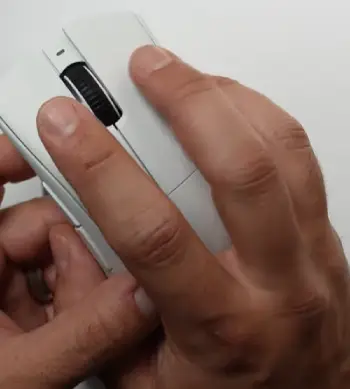
I ran both mice through the same set of titles including fast tactical shooters battle royales and slower tactical games.
In high-mobility shooters the Viper’s lower weight let me snap to targets with less arm fatigue.
The DeathAdder gave more consistent tracking on long-range holds where I needed the mouse to stay planted.
Sensor accuracy felt identical at 800 and 1600 DPI and the extra numbers on the Viper never translated into visible advantage in actual matches.
Both stayed lag-free on the same wireless setup and neither dropped connection even with multiple devices nearby.
Battery tests matched the official claims closely when I used 1000 Hz.
Switching to higher polling rates cut runtime as expected on both so I kept most sessions at 1000 or 2000 Hz and only raised the rate for important matches.
The PTFE feet on both mice wore at similar rates and never collected dust in a way that hurt glide quality over time.
Who should choose which mouse ?
If you prefer a full palm grip have medium-to-large hands and want maximum comfort over pure speed the DeathAdder V3 Pro fits better.
It rewards controlled aim and long sessions. If you use claw or fingertip grips chase the lightest possible weight and want 8000 Hz without buying extra parts the Viper V3 Pro is the stronger pick.
Both mice remove RGB and focus purely on performance so neither wastes battery or weight on lighting.
The decision ultimately comes down to how your hand rests on the shell more than any single specification.
I recommend trying both shapes if possible or at least measuring your hand and comparing it to the dimensions listed earlier.
Once the shape matches your grip either mouse delivers the sensor quality switch reliability and wireless stability expected from a current flagship.
Also Read: Comparison Of Logitech M317 And M325
Frequently Asked Questions (FAQ)
It depends on grip. Viper wins for light weight and high polling out of the box. DeathAdder wins for palm comfort and stability.
It ranks among the top ultralight wireless options for competitive play especially if you value 8000 Hz and low mass.
Yes. It remains one of the strongest ergonomic wireless mice available for players who want comfort and proven performance.
Yes in weight sensor generation and native high polling. The shape is different so personal preference still matters.
Wrapping Up
After living with both mice I can say neither is a wrong choice if the shape suits your hand.
The Viper V3 Pro pulls ahead for pure speed and modern esports demands while the DeathAdder V3 Pro still feels like the more natural extension of the hand for many players.
Pick the one that matches how you actually hold a mouse and you will get years of reliable high-level performance.
You now have the details needed to choose with confidence instead of guessing.
Recent Posts
I spent months sorting through my own thinning hair and the endless options online before settling on a clear path. My goal here is simple: give you a straightforward real-user breakdown of...
Blood Balance Plus Reviews: Is This Blood Support Supplement Worth Buying?
Blood Balance Plus is marketed as a natural supplement designed to support healthy blood sugar levels, blood pressure, and metabolic wellness.However, after examining its product information,...