
I have spent plenty of time with both the Logitech M317 and M325, testing them side by side for everyday work, browsing, and light travel use.
My goal here is simple: help you decide which compact wireless mouse fits your needs better by breaking down real differences in feel, features, battery, and daily performance so you can pick the one that actually works for your hands and habits without wasting money or settling for frustration.
| Feature | Logitech M317 | Logitech M325 |
| Buttons | 3 (left, right, middle) | 5 (left, right, middle + left/right tilt) |
| Scroll | Line-by-line | Micro-precise with tilt |
| DPI | 1000 fixed | 1000 fixed |
| Battery life | Up to 12 months (1 AA) | Up to 18 months (1 AA) |
| Weight | 84 g with battery | 93 g with battery |
| Connectivity | 2.4 GHz, Unifying compatible | 2.4 GHz, Unifying receiver |
| Range | 10 m / 33 ft | 10 m / 33 ft |
| Design | Compact ambidextrous with rubber grips | Compact ambidextrous contoured |
| Best for | Basic use, portability, smaller hands | Web browsing, extra navigation, longer battery |
Key Differences Between The Logitech M317 And M325
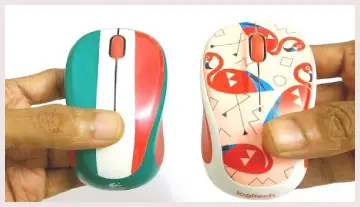
- Button count and tilt functionality: The M325 includes two extra tilt actions on the scroll wheel that the M317 lacks entirely, letting you jump forward and back in browsers or pan horizontally in spreadsheets without shifting your hand, while the M317 keeps you limited to the classic three buttons and forces keyboard shortcuts for extra navigation.
- Scroll wheel behavior: The M317 relies on a traditional notched wheel that clicks through lines one at a time with clear feedback, whereas the M325 uses a smoother micro-precise wheel that feels freer when flicked and works especially well for long web pages or documents once you get used to the reduced resistance.
- Battery endurance: Logitech rates the M325 for roughly six extra months on the same single AA cell, and that gap becomes noticeable if you leave the mouse powered on for weeks, while the M317 still delivers a full year for most people yet requires more frequent swaps in continuous daily use.
- Weight and hand feel: At 84 grams the M317 sits lighter and can feel quicker for short frequent movements across screens, while the M325’s extra 9 grams come from a slightly larger body and more complex scroll mechanism that some users prefer for a more planted and steady sensation.
- Software and customization: Both support Logitech Options or Options+ for basic button remapping, but the M325’s tilt buttons give you more actions to assign for productivity shortcuts, whereas the M317 mainly lets you reprogram only the middle click and offers fewer overall options.
These differences matter most if your work involves heavy web use or multi-page documents. For pure point-and-click tasks the gap shrinks.
Key Features Of The Logitech M317
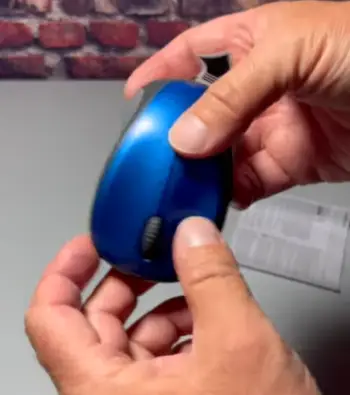
- Compact contoured shape with soft rubber side grips: The body follows the natural curve of smaller to medium hands and stays comfortable for hours of light use, while the rubber panels keep the mouse from sliding even when your palm warms up during longer sessions.
- Plug-and-play 2.4 GHz connection with nano receiver: Insert the tiny USB receiver and the mouse works on Windows, macOS, ChromeOS, and most Linux distributions within seconds, and the receiver stores neatly inside the battery compartment so it never gets lost while traveling.
- Fixed 1000 DPI optical sensor: Tracking stays consistent on most surfaces without needing a mouse pad and delivers reliable cursor movement for office work and casual browsing, though you cannot raise or lower the sensitivity through software or hardware switches.
- Twelve-month battery life with on/off switch: A single AA battery keeps the mouse running for a full year under typical use, and the dedicated power switch combined with sleep mode stretches that life even further when the mouse sits idle overnight.
- Ambidextrous layout: Left-handed users can swap the primary buttons through the software, making the mouse fully usable for either hand without awkward stretching or forced grip changes during everyday tasks.
Pros Of The Logitech M317
- Lighter weight for agile movement: The reduced mass makes the mouse feel more responsive for quick cursor jumps across multiple monitors or when switching between a laptop and an external screen throughout the day.
- Smaller overall footprint: It slides easily into laptop sleeves or crowded bags without adding bulk, which proves useful for frequent travelers or anyone who packs light on a regular basis.
- Lower typical price point: You spend less while still receiving reliable Logitech build quality and a three-year limited warranty that covers defects under normal conditions.
- Simple three-button design: The minimal layout reduces accidental clicks for users who never need extra navigation buttons and prefer a straightforward point-and-click experience.
- Secure rubber grips and matte finish: The side panels stay firm even after months of daily handling, and the surface resists fingerprint buildup better than glossy plastics found on some competing models.
Cons Of The Logitech M317
- No tilt scroll available: You must rely on keyboard shortcuts for back/forward or horizontal movement, which can slow workflow if you spend most of your time jumping between browser tabs or wide documents.
- Shorter battery life: More frequent AA swaps become necessary compared with the M325, especially if the mouse stays powered on overnight or sees continuous use across long workdays.
- Limited button customization: Power users end up wanting more options for productivity shortcuts because only the middle click offers meaningful remapping through the software.
- Very compact size for larger hands: The small body can feel cramped during long sessions that require a fuller palm rest, making it less ideal for users with bigger hands.
- Possible non-Unifying receiver: Some units ship with a dedicated receiver only, so pairing multiple devices requires checking for the orange logo or purchasing a separate Unifying dongle later.
Key Features Of The Logitech M325
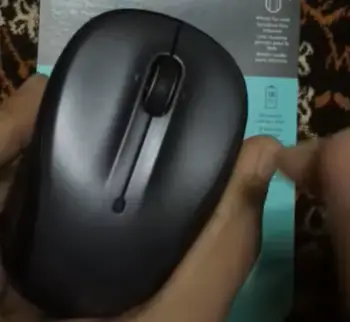
- Five-button layout including tilt scroll: Left and right tilt actions let you navigate browser history or move sideways in wide documents with one hand, while the middle click still functions normally and opens more one-handed control options overall.
- Micro-precise scroll wheel: The wheel spins with less resistance than a traditional notched design so long pages fly by with a single flick, yet you still retain enough control for precise line-by-line movement when the task demands accuracy.
- Eighteen-month battery rating: The same AA cell lasts noticeably longer than on the M317, and when combined with the on/off switch many users report going well over a year between changes even with moderate daily use.
- Unifying receiver included: The nano receiver can pair with up to six compatible Logitech devices at once, which frees up USB ports if you already own other Unifying gear and reduces cable clutter on a crowded desk.
- Contoured ambidextrous body: Slightly fuller than the M317 yet still compact enough for travel, the shape supports both palm and fingertip grips comfortably for smaller hands during extended work sessions.
Pros Of The Logitech M325
- Tilt wheel and micro-precise scrolling: These features speed up web navigation and spreadsheet work without lifting your hand from the mouse, saving noticeable time during research-heavy or multi-page tasks.
- Longer battery life overall: Fewer maintenance interruptions keep the mouse ready for extended travel or shared desk use, and many people go well beyond a year on a single AA cell.
- Five buttons for basic shortcuts: Once assigned in Logitech software the extra actions open useful productivity options that the three-button M317 cannot match.
- Unifying receiver compatibility: It works with other Logitech devices you may already own, cleaning up cable clutter and allowing up to six peripherals on one nano receiver.
- Slightly heavier planted feel: The extra mass gives steadier control during detailed clicking and feels more substantial in the hand for users who prefer that sensation.
Cons Of The Logitech M325
- Extra weight and larger body: These reduce the ultra-portable advantage the M317 holds for strict minimalists who pack the absolute lightest gear possible.
- Free-spinning scroll preference: The smoother action can feel less precise if you prefer strong detents for exact line control on code or detailed documents.
- Higher typical street price: You pay more for the added buttons and battery life, which may not justify the cost if those extras go unused.
- Discontinued status in many markets: Finding new sealed units becomes harder over time and can push remaining stock prices higher than expected.
- Still limited sensor capabilities: Fixed 1000 DPI and basic optical tracking mean it will never satisfy users who want adjustable sensitivity or gaming-grade performance.
Everyday Performance And Real-World Feel

I used both mice for writing, research, spreadsheet work, and casual media browsing across a Windows laptop and a Mac.
Cursor tracking felt identical on desk surfaces and even on a slightly textured notebook cover.
Neither skipped or jittered under normal conditions. Click force sits in the middle range—firm enough to avoid accidental presses yet light enough that your fingers do not tire after a full day.
The M317’s rubber grips gave me better purchase when my hand warmed up during long sessions.
The M325 felt a bit smoother and more polished but needed an occasional wipe to keep the sides from feeling slick.
Battery indicators on both are simple LED flashes that warn you before the cell dies, so I never got caught offline mid-task.
Range stayed solid out to about eight or nine meters in open space. Walls and metal desks cut that distance, yet both still worked fine across a typical home office.
Latency stayed low enough for ordinary productivity; neither mouse is built for fast-paced games, and I noticed the expected lag if I tried any competitive titles.
Who Should Choose The M317?
If you want the lightest, simplest, most portable option and rarely need extra buttons, the M317 makes the stronger case. Students, travelers, and anyone with smaller hands will appreciate how easily it disappears into a bag.
The lower cost also makes it easier to keep a spare or replace without second thoughts.
Who Should Choose The M325?
Choose the M325 when browser navigation and longer battery life matter more than absolute minimal weight.
Writers who jump between research tabs, analysts who pan across wide spreadsheets, and anyone who already owns other Unifying devices will gain the most from the extra features. The smoother scroll alone can change how quickly you move through long documents.
Build Quality And Longevity
Both mice use the same solid plastic shells and optical sensors that Logitech has refined over years.
I have seen units last three to five years of daily use before the scroll wheel or switches start to wear.
The three-year limited warranty covers defects, and replacement parts remain available through Logitech support even as the M325 leaves store shelves.
Keep the receiver stored in the battery bay when packing, and avoid dropping the mice on hard floors; those two habits extend life more than any other care tip.
Also Read: Comparison Of Naga V2 HyperSpeed And Pro
Frequently Asked Questions (FAQ)
Yes, Logitech has largely phased out the original M325, though limited stock and successor models like the M325s still appear in some channels.
Yes for everyday office and web work. It offers solid tracking, long battery life, and useful tilt scrolling in a compact package.
No. Its fixed 1000 DPI sensor and standard polling rate lack the precision and low latency serious gaming requires.
Yes on Unifying-ready versions that carry the orange logo. Some early units use a dedicated receiver and need a separate Unifying dongle for multi-device pairing.
Final Thoughts
After living with both mice I keep reaching for the M325 when I settle in for long writing or research sessions because the tilt wheel and smoother scroll simply save time.
Yet the M317 still wins when I pack light for travel or need a no-fuss backup that costs less. You should match the choice to your daily habits rather than chasing the longer battery or lighter weight alone.
If web navigation and fewer battery changes rank high, grab the M325 while stock lasts. If pure portability and simplicity matter most, the M317 will serve you well for years.
Either way you get reliable Logitech performance without overspending on features you will never use.
Recent Posts
● Interactive 5-Zone Interior & Exterior Paint Blueprint Paint Coverage Calculator: Gallons, Primer, Square Footage & Cost Tap any architectural surface zone on the blueprint...
If you want smooth, shiny hair without spending a fortune on a premium styling tool, the Ella Bella hair dryer may be worth considering.In these Ella Bella hair dryer reviews, I’ll look...