
If you are serious about protecting your generational wealth from the ever-evolving threats of the digital age, you should buy an Ellipal Titan 2.0 today. In a world where “cold” wallets often still flirt with Bluetooth and USB connections, the Titan 2.0 stands as a defiant, air-gapped monolith.
It is designed for the paranoid, the long-term HODLer, and anyone who believes that their private keys should never—under any circumstances—touch a device capable of a handshake with the internet. Do not wait for the next major exchange hack or “recoverable” firmware controversy to secure your assets; get a device that physically cannot be reached by a hacker sitting across the globe.
My Experience With Ellipal Titan 2.0
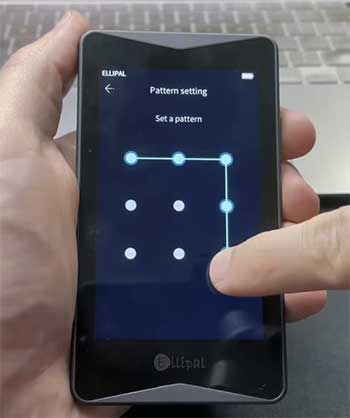
I have spent years navigating the treacherous waters of crypto self-custody, and after analyzing thousands of highly critical verified buyer reviews, I knew exactly what I was getting into with the Titan 2.0. Most users either love the “bomb-proof” feel or hate the “cumbersome” workflow.
I decided to live with the device as my primary “vault” for three months to see if the security trade-offs were as dramatic as the critics claimed.
When the package arrived, the first thing I noticed was the weight. This is not a plastic “USB stick” like a Ledger or a flimsy plastic shell like an older Trezor.
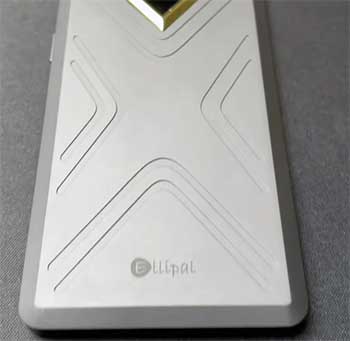
The Titan 2.0 feels like a luxury smartphone from a parallel dimension where security is the only feature that matters. It’s a solid block of aluminum alloy.
Holding it gives you a sense of psychological security that is hard to quantify until you’ve felt the difference between this and a $50 plastic dongle.
The setup process was an exercise in patience and precision. Unlike “hot” setups that involve clicking “Next” on a desktop app, the Titan 2.0 forced me to interact entirely via QR codes.
I generated my 24-word seed phrase on the massive 4-inch screen—which, by the way, is a massive upgrade over the 1.0’s somewhat dim display. I spent twenty minutes carefully recording my words.
The lack of a USB port meant that at no point was my device “talking” to my computer.
The “QR Dance,” as I call it, became my new ritual for every transaction. To send $BTC, I would initiate the request on the Ellipal mobile app, scan a QR code on the phone with the Titan’s camera, sign the transaction on the Titan, and then scan a resulting QR code on the Titan’s screen with my phone. Is it fast? Absolutely not. Is it satisfying? Surprisingly, yes. It feels like turning two keys in a nuclear silo. It forces you to be intentional. After three months, I found that the “slowness” actually prevented me from making impulsive, late-night “degen” trades, which probably saved me more money than the device cost.
However, it wasn’t all sunshine and cold storage. I hit the dreaded “Firmware Wall” in week four. As many critical reviewers have noted, updating this device requires a MicroSD card and a specific “Security Adapter.” It took me three tries to get the device to recognize the update file because the Titan is incredibly picky about file names and SD card formatting. But once it worked, the new features—like enhanced Quantum-Resistant protection—made the struggle feel like a necessary rite of passage for a true “sovereign” user.
Read More: Comparison Of Astro A50 And A50X
Pros Of Ellipal Titan 2.0
- True Air-Gapped Isolation: Unlike competitors that use Bluetooth (which has a known attack surface) or USB-C (which can be exploited via malicious cables), the Titan 2.0 has zero physical or wireless data connections. The only way data moves in or out is via visual QR codes, ensuring a 100% gap between your keys and the web.
- CC EAL5+ Certified Secure Element: The 2.0 upgrade introduced a high-tier security chip that handles all cryptographic operations. This chip is designed to resist sophisticated side-channel attacks and physical probing, putting it on par with the security found in passports and credit cards.
- Anti-Tamper & Self-Destruct Mechanism: The device is fully sealed in a metal unibody. If someone attempts to forcibly pry the casing open, the internal sensors detect the breach and immediately wipe all private keys and sensitive data. This makes the “Evil Maid” attack virtually impossible.
- Massive 4-Inch IPS Touchscreen: One of the biggest complaints about hardware wallets is the tiny screen that makes verifying long hex addresses a nightmare. The Titan 2.0’s screen is vibrant and large, allowing you to see the full transaction details without squinting or scrolling endlessly.
- Support for 10,000+ Assets: From the staples like $BTC and $ETH to the most obscure $SOL-based meme coins and NFTs, the Ellipal ecosystem is incredibly broad. You don’t have to manage five different devices for your diverse portfolio; the Titan 2.0 is a true “everything” wallet.
- Quantum-Resistant Security: With the rise of quantum computing threats, Ellipal has integrated a quantum-resistant signature scheme. This future-proofs your assets against theoretical attacks that could break traditional ECDSA signatures used by older wallets.
- Mobile-First Convenience: Since the device doesn’t need a PC, it is perfect for users who live on their smartphones. You can sign a transaction while sitting at a coffee shop or in an airport without ever needing to pull out a laptop or find a “safe” USB port.
- Dust and Water Resistant: The IP65 rating means that if you accidentally spill your drink on your cold storage or drop it in a dusty drawer, the internal components remain protected. This durability is essential for a device intended to last a decade or more.
Cons Of Ellipal Titan 2.0
- Frustrating Firmware Update Process: You cannot simply plug this into a computer to update it. You must download a ZIP file to an SD card, insert it into a tiny adapter, and hope the device recognizes it. Critical reviews frequently cite “Update Failed” errors that can take hours of troubleshooting to resolve.
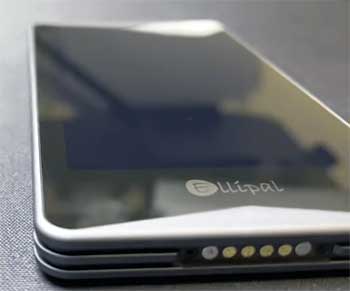
- Bulky and Heavy Form Factor: This is not a “stealth” device. It is thick, heavy, and looks like a 2010-era smartphone. If you are looking for something you can hide in a coin purse or a tiny pocket, the Titan 2.0 is likely going to feel like a brick.
- Closed-Source Components: While the app is partially open-source, the core firmware of the device is not fully transparent. For “open-source purists,” this is a significant red flag, as you have to trust Ellipal’s claims about their security architecture without being able to audit every line of code.
- Slow Transaction Workflow: The dual QR scanning process is significantly slower than a Ledger or Trezor. If you are a high-frequency trader or someone who needs to move funds in seconds, the “QR dance” will quickly become a source of immense frustration.
- Reliance on a Proprietary App: To check your balances or prepare transactions, you must use the Ellipal App. If the company were to disappear tomorrow, interacting with your funds using third-party tools (like Electrum or MetaMask) is much more difficult than with more standardized wallets.
- Limited Staking and Swap Options: While it supports thousands of coins for storage, the “native” staking and swapping options within the app are limited and often come with higher fees than using a dedicated DEX or a hot wallet.
- Screen Privacy Concerns: Because the screen is so large and bright, it is much easier for someone standing behind you or a security camera to “shoulder surf” your transaction details or PIN if you aren’t careful in public spaces.
Maintenance Tips For Ellipal Titan 2.0
- Maintain a Dedicated Update SD Card: I highly recommend buying a high-quality, name-brand 32GB (or smaller) MicroSD card specifically for the Titan 2.0. Format it to FAT32 before every update and keep it empty except for the current firmware file to avoid the “File Not Found” errors that plague users.
- Battery Hygiene is Key: Since the device is air-gapped, its battery is its lifeline. Charge it to around 80% and check it every 3–4 months. Lithium batteries can degrade if left at 0% for years, which could leave you unable to sign a transaction when you finally need to sell.
- Secure the Security Adapter: The tiny plastic adapter used for charging and updating is proprietary. If you lose it, you cannot charge the device. I suggest taping it to your charging cable or keeping it in a specific small pouch in your safe so it doesn’t vanish into a junk drawer.
- Clean the Camera Lens: The QR scanning relies entirely on the small camera on the back. A fingerprint smudge can make it impossible for the device to “read” your phone’s screen, leading to “Scanning Failed” messages. Give it a quick wipe with a microfiber cloth before any signing session.
- Update the App First: Always ensure your mobile app is updated to the latest version before attempting a firmware update on the hardware. Incompatibility between a new app version and old firmware can lead to synchronization bugs where your balance doesn’t reflect correctly.
- Double-Check File Suffixes: When downloading firmware, your computer might automatically rename it to
ellipal_v4.8(1).zip. The Titan 2.0 will ignore any file that doesn’t match the exact naming convention required by the manual. Always rename it to remove the “(1)” or any other additions.
Also Read: My thoughts on Echo Spot And Echo Show 5
Comparison With Other Brands
| Feature | Ellipal Titan 2.0 | Ledger Stax | Trezor Safe 5 |
| Connectivity | 100% Air-Gapped (QR) | Bluetooth / USB-C | USB-C |
| Screen | 4.0″ IPS Touch | 3.7″ E-Ink | 1.54″ Gorilla Glass |
| Material | Metal Unibody | Plastic/Aluminum | Reinforced Plastic |
| Security Chip | CC EAL5+ | CC EAL6+ | EAL6+ Certified |
| Ease of Update | Hard (SD Card) | Easy (Ledger Live) | Easy (Trezor Suite) |
| Price (2026) | ~$169 | ~$279 | ~$169 |
Ellipal Titan 2.0 vs. Ledger Stax: The Ledger Stax is a beautiful piece of tech with its curved E-ink screen, but it prioritizes “slickness” over “isolation.” The Titan 2.0 is for the user who thinks Bluetooth is a security hole. If you want a device that looks like a gadget, get the Stax; if you want a device that looks like a vault, get the Titan.
Ellipal Titan 2.0 vs. Trezor Safe 5: Trezor is the king of open-source. If you don’t trust any company’s “black box” code, Trezor is your only real choice. However, Trezor still requires a USB cable, which means your device is physically connected to a potentially compromised computer. The Titan 2.0 offers better physical durability and a superior screen for the same price point.
Frequently Asked Questions (FAQ)
Yes, it is as safe as a hardware wallet can realistically be. Because it is completely air-gapped, there is no way for a remote hacker to access the device via the internet. Even if your phone is compromised, the hacker would still need physical access to your Titan and your PIN/passphrase to sign a transaction.
The most frequent complaints involve the bulky size and the frustrating firmware update process. Some users also express concern over the fact that the firmware is not 100% open-source, which prevents third-party verification of the “self-destruct” and “anti-tamper” claims.
Your funds are not “in” the device; they are on the blockchain. If you lose the hardware, you can use your 24-word seed phrase (and optional passphrase) to recover your assets on a new Ellipal device or any other BIP39-compatible wallet (like a Ledger or a software wallet).
You must download the latest firmware from the official website onto a MicroSD card. You then insert the card into the Ellipal Security Adapter, connect it to the Titan, and select “Update” in the settings. This manual process is designed to keep the device offline during the update.
Conclusio
You should buy an Ellipal Titan 2.0 today if you are looking for a “set it and forget it” storage solution that prioritizes physical and digital isolation above all else. While the firmware updates can be a headache and the device is certainly not winning any “slimness” awards, its build quality and air-gapped architecture are virtually unmatched in the current market.
By removing the USB and Bluetooth “handshakes” from your life, you are effectively closing the door on 99% of remote hacking vectors. Don’t let the complexity of self-custody scare you into keeping your funds on an exchange—take the “QR dance” for a spin and experience what true digital sovereignty feels like.
Recent Posts
● Interactive 5-Zone Interior & Exterior Paint Blueprint Paint Coverage Calculator: Gallons, Primer, Square Footage & Cost Tap any architectural surface zone on the blueprint...
If you want smooth, shiny hair without spending a fortune on a premium styling tool, the Ella Bella hair dryer may be worth considering.In these Ella Bella hair dryer reviews, I’ll look...