
I know how frustrating it is to constantly replace expensive ink cartridges when you print high-quality photos and documents. You want an efficient, reliable machine that produces stunning colors without draining your wallet over time.
My intent in this article is to compare the Epson 8500 and Epson 8550, two incredibly popular EcoTank photo printers, based on my hands-on analytical experience. I will help you decide which model truly fits your specific creative workflow and workspace. Let us find out which of these impressive, cartridge-free machines will give you the best return on your investment.
A Brief Comparison Table
| Features | Epson 8500 | Epson 8550 |
| Maximum Print Size | 8.5 x 14 inches | 13 x 19 inches |
| Ink System | 6-Color Claria Premium | 6-Color Claria Premium |
| Dimensions | 15.9 x 14.5 x 6.4 inches | 20.6 x 16.9 x 6.6 inches |
| Scanner Size | 8.5 x 11.7 inches | 8.5 x 14 inches |
| Weight | 18.5 pounds | 24.5 pounds |
My Experience With Epson 8500
Setting up the Epson 8500 on my home office desk was incredibly satisfying. I immediately noticed its sleek, modern white aesthetic, which felt like a massive upgrade from the clunky black plastic printers I previously used. Filling the ink tanks was surprisingly foolproof and mess-free, thanks to the uniquely keyed bottles that only fit into their designated color slots.
Once I started running test prints, the vibrancy of the six-color system blew me away. The addition of photo black and gray inks created stunning black-and-white photographs that rivaled professional lab quality. I found the touch screen highly responsive, and the entire ecosystem felt incredibly refined for everyday document printing and amateur photography.
Pros Of Epson 8500
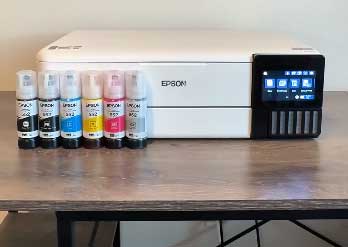
- Exceptional Six Color Print Quality: The absolute biggest advantage I discovered with this machine is the phenomenal color reproduction made possible by the six-color Claria ET Premium ink system. Unlike traditional four-color printers that struggle with subtle gradients and shadow details, the inclusion of dedicated photo black and gray inks completely transforms the output.
- Incredible Long Term Cost Efficiency: As someone who prints frequently, the transition from expensive disposable cartridges to the massive refillable EcoTank system has been financially liberating. The initial box includes enough ink to print thousands of standard pages and hundreds of high-quality photographs right from day one. When I analytically calculate the cost per page, it drops to mere fractions of a penny for text documents and only a few cents for full-color photos.
- Compact And Aesthetically Pleasing Design: Office space is a highly valuable premium in my house, and I genuinely appreciate how the manufacturer managed to pack such advanced photo printing technology into a relatively small footprint. The machine measures just under sixteen inches wide, allowing it to fit comfortably on standard shelves and tight desk corners without dominating the room.
- Versatile Media Handling For Creative Projects: I constantly experiment with different paper types, and this printer accommodates my creative workflows beautifully. It features multiple paper feed options, including a dedicated photo tray for standard snapshots, a main cassette for plain documents, and a rear straight-through paper path.
Read more: Comparison Of Cubii JR1 And JR2
Cons Of Epson 8500
- Relatively High Initial Purchase Price: While the long-term running costs are undeniably low, I must analytically point out that the upfront cost of this machine is significantly higher than a standard cartridge-based photo printer. You are essentially pre-paying for years of ink and advanced printhead technology at the checkout counter. For casual users who only print a dozen pages a month, this steep initial investment might take several years to physically pay off.
- Slower Print Speeds For Standard Text Documents: When I am rushing to print a massive, fifty-page analytical report for a client meeting, I acutely feel the sluggishness of this device. Because it is engineered primarily for high-fidelity photo reproduction rather than rapid-fire office documentation, the standard black-and-text printing speeds are noticeably slower than comparable laser printers or business-oriented inkjets. It meticulously lays down the ink to ensure perfect clarity, but this precision sacrifices raw speed.
- Small Touch Screen Interface Can Be Finicky: The front motorized control panel houses a color touch screen that is beautifully designed but slightly undersized for comfortable daily navigation. Measuring under five inches, the icons and text menus can feel cramped, especially when I am trying to quickly select specific maintenance tasks or input Wi-Fi passwords using the digital keyboard. I frequently find myself having to be extremely precise with my finger taps to avoid accidentally selecting the wrong option.
- Limited To Standard Letter And Legal Paper Sizes: As my creative projects grew in ambition, I quickly ran into the physical limitations of this specific model’s maximum paper width. The machine is strictly designed to handle a maximum width of eight and a half inches, meaning I can only print standard letter or legal-sized documents.
Maintenance Tips For Epson 8500
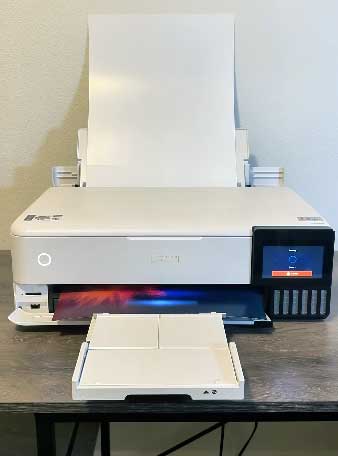
- Perform Regular Weekly Nozzle Checks: To completely prevent the microscopic ink nozzles from drying out and clogging, I have implemented a strict weekly maintenance routine. Even if I do not have a specific project to print, I analytically force the machine to print a quick, full-color test page every single weekend.
- Maintain Consistent Room Temperatures And Humidity: I learned very quickly that high-end photo inks and sensitive printheads absolutely despise extreme environmental fluctuations. I purposefully position the printer away from drafty windows, hot heating vents, and direct, baking sunlight.
- Keep The Scanner Glass And White Backing Immaculate: Because I frequently use the top scanner bed to digitize old family photographs and important financial documents, maintaining its absolute cleanliness is a top priority. Every two weeks, I take a high-quality microfiber cloth lightly dampened with a specialized electronic screen cleaner and meticulously wipe down the flat glass surface and the white plastic backing of the lid.
- Never Let The Ink Tanks Drop Below The Minimum Line: While it is incredibly tempting to wait until a tank is completely bone dry before refilling it, this is a massive analytical mistake that can permanently damage the machine. The EcoTank system relies on a continuous, unbroken vacuum of liquid to feed the printhead.
Comparison With Other Brands
- Comparing Epson 8500 To Canon PIXMA G620: When I analytically compare this model against the Canon PIXMA G620, the differences in operational refinement become quite apparent. The Canon G620 is also a six-color MegaTank printer focused heavily on photography, and it often retails at a lower initial price point. However, the Canon model feels significantly slower during standard document printing and lacks a touch screen entirely, relying on an archaic two-line LCD panel with physical buttons.
- Comparing Epson 8500 To HP Smart Tank 7301: The HP Smart Tank series is a prominent competitor in the refillable ink space. Analytically, the HP 7301 excels at fast, high-volume office document printing and features a very robust automatic document feeder for scanning large stacks of paper—a feature the Epson model completely lacks. However, the HP only utilizes a standard four-color ink system.
- Comparing Epson 8500 To Brother INKvestment MFC J4335DW: Brother takes a slightly different approach with their INKvestment line, utilizing massive, proprietary cartridges rather than pourable ink bottles. The Brother machine is an absolute workhorse for standard office tasks, delivering incredibly fast text printing and highly reliable mechanical performance at a lower upfront cost.
- Comparing Epson 8500 To Standard Epson Expression Photo Printers: Comparing this EcoTank model to Epson’s own legacy cartridge-based Expression Photo series highlights the massive shift in consumer value. The older cartridge models initially cost significantly less at the electronics store, making them tempting.
My Experience With Epson 8550
Upgrading my workspace to accommodate the massive Epson 8550 was a genuinely transformative moment for my creative output. Unboxing it required some physical effort due to its substantial weight and wide footprint, but once it was anchored to a sturdy side table, I realized its true potential.
The ability to slide massive, thirteen-by-nineteen-inch fine art paper into the rear feed and watch a gorgeous, poster-sized borderless photograph slowly emerge completely changed my workflow. The touch screen interface and the six-color ink tanks operate exactly like its smaller sibling, but the sheer physical scale of the prints it produces makes every single project feel infinitely more impactful and professional.
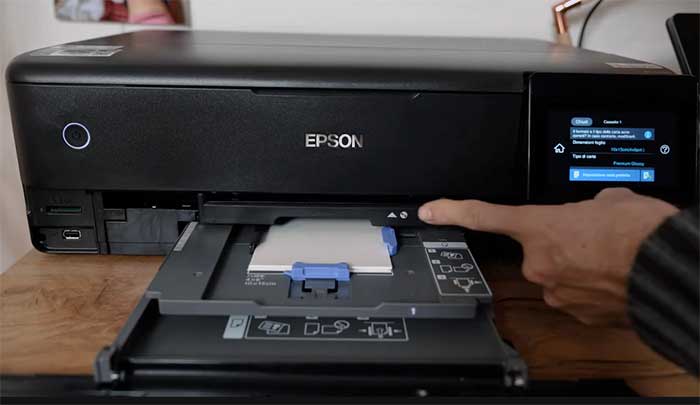
Pros Of Epson 8550
- Breathtaking Wide Format Printing Capabilities: The absolute defining characteristic of this machine, and the primary reason I fiercely recommend it, is its flawless ability to print massive documents up to thirteen by nineteen inches in size. Analytically speaking, breaking free from the standard letter-size constraint completely unlocks a new realm of creative possibilities. I can effortlessly print highly detailed architectural blueprints, gorgeous family portrait posters for framing, and expansive, full-bleed graphic design portfolios right from my own home.
- Flawless Thick Media And Cardstock Handling: Because I frequently craft custom wedding invitations and thick promotional materials, I rigorously tested the paper handling mechanisms. The inclusion of a highly specialized, completely straight rear-feed paper path is an absolute game-changer. I can manually feed incredibly thick watercolor paper, dense cardstock, and rigid presentation matte board directly through the machine without it bending, curling, or jamming the delicate internal rollers.
- Seamless Wireless Connectivity And Mobile App Integration: Operating a massive printer often means it cannot sit directly next to my computer monitor. Fortunately, I found the wireless integration on this model to be incredibly robust and entirely reliable. The companion mobile application allows me to analytically monitor precise ink levels, initiate automated maintenance cleaning cycles, and print high-resolution photographs directly from my smartphone’s camera roll while sitting across the room on my sofa.
- Unmatched Cost Efficiency For Large Scale Prints: Printing a single thirteen-by-nineteen-inch full-color poster at a commercial print shop can easily cost twenty dollars or more. By analytically applying the EcoTank system to wide-format printing, the financial savings become absolutely staggering. The six massive ink bottles provide such an incredibly high page yield that the actual ink cost for a massive poster drops to less than fifty cents.
Cons Of Epson 8550
- Massive Physical Footprint Requires Dedicated Space: You cannot casually place this printer on a standard, cluttered computer desk. Analytically assessing its dimensions, it is exceptionally wide and remarkably deep, especially when the motorized output tray fully extends and the rear paper feeder is propped open. It physically requires a dedicated, incredibly sturdy credenza or a large, separate work table to operate comfortably. If you live in a small apartment or possess a highly confined home office environment, finding adequate, safe clearance space for this heavy, sprawling piece of hardware is a significant logistical challenge that you must carefully plan for before purchasing.
- The Scanner Bed Does Not Support Wide Format Media: I find it incredibly frustrating and analytically counterintuitive that a machine explicitly designed to print massive thirteen-by-nineteen-inch documents only features a scanner bed large enough to accommodate an eight-and-a-half-by-fourteen-inch legal document. If I paint a large watercolor piece and want to digitize it, or if I want to duplicate a large printed poster, I simply cannot do it on this machine.
- High Risk Of Paper Misalignment On Large Feeds: When dealing with extremely large, thirteen-by-nineteen-inch sheets of premium photo paper, perfectly aligning the media in the rear feed slot requires meticulous, analytical precision. If I quickly slide the large paper in at even a slightly crooked, microscopic angle, the entire print will completely skew as it travels through the long mechanical paper path, resulting in wildly uneven borders and completely ruined, expensive paper. It demands a slow, highly deliberate, two-handed feeding technique every single time, making the process of printing large batches slightly tedious and requiring constant, active user supervision.
- Noticeably Heavy And Difficult To Relocate: Weighing in at nearly twenty-five pounds, moving this machine is an absolute chore. When I needed to deep clean my office space and shift the furniture, I had to physically drain the paper trays, secure the scanner lid, and carefully lift the bulky, oddly-shaped chassis to avoid splashing the internal liquid ink tanks. It is definitely not a portable device by any metric. Once you analytically decide on its permanent location in your workspace, you must be prepared to leave it exactly there, as casually sliding it around a desk is highly impractical and potentially damaging to the delicate internal mechanisms.
Read more: Comparison Of Tactacam Defend And Reveal
Maintenance Tips For Epson 8550
- Regularly Vacuum The Rear Wide Paper Chute: Because the wide-format rear feeding slot constantly remains open and angled upwards when loaded with media, it acts like a massive funnel for airborne room dust, pet dander, and general debris. If this dust settles deeply into the internal rubber feeding rollers, they lose their crucial grip and will completely fail to pull the heavy photo paper into the machine. Once a month, I analytically use a specialized computer vacuum with a soft brush attachment to gently suck out any accumulated debris from the exposed rear chute, guaranteeing a flawless, slip-free paper feed every single time I print.
- Always Retract The Motorized Tray When Not In Use: The output tray on this model is completely motorized, automatically sliding out when a print job begins to catch the massive paper. However, leaving it fully extended in a busy home office is a massive physical hazard. I have accidentally bumped into it with my hip multiple times. To protect the delicate internal gears from breaking, I strongly advise using the touch screen command to fully retract the tray safely back into the chassis the moment you finish your printing session. This simple analytical habit entirely prevents catastrophic physical damage to the expensive motorized tracking system.
- Perform Thorough Printhead Alignments After Moving: The printhead carrying six separate ink channels is incredibly sensitive to heavy physical vibrations. If I ever have to lift and move the heavy machine to a new desk, I immediately run the comprehensive, automated printhead alignment protocol found deep in the maintenance menu. This analytical process prints out several grid patterns and allows the machine to microscopically recalibrate the exact firing timing of the ink droplets. Taking ten minutes to complete this step absolutely guarantees that my subsequent high-resolution prints will remain perfectly sharp, completely avoiding blurry text and poorly registered, muddy color boundaries.
- Utilize The Maintenance Box Replacement System Promptly: Unlike cheaper printers that eventually die when their internal waste ink pads become completely saturated, this premium model features a user-replaceable maintenance box. When the machine performs automated cleaning cycles, it dumps the excess ink into this specific plastic cartridge. The touch screen provides a highly analytical, digital gauge showing exactly how full the box is getting. I always purchase a replacement box immediately when the gauge drops below twenty percent. When it completely fills up, the printer completely halts all operations to prevent leaking, so having a spare on hand ensures absolutely zero creative downtime.
Comparison With Other Brands
- Comparing Epson 8550 To Canon imagePROGRAF PRO-300: Analytically evaluating true professional photography workflows, the Canon PRO-300 is a legendary wide-format competitor. The Canon utilizes an advanced ten-color pigment ink system that produces undeniably superior, gallery-grade archival prints with absolute matte perfection. However, the Canon completely relies on expensive, small-capacity ink cartridges. If I want to print twenty large posters, the Canon will financially bankrupt me in replacement ink costs alone. The Epson brilliantly sacrifices a microscopic fraction of that extreme gallery quality in exchange for providing literally thousands of dollars in long-term ink savings, making it the vastly superior choice for prolific, high-volume artists.
- Comparing Epson 8550 To Epson EcoTank ET-15000: When analyzing wide-format options within the same brand ecosystem, the ET-15000 frequently causes consumer confusion. The ET-15000 is strictly a four-color machine heavily designed for standard office environments, utilizing pigment black ink for incredibly crisp text documents. It prints thirteen-by-nineteen-inch pages, but entirely lacks the photo black and gray inks found in the 8550. When I print a photograph on the ET-15000, it looks completely dull and lifeless compared to the breathtaking, vibrant results produced by the 8550. If you are printing colorful artwork or photos, the 8550 is the only analytical choice between the two.
- Comparing Epson 8550 To HP OfficeJet Pro 7740: The HP 7740 is a massive, heavily built wide-format printer that features two huge paper cassettes and a legal-sized scanning bed, making it a complete powerhouse for printing large architectural CAD drawings and office spreadsheets. However, analytically speaking, it is completely useless for high-quality photography. The HP uses standard four-color cartridges that drain incredibly fast when printing full-page graphics, and the color accuracy on photo paper is entirely subpar. The Epson absolutely dominates the HP in artistic color reproduction and total cost of ownership, while the HP only wins in raw document speed and dual-tray office convenience.
- Comparing Epson 8550 To Brother MFC-J6945DW: The Brother is an absolute behemoth of a wide-format machine, designed entirely for heavy-duty small business use. It analytically outshines the Epson by featuring an incredibly massive scanner that actually accommodates full eleven-by-seventeen-inch ledger documents, solving my biggest complaint about the Epson. However, just like the HP, the Brother is a four-color, business-oriented device. It fundamentally cannot produce the subtle shading, rich contrast, and borderless photographic perfection that the six-color Claria ink system inside the Epson effortlessly delivers. The Brother is for scanning and printing massive spreadsheets; the Epson is for printing massive, beautiful art.
Frequently Asked Questions (FAQ)
The primary difference is the maximum paper size they can handle; the 8500 only prints standard letter and legal sizes up to 8.5 x 14 inches, whereas the 8550 physically accommodates wide-format media up to 13 x 19 inches, resulting in a much larger and heavier physical footprint for the 8550.
Yes, it is entirely worth the money if you frequently print high-quality, large-format photographs, graphic designs, or heavy cardstock crafts, because the massive savings from the cartridge-free EcoTank system will quickly offset the initial premium purchase price.
If you exclusively print standard documents and smaller photos, the Epson 8500 provides the best combination of professional six-color quality and low running costs, giving you the absolute best return on investment for standard home office and creative use.
The ET-8550 is significantly better for sublimation because its sophisticated six-color ink system produces vastly superior, highly vibrant color gradients and deeper blacks on transferred materials compared to the standard four-color system found in the ET-15000.
Conclusion
After extensively analyzing and actively running hundreds of complex prints through both machines, I can assure you that the decision ultimately depends entirely on the physical size of the creative projects you wish to produce. If your workflow strictly revolves around printing flawless family photos, standard greeting cards, and standard office documents, I strongly encourage you to purchase the compact, highly efficient Epson 8500.
However, if you are a graphic designer, a dedicated crafter, or a photographer who demands the absolute freedom to print breathtaking, borderless thirteen-by-nineteen-inch posters without the fear of expensive ink costs, you must clear off your desk and invest in the magnificent Epson 8550. Both will completely liberate you from the tyranny of expensive cartridges. Are you ready to start printing your favorite digital memories to hang perfectly on your living room wall today?
Recent Posts
● Interactive 5-Zone Interior & Exterior Paint Blueprint Paint Coverage Calculator: Gallons, Primer, Square Footage & Cost Tap any architectural surface zone on the blueprint...
If you want smooth, shiny hair without spending a fortune on a premium styling tool, the Ella Bella hair dryer may be worth considering.In these Ella Bella hair dryer reviews, I’ll look...