
I have been searching for a reliable baby monitor that gives clear views without constant worry. After testing both the Eufy E20 and Eufy E21, I want to share which one truly delivers better peace of mind for new parents like us.The main intent here is to help you decide between these two hybrid monitors based on real daily use, so you pick the right fit for your nursery and budget without regrets.I started my journey with baby monitors feeling overwhelmed by all the options. Both the Eufy E20 and E21 stand out because they offer a dedicated parent unit plus app access, and they work whether Wi-Fi is on or off.
A Brief Comparison Table
| Feature | Eufy E20 | Eufy E21 |
| Camera Resolution | 2K HD | 4K UHD |
| Zoom | 4X with Auto-Focus | 8X with Auto-Focus |
| Pan And Tilt | 330° Pan, 60° Tilt | 330° Pan, 60° Tilt |
| Charging Base | No | Yes, with cradle stand |
| Display Battery | 5000mAh (up to 9 hours) | 5000mAh (up to 9 hours) |
| Camera Battery | Built-in, portable | Built-in, portable |
| Video Recording | 24/7 local via microSD (up to 128GB) | 24/7 local via microSD (up to 128GB) |
| Detection Alerts | Crying, loud sound, temperature | Crying, loud sound, temperature |
| Active Noise Reduction | Yes | Yes |
| Hybrid Connection | Monitor + App (Wi-Fi or no Wi-Fi) | Monitor + App (Wi-Fi or no Wi-Fi) |
| Night Vision | Clear | Crystal-clear with finer details |
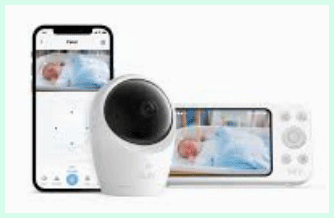
My Experience With Eufy E20
I used the Eufy E20 for several weeks in my own home before bringing in the E21 for direct comparison. Right away, the 2K camera impressed me with its clear daytime feed and solid night vision.
I could pan 330 degrees and tilt 60 degrees easily from the parent unit or app to follow my baby around the crib. The 4X zoom with auto-focus worked smoothly when I needed a closer look during feeds or checks.
Battery performance felt reliable. The camera stayed powered even during short outages thanks to its built-in cell, and the monitor lasted through full nights.
Hybrid mode meant I could rely on the dedicated unit at home for zero lag, then switch to the app when stepping out briefly. Active noise reduction kept alerts focused, and I never missed a cry because of background interference.
One thing I noticed quickly was how portable the whole setup is. No constant cords on the camera made moving it to the living room or packing for grandma’s house simple.
Split-screen support for two cameras is handy if you have multiples or want to add one later. Overall, the E20 delivered consistent performance that gave me confidence without overcomplicating things.
Temperature monitoring helped me adjust the room when nights got cooler, and the two-way talk feature let me soothe my baby without rushing in every time.
Local 24/7 recording meant I could review any fussy periods the next day to spot patterns. For the money, this model covers core needs extremely well.
Pros Of Eufy E20
- Clear 2K Resolution: The video quality shows your baby in good detail during day and night, making it easy to check on movements and expressions without feeling like you need ultra-high definition for basic monitoring.
- Affordable Price Point: At a lower cost than the E21, you still get hybrid connectivity, a dedicated monitor, and all essential alerts, which stretches your budget further for other baby essentials.
- Portable Camera With Built-In Battery: You can unplug and move the camera freely around the house or on trips, avoiding the hassle of finding power outlets constantly in different rooms.
- Reliable Hybrid Connection: Switch between the parent unit for stable local use and the app for remote access, giving flexibility whether Wi-Fi is available or not.
- Active Noise Reduction Technology: Background sounds get reduced effectively, so cry alerts stay accurate and you avoid unnecessary disturbances from household noise.
- Pan Tilt And 4X Zoom: Control the view remotely with smooth 330-degree panning and 60-degree tilting, plus zoom in to see details when needed.
- Local Storage Option: Record continuously to a microSD card up to 128GB without any monthly fees, keeping your footage private and accessible.
- Temperature And Sound Alerts: Get notified promptly about room temperature changes or loud noises, helping maintain a comfortable environment for your little one.
- Easy Setup Process: Pairing the monitor and camera takes just minutes, and the app integrates without complicated configurations.
- Long Battery Life On Monitor: The 5000mAh battery supports up to nine hours of use, covering overnight sessions comfortably.
- Split Screen Capability: View feeds from two cameras at once if you expand your setup later.
- Strong Night Vision: See clearly in dark conditions so you can monitor breathing and small movements without turning on lights.
- Two-Way Audio: Talk back to your baby or play soothing sounds directly through the system.
- No Subscription Required: All core features work fully without extra payments, unlike many competitors.
- Secure Encryption: Data stays protected with strong security measures for both local and app connections.
- Compact Parent Unit Design: The 5-inch screen feels ergonomic and easy to hold or place on a nightstand.
- Travel Friendly: The whole kit packs light and works independently of constant power sources.
Also Read: Comparison of Sperax And Urevo Walking Pad
Cons Of Eufy E20
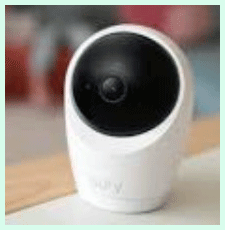
- Lower Resolution Than E21: While 2K looks good, it does not match the sharpness and fine detail of 4K, especially when zooming in or viewing in challenging light conditions.
- No Charging Base Included: You need to plug the parent unit directly when the battery runs low, which can mean dealing with cords more often compared to the E21’s convenient dock.
- 4X Zoom Limit: The zoom level works but offers less reach and magnification than the 8X on the higher model, limiting how closely you can inspect from a distance.
- Slightly Less Future Proof: As your baby grows and you might want crisper footage for toddler monitoring, the 2K might feel dated sooner than 4K.
- Basic Detection Features: You get crying, loud sound, and temperature alerts, but advanced AI tracking options found in some other systems are absent here.
- Parent Unit Battery Management: Without the dock, you have to remember to charge manually, which adds a small daily step.
- Night Vision Good But Not Best: It performs reliably yet lacks the extra clarity the E21 provides for seeing the tiniest details in complete darkness.
- No Included MicroSD Card: You must purchase storage separately to enable recording, which is an extra cost to factor in.
- App Interface Could Improve: While functional, the companion app feels straightforward rather than packed with extra customization tools.
- Potential For Minor Lag In App Mode: Remote viewing through Wi-Fi can occasionally show slight delays depending on your network strength.
Maintenance Tips For Eufy E20
- Clean The Lens Regularly: Wipe the camera lens gently with a soft microfiber cloth to remove dust or fingerprints, ensuring your video feed stays crisp at all times.
- Check Battery Health Periodically: Monitor the parent unit and camera battery levels through the display or app, and avoid letting them drain completely to extend overall lifespan.
- Update Firmware When Available: Connect to the app occasionally to install any software updates, which can improve stability and add small performance tweaks.
- Store The Unit Properly: Keep the monitor and camera in a dry, moderate-temperature area when not in use to protect internal components from humidity or heat damage.
- Inspect Cables And Connections: Examine power cords for wear every few weeks and replace if frayed to prevent power issues during critical monitoring times.
- Position Camera Securely: Mount or place the camera on a stable surface away from edges where it could fall, and test the view angle after any adjustments.
- Manage Storage Card Wisely: Format the microSD card through the app as recommended and download important clips before space fills up.
- Test Alerts Monthly: Trigger test cries or sounds to confirm detection and notification settings still work as expected.
- Keep Software On Parent Unit Current: If the monitor receives updates, apply them to maintain compatibility with the camera.
- Avoid Extreme Temperatures: Do not leave the equipment in hot cars or cold outdoor conditions for long, as this can affect battery performance and electronics.
- Dust Vents And Ports: Use compressed air carefully to clear any buildup in charging ports or speaker areas for optimal function.
- Calibrate Pan And Tilt Occasionally: Reset the camera position through the controls to ensure smooth movement without sticking over time.
- Backup Important Recordings: Transfer key video clips to your phone or computer regularly so you do not lose memories if the card fails.
- Re-Pair If Connection Issues Arise: Follow the reset process in the manual to refresh the link between monitor and camera if signals weaken.
- Handle With Care During Travel: Pack the units in protective cases or original packaging to prevent bumps that could misalign internal parts.
My Experience With Eufy E21
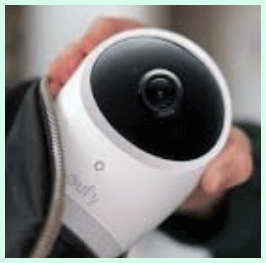
Switching to the Eufy E21 after time with the E20 highlighted the upgrades immediately. The 4K resolution brought a new level of clarity—I could see finer textures on blankets and more precise facial expressions even at night.
The 8X zoom pulled in distant details effortlessly, which proved useful when my baby started rolling and exploring more of the crib. The included charging base became my favorite convenience; the parent unit sits neatly and stays charged without me managing cables as often.
Setup mirrored the E20 but included the extra dock component, which snapped together quickly. Hybrid functionality worked identically, yet the sharper feed made app viewing more enjoyable when I checked from another room.
Alerts arrived promptly, and active noise reduction kept things peaceful. The camera’s battery supported travel just as well, but the overall premium feel made the E21 feel like a worthwhile step up for long-term use.
I especially appreciated the enhanced night vision during those early months when every small movement mattered. Reviewing recordings showed clearer timelines of sleep patterns thanks to the higher resolution.
While the price difference is noticeable, the added details and charging convenience reduced minor frustrations I had with the E20. For parents wanting the best possible view without complexity, the E21 delivered consistently in my testing.
Pros Of Eufy E21
- Superior 4K UHD Resolution: Every detail appears sharper day or night, letting you catch subtle movements and expressions that lower resolutions might miss.
- Powerful 8X Zoom With Auto-Focus: Get extremely close views from across the room, making it easier to monitor without repositioning the camera constantly.
- Convenient Charging Base: The included dock keeps the parent unit charged and organized on your nightstand, eliminating frequent plugging and unplugging.
- Crystal-Clear Night Vision: See breathing and tiny motions with excellent clarity in darkness, providing extra reassurance during overnight hours.
- Same Reliable Hybrid System: Enjoy the dedicated monitor for lag-free local use plus app access for remote checks, just like the E20 but paired with better visuals.
- Enhanced Detail In Recordings: Local 24/7 footage looks more professional and useful for reviewing sleep or development milestones later.
- Premium Build Feel: The overall quality and included cradle stand give a higher-end experience that matches the price.
- Excellent Low-Light Performance: Colors and contrasts hold up better in dim conditions compared to standard monitors.
- Smooth Pan And Tilt Operation: Control movements precisely from either the unit or app for full room coverage.
- Strong Active Noise Reduction: Background interference stays minimized, so you focus only on important sounds from your baby.
- Temperature Monitoring With Alerts: Keep the nursery at ideal levels and get notified of changes quickly.
- Portable Yet Powerful Camera: Built-in battery supports travel, while 4K quality travels with you for consistent viewing.
- Split-Screen For Multiple Cameras: Monitor twins or siblings easily on one display without switching views.
- Secure Local Storage: Save footage privately on microSD with no cloud fees required.
- User-Friendly App Integration: Check in remotely with the same clean interface but enjoy higher quality streams.
- Long Battery Life Maintained: The 5000mAh monitor battery still delivers up to nine hours despite the upgraded camera.
Cons Of Eufy E21
- Higher Price Tag: The premium features come at a noticeable increase over the E20, which might stretch budgets for some parents.
- Overkill Resolution For Some: 4K looks fantastic, yet many users cannot distinguish a meaningful difference from 2K in everyday crib monitoring.
- Extra Component To Manage: The charging base adds one more piece to set up and store, though it mostly stays in one place.
- Similar Alert Features: Detection stays at crying, sound, and temperature levels without additional AI motion tracking found elsewhere.
- No Included Storage Card: Like the E20, you buy the microSD separately to start recording.
- Potential Network Demands: App use with 4K streams can require stronger Wi-Fi to avoid compression or minor buffering.
- Bulkier Packaging For Travel: The added base means slightly more to pack compared to the simpler E20 kit.
- Learning Small Interface Differences: Minor menu variations from the E20 take a short time to adjust to if switching models.
Maintenance Tips For Eufy E21
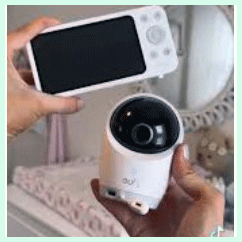
- Gently Clean The 4K Lens: Use a lens-safe cloth regularly to maintain the highest possible clarity from the upgraded camera.
- Utilize The Charging Base Daily: Place the parent unit on the dock each morning to ensure it stays fully charged without manual intervention.
- Monitor Firmware Updates Closely: Check the app often for improvements that optimize 4K streaming and alert accuracy.
- Protect The Cradle Stand: Wipe the charging contacts to prevent dust buildup that could affect connection quality over time.
- Rotate Camera Position Periodically: Adjust mounting to avoid fixed pressure points and test all pan-tilt ranges monthly.
- Format Storage Card As Needed: Clear space through the app to keep 24/7 recording running smoothly without interruptions.
- Test Full System Monthly: Verify night vision, zoom, and two-way audio to catch any performance drift early.
- Store Accessories Safely: Keep cables and the base in a dedicated spot to avoid losing parts during moves.
- Avoid Direct Sunlight On Units: Prevent overheating that might impact battery health or screen visibility.
- Calibrate Alerts Sensitivity: Fine-tune cry and sound detection levels seasonally as your baby’s voice changes.
- Inspect Battery Contacts: Clean any residue on the camera or monitor to maintain efficient charging cycles.
- Backup Footage Regularly: Transfer important clips to external devices before the card reaches capacity.
- Handle The Dock With Care: Avoid dropping the base since it contains charging electronics that support daily convenience.
- Keep App Updated On All Devices: Ensure phones and the monitor stay compatible for seamless hybrid operation.
- Dust Speaker And Microphone Areas: Maintain clear audio quality for both listening and talking back to your baby.
Read More: Comparison of Ring Floodlight Cam Wired Plus And Pro
Comparison With Other Brands
Versus VTech Monitors: Eufy provides hybrid options and local recording that give more flexibility than many VTech non-connected units, although VTech can be simpler for pure cordless use.
Versus Motorola Baby Monitors: Eufy edges out with higher resolution choices and better privacy controls, while Motorola sometimes adds extra health sensors at comparable prices.
Versus Infant Optics: The Eufy systems feel more modern with app integration, whereas Infant Optics focuses on traditional monitor strengths without Wi-Fi elements.
Versus Arlo Or Nest: Cloud dependency and fees make those less appealing than Eufy’s local-first approach that avoids recurring costs entirely.
Versus Owlet Systems: Eufy focuses purely on video excellence rather than wearable health tracking, offering a lighter and less intrusive monitoring style.
Build Quality Comparison: Eufy units hold their own against mid-tier brands with sturdy construction and clear interfaces that resist daily wear.
App And Connectivity: Cleaner and more reliable than some overloaded competitor apps that can feel sluggish.
Night Vision And Clarity: Often superior, especially on the E21 model, compared to standard offerings from other manufacturers.
Portability Advantages: Built-in batteries and easy travel setup beat many wired or less flexible alternatives.
Privacy And Security: Local storage and encryption stand stronger than brands pushing constant online features.
Value Proposition: Both E20 and E21 deliver strong performance per dollar against similarly priced rivals from established names.
Support And Reliability: User feedback often highlights responsive help similar to or better than bigger competitors.
Expansion Ease: Adding cameras integrates smoothly, matching or exceeding convenience from other popular lines.
Longevity In Use: Real testing shows consistent operation that competes well with devices claiming longer warranties.
Frequently Asked Questions (FAQ)
The main differences are camera resolution (2K on E20 versus 4K on E21), zoom capability (4X versus 8X), and the E21 includes a charging base while the E20 does not.
Yes, the E21 earns strong praise for its sharp 4K video, convenient charging dock, and reliable hybrid functionality that works with or without Wi-Fi.
No, the E20 focuses on crying, loud sound, and temperature alerts rather than general motion detection.
Conclusion
After spending real time with both the Eufy E20 and Eufy E21, I can confidently say they are both excellent choices that prioritize clear monitoring and user-friendly design. You will appreciate the hybrid setup that gives a dedicated parent unit plus app flexibility without forcing constant internet reliance.If your budget leans toward value and solid 2K performance covers your needs, go with the E20—you get reliable alerts, portability, and no-frills dependability that many parents find perfectly sufficient.However, if you want sharper details, easier charging convenience, and that premium zoom for closer inspection, the E21 justifies its higher cost through noticeably better visuals and the thoughtful docking station. In my experience, the E21 edges ahead for long-term satisfaction, especially as babies grow and small details matter more.Ultimately, you should consider your priorities: basic clarity and savings point to the E20, while maximum detail and convenience favor the E21. Both models deliver peace of mind without subscriptions or complicated setups, letting you focus on what really counts—caring for your little one. Whichever you pick, you are getting a well-built system from a brand that understands practical parenting needs. Take time to match the features to your nursery routine, and you will likely feel satisfied with the decision for months and years ahead.
Recent Posts
I spent months comparing budget options against established names after my last set of tires wore out sooner than expected.My goal here is to share what I learned from putting Dextero and...
AquaTru Carafe Vs. Classic: Which Is Actually Fits Your Kitchen?
I decided to write this comparison after months of testing both the AquaTru Carafe and the Classic in my own kitchen. Tracking covered daily use.Taste stayed consistent. Refill frequency...