
If you’re tired of waking up to harsh alarms and restless nights, I genuinely think the Hatch alarm clock is one of those rare upgrades that can change how you start and end your day.
From my experience, it blends smart lighting, soothing sounds, and thoughtful design into something that feels more like a sleep companion than just a clock.
If better sleep and calmer mornings matter to you, this is a product worth considering.
My Personal Experience With The Hatch Alarm Clock

When I first started using the Hatch alarm clock, I didn’t expect it to feel so different from a regular alarm.
I assumed it would just be a fancier version of what I already had. But within the first few nights, I noticed something shift in how I approached sleep.
Instead of scrolling on my phone until I passed out, I started using the soft ambient sounds and warm light to wind down.
You know that feeling when your brain just won’t shut off? The Hatch helped ease that. I’d set a gentle sunset routine, and slowly, my room would dim into a cozy glow. It felt intentional, like I was signaling my body that it was time to rest.
Mornings were where I noticed the biggest difference. Rather than being jolted awake by a loud alarm, the gradual sunrise feature worked its magic.
The light slowly brightened, and by the time the sound kicked in, I was already halfway awake. It felt natural, almost like waking up without an alarm at all.
There were a few moments of frustration, especially while figuring out the app settings. You might feel the same at first. But once I customized everything to my liking, it became second nature.
What surprised me most was how consistent my sleep routine became. I didn’t just wake up better—I started going to bed earlier without forcing it. That’s something I didn’t expect from an alarm clock.
Pros Of The Hatch Alarm Clock

- Gentle and Natural Wake-Up Experience
One of the biggest advantages is how it wakes you up. Instead of a sudden, jarring alarm, you get a gradual light increase that mimics sunrise.
This feels far less stressful and helps you start your day in a calmer state.
You’ll likely notice that you feel less groggy. That heavy, disoriented feeling in the morning becomes less intense because your body wakes up more naturally.
- Highly Customizable for Personal Preferences
You can tailor almost everything. From light color to sound type, timing, and intensity, it gives you control over your sleep environment.
If you’re someone who struggles to find the “perfect” setup, this flexibility is a huge plus. You’re not stuck with default settings—you can experiment until it feels right.
- Improves Sleep Routine Consistency
This was a surprising benefit for me. The structured wind-down and wake-up routines help reinforce a consistent sleep schedule.
You might not realize how valuable that is until you experience it. Once your body gets used to a rhythm, falling asleep and waking up becomes much easier.
- Multi-Functional Design
It’s not just an alarm clock. It works as a night light, sound machine, and relaxation tool. That means fewer devices cluttering your bedside table.
If you like keeping things simple and organized, this all-in-one approach is incredibly convenient.
- Family-Friendly Features
If you have kids or share your space, this device adapts well. It can be used as a nightlight for children or a calming tool for bedtime routines.
You’re not just buying something for yourself—it can fit into different parts of your household.
Cons Of The Hatch Alarm Clock
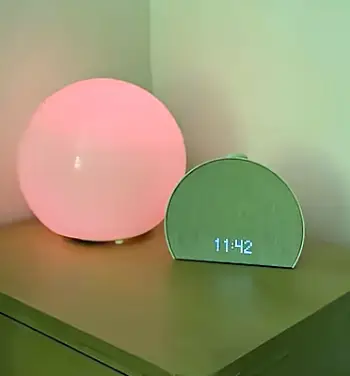
- Heavy Reliance on the Mobile App
One of the first things you’ll notice is how dependent the Hatch alarm clock is on its mobile app.
At first, this feels modern and convenient—you control everything from your phone. But over time, you might find it slightly frustrating.
If your Wi-Fi connection drops or the app lags, making quick adjustments becomes harder than it should be.
There were moments when I just wanted to tweak the brightness or change a sound without reaching for my phone.
You might feel the same, especially late at night when simplicity matters most.
Also, if you’re not someone who enjoys managing apps or navigating digital settings, this reliance can feel like an extra step rather than a benefit. It’s powerful, yes—but not always effortless.
- Subscription Model Can Feel Limiting
This is probably the biggest sticking point. While the device works without a subscription, some of the more appealing features—like expanded sound libraries and guided sleep content—are locked behind a paywall.
You may feel like you’re only getting a partial experience after paying a premium upfront. I personally found the free features sufficient, but there’s always that lingering feeling that you’re missing out unless you subscribe.
If you prefer one-time purchases without ongoing costs, this could be a dealbreaker for you.
- Premium Price Compared to Basic Alternatives
Let’s be real—you’re paying significantly more than a traditional alarm clock. And while the Hatch offers more features, not everyone will find those extras necessary.
If your main goal is simply to wake up on time, you might question whether the investment is justified. You’re essentially paying for comfort, customization, and experience rather than basic functionality.
From my perspective, it’s worth it if you value better sleep quality. But if you’re budget-conscious, you’ll definitely feel the difference.
- Initial Setup Can Be Time-Consuming
When I first set it up, I expected a quick, plug-and-play experience. Instead, I spent a fair amount of time exploring settings, adjusting routines, and figuring out what worked best.
You might actually enjoy this process if you like customization. But if you prefer simplicity, it can feel like a bit of a chore at the beginning.
The good news is that once everything is set, you rarely need to revisit the setup. Still, that first impression matters.
- Limited Physical Controls on the Device
While the device does have touch controls, they’re somewhat limited compared to what you can do in the app.
There were moments when I wished I could make quick changes directly on the device—like switching sounds or adjusting brightness more precisely. Instead, I had to grab my phone.
You may not notice this at first, but over time, it becomes a small inconvenience that adds up.
- Sound Quality Is Good but Not Exceptional
The built-in speaker does a decent job, especially for white noise and ambient sounds. But if you’re expecting rich, high-quality audio like a dedicated speaker, you might be slightly disappointed.
I found it perfectly fine for sleep purposes, but if you’re picky about sound clarity or depth, you’ll notice its limitations.
It’s more about functionality than audio excellence.
- Not Ideal for Very Bright Sleepers
If you’re extremely sensitive to light while sleeping, the Hatch might not always be perfect for you.
Even at low brightness levels, some users may find the glow noticeable. You can turn it off completely, of course—but then you lose part of the experience.
It’s a balance, and you’ll need to experiment to find what works best for your comfort.
Tips For Hatch Alarm Clock
- Keep the Surface Clean and Free from Dust
Since the Hatch sits out in the open, it naturally collects dust over time. I didn’t think much of it initially, but a dusty surface can dull the light and make the device look worn.
You don’t need anything complicated—just wipe it down with a soft, dry cloth every few days. If there’s buildup, a slightly damp cloth works well, but make sure you avoid excess moisture.
Keeping it clean not only improves appearance but also ensures the light output stays consistent and clear.
- Maintain a Stable Wi-Fi Connection
Because the device relies on app connectivity, a stable Wi-Fi connection is essential. If your network is inconsistent, you might experience delays or syncing issues.
I noticed that routines sometimes didn’t update properly when my connection was weak. Once I ensured a stable network, everything worked smoothly.
If you’re setting this up, try placing it within a strong Wi-Fi range. It makes a bigger difference than you’d expect.
- Regularly Update the App and Firmware
It’s easy to ignore update notifications, but with this device, they actually matter.
Updates often fix bugs, improve performance, and sometimes even add new features. Skipping them can lead to glitches or slower response times.
I make it a habit to update whenever prompted, and it keeps the experience smooth. You should do the same to avoid unnecessary issues.
- Optimize Placement for Best Light Exposure
Where you place the Hatch has a direct impact on how effective it is.
If it’s too far from your bed or blocked by furniture, the sunrise simulation won’t reach you properly. I had to reposition mine once before I found the perfect spot.
Ideally, place it at eye level or slightly above, within your natural line of sight when you wake up. This ensures the light gradually wakes you as intended.
- Avoid Overusing Maximum Brightness Levels
It can be tempting to crank up the brightness, especially in the morning. But using maximum brightness too often can feel harsh and reduce the calming effect.
I found that moderate levels work best. They’re strong enough to wake you but still gentle on your eyes.
At night, stick to warm, dim tones to create a relaxing environment. Your eyes—and your sleep quality—will thank you.
- Personalize and Refresh Your Routines Periodically
Your schedule isn’t static, so your Hatch routines shouldn’t be either.
Every few weeks, I revisit my settings to adjust sleep sounds, light intensity, or timing. It keeps the experience fresh and aligned with my current habits.
You might notice that what works for you in one season doesn’t feel right in another. Small tweaks can make a big difference.
- Restart the Device Occasionally
Like any smart device, the Hatch benefits from an occasional restart.
If you notice slight delays or minor glitches, turning it off and back on usually fixes the issue. It’s a simple step, but it keeps everything running smoothly.
I do this every couple of weeks, and it helps maintain consistent performance.
- Protect It from Moisture and Heat
Since it’s an electronic device, keeping it away from moisture and excessive heat is important.
Avoid placing it near open windows during rain or in direct sunlight for long periods. Over time, exposure can affect both performance and durability.
Treat it like any other smart device, and it’ll last much longer.
Comparison Hatch Alarm Clock With Other Brands
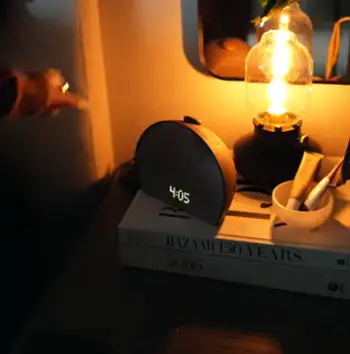
- Hatch Versus Philips Wake-Up Lights
When I compare Hatch with Philips wake-up lights, the biggest difference comes down to flexibility. Philips devices tend to focus heavily on the sunrise simulation, and they do it well.
However, Hatch offers a broader experience with customizable sounds and app-based routines.
You might prefer Philips if you want something straightforward.
But if you enjoy adjusting settings and creating personalized routines, Hatch gives you more freedom.
- Hatch Versus Lumie Alarm Clocks
Lumie devices are known for their strong light therapy features. They feel more clinical in approach, focusing on improving mood and sleep cycles through light exposure.
Hatch, on the other hand, feels more lifestyle-oriented. It blends aesthetics, sound, and light into a more relaxed experience.
If you want something that fits seamlessly into your bedroom vibe, Hatch may feel more natural.
- Hatch Versus Traditional Alarm Clocks
Compared to a basic alarm clock, Hatch is in a completely different category. Traditional alarms are functional but harsh. They wake you up, but they don’t care how you feel doing it.
Hatch prioritizes comfort and experience. If you’ve ever dreaded the sound of your morning alarm, this difference alone might be enough to convince you.
Who Should Buy The Hatch Alarm Clock?
If you struggle with waking up feeling tired or going to bed on time, this device can genuinely help.
It’s ideal for light sleepers, people with inconsistent routines, or anyone trying to improve their sleep habits.
You’ll get the most value if you’re willing to use its features consistently. It’s not just about owning it—it’s about integrating it into your daily life.
Also Read: Comparison Of Garmin Vivoactive 5 And Venu 3S
Frequently Asked Questions (FAQ)
Yes, if you value better sleep routines and a gentler wake-up experience.
Some users criticize the subscription model and reliance on the app for full functionality.
It combines light, sound, and smart controls to create a personalized sleep and wake routine.
Yes, but some premium features and sound options require a subscription.
Wrapping Up
After using the Hatch alarm clock, I can confidently say it’s more than just a bedside gadget—it’s a small lifestyle upgrade.
If you want calmer nights and smoother mornings, this device delivers in ways a traditional alarm simply can’t.
You don’t need it to survive, but once you use it, you’ll probably wonder how you managed without it.
Recent Posts
● Interactive 5-Zone Interior & Exterior Paint Blueprint Paint Coverage Calculator: Gallons, Primer, Square Footage & Cost Tap any architectural surface zone on the blueprint...
If you want smooth, shiny hair without spending a fortune on a premium styling tool, the Ella Bella hair dryer may be worth considering.In these Ella Bella hair dryer reviews, I’ll look...