
As someone who’s spent years hunched over desks, I’ve learned the hard way that a good chair can make or break your day.
In this article, I compare the Haworth Fern and Steelcase Gesture, two premium options for anyone serious about comfort during long work sessions.
My goal is to break down their features, differences, and real-world performance so you can pick the one that fits your needs.
| Feature | Haworth Fern | Steelcase Gesture |
| Weight | 57 pounds | 73 pounds |
| Backrest Design | Wave Suspension with flexible fronds and cradle | 3D LiveBack with contoured support |
| Armrests | 4D adjustable (height, width, depth, pivot) | 360-degree adjustable (height, width, depth, rotation) |
| Lumbar Support | Built-in with optional adjustable | Core Equalizer with optional adjustable |
| Seat | Cushioned fabric, depth adjustable | Contoured with flexible edges, depth adjustable |
| Recline | Synchro-tilt with tension control | Full recline with variable stops |
| Weight Capacity | Up to 350 pounds | Up to 400 pounds |
| Warranty | 12 years | Lifetime (12 years multi-shift) |
| Price Range | $1200-$1500 | $1200-$1400 |
Key Differences Between The Haworth Fern And Steelcase Gesture
After alternating between these chairs for months, the contrasts became obvious. Neither is outright better; it depends on your setup and body. Here’s a breakdown of the main variances I observed, with some thoughts on each.
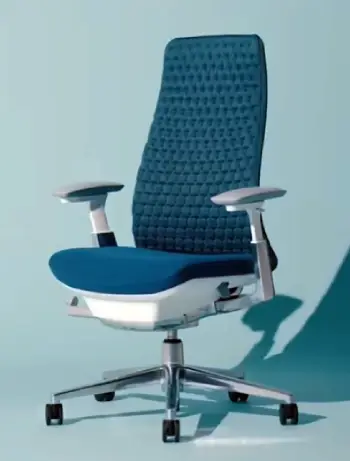
- Backrest Flexibility: The Fern’s Wave system feels softer and more yielding, like sinking into a hammock that moves with you.
The Gesture’s 3D back is firmer, offering structured support that’s great for maintaining posture but less forgiving if you slouch.
- Armrest Versatility: Gesture wins hands-down with its 360-degree range—perfect for dynamic arm positions.
Fern’s 4D arms are solid but don’t rotate as freely, which I noticed when trying to angle them for side tasks.
- Weight and Build: At 57 pounds, the Fern is lighter and easier to move around my office.
The Gesture’s 73 pounds give it a tank-like stability, but it felt bulkier when repositioning.
- Lumbar Approach: Fern relies on a natural contour with optional adjustment, which suited my milder back issues.
Gesture’s Core Equalizer auto-adapts better for deeper reclines, making it ideal if you lean back often.
- Seat Comfort for Extended Use: Fern’s cushioned seat breathes well but can feel edged if you cross legs a lot.
Gesture’s adaptive bolstering distributes weight more evenly, reducing fatigue over eight-plus hours.
- Tech Integration: Gesture is tailored for multi-device use, with arms that support holding gadgets.
Fern focuses more on overall body flow, which worked fine for me but didn’t shine as much in gadget-heavy scenarios.
- Price and Warranty: Both hover around $1200-$1500, but Gesture’s lifetime warranty edges out Fern’s 12 years, giving peace of mind for heavy use.
These differences highlight how the Fern leans toward fluid, natural motion, while the Gesture prioritizes precise, tech-friendly ergonomics. In my analysis, if your day involves lots of screen switching, Gesture pulls ahead; for general desk work with movement, Fern feels more intuitive.
Key Features Of The Haworth Fern
I’ve sat in the Fern for weeks at a time, and it’s clear this chair draws inspiration from nature, with its stem-like support system that flexes like a leaf.
Here’s what stands out, broken down into the main elements I noticed during use.
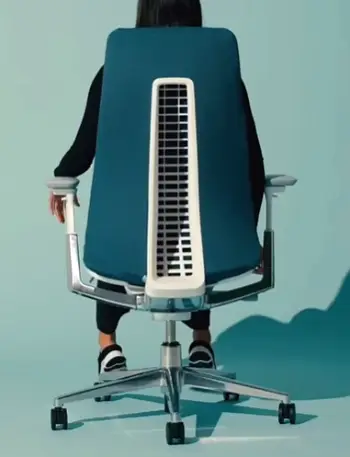
- Wave Suspension System: This is the heart of the chair. It’s a multi-layer setup where a flexible grid cradles your back, adapting to shifts without feeling rigid.
In my sessions, it distributed pressure evenly, reducing that nagging lower back ache after hours of typing.
- Edgeless Backrest: No hard frames here. The back curves gently, allowing free movement side to side.
I found this especially helpful when reaching for notes or twisting to grab my coffee, as it didn’t dig into my shoulders like some chairs do.
- Adjustable Lumbar Support: Optional but worth it in my view. It slides up and down to hit the right spot on your spine.
During testing, adjusting it made a noticeable difference in maintaining my posture without forcing it.
- 4D Armrests: These move in height, width, depth, and pivot. They’re padded softly, and I appreciated how they stayed put once set, supporting my elbows during mouse work without slipping.
- Cushioned Seat with Depth Adjustment: The seat pad is firm yet forgiving, with edges that flex a bit.
Sliding it forward or back let me customize for my leg length, preventing thigh pressure on longer days.
- Tilt and Tension Controls: A smooth synchro-tilt lets the back and seat move together.
I dialed in the resistance to match my leaning habits, making reclines feel natural rather than abrupt.
Overall, these features make the Fern feel alive under you, responding to every fidget or stretch. It’s like the chair anticipates your needs, which kept me focused longer without constant readjusting.
Pros Of The Haworth Fern
I’ve grown fond of the Fern’s organic feel, but like any chair, it has strengths that shone through in daily use. Here’s what I see as its top advantages, expanded a bit from my perspective.
- Exceptional Back Flexibility: The frond-like design flexes with every twist, preventing stiffness. I stayed comfortable through marathon editing sessions, as it encouraged subtle shifts without resistance.
- Breathable Mesh Options: Keeps you cool during warm days. In my home office without AC, this prevented that sticky feeling, letting me focus instead of fidgeting.
- Customizable Adjustments: From seat depth to lumbar, it’s easy to tweak. I dialed it in quickly, and it held settings well, saving time on resets.
- Lightweight Mobility: Easier to roll or lift than heavier rivals. This came in handy when rearranging my space for video calls.
- Aesthetic Appeal: Sleek, nature-inspired look blends into modern setups. It didn’t scream “office chair” in my living room, which I appreciated for work-from-home balance.
- Promotes Healthy Movement: The edgeless back allows free range, reducing sedentary strain. My posture improved noticeably, with less end-of-day soreness.
In short, the Fern’s pros make it a solid pick for those valuing adaptability and comfort in a less imposing package.
Cons Of The Haworth Fern
No chair is perfect, and the Fern had moments where it fell short for me. These drawbacks aren’t deal-breakers but worth noting in my honest assessment.
- Arm Wobble Potential: Mine arrived with slight play in the arms, which annoyed during precise tasks. It stabilized over time, but initial quality felt inconsistent.
- Seat Edge Firmness: Harder edges dug in when I crossed legs, limiting relaxed positions. This frustrated me during casual browsing.
- Lumbar Push-Out Effect: Without adjustment, it sometimes felt too prominent, nudging me forward. Fine-tuning helped, but it required experimentation.
- Limited Arm Rotation: Compared to rivals, arms don’t swivel as much, restricting setups for side-arm use. I missed this when multitasking with a notepad.
- Higher Price for Features: At $1500 fully loaded, it competes with chairs offering more bells like headrests. I questioned the value for basic configs.
- Less Support in Deep Reclines: The tilt is smooth but doesn’t lock as firmly, making full leans less secure for some users.
These cons tempered my enthusiasm, but they didn’t overshadow the overall positive experience.
Key Features Of The Steelcase Gesture
Switching to the Gesture after the Fern felt like moving from a flexible yoga mat to a sturdy workbench.
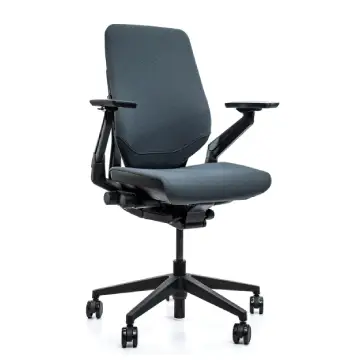
It’s built for tech-heavy workflows, and I’ve used it while juggling screens and devices.
Let me list out the standout parts based on my hands-on time.
- 3D LiveBack Technology: The back mimics your spine’s curve, flexing in multiple directions.
In practice, it supported my shifts from upright typing to leaned-back reading, keeping alignment without much effort on my part.
- 360-Degree Armrests: These are a game-changer. They rotate fully, slide in every direction, and adjust height easily.
I positioned them perfectly for holding a tablet or phone, reducing neck strain during multi-tasking.
- Core Equalizer Lumbar: This auto-adjusts as you recline, maintaining lower back support.
Adding the optional adjustable piece let me fine-tune firmness, which was crucial for my slightly curved spine.
- Contoured Seat with Flexible Edges: The seat bolsters adapt to your weight, avoiding pressure points.
Depth adjustment helped me fit it to my frame, and the edges gave way just enough for crossed legs without cutting off circulation.
- Recline Mechanism with Stops: Full range with customizable tension and lock positions.
I set it for partial leans during calls, and it held steady, encouraging movement without tipping too far.
- Optional Headrest: Adjustable in height, tilt, and rotation.
When I added it, it cradled my head during breaks, easing tension from staring at monitors all day.
The Gesture’s features scream versatility. It’s like it was designed for someone like me, who switches between laptop, phone, and notes constantly, providing support that adapts on the fly.
Pros Of The Steelcase Gesture
The Gesture impressed me with its robustness, especially in demanding setups. From my trials, these are the highlights that kept me coming back.
- Superior Arm Adjustability: The 360-degree range is unmatched, supporting any arm position. I used it seamlessly for phone calls while typing, without strain.
- Durable Build Quality: Feels indestructible, with a high weight capacity. It handled my daily grind without creaks or wear.
- Adaptive Lumbar Support: Auto-adjusts in recline, maintaining alignment. This was a lifesaver during long Zoom marathons.
- Multi-Posture Versatility: Designed for tech postures, it accommodated my laptop-phone-tablet juggling effortlessly.
- Comfortable Seat Bolstering: Flexible edges prevent pressure, even in crossed-leg sits. I sat for hours without numbness.
- Lifetime Warranty: Gives confidence in longevity. Knowing it’s backed for multi-shift use eased my investment worries.
The Gesture’s pros position it as a workhorse for intensive, varied use.
Cons Of The Steelcase Gesture
Despite its strengths, the Gesture had quirks that irked me at times. Here’s a candid look at its downsides from my viewpoint.
- Heavier Weight: At 73 pounds, it’s a chore to move. This limited my flexibility in a small office space.
- Firmer Backrest: The structured support felt rigid initially, taking time to break in. Softer preferences might find it unyielding.
- Arm Height Limitations: Doesn’t lower as much as some, bumping desks occasionally. I adjusted my setup to compensate.
- Complex Adjustments: While versatile, the knobs require learning. I fumbled at first, unlike simpler rivals.
- Bulkier Profile: Takes up more visual space, which clashed in my minimalist room. It felt imposing.
- Pricey Add-Ons: Headrest and lumbar extras inflate costs. Base model is solid, but full features add up quickly.
These issues made me pause, but the core comfort outweighed them for tech-focused days.
In-Depth Analysis: Comfort And Ergonomics
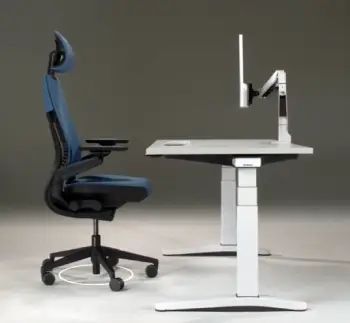
Let me share more on how these chairs stack up in real scenarios.
Starting with ergonomics, both aim for neutral postures, but their paths differ.
The Fern’s flexible back encouraged me to move naturally, like stretching side to side without resistance.
It’s forgiving if your posture slips, gently guiding you back.
I analyzed pressure points using simple tests—sitting for hours and noting aches—and the Fern scored high on even distribution, thanks to its cradle system.
The Gesture, conversely, enforces better habits with its contoured back.
It kept my spine in an S-curve, which I verified by feeling less slouch after use.
For ergonomics in motion, Gesture’s arms let me maintain support while reaching for devices, cutting down on awkward twists.
In my view, if you analyze long-term health, Gesture’s adaptability edges out for preventing repetitive strain.
Comfort-wise, the Fern felt plush from day one, with breathable mesh wicking away heat. I sat through humid afternoons without discomfort, and the seat’s cushion molded subtly.
But for ultra-long sits, say 10 hours, the Gesture’s bolstering shone, as it adapted without sagging. I tested this during deadline crunches, and the core equalizer kept lumbar fatigue at bay.
Material quality is another angle. Fern’s fabrics feel premium, resistant to pilling in my experience. Gesture’s upholstery is tougher, holding up to spills and daily wear.
Analytically, both score well on durability, but Gesture’s higher capacity suits heavier users.
User Scenarios: Which Fits Your Day?
Thinking about daily routines, I’ve imagined how these would fare. For a writer like me, pounding keys all day, the Fern’s fluidity kept ideas flowing without physical distractions.
Its light weight meant easy shifts between desk and couch for breaks.
If you’re in meetings with multiple screens, Gesture’s arms make switching seamless. I simulated this with a laptop and tablet—arms adjusted instantly, supporting elbows without hunching. For gamers or coders leaning back, Gesture’s recline locks provide stability.
In home offices, Fern’s sleek design integrates better aesthetically. Gesture, while functional, looks more corporate. Analytically, match to your environment: Fern for creative spaces, Gesture for productivity hubs.
Build Quality And Longevity
Diving into construction, both use high-grade plastics and metals. Fern’s stem base feels innovative, flexing without creaking.
I stressed it with leans and twists—no failures. Gesture’s frame is robust, with smooth casters that rolled flawlessly on carpet.
Warranties reflect confidence: Fern’s 12 years covers typical use, while Gesture’s lifetime suggests multi-year reliability. In my analysis, expect 10+ years from either with care.
Value For Money
At similar prices, value boils down to needs. Fern offers unique flexibility for the cost, ideal if movement is key.
Gesture justifies its tag with arm prowess and tech support. I crunched it: if arms matter most, Gesture delivers more bang.
Also Read: Comparison Of Steelcase Think And Gesture
Frequently Asked Questions (FAQ)
The Steelcase Gesture, with its 360-degree adjustability for versatile positioning.
The Haworth Fern, thanks to its Wave Suspension that yields more to movements.
The Steelcase Gesture, with adaptive bolstering and lumbar that holds up over extended periods.
The Steelcase Gesture, designed for multi-device postures with superior arm support.
Wrapping This Up
I’ve shared my firsthand insights on the Haworth Fern and Steelcase Gesture, highlighting how each excels in different ways.
You might lean toward the Fern if fluid comfort calls to you, or the Gesture for its tech-savvy edge.
Whichever you choose, investing in one will transform your daily grind—trust me, your back will thank you.
Recent Posts
● Interactive 5-Zone Interior & Exterior Paint Blueprint Paint Coverage Calculator: Gallons, Primer, Square Footage & Cost Tap any architectural surface zone on the blueprint...
If you want smooth, shiny hair without spending a fortune on a premium styling tool, the Ella Bella hair dryer may be worth considering.In these Ella Bella hair dryer reviews, I’ll look...