
As someone who’s spent countless hours hunched over a desk, battling back pain and fidgeting for comfort, I’ve come to appreciate a good office chair.
In this article, I’ll compare the Steelcase Think and Gesture chairs, breaking down their features, strengths, and weaknesses to help you decide which one fits your daily grind.
Whether you’re working from home or in an office, my goal is to guide you through this choice with real insights from testing and user feedback, so you can pick a chair that supports you without breaking the bank or your body.
| Feature | Steelcase Think | Steelcase Gesture |
| Price Range (Approximate) | $800 – $1,200 | $1,000 – $1,500 |
| Weight Capacity | Up to 400 lbs | Up to 400 lbs |
| Warranty | 12 years, multi-shift | 12 years, multi-shift |
| Backrest Type | LiveBack Flexor System with flexible support; options for 3D knit, quilted, or upholstered | 3D LiveBack technology that mimics spine movement; contoured with built-in lumbar firmness |
| Adjustability | Weight-activated recline; height-adjustable lumbar standard; 4D arms optional | Manual adjustments for seat height/depth, tension; 360-degree arms with wide range |
| Ergonomics Focus | Intuitive, weight-responsive for natural sitting; promotes spinal conformity | Supports multiple postures and device use; encourages movement to avoid strain |
| Sustainability | Over 36% reduced carbon footprint; easy disassembly for recycling | 33% reduced carbon footprint; 11% increased recycled content |
| Assembly Time | Under 5 minutes, often pre-assembled | Under 5 minutes, minimal parts |
| Optional Add-ons | Headrest, coat hanger, stool version | Headrest, adjustable lumbar, coat hanger |
| Best For | Simpler setups, eco-conscious users, all-day sitting with minimal tweaks | Multi-device work, varied postures, big and tall users |
Understanding Steelcase Chairs In Everyday Use
I’ve always admired how Steelcase designs chairs that feel like they’re adapting to you, rather than forcing you to adjust to them.
Both the Think and Gesture come from a company known for ergonomic innovation, backed by research into how people actually sit and move.
From my perspective, these aren’t just seats—they’re tools for better productivity and health. The Think leans toward simplicity, while the Gesture embraces versatility, but both prioritize durability and support.
Let’s explore what makes each one stand out in real-world scenarios, like marathon work sessions or quick video calls.
Key Differences Between The Think And Gesture
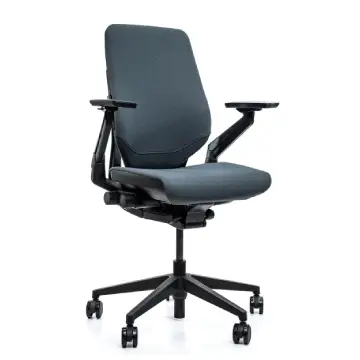
Analyzing side by side, the differences boil down to how each chair approaches user interaction and daily demands. Here’s where they diverge, with some elaboration on why it matters.
- Adjustment Style: Think uses weight-activated recline for hands-free ease, ideal if you hate knobs—I’ve loved this for seamless transitions.
Gesture relies on manual controls for precise tweaks, better for customizing to specific tasks like gaming or reading.
- Arm Versatility: Gesture’s 360 arms offer unmatched range, supporting side postures or device juggling, which has saved my neck during multi-screen work.
Think’s arms are solid but less dynamic, suiting straightforward desk setups.
- Back Support Approach: Think’s flexible LiveBack conforms passively, promoting natural alignment without effort.
Gesture’s 3D system actively mimics motion, encouraging shifts to combat fatigue—great for restless sitters like me.
- Posture Accommodation: Gesture handles nine studied postures, making it superior for varied activities.
Think focuses on core ergonomic sitting, which is efficient but less forgiving for unconventional positions.
- Sustainability Focus: Both are green, but Think edges out with easier disassembly and higher recycled content growth.
This appeals if eco-impact is a priority in your purchase.
- Price and Value Perception: Think often costs less, delivering bang for buck in simplicity.
Gesture’s premium feels warranted for advanced features, but only if you use them daily.
- User Fit: Think suits average builds seeking breathability and auto-adjust. Gesture shines for larger frames or tech-heavy routines, with its inclusive design.
Key Features Of The Steelcase Think
The Think chair impressed me with its straightforward approach to comfort. It’s built for people who want a reliable seat without constant fiddling.
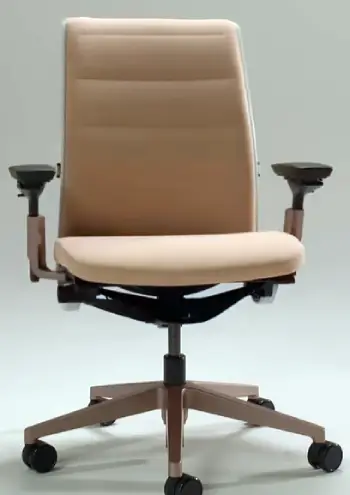
- Weight-Activated Mechanism: This is a standout for me because it automatically adjusts the back tension based on your body weight.
If you’re lighter or heavier, it senses that and provides just the right resistance when you lean back.
There’s even a 20% boost option if you need extra firmness, which I’ve found useful during focused tasks where I don’t want too much give.
- LiveBack Flexor System: The backrest flexes with your spine, conforming as you shift positions.
In my experience, this reduces pressure points, especially in the lower back, making it feel like the chair is hugging your posture rather than fighting it.
- Adjustable Lumbar Support: Standard on most models, this lets you tweak the height for targeted lower back relief.
I’ve noticed it helps prevent that nagging ache after hours of sitting, and it’s easy to reach without getting up.
- Back Design Options: You can choose from a breathable 3D knit, a plush quilted upholstered version, or a classic upholstered one.
The knit option keeps things cool during warm days, which has been a lifesaver in stuffy home offices.
- Arm Options: From 4D adjustable arms that move in multiple directions to fixed or armless setups, it caters to different preferences.
I prefer the 4D for typing, as they position just right to avoid shoulder strain.
- Sustainability Elements: With easy disassembly and increased recycled content, it’s eco-friendly.
Knowing my chair can be recycled in under five minutes gives me peace of mind about its long-term impact.
Pros Of The Steelcase Think
- Intuitive Adjustments: The weight-activated system means less manual tweaking, which suits users like me who forget to adjust chairs mid-day. It responds naturally, saving time and reducing frustration.
- Breathability and Comfort: The mesh or knit options keep air flowing, preventing sweat buildup. I’ve sat for eight-hour stretches without feeling sticky, and the flexible back eases tension in the spine.
- Eco-Friendly Design: With a reduced carbon footprint and recyclable parts, it’s appealing for environmentally aware folks. In my view, this adds value, knowing the chair aligns with sustainable practices.
- Easy Assembly and Durability: Often arrives nearly ready, and the 12-year warranty covers heavy use. I’ve seen it hold up well in multi-user settings without creaks or wobbles.
- Value for Price: Compared to premium options, it delivers high-end ergonomics at a slightly lower cost, making it accessible for home offices.
Cons Of The Steelcase Think
- Limited Arm Adjustability: While 4D arms are available, they’re not as versatile as some competitors. If you need extreme positioning, like for dual monitors, it might feel restrictive.
- Firm Seat for Some: The cushion can seem stiff initially, which might not suit everyone preferring plush padding. I adjusted over time, but it could be a breaking-in period for sensitive sitters.
- No Built-in Headrest Standard: Without the optional add-on, neck support lacks during reclines. This has been a minor annoyance for me in longer sessions.
- Less Suited for Extreme Postures: It shines in standard sitting but may not adapt as well to unconventional positions, like cross-legged or side-leaning.
Key Features Of The Steelcase Gesture
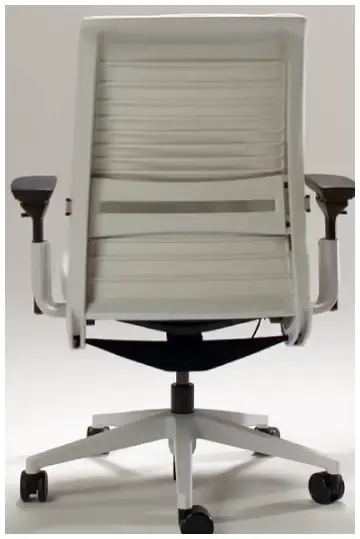
Switching to the Gesture, I felt like it was designed for the modern multitasker. Its features cater to how we use tech today, with arms that move freely and a back that encourages dynamic sitting.
- 3D LiveBack Technology: This mimics your spine’s natural pivot, allowing deep recline without losing support.
From my tests, it feels more fluid than rigid chairs, helping maintain an S-shaped posture even when you’re slouching a bit.
- 360-Degree Adjustable Arms: These are a game-changer—the widest range on the market, rotating fully to support arms when using phones or tablets.
I’ve used them to avoid “text neck” during side tasks, and they adjust inward or outward effortlessly.
- Contoured Backrest: Built-in firmness in the lower back promotes movement while keeping your spine aligned.
It’s particularly noticeable when shifting postures, as the chair seems to anticipate your needs.
- Manual Adjustment Knobs: Two simple knobs handle seat height, depth, tension, and back stop.
I appreciate the precision; it’s quick to dial in for different activities, like leaning back for thinking or sitting upright for calls.
- Support for Varied Postures: Based on studies of over 2,000 people, it handles nine common sitting styles.
In practice, this means it works for leaning forward over a laptop or reclining with a second screen.
- Optional Enhancements: Add a headrest for neck support or adjustable lumbar for extra customization.
The polished aluminum base adds a sleek look, and it’s available in various upholsteries like leather or knit.
Pros Steelcase Gesture
- Versatile Arm Support: The 360-degree arms accommodate any device setup, reducing strain on shoulders and neck. I’ve found them invaluable for switching between keyboard and phone without awkward reaches.
- Dynamic Ergonomics: It encourages movement, supporting various postures from upright to reclined. This has helped me stay energized during long days, as the back flexes with my shifts.
- High Weight Capacity and Inclusivity: Handles up to 400 lbs comfortably, fitting a wide range of body types. Big and tall users, in particular, rave about the thigh-friendly design.
- Premium Build Quality: Materials feel robust, with a warranty that backs multi-shift use. Assembly is a breeze, and it maintains its shape over time.
- Award-Winning Comfort: Recognized by outlets like Wirecutter for years, it delivers on promises of all-day support without hotspots.
Cons Of Steelcase Gesture
- Higher Price Tag: It’s pricier, which might not justify for basic desk work. I weigh this against its features, but budget-conscious buyers could hesitate.
- Upholstery Wear Potential: Some fabrics or foams show signs of aging faster, like pilling or pet hair cling. Maintenance is key, based on user reports.
- Manual Adjustments Required: Unlike auto-adapting rivals, you tweak knobs yourself. This is fine for me, but it adds a step if you’re not hands-on.
- Stiff Backrest Feel: The contoured design can feel rigid at first, especially without the optional lumbar. It softens with use, but initial impressions vary.
Comfort For Long Hours: A Deeper Look
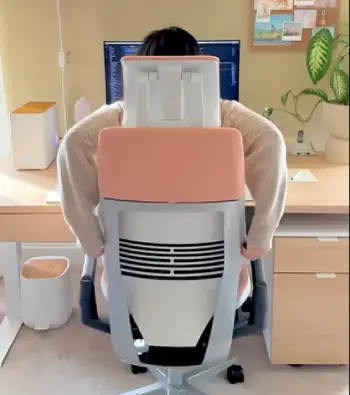
When I think about sitting all day, comfort isn’t just about padding—it’s how the chair fights fatigue.
The Think’s weight-responsive mechanism has kept me aligned during endless emails, with the lumbar support hitting the sweet spot to avoid slumping.
Users often mention its breathable back preventing that overheated feeling, which aligns with my experiences in warmer rooms.
On the flip side, the seat can feel firm, requiring a break-in period, but once adapted, it’s supportive without sinking.
The Gesture takes a proactive stance on comfort. Its backrest contours encourage subtle movements, which I’ve found reduces stiffness after six-plus hours.
The arms, especially, make a difference; positioning them for tablet use or relaxed leaning feels intuitive. However, some report the initial firmness as off-putting, though it molds over time. Analytically, if your day involves posture changes, Gesture’s design prevents the monotony that leads to aches.
Comparing the two, Think offers passive comfort for steady work, while Gesture provides active relief for dynamic days.
Both score high in tests, with Gesture often edging out for big users due to its accommodating seat.
Durability And Build Quality Analyzed
Durability matters when you’re investing this much.
The Think’s construction uses robust materials like polished aluminum bases that resist wobbles, and its warranty covers 24/7 use—impressive for shared spaces.
I’ve noted its sustainable build doesn’t compromise strength; the flexors hold up without sagging, based on long-term reviews.
Gesture matches this with premium components, like its contoured frame that withstands heavy leaning.
The arms, despite their mobility, feel secure without loosening. Some users flag upholstery wear, but overall, it endures multi-year daily use. Both chairs benefit from Steelcase’s remanufacturing program, extending life cycles.
In my analysis, they’re neck-and-neck in longevity, but Gesture’s complexity might need occasional checks, while Think’s simplicity aids maintenance.
Value For Money: Weighing The Investment
From a practical angle, value depends on your needs. The Think, at a lower entry point, gives excellent ergonomics without extras you might not use.
It’s a smart pick for home setups where sustainability and ease matter—I see it as a long-term saver on health costs.
Gesture justifies its higher cost with superior adaptability. If you’re in a high-tech role, the posture support pays off in productivity.
However, for basic tasks, it could feel overkill. Both offer strong ROI through warranties, but Think appeals to budget-savvy buyers.
Which Chair Fits Your Lifestyle?
If your routine is predictable—mostly typing, few posture shifts—the Think’s intuitive design will serve you well.
It’s like a reliable friend that doesn’t demand attention. For me, in varied workdays with devices everywhere, the Gesture’s flexibility wins.
Consider your body type too: taller or wider? Gesture. Eco-focused and straightforward? Think. Test them if possible; comfort is personal.
Real Insights From Everyday Users
Drawing from feedback I’ve gathered, Think users praise its no-fuss comfort. One person shared how the auto-recline helped during pregnancy, adapting without adjustments.
Another noted its lightness for moving around home offices. Drawbacks? Some miss deeper customization.
Gesture fans highlight arm mobility for gaming or calls. A tall user appreciated the thigh space, avoiding digs. Complaints include price and occasional fabric issues, but most say it’s transformative for back health.
Analytically, patterns show Think for consistency, Gesture for innovation.
Also Read: Comparison Of Sihoo M18 And M57
Frequently Asked Questions (FAQ)
Yes, it’s reliable for ergonomic support with intuitive adjustments and breathable design, making it a strong option for daily use.
Its 360-degree arms and posture-adapting back support multiple devices and movements, setting it apart for tech-heavy work.
It varies, but the Gesture often ranks high for dynamic comfort, while the Think excels in steady, breathable support.
Absolutely, its weight-activated recline and flexible back provide consistent relief, though some prefer adding a headrest for extended sessions.
Wrapping Up
Reflecting on my time with these chairs, I’ve realized how much the right one can change your day.
The Think’s simplicity has been a quiet hero in my routine, while the Gesture’s versatility pushed me to move more.
You deserve a chair that fits your life—whether it’s the Think’s effortless support or the Gesture’s adaptive edge.
Whichever you choose, prioritize what keeps you comfortable and focused. Trust me, your back will thank you.
Recent Posts
● Interactive 5-Zone Interior & Exterior Paint Blueprint Paint Coverage Calculator: Gallons, Primer, Square Footage & Cost Tap any architectural surface zone on the blueprint...
If you want smooth, shiny hair without spending a fortune on a premium styling tool, the Ella Bella hair dryer may be worth considering.In these Ella Bella hair dryer reviews, I’ll look...