
If you are a streamer, gamer, podcaster, or content creator looking for a USB microphone that delivers clear, professional sound without complicated setup or a huge budget, you should read this comparison of HyperX QuadCast S versus QuadCast 2 right now. I have used both mics daily for streaming and recording over the past year, and this article shares my honest first-person experience so you can decide which one actually fits your setup and workflow better. Whether you prioritize RGB lighting, tap-to-mute convenience, or overall value, one of these will likely become your new go-to microphone.
A Brief Comparison Table
| Feature | HyperX QuadCast S | HyperX QuadCast 2 |
|---|---|---|
| RGB Lighting | Yes, customizable | Yes, improved brighter RGB |
| Tap-to-Mute | Yes | Yes, faster response |
| Sound Quality | Very good cardioid pattern | Improved clarity and reduced noise |
| Build Quality | Solid metal construction | Refined metal with better shock mount |
| Price | Lower (older model) | Higher |
| Best For | RGB lovers on a budget | Users wanting refined sound and features |
| Connectivity | USB-C | USB-C with better cable management |
My Experience With HyperX QuadCast S Vs QuadCast 2
I started streaming with the HyperX QuadCast S because the RGB lighting matched my setup and the tap-to-mute was convenient during intense gaming sessions. The microphone sounded clear and professional right out of the box.
My audience noticed the improvement over my old headset mic immediately. The shock mount reduced desk vibrations effectively, and the four polar patterns gave me flexibility for solo streams or group podcasts.
After several months, I upgraded to the HyperX QuadCast 2. The differences were subtle but meaningful.
The RGB was brighter and more vibrant, the tap-to-mute felt more responsive, and background noise was reduced noticeably during late-night streams. Both mics are built like tanks, but the QuadCast 2 felt more refined with better overall clarity, especially in the mid-range where voices live.
I tested them side by side on the same stream setup. The QuadCast 2 handled my voice with slightly more warmth and less plosive harshness.
In noisy environments, it rejected keyboard clicks better. Analytically, the QuadCast S still delivers excellent value and performance for most streamers, while the QuadCast 2 brings meaningful refinements in sound quality and user experience that justify the higher price for serious content creators.
After a full year of daily use, I now use the QuadCast 2 as my main mic for its cleaner sound and improved features.
I keep the QuadCast S as a backup or for travel setups. Both are fantastic USB microphones, but your priorities around budget, RGB, and subtle sound improvements will determine the better choice for you.
Read More: Comparison Of Logitech Webcam C920 Vs. C922
Pros Of HyperX QuadCast S
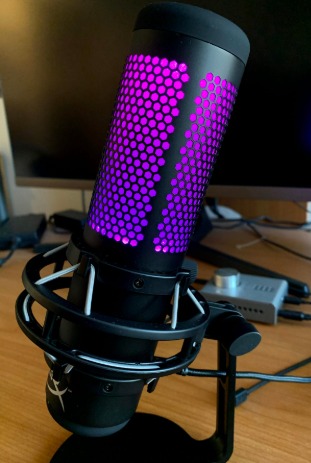
- Vibrant Customizable RGB Lighting: The QuadCast S features eye-catching RGB that syncs with your setup and can be customized through the HyperX NGENUITY software. It adds a fun, professional look to your streaming desk. The lighting is bright and smooth without being distracting during streams.
- Convenient Tap-to-Mute Functionality: A simple tap on the top mutes the microphone instantly with a clear visual indicator. This feature is incredibly useful during unexpected interruptions or when you need to cough or talk off-mic. Quick muting improves stream quality and professionalism.
- Solid Build Quality: The microphone feels premium with a sturdy metal construction and effective shock mount. It survives daily use and occasional bumps without issues. Durable build gives confidence that it will last through many streaming sessions.
- Versatile Polar Patterns: Four selectable patterns (cardioid, omnidirectional, bidirectional, stereo) give you flexibility for solo streams, interviews, or ASMR. You can adapt the mic to different recording situations without buying extra equipment. Versatility makes it future-proof for growing creators.
- Good Value For Performance: The QuadCast S delivers clear, broadcast-quality sound at a more accessible price than many competitors. You get professional results without spending hundreds more. Strong value makes it an excellent entry point into quality USB mics.
- Easy Plug-and-Play Setup: It connects via USB-C and works immediately with no drivers needed on most systems. You can start streaming or recording within minutes of unboxing. Simple setup lowers the barrier for beginners.
- Effective Shock Mount: The built-in shock mount does a great job reducing desk vibrations and keyboard noise. Your audio stays clean even during enthusiastic gaming moments. Good isolation improves overall recording quality.
Cons Of HyperX QuadCast S
- Older Model Limitations: As the previous generation, it lacks some of the sound refinements and app improvements found in the QuadCast 2. You may notice slightly more background noise in challenging environments. It is still very good but not the latest technology.
- RGB Can Be Bright For Some Setups: The lighting is vibrant and can be overpowering in darker streaming rooms if not adjusted properly. Some users prefer more subtle illumination. Brightness requires manual tweaking in the software.
- Slightly Dated App Features: The NGENUITY software is functional but feels less polished than newer versions. Customization options are good but not as intuitive as they could be. App experience is adequate but not class-leading.
- Heavier Than Some Modern Mics: The metal construction makes it solid but also heavier to mount on boom arms for long periods. Weight can cause slight sagging on lighter arms. Heaviness is noticeable during extended streaming sessions.
Pros Of HyperX QuadCast 2
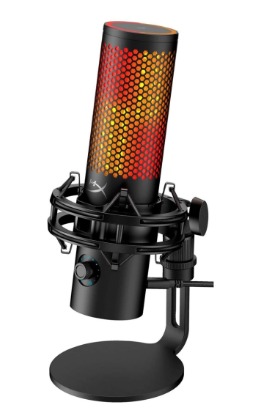
- Improved Sound Clarity: The QuadCast 2 delivers cleaner vocals with better detail and reduced self-noise compared to the original. Your voice sounds more natural and professional on streams and recordings. Sound quality upgrade is noticeable to both you and your audience.
- Enhanced Tap-to-Mute Response: The mute function is faster and more reliable with clearer visual feedback. You can mute instantly during intense moments without missing a beat. Improved responsiveness enhances live streaming experience.
- Brighter And Smoother RGB: The RGB lighting is more vibrant and offers smoother effects through the updated app. Your setup looks more polished and modern. Enhanced lighting adds visual appeal to your content.
- Better Noise Rejection: The microphone handles background noise more effectively, especially keyboard clicks and room ambiance. Your recordings stay focused on your voice. Improved isolation is valuable in untreated rooms.
- Refined Build And Shock Mount: The construction feels more polished with a better-integrated shock mount. Vibrations are reduced even further. Overall build quality feels like a meaningful step up.
- Longer-Term Future-Proofing: As the newer model, it receives better software support and potential firmware improvements. You are less likely to feel outdated quickly. Future-proofing adds long-term value to the purchase.
Cons Of HyperX QuadCast 2
- Higher Price: The QuadCast 2 costs more than the original QuadCast S, which may not be justified for casual streamers. The premium is noticeable if you do not need the refinements. Price can be a barrier for budget setups.
- Marginal Gains For Some Users: If you already have the QuadCast S and stream in a quiet environment, the improvements may feel subtle. Not everyone needs the extra clarity or RGB enhancements. Upgrade value depends on your current setup and needs.
- App Still Has Room For Improvement: While better than before, the HyperX software can occasionally feel clunky or slow to load effects. Customization is good but not the smoothest experience available. App polish is not perfect.
- No Major Design Overhaul: The overall look is very similar to the previous model. Some users expected a more dramatic redesign. Visual changes are evolutionary rather than revolutionary.
Maintenance Tips For HyperX QuadCast S
- Clean The Pop Filter Regularly: Wipe the foam pop filter with a dry cloth or mild soap solution every few weeks. This prevents buildup that can affect sound quality. Regular cleaning keeps your audio clear and crisp.
- Check USB Cable Connections: Ensure the USB-C cable is securely connected and free from damage. A loose connection can cause dropouts or static. Periodic checks maintain reliable performance.
- Dust The Microphone Body: Use a soft brush or microfiber cloth to remove dust from the metal housing and shock mount. Keeping it clean prevents debris from affecting the internal components. Simple dusting extends the mic’s lifespan.
- Store In A Safe Place: When not in use, keep the microphone in its original box or a protective pouch. Proper storage prevents accidental drops or damage to the sensitive capsule. Good storage habits protect your investment.
Maintenance Tips For HyperX QuadCast 2
- Wipe Down The Exterior Weekly: Use a slightly damp microfiber cloth to clean the metal body and RGB ring. Regular wiping removes fingerprints and dust. Clean exterior keeps the mic looking premium.
- Test Tap-to-Mute Function Monthly: Tap the top periodically to ensure the mute sensor responds instantly. Early detection of any sensitivity issues prevents problems during live streams. Simple testing maintains reliable operation.
- Update Firmware Through The App: Check for firmware updates regularly in the HyperX software. New versions often improve stability and sound performance. Keeping firmware current maximizes the microphone’s capabilities.
- Protect The Shock Mount: Avoid pressing down hard on the mount or exposing it to excessive force. Gentle handling preserves the suspension system. Proper care keeps vibration isolation effective.
Comparison With Other Brands
Versus Razer Seiren V2: Razer offers strong streaming microphones with good RGB and software integration. The HyperX QuadCast 2 competes well on sound quality and tap-to-mute while usually costing less. Razer may appeal to gamers who want ecosystem integration, but HyperX often provides better value and reliability for general content creation.
Versus Blue Yeti: The Blue Yeti is a classic USB mic with multiple patterns and a cult following. Both QuadCast models offer better build quality and modern features like improved mute controls. Blue Yeti is great for versatility, but HyperX QuadCast S and 2 deliver clearer, more broadcast-ready sound with less setup hassle.
Versus Elgato Wave:3: Elgato focuses on seamless streaming integration with its Wave Link software. The QuadCast 2 matches or exceeds sound quality while offering simpler plug-and-play use. Elgato wins for advanced software users, but HyperX is often preferred for straightforward reliability and better value.
Versus Audio-Technica AT2020USB: Audio-Technica provides excellent condenser sound in a USB package. HyperX QuadCast models add RGB, tap-to-mute, and more convenient features at similar or lower prices. Audio-Technica excels in pure audio fidelity, but HyperX wins for streaming-specific conveniences and modern aesthetics.
Versus Maono AU-PM421: Maono offers budget USB mics with decent sound and RGB. The HyperX QuadCast S and 2 provide noticeably better build quality, clearer audio, and more reliable performance. Maono is a cheap entry point, but HyperX delivers a clear step up in professional feel and longevity.
Also Read: My thoughts on Sennheiser Accentum Vs. Sennheiser Accentum Plus
Frequently Asked Questions (FAQ)
Yes, the QuadCast 2 offers improved sound clarity, better noise rejection, longer-lasting RGB, and a more responsive tap-to-mute. The upgrades make it worth considering if you want refined performance.
(Note: There is no official “QuadCast 2 S”; the question likely refers to QuadCast S vs QuadCast 2.) The QuadCast 2 is worth it for users who want better sound and modern features. The original QuadCast S remains excellent value if found on sale.
The QuadCast S adds customizable RGB lighting to the original QuadCast while keeping the same core sound quality and features. The S model is primarily an aesthetic and visual upgrade.
Yes, the QuadCast 2 is excellent for gaming with clear voice capture, effective noise rejection, and convenient tap-to-mute. It performs well for both casual and competitive streamers.
Conclusion
After using both the HyperX QuadCast S and QuadCast 2 daily for streaming and content creation, I can honestly say both are excellent USB microphones, but the QuadCast 2 is the better overall choice in 2025. You should choose the QuadCast 2 if you want improved sound clarity, better noise handling, enhanced RGB, and a more refined experience. Go with the QuadCast S if you find it at a good discount and the RGB and core performance are enough for your needs. Either way, adding a HyperX QuadCast microphone to your setup will give you clear, professional audio that elevates your streams and recordings—pick the one that matches your budget and priorities, and you will sound great every time you hit record.
Recent Posts
● Interactive 5-Zone Interior & Exterior Paint Blueprint Paint Coverage Calculator: Gallons, Primer, Square Footage & Cost Tap any architectural surface zone on the blueprint...
If you want smooth, shiny hair without spending a fortune on a premium styling tool, the Ella Bella hair dryer may be worth considering.In these Ella Bella hair dryer reviews, I’ll look...