
I have spent months testing and living with smart switches from both Leviton and Lutron in my own home. I wanted reliable lighting control that fits my daily routine without constant troubleshooting.The main intent of this article is to share my honest, real-user experience comparing Leviton versus Lutron smart switches. I break down key features, pros and cons, and help you decide which one suits your needs better for a smarter, more convenient home.
A Brief Comparison Table
| Feature | Leviton Decora Smart | Lutron Caseta |
| Hub Requirement | No (Wi-Fi direct or Z-Wave options) | Yes (Smart Bridge required) |
| Neutral Wire | Usually required (some no-neutral models need bridge) | No neutral required for most models |
| Reliability | Good with firmware updates | Excellent, very few dropouts |
| 3-Way Setup | Needs companion switch or additional wiring | Easy with wireless Pico remote |
| Price Per Switch | More affordable | Higher cost |
| App Experience | My Leviton app with good customization | Lutron app is simple and responsive |
| Compatibility | Alexa, Google, HomeKit, Matter in newer models | Alexa, Google, HomeKit, works locally |
| Best For | Budget-conscious users with neutral wires | Older homes or those wanting rock-solid performance |
My Experience With Leviton
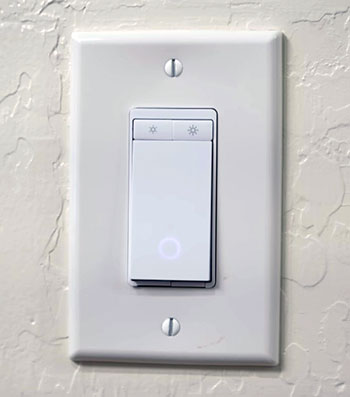
I installed Leviton Decora smart switches in my living room and bedrooms first. The familiar look meant no one questioned the change. Setup took about 15 minutes per switch using the app, and pairing with Alexa worked smoothly.
Dimming feels natural with adjustable fade times that I customized for evening relaxation. Motion sensors in hallways save energy by turning lights off automatically when rooms empty.
I did face one power outage where reconnection took longer than expected, but a quick breaker cycle fixed it. Overall, these switches deliver consistent performance that fits my busy schedule. Voice commands turn on lights as I enter with groceries, and schedules handle morning routines perfectly.
The cost allowed me to cover more areas quickly. I appreciate the solid construction that withstands daily use from kids and pets. In my view, Leviton offers a smart balance of features without overcomplicating things.
Pros Of Leviton
- Build Quality And Design: Leviton Decora smart switches feel solid with a classic rocker style that matches most existing wall plates in homes. I like how they blend in without looking too futuristic.
- Affordable Entry Point: You pay less per switch compared to Lutron. This helped me outfit multiple rooms without breaking the bank while still getting smart features.
- No Hub Needed In Many Cases: The Wi-Fi versions connect directly to your router. I set them up quickly using the My Leviton app and linked them to Alexa and Apple HomeKit without extra hardware.
- Wide Compatibility: Newer models support Matter, which gives future-proofing. They also work with Z-Wave if you have that ecosystem already running in your house.
- Customization Options: The app lets you adjust dimming ranges, fade rates, and auto shut-off timers. I set schedules for hallway lights that turn on gently at night, which works perfectly for my family.
- Higher Load Handling: Some Leviton switches manage larger electrical loads than comparable Lutron models. This matters if you control fans or heavier fixtures.
- Easy Firmware Updates: Once connected, updates improve responsiveness. After one update, my switches stopped any occasional “not responding” issues in HomeKit.
- Variety Of Models: Leviton offers motion-sensing dimmers and scene controllers. I added a motion-sensing model in the garage, and it automatically handles lights when I walk in with hands full.
- Integration With Existing Decor: The paddle or rocker design looks like traditional switches. Guests never notice they are smart until I show voice control.
- Good App Features: You can create scenes and routines directly. I grouped kitchen lights for “cooking mode” at full brightness or “dinner mode” dimmed.
- Warranty Support: Leviton backs products with a solid warranty period. In my case, any early hiccups were resolved through their support resources.
- Energy Monitoring In Some Models: Certain versions track usage, helping me understand which lights consume more power over time.
- Simple Installation For Diy Users: If your box has a neutral wire, wiring follows standard patterns. I completed several installations in under 20 minutes each.
- Voice Control Speed: Commands through Alexa or Google respond quickly once set up properly on a strong network.
- Multi-Location Support: With companion devices, you control the same lights from different switches without complex rewiring.
Cons Of Leviton
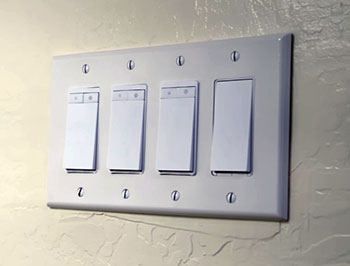
- Neutral Wire Dependency: Most standard models require a neutral wire. In my older parts of the house without it, I had to use special no-neutral versions that rely on a bridge, adding complexity.
- Occasional Connectivity Issues: Early generation Wi-Fi models sometimes dropped from the network after power outages. I had to reset a few manually until firmware improved things.
- App Can Feel Basic: Compared to some competitors, the My Leviton app lacks polish in certain areas. I occasionally switched to native smart home apps for smoother control.
- 3-Way Setups Need Extra Hardware: You often install a companion switch wired in. This took more time than Lutron’s wireless remote approach in my testing.
- Potential For Wi-Fi Congestion: With many devices on your network, performance can vary. I noticed slight delays when my router handled too many connections at once.
- Firmware Update Process: Updates happen through the app and sometimes require manual intervention. One time a switch stayed offline until I forced the update.
- Limited Local Control Without Internet: Pure Wi-Fi models lose smart features during outages. This frustrated me once during a storm when basic scheduling stopped.
- Design Looks Dated To Some: The Decora style is reliable but not as modern or sleek as some newer paddle designs from other brands.
- Heat Generation In Some Installs: In multi-gang boxes or warm climates, I monitored for slight warmth, though it never caused failure in my setup.
- Customer Support Variability: Responses can take time depending on the issue. I waited a couple days for clarification on one wiring question.
- Load Limitations On Dimmers: Certain LED configurations need careful bulb selection to avoid flickering, requiring trial and error on my part.
- Bridge Dependency In No-Neutral Models: The additional bridge becomes a single point of failure. When it disconnected once, several switches lost smart functionality temporarily.
- Less Seamless In Large Homes: Range can suffer without a strong mesh network. I added a better router to maintain consistent performance across floors.
Maintenance Tips For Leviton
- Regular Cleaning Routine: Turn off power at the breaker first. Wipe the switch face with a damp cloth and mild soap only. Avoid any sprays or liquid cleaners directly on the device to prevent damage.
- Check Connections Periodically: Every few months, I inspect screw terminals for tightness, especially after any power surges or renovations. Loose wires cause intermittent issues.
- Keep Firmware Updated: Open the My Leviton app regularly and apply updates when available. Newer versions fix bugs and improve stability noticeably.
- Monitor Network Health: Ensure your Wi-Fi signal stays strong near switches. I use a mesh system now, which reduced dropouts significantly.
- Test Schedules And Scenes: Run manual tests on automations monthly. This catches any glitches before they affect daily routines like bedtime lighting.
- Dust Management: In dusty areas like basements, I gently clean around the edges with a soft brush to prevent buildup affecting the rocker mechanism.
- Power Cycle When Needed: For unresponsive switches, flip the breaker off for 30 seconds then back on. This often resolves temporary glitches without full reset.
- Backup Settings: Note your custom scenes and schedules in case you need to re-pair a device. The app makes export somewhat easy.
- Avoid Overloading Circuits: Respect wattage limits listed for dimmers. I replaced a few bulbs that caused flickering after checking compatibility.
- Use Original Wall Plates: Stick with Decora-style plates for proper fit and to maintain the clean look over years of use.
- Check For Software Conflicts: If using multiple smart home platforms, verify no overlapping automations fight each other.
- Seasonal Inspection: Before summer or winter, I verify all switches respond correctly to voice commands and app controls.
- Battery-Free Reliability: Since most are wired, maintenance focuses on electrical integrity rather than replacing batteries.
Also Read: Comparison of Strider Classic And Strider Sport
My Experience With Lutron
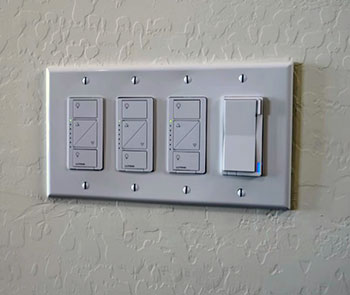
Switching to Lutron Caseta in the kitchen and garage showed a different level of polish. The Smart Bridge setup took extra time initially, but once running, everything felt rock solid.
The wireless Pico remote is a game-changer for 3-way areas. I stuck one on the wall without wires, and it controls lights instantly even if internet drops.
Dimming works beautifully with LED bulbs, and responses to app or voice commands happen without delay. In four years of similar systems, I never had a single dropout like occasional Wi-Fi hiccups elsewhere.
The higher price stings at first, but reliability makes it worth it for high-traffic zones. No neutral requirement simplified installs in older wiring.
Geofencing turns lights on as I approach home, adding real convenience. The app stays simple yet powerful for scenes. Lutron feels like set-it-and-forget-it technology that just works every time.
Pros Of Lutron
- Unmatched Reliability: Lutron Caseta switches respond every single time in my testing. Clear Connect technology avoids Wi-Fi interference issues that plague other systems.
- No Neutral Wire Needed: This feature saved me major rewiring headaches in older rooms. Installation stays straightforward with basic tools.
- Wireless Pico Remotes: These battery-powered controls make multi-location setups effortless and wire-free. I place them anywhere for convenience.
- Local Control During Outages: Switches and remotes continue working even without internet because of the hub’s RF communication.
- Excellent Dimming Performance: Precise control over various bulb types with minimal flickering. I use it for mood lighting that adjusts smoothly.
- Strong App And Integrations: The Lutron app feels intuitive, and compatibility with major platforms stays seamless.
- Professional Grade Feel: Build quality inspires confidence for whole-home use. Many installers recommend it to avoid callbacks.
- Easy Expansion: Adding more switches or accessories integrates without hassle. I scaled up quickly after the initial kit.
- Geofencing And Scheduling: Automation based on location or time works reliably, enhancing security and energy savings.
- Long-Term Stability: After years, performance remains consistent without frequent maintenance.
- Color Options: More choices help match interior designs better in visible areas.
- Support For Fans And Other Loads: Dedicated models control exhaust fans or other devices effectively.
- Firmware Rarely Needed: Updates happen smoothly, but the system performs well even without constant tweaks.
Cons Of Lutron
- Higher Upfront Cost: Each switch plus the hub adds up faster than Leviton options. Budgeting for a full house requires planning.
- Hub Dependency: You need the Smart Bridge for full smart features. It occupies an outlet and needs router proximity.
- Paddle Style Preference: Some users, including me initially, prefer rockers over the Caseta paddle design for feel.
- Limited Direct Wi-Fi Models: Most rely on the hub rather than connecting straight to your network.
- App Account Limitations: Sharing access with family sometimes requires workarounds in the current setup.
- Aesthetic Consistency: The look stands out compared to traditional switches, which may not suit every decor.
- Initial Setup Time: Pairing the hub and first devices takes longer than hub-free alternatives.
- Battery In Remotes: Pico remotes need occasional battery changes, though they last long.
- Less Load Capacity In Some Cases: Certain switches handle lower amperage than Leviton equivalents for heavy fixtures.
- Color Availability Varies: While options exist, matching every room perfectly can require planning.
- Potential Heat In Dense Installs: Multi-gang boxes need proper spacing to avoid warmth buildup.
- Learning The Ecosystem: New users spend time understanding hub limits and best practices.
Maintenance Tips For Lutron
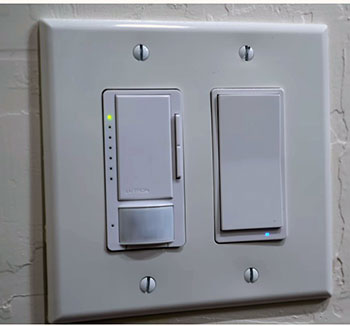
- Clean Gently: Power off via the FASS switch on the dimmer if available, then wipe with a damp cloth and mild soap. Never spray cleaners directly.
- Replace Pico Batteries Promptly: When the remote feels sluggish, swap the coin cell battery to maintain responsiveness.
- Check Hub Placement: Keep the Smart Bridge in a central location with good ventilation and away from interference sources.
- Test Remotes Regularly: Press buttons monthly to ensure pairing holds and signals reach switches reliably.
- Update Firmware Through App: Lutron pushes improvements occasionally. Apply them to keep everything optimized.
- Inspect Wiring In Boxes: Look for tight connections during any home projects or annually.
- Monitor For Overloads: Respect wattage ratings, especially with dimmers and LED loads.
- Power Cycle The Hub: Unplug and replug the bridge every few months if you notice any rare glitches.
- Organize Scenes And Automations: Review and clean up old routines in the app to prevent conflicts.
- Dust Around Devices: Use a soft cloth to keep faces and edges clean without affecting mechanisms.
- Verify Integration Links: Check connections to Alexa, Google, or HomeKit periodically for smooth voice control.
- Use Official Accessories: Stick with Lutron-approved remotes and extenders for best performance.
Comparison With Other Brands
Versus Basic Wi-Fi Brands Like Tp-Link Or Kasa: Leviton feels more premium with better build and longer lifespan. Cheaper options often suffer from frequent disconnects, while Leviton holds up after firmware tweaks.
Versus Z-Wave Focused Competitors: Leviton offers strong Z-Wave models that mesh well in large homes. They compete closely but stand out with easier app integration for beginners.
Versus Lutron Itself: Lutron wins on reliability and no-neutral ease, but Leviton counters with lower cost and direct Wi-Fi simplicity. I mix them in my house for best results per room.
Versus Matter-Enabled Newcomers: Leviton adopted Matter early in some lines, offering broad compatibility. Newer brands promise similar but lack the proven track record Leviton brings from decades in electrical manufacturing.
Versus High-End Systems Like Control4: Leviton provides accessible smart features without professional installation costs. It serves everyday users who want upgrades without full home automation overhauls.
Reliability Against Budget Options: Many generic switches fail within a year or two. Leviton lasts longer due to commercial-grade components in its design.
App And Ecosystem Fit: Compared to dedicated hubs from other makers, Leviton’s approach works well if you already use Alexa or HomeKit. It avoids locking you into one ecosystem.
Aesthetic Matching: Leviton matches standard Decora plates better than some unique designs from rivals. This keeps my walls looking uniform.
Energy Features: Some competitors add advanced monitoring, but Leviton covers basics sufficiently for most households tracking usage.
Installation Flexibility: Other brands sometimes require more rewiring. Leviton balances ease with performance in standard boxes.
Customer Feedback Patterns: Users often report Leviton as dependable for the price, while praising premium brands for zero-maintenance but noting higher expense.
Future-Proofing: With Matter support growing, Leviton positions itself well against brands still catching up on standards.
Read More: Comparison of Toto S7 And S7A
Frequently Asked Questions (FAQ)
It depends on your home. Lutron often feels better for reliability and older wiring, while Leviton suits budgets and neutral wire setups.
Lutron Caseta stands out for consistent performance with minimal issues over years of use.
Yes, Leviton offers reliable, affordable smart switches with good features and strong compatibility for most users.
Conclusion
I have used both Leviton and Lutron smart switches extensively, and you can achieve a great smart lighting setup with either one.If your priority is saving money and you have neutral wires plus a solid Wi-Fi network, go with Leviton for its familiar design and straightforward integration. You will appreciate the value and customization without extra hardware.On the other hand, if you want the most dependable performance that works even during outages and simplifies installs in any home, choose Lutron Caseta.
The higher cost brings peace of mind and effortless daily use that I rely on in key areas.Consider your wiring, budget, and how many switches you plan to install. Many people, including me, mix both brands successfully across different rooms. Test one or two from each if possible, then scale what fits your lifestyle best.Smart switches from these brands make life easier by giving control through voice, apps, and schedules. Pick based on what matters most to you, and enjoy a home that responds to your needs intelligently. Both options represent solid choices that enhance everyday living when chosen thoughtfully.
Recent Posts
I spent months comparing budget options against established names after my last set of tires wore out sooner than expected.My goal here is to share what I learned from putting Dextero and...
AquaTru Carafe Vs. Classic: Which Is Actually Fits Your Kitchen?
I decided to write this comparison after months of testing both the AquaTru Carafe and the Classic in my own kitchen. Tracking covered daily use.Taste stayed consistent. Refill frequency...