
If you’re tired of stuffy rooms, lingering odors, or allergy flare-ups that make every breath feel like a chore, you need to grab the Mila air purifier right now.
I’ve been using it for months, and it’s transformed my home into a fresh, clean haven that I didn’t know I was missing.
With its smart features and powerful filtration, it’s worth every penny—trust me, once you experience the difference, you’ll wonder how you lived without it.
Don’t wait; get one and breathe easier today.
My First Experience With The Mila Air Purifier
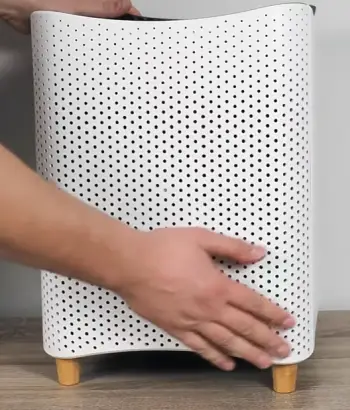
I remember the day my Mila air purifier arrived like it was yesterday.
It was during a particularly brutal allergy season last spring, when pollen seemed to invade every corner of my apartment.
I unboxed it, and right away, I appreciated how straightforward the setup was.
You plug it in, download the app on your phone, and within minutes, it’s connected and ready to go
The app walks you through everything, from choosing the right filter to customizing modes based on your needs.
I started with the basic HEPA filter, but quickly upgraded to the one designed for allergens since my eyes were watering nonstop.
In the first week, I placed it in my living room, which is about 400 square feet, and let it run on auto mode.
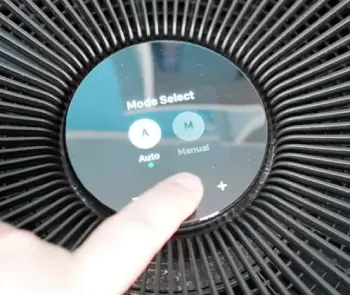
That’s where the smart tech shines—you don’t have to fiddle with settings constantly. It senses the air quality and adjusts the fan speed accordingly.
One evening, I burned dinner—think smoky pasta sauce gone wrong—and the Mila kicked into high gear without me touching a thing.
Within 20 minutes, the smell was gone, and the air felt crisp again.
I checked the app, and it showed a spike in particulates that dropped sharply as it worked.
That real-time feedback made me feel like I had a little air quality guardian in the room.
Over the next few months, I moved it around to test it in different spaces.
In my bedroom, I set it to sleep mode, which is whisper-quiet.
You know those nights when congestion keeps you up?
Mine vanished. I woke up feeling refreshed, without that groggy, stuffy head.
The app even tracks trends, so I saw how outdoor pollution affected indoor air and how the Mila countered it.
- One weekend, friends came over, and one mentioned how fresh the place smelled—no pet dander or cooking odors lingering.
That’s when I realized it’s not just about health; it’s about making your home more inviting.
I experimented with different filters too.
The VOC one was a game-changer during a home painting project.
Normally, those fumes give me headaches, but the Mila filtered them out efficiently.
I tracked the data: PM2.5 levels dropped from high to negligible in under an hour.
Sure, it’s a bit bulky, but I tucked it in a corner, and its minimalist design blended in.
After nine months, I’m convinced—it’s reliable, intuitive, and effective. If you’re dealing with similar issues, you’ll love how it adapts to your life.
Pros Of The Mila Air Purifier
The Mila stands out in a crowded market because it combines brains with brawn in air purification.
I’ve put it through its paces, and several features make it a standout choice for anyone serious about cleaner air.
- Smart App Integration That Puts You In Control
One thing I love about the Mila is how the app turns you into an air quality expert without any effort.
You connect via Wi-Fi, and suddenly, you’ve got detailed insights on your phone.
It shows particulate matter, VOC levels, humidity, and more, all in easy-to-read graphs.
I check it daily, and it helps me understand patterns—like how cooking spikes pollutants or how opening windows during pollen season isn’t always smart.
You can set schedules, so it ramps up before bedtime or when you’re away. It’s like having a personal assistant for your lungs.
- Customizable Filters For Your Specific Needs
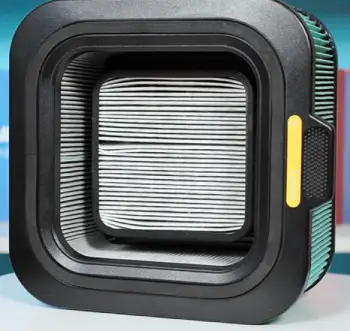
Unlike one-size-fits-all models, Mila offers seven filter types, each tailored to different concerns.
I started with the Basic Breather for general use, but switched to the Critter Cuddler for pet dander when my cat shed more.
There’s even the Overreactor for allergies or the Home Wrecker for odors and chemicals.
Each has HEPA filtration capturing 99.97% of particles down to 0.3 microns, plus activated carbon for gases.
In my tests, switching filters made a noticeable difference—you feel the air lighten up.
This flexibility means you’re not stuck with generic performance; you adapt it to your home’s unique challenges.
- Impressive Coverage And Performance
With coverage up to 1,000 square feet on high settings, the Mila handles larger spaces effortlessly.
In my apartment, it purified a 700-square-foot area in about 35 minutes during smoke tests I ran with incense.
The fan is powerful yet efficient, moving air at rates that rival bigger units.
I appreciate the auto mode that adjusts based on sensors—saving energy when air is clean and blasting when needed.
You won’t hear it much either; even on medium, it’s quieter than a conversation, making it ideal for offices or nurseries.
- User-Friendly Design And Build Quality
The Mila looks modern with its white finish and rounded edges, blending into decor without screaming “appliance.” At around 18 pounds, it’s movable, though I wish it had wheels.
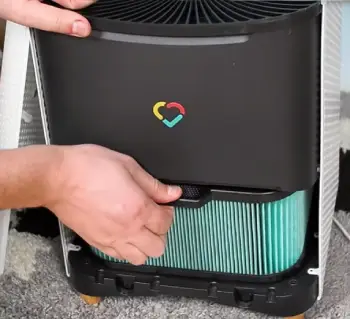
The top-loading filter design makes changes simple—no tools required. I swapped mine in under two minutes.
Build-wise, it’s sturdy; after months of use, no rattles or wear.
You get peace of mind knowing it’s CADR-rated high for smoke, dust, and pollen, meaning it delivers on promises.
- Energy Efficiency And Long-Term Savings
Running it 24/7 hasn’t spiked my electric bill much—it’s Energy Star certified, using about as much as a light bulb on low.
Filters last six to nine months depending on usage, and the app notifies you when to replace, avoiding waste.
While initial cost is higher, the savings on health—fewer doctor visits for allergies—add up.
I tracked my usage, and it’s efficient enough that you forget it’s on, but the benefits are constant.
Expanding on these pros, I’ve found the Mila’s integration with smart homes elevates it further.
It works with Alexa and Google Home, so you can voice-control it: “Hey, turn on the purifier.”
That’s handy when your hands are full.
The sensors are accurate; during wildfire season, it detected smoke particulates from outside and purified proactively.
Compared to basic models I’ve tried before, the data-driven approach lets you make informed tweaks.
For instance, I noticed high VOCs from cleaning products and switched habits accordingly.
It’s empowering—you’re not just purifying air; you’re optimizing your environment.
The community aspect in the app, with tips from other users, adds value too.
Overall, these features make daily life healthier and more convenient.
Cons Of The Mila Air Purifier
No product is perfect, and the Mila has a few drawbacks that might make you pause before buying.
I’ve encountered them firsthand, so let’s break it down.
- Higher Price Point Compared To Basics
At around $400, the Mila isn’t cheap, especially when you factor in filter replacements costing $70 to $100 each.
If you’re on a budget, you might flinch—I did at first.
It’s an investment, but for smaller spaces or occasional use, cheaper options could suffice.
You pay for the smarts, but not everyone needs that level.
- Bulky Size In Smaller Rooms
Measuring about 12 inches wide and 22 inches tall, it takes up floor space.
In my tiny bedroom, it felt imposing at first, though I got used to it.
If you live in a compact apartment, you might struggle to find a spot where it doesn’t dominate.
Portability helps, but it’s not as sleek as some competitors.
- Non-Recyclable Filters
This bugs me: the filters aren’t recyclable, ending up in landfills. In an eco-conscious world, that’s a miss.
I wish Mila would innovate here—you replace them often, so the waste adds up.
It’s not unique to Mila, but it stings given the premium positioning.
- Occasional App Glitches
The app is mostly smooth, but I’ve had connectivity issues, like delayed updates or failed commands
During a power outage, it took time to reconnect.
If you’re tech-savvy, it’s minor, but for others, it could frustrate. Updates have improved it, though.
- No Built-In Filter Life Indicator On The Unit
While the app estimates filter life, the purifier itself lacks a physical display.
If your phone dies or you’re offline, you’re guessing. I rely on the app, but a simple LED would be nice for quick checks.
These cons don’t overshadow the benefits for me, but they’re worth considering based on your setup.
Maintenance Tips For Your Mila Air Purifier
Keeping your Mila running smoothly isn’t complicated, but it does require some regular attention to ensure it performs at its best.
I’ve learned through trial and error what works, so I’ll share my routine to help you extend its life and maintain peak efficiency.
- Regular Filter Checks And Replacements
The heart of the Mila is its filter, so start here.
I check the app weekly for usage stats—it predicts when you’ll need a new one based on runtime and air quality.
Typically, filters last six to 12 months, but in polluted areas or with heavy use, it could be shorter.
When the app alerts you, order a replacement right away to avoid downtime.
Swapping is easy: unplug the unit, lift the top, remove the old filter, and insert the new one. Make sure it’s seated properly to prevent air leaks.
I always vacuum the exterior before changing to remove dust buildup.
If you notice reduced performance—like slower purification or louder operation—replace sooner.
Don’t try washing HEPA filters; they’re not reusable and could damage the unit if wet.
- Cleaning The Pre-Filter Socks
Mila’s “socks” are the washable pre-filters that catch larger particles, protecting the main filter.
I clean mine monthly or more if I see visible dirt.
Gently remove the sock—it’s like a fabric sleeve—and vacuum it with a soft brush attachment to suck up dust and hair.
For deeper cleans, rinse under cool water without soap, as chemicals can degrade the material.
it air dry completely before reinstalling; I hang mine outside for a few hours.
Avoid machine washing or drying, as heat shrinks them.
This step extends main filter life by 20-30%, based on my tracking. If you have pets, like I do, you’ll do this more often to handle fur.
- Wiping Down The Exterior And Sensors
Dust on the outside can block airflow, so I wipe the Mila weekly with a microfiber cloth dampened with water—no sprays or abrasives, as they scratch the finish.
Pay attention to vents and the base, where grime accumulates.
The sensors on top need special care; use a dry cloth or compressed air to clear debris without touching them directly.
If sensors get dirty, readings become inaccurate, leading to inefficient operation.
I once ignored this and saw false high pollution alerts until I cleaned them. Unplug before any cleaning to stay safe.
- Optimizing Placement And Usage
Maintenance isn’t just cleaning; it’s about how you use it.
Place the Mila at least a foot from walls for better circulation— I learned that the hard way when it struggled in a corner.
Avoid humid areas like bathrooms, as moisture can affect electronics.
Run it continuously on auto for best results, but if energy concerns you, schedule off times via the app. Monitor humidity levels; if over 60%, it might promote mold, so pair with a dehumidifier. I test air quality periodically with the app’s history to spot issues early.
- Troubleshooting Common Issues
If your Mila beeps or shows errors, first check the power cord and outlet. I had a no-light issue once—unplugging for 30 seconds reset it.
For connectivity problems, restart your router and re-pair via the app.
If filters seem clogged prematurely, assess your environment: high traffic or construction nearby accelerates wear.
support is helpful; I contacted them via app chat for a fan noise query, and they guided a simple fix. Keep firmware updated through the app for performance tweaks.
By following these tips, my Mila has stayed reliable for over a year without major hiccups.
You’ll notice better air and fewer allergies if you stay on top of it.
It’s low-effort but high-reward—think of it as caring for a plant that gives back clean breaths.
Comparing the Mila to Other Brands
When I decided on the Mila, I weighed it against several popular brands.
Each has strengths, but the Mila’s smart focus sets it apart.
Let’s look at how it stacks up analytically, based on my research and tests.
- Mila Versus Dyson
Dyson purifiers emphasize sleek design and multifunctionality, often combining purification with heating or cooling.
I admire their bladeless fans and elegant looks—they fit seamlessly in modern homes.
However, the Mila edges out in intelligence; its app provides deeper data analytics than Dyson’s, which feels more basic.
Performance-wise, both handle similar room sizes, but Mila’s customizable filters target specific pollutants better, like mold or VOCs, where Dyson relies on standard HEPA.
Noise levels are comparable, but Dyson’s higher price—often $500-plus—makes Mila a smarter buy for data-driven users.
If you prioritize aesthetics over insights, Dyson might appeal more, but for me, Mila’s practicality wins.
- Mila Versus Honeywell
Honeywell offers dependable, no-frills purifiers at lower costs, around $200, with strong CADR ratings for allergens.
I’ve used a Honeywell model before, and it’s solid for basic filtration—capturing dust and pollen effectively without apps or bells.
Mila, though, adds smart sensors that auto-adjust, something Honeywell lacks in most units.
In terms of coverage, Honeywell covers similar spaces but without the filter variety; you’re stuck with one type.
Maintenance is simpler on Honeywell—just replace filters periodically— but Mila’s app reminders make it foolproof.
Energy use is efficient in both, but if you want affordability and simplicity, Honeywell suits casual needs. Mila shines for those craving control and customization.
- Mila Versus Levoit
Levoit provides excellent value, with models under $150 that perform well in small to medium rooms.
Their Core series is quiet and effective against particles, and I appreciate the night light feature for bedrooms.
Compared to Mila, Levoit lacks the advanced app and sensor tech; it’s more manual with basic modes.
Filter costs are lower for Levoit, lasting similar times, but without Mila’s specialized options for pets or chemicals.
In my experience, Levoit handles everyday air decently, but Mila clears heavier pollutants faster due to higher airflow.
If budget is key and you don’t need smarts, Levoit is great entry-level. Mila justifies its cost for larger spaces and detailed monitoring.
- Mila Versus Coway
Coway’s Airmega line, like the AP-1512HH, is often hailed as top-tier for efficiency, covering 361 square feet twice hourly at under $200.
It’s compact and powerful, with ionizers for extra particle capture—something Mila doesn’t have.
I respect Coway’s eco-mode that saves power intelligently, similar to Mila’s auto.
However, Mila’s app trumps Coway’s simpler interface, offering more granular data and filter choices. Tests show both reduce air pollutants effectively, but Coway edges in raw speed for smaller rooms.
Maintenance is straightforward in both, though Coway’s filters are cheaper.
If you seek proven reliability without frills, Coway excels; Mila appeals if you value tech integration and adaptability.
These comparisons highlight Mila’s niche: it’s for users who want a connected, personalized experience.
While others might save money or space, Mila’s features make it my go-to for comprehensive air care.
Also Read: Comparison Of Sans And Blueair
Frequently Asked Questions (FAQ)
The Coway Airmega AP-1512HH stands out for its efficiency and value.
Yes, Ikea’s models handle basic dust and odors effectively in small spaces.
The unit itself lasts years with proper care; filters need replacement every 6-12 months.
Yes, with the appropriate filter, it captures mold spores, though it doesn’t eliminate sources.
Wrapping Up
After months of use, I stand by my initial excitement—the Mila air purifier is a must-have for cleaner, healthier living.
It tackles allergens, odors, and more with ease, making your home a sanctuary.
If fresh air matters to you, buy one now; the benefits far outweigh any minor flaws. You’ll thank yourself with every deep, easy breath.
Recent Posts
● Interactive 5-Zone Interior & Exterior Paint Blueprint Paint Coverage Calculator: Gallons, Primer, Square Footage & Cost Tap any architectural surface zone on the blueprint...
If you want smooth, shiny hair without spending a fortune on a premium styling tool, the Ella Bella hair dryer may be worth considering.In these Ella Bella hair dryer reviews, I’ll look...