
As someone who’s always juggling home organization and small business tasks, I decided to compare the Niimbot B1 and B21 label printers.
My main goal here is to break down their features, strengths, and weaknesses so you can figure out which one fits your daily labeling needs without any fluff.
| Feature | Niimbot B1 | Niimbot B21 |
| Design and Build | Compact modern look, 5.2 x 3.6 x 2.4 inches, 0.7 lbs | Retro style, 3.7 x 5.1 x 2.4 inches, 0.66 lbs |
| Battery Capacity | 1500 mAh, up to 5 hours continuous use | 1200 mAh, about 4 hours use |
| Print Resolution | 203 dpi | 203 dpi (Pro version offers 300 dpi) |
| Print Speed | 30-50 mm/s | 60 mm/s |
| Label Width Support | 0.8-2 inches (20-50 mm) | 0.8-2 inches (20-50 mm) |
| Connectivity | Bluetooth, iOS/Android app, PC compatible | Bluetooth, iOS/Android app, PC compatible |
| Key Extras | Auto label detection, versatile printing (text, barcodes, images) | Auto calibration, batch printing, stylish color options |
| Price Range | $40-70 | $50-60 |
| Best For | Everyday portability and value | Aesthetic appeal and quick tasks |
Why I Chose To Compare These Niimbot B1 And B21?
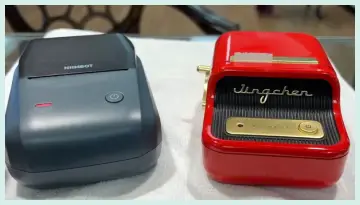
I’ve used both the B1 and B21 in my own setup, labeling everything from kitchen jars to workshop tools.
The B1 feels like that reliable friend who’s always ready for quick jobs, while the B21 adds a bit of flair with its vintage vibe.
But let’s get real—choosing between them boils down to what you value most: raw functionality or a mix of style and speed.
I remember when I first unboxed the B1; it was straightforward, no nonsense. Plug in the app, connect via Bluetooth, and I was printing labels for my spice rack in minutes.
The B21, on the other hand, caught my eye right away with its glossy finish—it almost looks like a mini typewriter from the 50s.
I used it for labeling gift tags during the holidays, and it just felt more fun. Both are thermal printers, meaning no ink hassles, which saves me time and money on replacements.
They’re both portable, fitting easily into a bag for on-the-go use, like when I take one to label items at a flea market stall.
But if you’re like me and hate dealing with cords, the rechargeable batteries make a huge difference. I charged the B1 once and labeled an entire pantry without recharging.
The B21’s battery is a tad smaller, but it still lasts through a full afternoon of organizing. What stands out is how both handle labels automatically—the B1 detects the size right away, preventing waste, and the B21 calibrates itself for perfect alignment every time.
I’ve wasted labels in the past with other printers, so this feature alone makes them worth it.
In my experience, these aren’t just gadgets; they’re tools that make life less chaotic. If you’re running a small business, the ability to print barcodes and QR codes on both is a game-changer for inventory. At home, I use them for everything from cable labels to expiration dates on food containers.
The app for both is the same, packed with templates, fonts, and icons, so customizing is a breeze. I once designed a label with a QR code linking to a recipe—super handy for meal prep. But enough about my setup; let’s break down the specifics.
Key Differences Between The Niimbot B1 And B21
To make your choice clearer, here’s how they stack up in my view.
- Design Style: B1 has a modern, functional aesthetic, while B21 goes retro for that eye-catching appeal. I prefer B21’s look on my desk.
- Battery Life: B1’s 1500 mAh outlasts B21’s 1200 mAh. For extended sessions, B1 wins hands down.
- Print Speed: B21 at 60 mm/s is faster than B1’s 30-50 mm/s. When I’m in a rush, B21 saves precious minutes.
- Price Point: B1 is generally cheaper, offering better value for basics. B21 costs more but justifies it with style.
- Build and Weight: B1 is slightly heavier but more rectangular for easy gripping; B21 feels premium but squarer.
- Resolution Upgrades: Both start at 203 dpi, but B21 has a Pro variant at 300 dpi for sharper prints. B1 lacks this option.
- Calibration vs Detection: B21 auto-calibrates for alignment; B1 auto-detects sizes. Both reduce waste, but B21 feels more precise.
- Use Cases: B1 suits heavy-duty portability; B21 shines in aesthetic-driven environments like crafts or retail.
These differences helped me decide—B1 for practicality, B21 for personality.
Key Features Of The Niimbot B1
The B1 packs a punch in a small package, and I’ve relied on it for tasks where I need something lightweight and efficient.
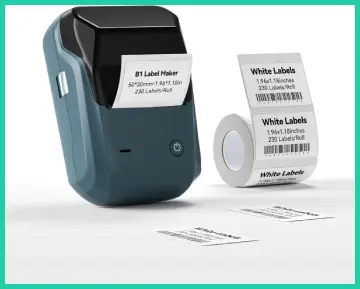
- Bluetooth Connectivity: Pairs seamlessly with my phone or tablet.
I connect in seconds and print from anywhere in the room, no wires needed.
- Auto Label Identification: This detects the label size automatically, so I never mess up alignments.
It’s saved me from reprinting dozens of times.
- Versatile Printing Options: Handles text, images, barcodes, QR codes, and even Excel sheets.
I printed a batch of price tags for my garage sale, including logos.
- Rechargeable Battery: With 1500 mAh, it lasts longer than expected.
I once used it for four hours straight organizing my office without a hitch.
- Compact Size: At just 0.7 pounds, it’s easy to carry.
I toss it in my backpack for labeling at events or while traveling.
- Thermal Technology: No ink required, just heat to print.
Labels come out waterproof and durable, perfect for my kitchen where spills happen.
- App Integration: The free app offers over 30 fonts and 1500 symbols.
I customize labels with shapes and dates effortlessly.
- Label Width Flexibility: Supports up to 2 inches, so I can print small tags or wider stickers for boxes.
These features make the B1 feel like an extension of my phone—simple and always ready.
Pros Of The Niimbot B1
From my hands-on time, here’s what shines about the B1.
- Affordability: It’s cheaper upfront, around $40-70, making it accessible if you’re on a budget. I got mine on sale and felt like I scored a deal.
- Longer Battery Life: That 1500 mAh means fewer charges. I’ve gone days between plugs during light use.
- Lightweight and Portable: Easier to carry than bulkier printers. I take it to my workshop without feeling weighed down.
- User-Friendly App: Intuitive interface with tons of templates. Even if you’re not tech-savvy, like my aunt who borrowed it, you’ll pick it up fast.
- Durable Labels: Prints resist water and fading. My outdoor plant labels held up through rain without smudging.
- Versatile for Various Uses: Great for home, office, or business. I use it for everything from file folders to product packaging.
- No Ink Costs: Thermal printing keeps ongoing expenses low. I’ve saved compared to ink-based printers I used before.
- Quick Setup: Out of the box, it’s ready in minutes. No complicated instructions bogged me down.
Overall, the B1’s pros make it a solid choice for practical users like me who prioritize efficiency over flash.
Cons Of The Niimbot B1
No printer is perfect, and the B1 has a few drawbacks I’ve noticed.
- Slower Print Speed: At 30-50 mm/s, it’s not the fastest. When printing batches, I sometimes wait longer than with other models.
- App Dependency: Requires the app for most functions; no offline mode. If my phone dies, I’m stuck until I charge it.
- Limited to Monochrome: Only black and white prints. I wished for color when labeling colorful craft supplies.
- Potential RFID Lock-In: Some users report print quality drops after a label limit due to proprietary rolls. I haven’t hit it yet, but it’s a concern.
- Ads in App: Occasional pop-ups can annoy. During a busy labeling session, they interrupted my flow.
- No Batch Printing Emphasis: While possible, it’s not as seamless as on some competitors. I had to tweak settings for larger runs.
- Build Feels Plastic-y: Sturdy but not premium. It survived a drop, but I handle it carefully.
- Resolution for Images: 203 dpi is fine for text, but images can look pixelated up close. Not ideal for detailed graphics.
These cons haven’t stopped me from using it, but they’re worth considering if speed or offline use matters to you.
Key Features Of The Niimbot B21
The B21 brings a retro charm that makes labeling feel less like a chore and more like a creative outlet.
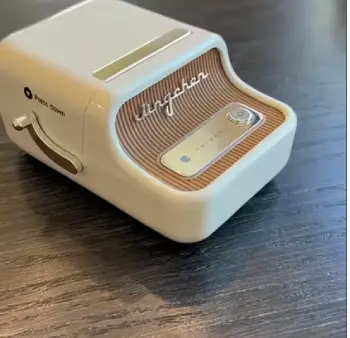
- Retro Design: Looks like a vintage gadget in colors like green or red.
It sits nicely on my desk without clashing with decor.
- Auto Calibration: Aligns labels perfectly every time.
I love how it prevents waste on misprints.
- Batch Printing Capability: Handles multiple labels quickly.
I printed 50 tags for a party in one go.
- Bluetooth and App Support: Connects to iOS, Android, or PC.
The app’s drag-and-drop design tool is intuitive.
- Rechargeable Battery: 1200 mAh provides solid runtime.
I labeled my entire closet in one session.
- Thermal Printing: Inkless, with labels that are waterproof and tear-resistant.
Great for my bathroom storage.
- Wide Label Compatibility: Up to 2 inches, including themed designs.
I used clear vinyl for glass jars.
- Fast Print Speed: At 60 mm/s, it’s quicker for urgent tasks. I notice the difference when time is tight.
This model’s features blend style with substance, making it fun to use daily.
Pros Of The Niimbot B21
Here’s what I’ve appreciated most about the B21 in real-world scenarios.
- Stylish Appearance: The retro look elevates any space. Friends comment on it when they see it in my home office.
- Faster Printing: 60 mm/s means less waiting. I zipped through labeling holiday gifts efficiently.
- Compact and Wireless: Lightweight at 0.66 pounds, perfect for portability. I carry it to markets for on-site labeling.
- Versatile Label Options: Supports various sizes and finishes. I’ve printed barcodes for my online shop seamlessly.
- Durable Output: Labels hold up to oil, water, and wear. My workshop tools stay labeled despite grime.
- Easy Customization: App has robust tools for templates and icons. I created custom QR codes for recipes.
- Rechargeable via USB-C: Modern port makes charging convenient. No hunting for special cables.
- Batch Efficiency: Great for larger jobs. It handled my inventory run without overheating.
The B21’s pros make it ideal if you want a printer that’s as pleasing to look at as it is to use.
Cons Of The Niimbot B21
Like any tool, the B21 has its shortcomings based on my experience.
- Smaller Battery: 1200 mAh drains faster than the B1’s. I recharge more often during heavy use.
- Higher Price: At $50-60, it’s pricier. If budget is tight, it might feel like an splurge.
- Monochrome Only: No color printing. Limits creativity for vibrant labels.
- App Required: No standalone operation. If the app glitches, you’re paused.
- Photo Quality: 203 dpi isn’t sharp for images; the Pro version fixes this, but it’s extra cost.
- No Carrying Case Included: Portable but unprotected. I bought one separately after a near-miss drop.
- Subscription for Extras: Some advanced features like OCR need payment. I skipped them but felt nickeled.
- Slightly Bulkier Feel: Despite light weight, the shape is less pocket-friendly than slimmer models.
These issues are minor for me, but they could sway your decision depending on priorities.
How I Use Them In Everyday Life?
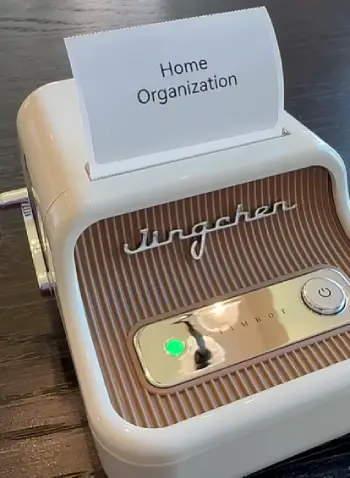
Let me share some real stories from my routine.
With the B1, I organized my garage last weekend.
I printed labels for tool drawers, including barcodes for inventory tracking via my phone.
The auto-detection meant no fumbling with settings; I just loaded the roll and went.
It took about two hours, and the battery barely dipped.
The labels stuck firm even on oily surfaces. Switching to the B21, I tackled my kitchen pantry.
Its faster speed let me print custom labels with icons for flour, sugar, and spices quickly.
The retro design matched my vintage kitchen decor, making it a conversation starter when friends visit.
I even printed QR codes linking to ingredient lists—handy for allergies.
But here’s where differences show: During a power outage, I couldn’t use either without my phone, which was frustrating.
For business, I sell handmade soaps online.
The B1’s longer battery helps at pop-up markets, where I label products on the spot.
The B21’s batch printing excels for prepping shipments at home.
I’ve printed over 200 labels in one sitting without issues.
Label quality is key—both produce BPA-free, self-adhesive stickers that don’t peel off easily.
I tested them in the fridge; no fading after weeks. If you’re into crafts, the app’s symbols and borders add flair.
I made personalized stickers for my kid’s school supplies with the B21, and they loved the designs.
For office use, the B1’s versatility with Excel imports saved me time on file organization. I imported a spreadsheet of client names and printed address labels effortlessly.
One downside across both: the app sometimes pushes updates or ads, pulling me out of my workflow. But overall, they’ve streamlined my chaos. If you’re debating, think about your environment.
In a busy household like mine, the B1’s endurance wins. For a stylish setup, B21 adds that extra touch.
Battery And Portability: On-The-Go Performance
Portability is why I love these. The B1’s 1500 mAh battery shines; I labeled an entire event booth without recharging. It auto-shuts off to save power, a smart touch.
The B21’s 1200 mAh is sufficient for shorter bursts, like a morning of home organizing. Both charge via USB-C, which is convenient—I use my phone charger.
In travel mode, the B1’s lighter weight makes it my go-to for trips. I packed it for a family vacation to label luggage tags. The B21’s retro bulk fits better in a desk drawer but still travels well. Runtime varies: light use lasts days, heavy printing drains faster. I’ve timed the B1 at 5 hours continuous; B21 around 4. No overheating issues, even in warm rooms.
Print Quality And Speed: Day-To-Day Results
Quality is consistent at 203 dpi—sharp text, readable barcodes. Images on B1 can pixelate; B21 handles them slightly better due to speed.
I printed a photo on B21 (non-Pro); it was okay for fun but not pro. Speed matters: B21’s 60 mm/s feels snappy for quick labels.
B1’s slower pace is fine for casual use. In batches, B21 pulls ahead. Noise is minimal, like a soft whir. Labels eject cleanly, no jams in my tests.
Maintenance And Longevity: Keeping Them Running
These are low-maintenance. No ink means no clogs. I clean the print head with alcohol swabs monthly. Batteries hold charge well over time.
I’ve had my B1 for months; no degradation. App updates keep features fresh. If issues arise, like connectivity, restarting fixes it. Longevity seems strong based on user stories—many last years with care.
Also Read: Comparison Of Phomemo And Niimbot
Frequently Asked Questions (FAQ)
The B1 offers a modern design with longer battery life and slightly lower cost, while the B21 features a retro look, faster print speed, and better batch handling, but with a smaller battery.
Yes, if you value style and speed for home or small business use; it’s versatile and fun, though consider the Pro for sharper prints.
No, it’s monochrome thermal printing only; no color options available.
No, it’s inkless thermal technology, using heat on special paper for prints.
Wrapping It Up
I’ve shared my experiences with the Niimbot B1 and B21, from their features to real-world quirks, all to help you make a smart choice.
If you’re after value and endurance, I’d grab the B1—it’s been my workhorse for everyday chaos. But if style and speed excite you, the B21 adds that spark to your setup.
Whichever you pick, you’ll wonder how you managed without one. What are you labeling next? Let me know if this helps your decision.
Recent Posts
● Interactive 5-Zone Interior & Exterior Paint Blueprint Paint Coverage Calculator: Gallons, Primer, Square Footage & Cost Tap any architectural surface zone on the blueprint...
If you want smooth, shiny hair without spending a fortune on a premium styling tool, the Ella Bella hair dryer may be worth considering.In these Ella Bella hair dryer reviews, I’ll look...